
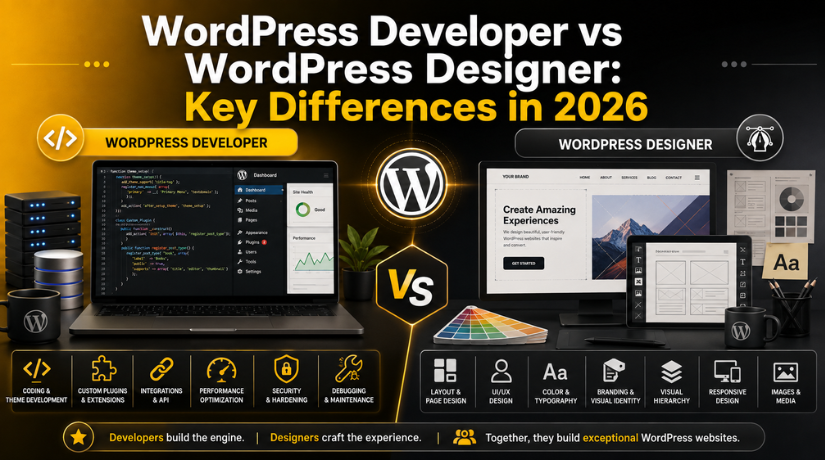
WordPress Developer vs WordPress Designer: Key Differences in 2026
When you set out to build or improve a WordPress website, you quickly run into two job titles that sound almost interchangeable: the WordPress designer and the WordPress developer. Many business owners use the words as if they mean the same thing. They do not. Hiring the wrong specialist for your project can cost you time, money, and months of frustration.
The short version is simple. A designer shapes how your website looks and feels. A developer builds the machinery that makes it work. In practice the line is blurrier than that, and in 2026 the two roles overlap more than they used to. This guide breaks down what each professional actually does, the skills they bring, and how to decide which one your project truly needs.
Who Is a WordPress Designer?
A WordPress designer is focused on the visual and experiential side of your site. Their job is to make sure visitors enjoy using your website and can find what they came for. They think in terms of layout, colour, typography, spacing, and flow.
Most WordPress designers work with themes, page builders, and visual editing tools rather than raw code. They arrange sections, choose fonts, pick a colour palette that matches your brand, and make sure the site reads well on a phone as well as a laptop. A strong designer also studies how real people move through a page, so buttons, forms, and menus land exactly where a visitor expects them.
What a designer typically delivers
A designer usually hands over mockups, a polished theme setup, a consistent brand style, and a site that feels intuitive. They care about first impressions, because a cluttered or confusing layout drives people away before they read a single word. If your current site looks dated or converts poorly, a designer is often the person who can turn it around.
Designers also handle the smaller visual details that add up to a professional look: image cropping, icon choices, hover effects, and white space. These touches rarely get noticed individually, but together they decide whether your brand feels trustworthy.
Who Is a WordPress Developer?
A WordPress developer works under the hood. Where a designer asks “does this look right?”, a developer asks “does this work correctly, quickly, and securely?” They write and edit code, build custom features, and solve technical problems that a visual editor simply cannot reach.
Developers are comfortable with the languages that power WordPress, including PHP, HTML, CSS, JavaScript, and often MySQL for database work. They can build a custom theme from scratch, create a bespoke plugin, connect your site to outside services through an API, and fix errors that break the front end. If you have ever wondered whether you can do custom coding in WordPress, a developer is the person who makes that possible safely.
What a developer typically delivers
A developer delivers functionality. That might be a membership system, a booking engine, a custom checkout flow, a performance overhaul, or a security fix. They also maintain the code as WordPress and its plugins update, so nothing quietly breaks over time. Many developers use tools like the built-in WordPress developer mode to test changes without disturbing the live site.
The Core Difference at a Glance
Think of building a website like building a house. The designer is the architect and interior stylist, deciding how rooms are arranged and how the space feels to live in. The developer is the structural engineer and builder, making sure the foundations hold, the wiring is safe, and the plumbing runs. You need both perspectives for a home that is beautiful and sound.
A designer answers questions about appearance, usability, and brand. A developer answers questions about function, speed, security, and custom behaviour. When a project stalls, it usually stalls because one of these two skill sets was missing from the start.
Skills and Tools Compared
The clearest way to separate the two roles is to look at what sits on their desk. A designer leans on visual tools: theme customizers, page builders, image editors, and prototyping software. Their vocabulary is full of words like hierarchy, contrast, and user journey.
A developer leans on technical tools: code editors, version control, local development environments, and browser debugging consoles. Their vocabulary features functions, hooks, queries, and deployment. A developer often needs a real grounding in programming, which is why people frequently ask how long it takes to learn WordPress step by step before they can build custom work with confidence.
There is overlap. A good designer understands enough CSS to fine-tune spacing, and a good developer understands enough design principle to keep an interface clean. But the depth of each skill runs in opposite directions.
Day-to-Day Responsibilities
On a typical day, a WordPress designer might sketch a new homepage layout, adjust a colour scheme to match a rebrand, test how a landing page looks on several screen sizes, and refine the wording and placement of a call-to-action button. Their work is highly visual and often iterative, refined through feedback until it feels right.
A WordPress developer, meanwhile, might build a custom post type for a client’s product catalogue, debug a plugin conflict that is slowing the site, write a function to automate an email trigger, and run updates to patch a security gap. Their work is logical and testable: it either functions correctly or it does not.
This difference in rhythm matters when you plan a project. Design work invites opinion and revision. Development work invites precision and verification. Setting the right expectation for each stage keeps everyone calm.
When Your Project Needs a Designer
Reach for a designer when your goals are mostly about appearance and experience. You need a designer if your site looks outdated, if visitors leave without acting, if your branding feels inconsistent, or if you want a fresh, modern layout that still runs on a standard theme. If your existing theme already does everything you need technically and you simply want it to look better, a designer is your best value.


Designers are also ideal for smaller businesses launching a first website that does not require unusual features. A polished, well-organised site built on a solid theme can serve most local shops, portfolios, and service businesses for years.
When Your Project Needs a Developer
Reach for a developer when your goals involve custom functionality or technical problem-solving. You need a developer if you want a feature no plugin provides, if you need to connect WordPress to another software system, if your site is slow and needs deep optimisation, or if you keep running into errors that visual tools cannot fix.
Larger projects almost always need development support. Membership platforms, online stores with unusual rules, multi-language sites, and high-traffic publications all rely on custom code and careful maintenance. For ambitious builds, many organisations turn to professional WordPress development companies rather than a single freelancer, because scale demands a team.
Can One Person Be Both?
Yes, and this hybrid is increasingly common in 2026. Many freelancers describe themselves as WordPress designers and developers, comfortable both shaping a layout and writing the code behind it. Modern tools have narrowed the gap, letting a single skilled person deliver a complete site for a small or mid-sized project.
Still, be realistic about depth. A generalist who does both is excellent for straightforward websites. For complex, mission-critical builds, specialists usually outperform a jack-of-all-trades. A dedicated developer will write cleaner, more secure code, and a dedicated designer will craft a sharper visual identity. The bigger the stakes, the more that specialisation pays off.
What About Cost?
Budget often decides the conversation. Design-focused work tends to be quoted per project or per page, while development work is frequently billed hourly because the scope is harder to predict. Custom development usually costs more than design refinement, simply because it takes deeper expertise and more testing.
Rates vary widely by experience and region. If you are weighing what to spend, it helps to review current WordPress freelancer and designer pricing so your expectations match the market. The cheapest quote is rarely the best value; poorly built work often costs more to fix later than it would have cost to build well the first time.
How to Choose the Right One for Your Website
Start with the problem, not the job title. Write down what you actually want to achieve. If your list is full of words like “looks”, “layout”, “brand”, and “easy to use”, you are describing design work. If it is full of words like “feature”, “integration”, “speed”, “custom”, and “fix”, you are describing development work.
Many real projects need both, just at different stages. A sensible sequence is to let a developer build the technical foundation and custom features, then let a designer polish the surface so the finished product feels effortless. When the two collaborate well, visitors never notice the seams.
If you are still unsure which skill set your website needs, that is completely normal. The safest move is to describe your goals to an experienced WordPress team and let them tell you honestly whether design, development, or both will get you there.
How Designers and Developers Work Together
The most successful WordPress projects treat design and development as partners rather than rivals. Problems appear when the two work in isolation. A beautiful mockup that ignores technical limits leads to a build that cannot be delivered on time. A powerful custom feature wrapped in a confusing interface leaves visitors unable to use it. Communication between the two roles is what turns a good idea into a working website.
In a healthy workflow, the designer shares layouts early so the developer can flag anything that will be difficult or slow to build. The developer, in turn, explains what is technically possible so the designer can dream within realistic bounds. This back-and-forth prevents expensive rework and keeps the project moving. When you hire, ask each candidate how they collaborate with the other discipline, because the answer reveals how smoothly your project will run.
A quick decision checklist
Before you commit, run through a few honest questions. Does the change I want alter how the site looks, or what the site does? Can my current theme already handle this without new code? Am I trying to solve a visual problem or a technical one? Will this feature need ongoing maintenance as WordPress updates? Answering these puts you far closer to knowing whether a designer, a developer, or a combined team is the right call for your budget and timeline.
Final Thoughts
A WordPress designer makes your website look right; a WordPress developer makes it work right. Neither role is more important than the other, and the best sites in 2026 are built when both perspectives come together. Understanding the difference means you can hire with confidence, set fair expectations, and avoid paying for the wrong kind of help.
Whether your project calls for a polished redesign, a custom feature, or a full rebuild, the expert team at 24×7 WP Support can match you with the right specialists and keep your WordPress site fast, secure, and beautiful all year round. Reach out today and let us help you build the website your business deserves.
Related posts:
How to install Free, Valid SSL Certificate on WordPress Website
How to do Jotform WooCommerce integration?
Where Is the Style Tab in WordPress & What Does It Do? (Complete Guide)
How to Fix Chinese Characters Appearing on My Website in Google Search Results
How Much Does It Cost to Hire Someone to Build a WordPress Website?

Brian is a WordPress support specialist and content contributor at 24×7 WP Support. He writes practical, easy-to-follow guides on WordPress troubleshooting, WooCommerce issues, plugin and theme errors, website security, migrations, performance optimization, and integrations. With a focus on solving real website problems, Brian helps business owners, bloggers, and online store managers keep their WordPress sites running smoothly.
