
How Long Does It Take to Learn WordPress Development and PHP?
Last updated on August 4th, 2026 at 05:37 am
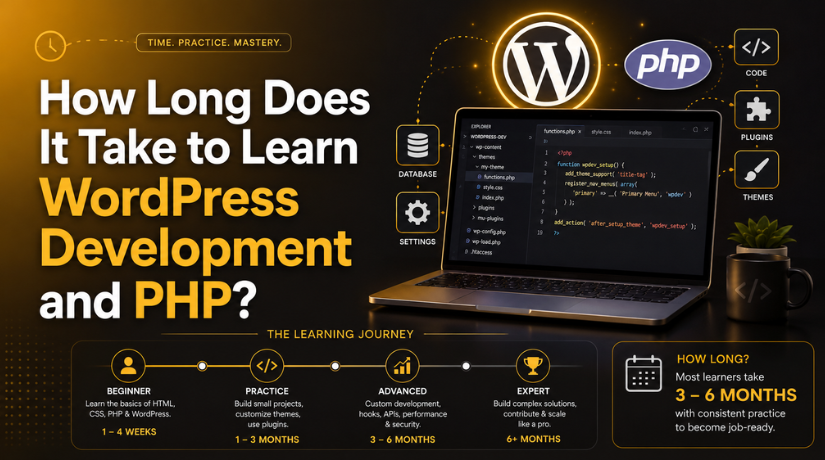
You want to learn WordPress development and build sites for a living. So how long will it take? The honest answer is that it depends on your goal.
Some people need a few weeks. Others need two years. This guide breaks the journey into clear stages. You will see what to learn, in what order, and how long each stage takes.
The Short Answer
Here is a realistic range for most learners:
- Basic PHP: 3 to 6 months of steady practice.
- Junior WordPress developer: 6 to 12 months.
- Confident, job-ready developer: 18 to 24 months.
These numbers assume 8 to 12 hours of study each week. Study more, and you will move faster. Study less, and the timeline stretches.
Note the gap between using WordPress and building for it. You can learn to run a site in about two weeks. Our guide on whether you can learn WordPress in 2 weeks covers that path. Development is a different skill set.
Why It Takes Longer to Learn WordPress Development
Site building is visual work. You click, drag, and publish. No code is required.
Development is code work. You write PHP. You read errors. You test changes. Then you test them again. That takes practice, and practice takes time.
That is why it takes longer to learn WordPress development than to learn simple site building. A WordPress developer also needs to know the platform’s own rules. WordPress has its own way of doing things. Those patterns are not obvious. Learning them adds months to any timeline.
Stage 1: Web Basics (4 to 8 Weeks)
Start with the front end. You need three things:
- HTML for page structure.
- CSS for layout and style.
- Basic JavaScript for simple interaction.
Most people get comfortable here in one to two months. You do not need to master JavaScript yet. Aim for working knowledge and move on.
Set up a code editor early. Pick one tool and stick with it. Our roundup of the best code editors for coding can help you choose.
Stage 2: Core PHP (3 to 6 Months)
PHP is the language WordPress runs on, so you cannot learn WordPress development without it. This stage is the longest single step. Do not rush it.
What to Learn First
- Variables, strings, and numbers
- Arrays and how to loop through them
- If statements and comparison logic
- Functions and how to call them
- Forms and user input
- Basic security, such as escaping output
Then move to objects and classes. Modern WordPress code uses them often.
How Long It Really Takes
Expect three months to write simple scripts on your own. Expect six months to feel steady. If you already code in another language, cut those numbers in half.
PHP itself keeps moving. WordPress recommends PHP 8.3 or newer in 2026. The minimum supported version is 7.4, and you can confirm release dates on the official PHP supported versions page. Older versions no longer get security patches.
So learn modern PHP, not old tutorials. Check the publish date on every guide you follow. You can also check your own site’s PHP version in a few clicks.
Stage 3: WordPress-Specific Skills (3 to 6 Months)
Now you learn how WordPress uses PHP. This is where general coders often stumble.
The Template System
WordPress picks a template file for each page. You need to know which file loads when. You also need The Loop. That is the code that prints your posts.
Hooks
Hooks are the heart of WordPress. Actions run your code at set moments. Filters change data before the site uses it. Almost every plugin depends on them.
Give this topic real time. Our explainer on what hooks are in WordPress is a good starting point.
Themes and Plugins
Build a child theme first. Then build a small plugin. Keep both simple. A plugin that adds one shortcode will teach you plenty.
Finish each project. A half-built plugin teaches you far less than a finished one.


The Database Layer
Learn WP_Query before you touch raw SQL. Most data work runs through it. You will also meet custom post types and custom fields here.
If you plan to edit files directly, read our guide to editing your WordPress source code first. It covers PHP, MySQL, HTML, JavaScript, and CSS safely.
Stage 4: Professional Practice (6 to 12 Months)
Writing code is one skill. Shipping code is another. This stage turns a hobbyist into a professional.
Here is what you add:
- Version control with Git
- A local development setup
- Staging sites and safe deployments
- Debugging tools and error logs
- Coding standards and code review
- Performance and security basics
Turn on WordPress developer mode while you work. It surfaces problems early, before your users find them.
Most developers reach this level around the 18-month mark. That is when clients start to trust you with real budgets.
What Changes Your Timeline
Things That Speed You Up
- Prior coding experience in any language
- Daily practice instead of weekend bursts
- Building real projects, not just watching videos
- Reading the official WordPress developer handbooks
- Getting your code reviewed by someone better than you
Things That Slow You Down
- Jumping between tutorials without finishing one
- Copying code you do not understand
- Skipping the PHP fundamentals
- Following guides written for old versions
- Waiting to feel ready before you build anything
Do You Need a Degree?
No. Most people who learn WordPress development are self-taught. The work is judged by output, not by paper.
A degree can help with large enterprise employers. For freelance and agency work, a portfolio matters far more. Three finished sites beat any certificate.
A Simple 12-Month Plan to Learn WordPress Development
If you want a schedule, use this one:
- Months 1 to 2: HTML, CSS, and basic JavaScript.
- Months 3 to 5: Core PHP. Build three small scripts.
- Months 6 to 7: WordPress templates, The Loop, and child themes.
- Months 8 to 9: Hooks, WP_Query, and custom post types.
- Months 10 to 11: Build one plugin from start to finish.
- Month 12: Git, local setup, and one client-style project.
Follow this plan and you will be a working junior developer in a year. That is a fair trade for 10 hours a week.
How to Tell You Are Ready to Work
You are ready for paid work when you can do all of these:
- Read an error log and find the cause
- Write a plugin without copying a template
- Explain why a hook fires when it does
- Update a live site without breaking it
- Undo your own mistakes calmly
If you can do four of the five, start applying anyway. The last one usually arrives on the job.
Common Questions
Can I Learn PHP and WordPress at the Same Time?
You can, but it is slower. WordPress hides a lot of PHP behind its own functions. You end up copying patterns without understanding them. Learn plain PHP for at least two months first.
Is PHP Still Worth Learning in 2026?
Yes. WordPress powers a large share of the web, and it runs on PHP. Demand for maintenance and custom work stays steady. Modern PHP is also much faster and cleaner than older versions.
How Many Hours Per Week Do I Need?
Ten hours is the sweet spot. Five hours works, but doubles your timeline. Twenty hours helps only if you rest and review. Consistency beats intensity every time.
When to Ask for Help
Learning takes time. Live sites cannot wait. A broken checkout page costs money today, not next quarter.
That is a fair reason to bring in support while you study. Our team at 24×7 WP Support handles fixes, updates, and custom work around the clock. You keep learning. Your site keeps running.
Many developers start out this way. They handle what they know and hand off the rest. Over time, that hand-off list gets shorter.
Final Thoughts
It takes real time to learn WordPress development. Treat it as a marathon, not a sprint. Give yourself six months for PHP. Give yourself a year for the full junior skill set. Give yourself two years to feel truly confident.
None of that happens without a first step. So take it today. Open one file. Change one line. See what happens.
That is how every WordPress developer started. If you get stuck on a live site along the way, our team can help while you keep learning.
Related posts:


Brian is a WordPress support specialist and content contributor at 24×7 WP Support. He writes practical, easy-to-follow guides on WordPress troubleshooting, WooCommerce issues, plugin and theme errors, website security, migrations, performance optimization, and integrations. With a focus on solving real website problems, Brian helps business owners, bloggers, and online store managers keep their WordPress sites running smoothly.
