
Elementor vs WordPress: What Is the Difference?
Last updated on August 4th, 2026 at 05:36 am
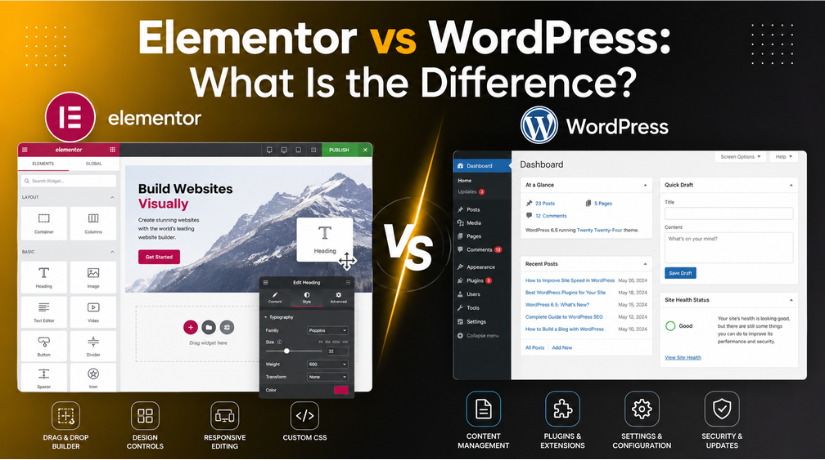
If you’ve spent any time researching how to build a website, you’ve likely come across both WordPress and Elementor — and wondered which one you actually need. The confusion is completely understandable. These two names pop up constantly in the same conversations, blog posts, and YouTube tutorials. But here’s the thing: comparing Elementor to WordPress is a little like comparing a steering wheel to a car. One is the platform, and the other is a tool you use inside it.
In this guide, we’ll break down exactly what each one is, how they relate to each other, and how to figure out which combination makes sense for your website in 2026.
What Is WordPress?
WordPress is a content management system (CMS) — the foundation your website is built on. It powers over 43% of all websites on the internet as of 2026, making it by far the most widely used website platform in the world.
When you install WordPress, you get a fully functional system that handles everything behind the scenes: storing your content in a database, managing user accounts and roles, handling URLs and routing, processing your theme, and running your plugins. WordPress is also responsible for things like security updates, comment management, media uploads, and SEO infrastructure.
Out of the box, WordPress includes a built-in editor called the Block Editor (often called Gutenberg). It lets you add and arrange content using blocks — individual sections for paragraphs, images, headings, buttons, and more. For many websites, especially content-heavy blogs and simple business pages, the native block editor is more than sufficient.
What Is Elementor?
Elementor is a WordPress plugin — specifically, a visual page builder. It adds a drag-and-drop design layer on top of your WordPress installation, giving you real-time, front-end control over how your pages look without needing to write any code.
Instead of working inside the WordPress dashboard, Elementor opens its own editing canvas where you drag widgets (text boxes, images, buttons, forms, sliders, and more) directly onto the page and see the result instantly. You can control spacing, typography, colours, responsive layouts, and complex design elements all visually.
This is the critical point: Elementor is not a competitor to WordPress. It only works with WordPress. You cannot install Elementor on Wix, Shopify, Squarespace, or any other platform. It is an extension that sits on top of WordPress and enhances what you can do visually.
How Elementor and WordPress Work Together
Think of WordPress as the engine and operating system of your website. Elementor is the custom dashboard you install to make it easier to design pages the way you want them.
Here’s the typical workflow when using both: You install WordPress on your hosting account, choose a theme, and install Elementor as a plugin. When you want to create or edit a page, you click “Edit with Elementor” instead of opening the standard WordPress editor. Elementor loads its canvas, and you design the page visually. When you save, Elementor stores the layout data through WordPress, and your visitors see the finished page.
All of your core WordPress functionality — your blog posts, menus, settings, user management, plugins — still lives in the standard WordPress dashboard. Elementor just handles the visual design layer for the pages you choose to build with it.
Elementor vs the WordPress Native Editor: The Real Comparison
Since Elementor and WordPress aren’t actually competing, the more useful comparison is between Elementor and the WordPress Block Editor (Gutenberg) — the two editing options available inside WordPress.
The block editor is built into WordPress and is free. It has improved enormously over the past few years and now handles complex layouts quite well, especially with Full Site Editing (FSE) support in modern themes. It produces clean, lightweight code and is fully integrated with the WordPress ecosystem.
Elementor offers a more visual, designer-friendly experience. Its drag-and-drop canvas feels intuitive and lets you position elements with pixel-level precision. The free version of Elementor includes 40+ widgets and a solid library of pre-made templates. Elementor Pro (starting at $59/year for a single site in 2026) unlocks 100+ additional widgets, a theme builder, form builder, popup builder, WooCommerce design tools, and dynamic content support.
Performance is where the distinction matters most. WordPress pages built with the native block editor average around 140KB in size with load times under 1.2 seconds. Elementor pages, by comparison, typically come in at 300–500KB due to the additional CSS and JavaScript the plugin loads. With good hosting and proper caching, this gap narrows significantly — but it’s still worth knowing about if site speed is a top priority for you.
When Should You Use Elementor?
Elementor shines in specific situations where the native block editor’s built-in design tools feel limiting:
Complex marketing and landing pages — If you need a polished sales page, product launch page, or service page with custom layouts, animations, and precisely controlled spacing, Elementor is built for this. Its template library and widget variety make it much faster to achieve professional-looking results than hand-crafting layouts in Gutenberg.
Full website design without a developer — With Elementor Pro’s Theme Builder, you can visually design your header, footer, single post templates, archive pages, and 404 page. This means non-developers can build a completely custom-feeling site without touching PHP or CSS.
WooCommerce stores — Elementor Pro integrates tightly with WooCommerce, letting you design custom product pages, cart layouts, and checkout flows visually. If your priority is a visually distinctive online store, Elementor gives you control that’s hard to match with the block editor alone.
Agencies and freelancers — If you’re building sites for clients who will maintain them, Elementor’s visual interface is often easier to hand off. Clients can update content without needing to understand WordPress internals.


You can learn more about how Elementor works in practice in our detailed guide: What is Elementor? How to Use Elementor to Build an eCommerce Store.
When Should You Stick With the Native Editor?
The block editor is the right choice in a number of common scenarios:
Content-first websites and blogs — If your site is primarily text, images, and embedded media — a news blog, a portfolio with standard layouts, a documentation site — Gutenberg handles it efficiently without the overhead of a third-party builder.
Speed-critical sites — When Core Web Vitals are a business priority (especially for SEO), the native editor’s lighter output can give you an advantage. Elementor adds 350–500KB of extra assets per page, which can hurt your Largest Contentful Paint (LCP) and Total Blocking Time (TBT) scores on slower connections.
Keeping things simple — The more plugins you run, the more potential points of failure and update conflicts exist. If you don’t need what Elementor adds, there’s no reason to add its complexity. WordPress itself is already a powerful platform.
Budget constraints — The free block editor does a lot. If the features you need are covered by Gutenberg and a good free theme, you can build a professional site at no cost beyond hosting and your domain.
Can You Use Both on the Same Website?
Yes — and many sites do. A very common approach is to use Elementor for pages where design matters most (homepage, landing pages, about page, services pages) while using the native block editor for blog posts and standard content pages where you want clean, fast-loading output.
This hybrid approach gives you the design power of Elementor where it counts without applying that overhead across every piece of content on your site. WordPress lets both editors coexist without any conflict — some pages are edited with Elementor, others stay in Gutenberg.
If you’re evaluating other page builders alongside Elementor, our comparison article Beaver Builder vs Elementor: WordPress Page Builders Comparison and our roundup of the Best Drag and Drop WordPress Theme Builders are worth a read before you commit to any tool.
Common Misconceptions Cleared Up
“Elementor replaces WordPress.” No — Elementor cannot function without WordPress. It is a plugin that depends entirely on the WordPress ecosystem. Your site is still powered by WordPress; Elementor just changes how you edit certain pages.
“You need Elementor to make a good-looking WordPress site.” Not true. Thousands of great-looking WordPress sites use only the native block editor and a well-designed theme. Elementor adds design flexibility, but it’s not a prerequisite for quality.
“Elementor is only for beginners who can’t code.” Actually, Elementor is widely used by professional developers and agencies precisely because it speeds up the design process. The ability to iterate on layouts visually without writing CSS is valuable whether or not you could write that CSS yourself.
“Elementor will break your site if you remove it.” Partially true — pages built with Elementor will lose their layout if the plugin is deactivated, reverting to raw text. This is a known limitation of all page builders and worth thinking about before making Elementor central to your site’s design.
Elementor AI Features in 2026
In 2026, Elementor has integrated AI capabilities that let you generate page content, create custom images, and write CSS directly within the editor using natural language prompts. This makes it even more accessible for users who previously felt limited by their lack of design or copywriting skills. The AI features are available as part of Elementor Pro and have become one of the more practical AI integrations in the WordPress space.
Making the Right Choice for Your Website
The decision comes down to your goals, budget, and technical comfort level. If you’re building a simple blog or informational website, start with WordPress and the built-in block editor. You may find you never need anything else. If you’re building a business website where the visual design is central to your brand, or if you’re creating landing pages, portfolios, or WooCommerce stores, Elementor is worth the investment.
Remember: WordPress is your platform, and Elementor is a tool you add to it. You’re not choosing between them — you’re choosing whether to enhance your WordPress setup with Elementor or stick with what’s already built in.
If you run into any issues getting Elementor set up or running into errors, our guide on How to Fix WordPress Elementor Editor Not Loading covers the most common problems and their solutions.
Need hands-on help with your WordPress site — whether you’re setting up Elementor, optimising your existing build, or troubleshooting design issues? The team at 24×7 WP Support is available around the clock to help you get things right. Contact us today and let’s build something great together.



Brian is a WordPress support specialist and content contributor at 24×7 WP Support. He writes practical, easy-to-follow guides on WordPress troubleshooting, WooCommerce issues, plugin and theme errors, website security, migrations, performance optimization, and integrations. With a focus on solving real website problems, Brian helps business owners, bloggers, and online store managers keep their WordPress sites running smoothly.
