
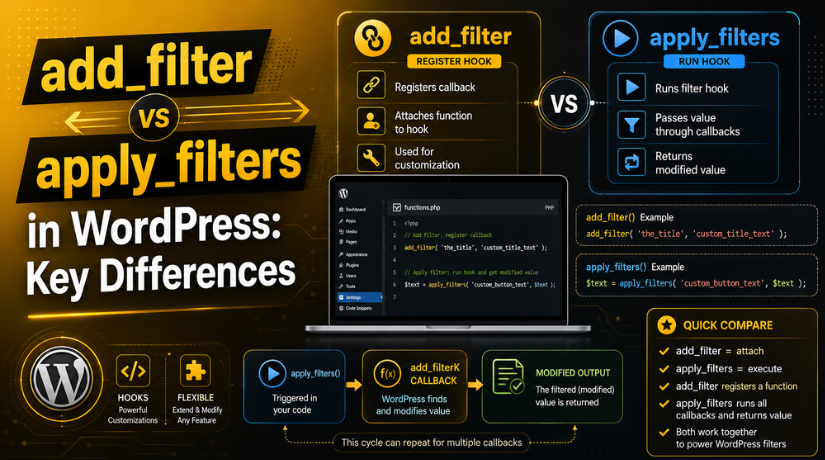
add_filter vs apply_filters in WordPress: Key Differences
Introduction
WordPress gives developers many ways to change website output safely. Filters are one of the most useful options. They help you change text, values, settings, and content without editing core files. This makes your website easier to manage and safer to update.
When learning add_filter vs apply_filters in WordPress, many beginners feel confused. Both functions are connected, but they do different jobs. The add_filter() function attaches your custom function to a filter hook. The apply_filters() function runs that filter hook and returns the changed value.
So, the simple idea is clear. add_filter() adds your change. apply_filters() allows that change to happen.
Understanding the difference between add_filter and apply_filters helps you write cleaner code. It also helps you customize themes and plugins correctly. This is important for WordPress developers, support teams, and website owners.
What Are WordPress Filter Hooks?
WordPress filter hooks allow developers to change data before use. This data can be post content, titles, prices, labels, messages, or settings. A filter receives a value, changes it, and returns the final value.
Here is a simple way to understand it. WordPress prepares some data first. Then a filter gives developers a chance to modify it. After that, WordPress uses the updated value on the website.
This is why WordPress filter hooks explained simply means understanding this process. Filters do not directly display content. They only adjust data before WordPress uses it.
For example, a filter can help you:
- Change button text on a WooCommerce checkout page.
- Add extra text after a blog post title.
- Modify email subject lines before sending emails.
- Update labels inside a theme or plugin.
Filter hooks are helpful because they keep custom code separate. You do not need to edit WordPress core files. You can place custom code inside a child theme or custom plugin.
This approach follows better coding practice. It also supports safer updates and long-term website maintenance.
What Is add_filter in WordPress?
The add_filter() function connects your custom function to a WordPress filter hook. It tells WordPress what function should run when that filter becomes active. This helps developers change existing values without editing WordPress core files.
In simple words, add_filter() is used to register your change. It does not create the filter hook itself. It only attaches your custom code to a filter that already exists.
For example, you can use it to change a post title, update button text, or modify plugin output. This is why many developers first learn how to use add_filter in WordPress when customizing themes or plugins.
How to Use add_filter in WordPress
The basic structure of add_filter() is simple. You need the filter hook name and your callback function name. A callback function contains the custom change you want to apply.
Example structure:
add_filter( ‘filter_hook_name’, ‘your_callback_function’ );
Here, filter_hook_name is the WordPress filter hook. The your_callback_function is your custom function. WordPress runs this function when the selected filter hook is applied.
You can also use priority and accepted arguments. Priority controls when your function runs. The default priority is 10. Accepted arguments tell WordPress how many values your function can receive.
add_filter( ‘filter_hook_name’, ‘your_callback_function’, 10, 1 );
This format is useful when a filter sends more than one value.
WordPress add_filter Example
Here is a simple WordPress add_filter example. It adds extra text after every post title.
function custom_title_text( $title ) {
return $title . ‘ – Updated Guide’;
}
add_filter( ‘the_title’, ‘custom_title_text’ );
In this example, WordPress passes the post title to the function. The function adds new text and returns the updated title. Then WordPress displays the changed title on the website.
This example shows how add_filter() works in real use. It attaches your custom function to the_title filter. Then your function changes the title safely before display.
What Is apply_filters in WordPress?
The apply_filters() function runs a WordPress filter hook. It sends a value through all functions attached to that filter. After that, it returns the final changed value.
In simple words, apply_filters() gives developers a place to modify data. It works like a gate where custom changes can happen. When WordPress reaches that gate, it checks for attached filter functions.
This is important when learning how to use apply_filters in WordPress. The function does not attach custom code itself. Instead, it makes the filter hook available for use.
Theme and plugin developers often use apply_filters() inside custom code. It allows other developers to change values later. This makes the code more flexible and easier to extend.
How to Use apply_filters in WordPress
The basic structure of apply_filters() includes a hook name and value. The hook name identifies the filter. The value is the data that can be changed.
Example structure:
$value = apply_filters( ‘filter_hook_name’, $value );
Here, WordPress sends $value through the selected filter hook. If any function is attached with add_filter(), it can change the value. If no function is attached, the original value stays the same.
You can also pass more data through apply_filters(). This helps callback functions make better changes.
$value = apply_filters( ‘filter_hook_name’, $value, $extra_data );
This method is useful in themes, plugins, and custom functions.
Simple apply_filters Example
Here is a simple example using apply_filters() inside custom code.
$button_text = ‘Read More’;
$button_text = apply_filters( ‘custom_read_more_text’, $button_text );
echo $button_text;
In this example, the default button text is Read More. The apply_filters() function gives developers a chance to change it.
Another developer can later use add_filter() on custom_read_more_text. Then they can replace the button text safely.
This example shows why apply_filters() is powerful. It creates a flexible point inside your code. It also supports clean WordPress customization without direct file changes.


Difference Between add_filter and apply_filters
The main difference between add_filter and apply_filters is their job. The add_filter() function attaches your custom function to a filter hook. The apply_filters() function runs that filter hook and returns the final value.
You can understand it in a simple way. add_filter() says what change should happen. apply_filters() says where that change can happen. Both functions work together inside the WordPress filter system.
Here is a simple comparison:
Main Job
The add_filter() function attaches a custom callback function to a filter hook. The apply_filters() function runs a filter hook and passes a value through all attached callback functions.
Used By
The add_filter() function is commonly used by developers who want to modify existing WordPress data. The apply_filters() function is mainly used by theme and plugin developers who want to create filter points for customization.
Return Value
The add_filter() function returns true after successfully registering a filter callback. The apply_filters() function returns either the modified value or the original value if no filter functions are attached.
Common Place
The add_filter() function is usually added inside a child theme, custom plugin, or custom code snippet. The apply_filters() function is generally placed inside theme files, plugin files, or custom functions where developers want to allow modifications.
Purpose
The purpose of add_filter() is to define how a value should be changed. The purpose of apply_filters() is to provide an opportunity for that value to be modified before WordPress uses or displays it.
When comparing add_filter vs apply_filters in WordPress, remember one key point. add_filter() listens for a filter hook. apply_filters() makes that filter hook active.
add_filter vs apply_filters in WordPress: Simple Example
Let us understand both functions with one simple example. First, a theme or plugin creates a filter point using apply_filters().
$button_text = ‘Read More’;
$button_text = apply_filters( ‘custom_button_text’, $button_text );
echo $button_text;
This code creates a filter hook named custom_button_text. It also allows the button text to be changed.
Now, another developer can use add_filter() to change that text.
function change_custom_button_text( $text ) {
return ‘Continue Reading’;
}
add_filter( ‘custom_button_text’, ‘change_custom_button_text’ );
Now the final button text becomes Continue Reading.
WordPress Custom Filter Example
This WordPress custom filter example shows the full process clearly. apply_filters() creates the changeable point. add_filter() connects the custom change to that point.
This method is useful for themes and plugins. It lets other developers customize output safely. They do not need to edit original files directly.
A custom filter also improves long-term maintenance. Your code remains flexible during theme or plugin updates. This follows better WordPress development practice.
When Should You Use add_filter?
Use add_filter() when you want to change existing WordPress output. It helps you modify values without editing core files. This is useful for titles, content, labels, buttons, and messages.
You should use add_filter() when you need to:
- Change default WordPress text.
- Modify theme or plugin output.
- Adjust WooCommerce labels or messages.
- Add custom text to existing content.
This is the safest way to customize filtered data. It also keeps your code update-friendly.
When Should You Use apply_filters?
Use apply_filters() when you create a custom filter point. This is common while building themes, plugins, or custom features. It lets other developers change your default value later.
For example, you may create a default button label. Then apply_filters() allows another function to change that label. This makes your code more flexible and easier to extend.
It is helpful when your code may need future changes. It also supports clean teamwork between developers.
Common Mistakes to Avoid
Many beginners use filters incorrectly at first. These mistakes can cause broken output or no result.
Avoid these common issues:
- Not returning the changed value.
- Using the wrong filter hook name.
- Passing the wrong number of arguments.
- Using add_filter() where apply_filters() is needed.
- Editing WordPress core or plugin files directly.
Always test custom filter code on a staging site first.
Best Practices for WordPress Filter Hooks
Use WordPress filter hooks carefully when adding custom changes. A small mistake can affect website output or plugin behavior. So, always write clean and tested code.
Use clear hook names when creating custom filters. Add a unique prefix with your brand, plugin, or theme name. This helps avoid conflicts with other code. For example, use myplugin_button_text instead of only button_text.
Keep your callback functions short and focused. One function should handle one clear task. This makes your code easier to read, test, and update later.
Always return the final value from your filter function. A filter must receive data, change it if needed, and return it. If you forget return, WordPress may show empty or broken output.
Set the correct priority when many filters use the same hook. A lower number runs earlier. A higher number runs later. Use priority only when the order really matters.
Also, check the accepted arguments carefully. If a hook passes two values, your function should support them correctly. This prevents warnings and unexpected results.
Follow these simple practices:
- Use unique hook names with prefixes.
- Keep callback functions small and clear.
- Always return the filtered value.
- Test code on a staging website first.
- Avoid editing WordPress core files directly.
- Add comments only where they explain important logic.
Good filter practices make your WordPress code safer. They also make future updates easier and less risky.
Conclusion
Understanding add_filter vs apply_filters in WordPress helps you write safer code. The add_filter() function adds your custom change. The apply_filters() function makes that change possible.
Both functions are important for clean WordPress customization. If you need help with custom WordPress filters, theme edits, or plugin fixes,24×7 WP Support can help you safely.
Related posts:

Brian is a WordPress support specialist and content contributor at 24×7 WP Support. He writes practical, easy-to-follow guides on WordPress troubleshooting, WooCommerce issues, plugin and theme errors, website security, migrations, performance optimization, and integrations. With a focus on solving real website problems, Brian helps business owners, bloggers, and online store managers keep their WordPress sites running smoothly.
