
WordPress Themes vs Plugins: What Is the Difference
Introduction
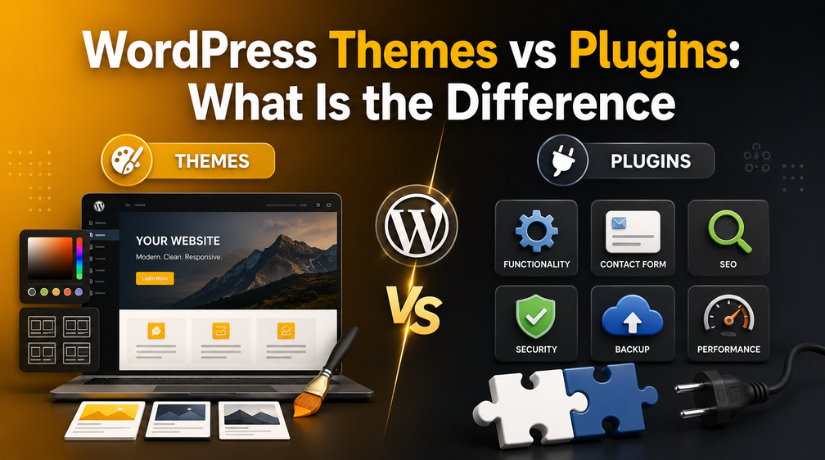
Many beginners feel confused about WordPress themes vs plugins. Both are crucial components of any WordPress website. However, both do different jobs on your site. Your website’s theme determines how users see it. A plugin adds features that improve website functions.
This confusion usually starts during website setup. Beginners often install a theme for design and features. They may also install plugins without knowing their exact purpose. This can create slow pages, broken layouts, or unwanted settings.
The simple answer is easy to understand. A theme manages the website’s design and layout. A plugin adds tools, actions, and extra options. When users understand this difference, they can build better websites.
Beginners can learn what a WordPress theme and plugin are by following this instruction. It will also explain their roles in simple words. This helps users make better choices during website setup.
What Is a WordPress Theme?
Your website’s visual style is managed by a WordPress theme. It determines the front-end appearance of your website. Visitors see the theme when they open your website. It manages design elements across pages, posts, and sections.
A theme controls many important website design parts, including:
- Website layout and page structure
- Header, footer, and menu design
- Font style, size, and color
- Blog page and post layout
- Page templates and archive pages
- Mobile and tablet display
A commercial website, for instance, might require a simple theme. A blog may need a simple reading-focused theme. An online store may need a WooCommerce-ready theme. Each website type needs a theme that matches its purpose.
A decent WordPress theme should be responsive and light. On desktop and mobile devices, it ought should load quickly. It should also support clear navigation and easy customization. These things improve both user experience and website performance.
Themes may include basic settings for colors and layouts. Some themes also include ready-made templates for pages. However, a theme should not handle every website feature. Features like forms, SEO, backups, and security need plugins.
So, when WordPress theme vs plugin explained in simple words, the theme handles design. It gives your website its look, style, and structure.
What Is a WordPress Plugin?
An add-on for your website is a WordPress plugin. It adds extra features without changing the main WordPress system. Beginners use plugins because they make website management easier. This is why WordPress plugin vs theme for beginners is important to understand.
A plugin does not mainly control your website design. It controls what your website can do for users. For example, WordPress does not include every advanced feature by default. Plugins help you add those features with simple settings.
You can use plugins for many useful website tasks, such as:
- Adding a contact form to your website
- Improving SEO settings for better search visibility
- Creating backups for website safety
- Adding security tools against common threats
- Improving page speed through caching
- Adding popups, sliders, or image galleries
- Connecting analytics tools for visitor tracking
- Adding payment options for online stores
Use a plugin, for instance, if you want a contact form. If you want SEO settings, use an SEO plugin. If you want daily backups, use a backup plugin. These plugins add features without changing your theme design.
Plugins are very useful for beginners and business owners. They help users build powerful websites without custom code. However, you should not install every plugin you find. An excessive number of plugins can cause your website to lag. Poorly coded plugins can also create conflicts or errors.
Always choose trusted, updated, and lightweight plugins. Before installing one, look at reviews, update history, and support quality. A good plugin should solve one clear website need. It should also work well with your current WordPress theme.
Main Difference Between WordPress Themes and Plugins
WordPress themes and plugins differ mostly in what they are used for. Your website’s appearance is controlled by a theme. Your website’s capabilities are managed by a plugin. Although both are significant, they shouldn’t take the place of one another.
A WordPress theme manages the visual side of your site. It controls the layout, colors, fonts, header, footer, and templates. When visitors open your website, they mostly see the theme design. A well-designed theme gives your website a tidy, polished appearance.
A WordPress plugin enhances your website’s functionality. It can add forms, SEO settings, backups, security, speed tools, and payment options. Plugins help your website perform tasks that WordPress does not include by default.
This is the easiest way to understand WordPress theme vs plugin explained. Themes handle design. Plugins handle features. A website usually needs both for better results. However, each one should be used for the right job.
For example, use a theme when changing your website look. When adding a contact form, make use of a plugin. Use a theme when improving the page design. Use a plugin when adding backup or security features.
Many beginners make mistakes here. They choose a theme because it has many built-in features. This may look useful at first. But it can create problems later. If you change the theme, those features may disappear.
Plugins are better for important website features. They usually stay active when you change themes. Over time, this facilitates the management of your website.


So, WordPress themes vs plugins is not about choosing one. It is about using both correctly. Use themes for design. For function, use plugins. This keeps your website simple to manage, stable, and clean.
When Should You Use a Theme or Plugin in WordPress?
Many beginners ask when to use theme or plugin in WordPress. The answer depends on your website need. Use a theme when you want to change design. If you wish to add features, use a plugin. This simple rule helps keep your website clean and stable.
When Should You Use a Theme in WordPress?
You should use a theme when your website needs design changes. A theme controls the look, layout, and style of your site. It helps visitors understand your brand through clear design.
When you wish to make a change, choose a theme:
- Website layout and page structure
- Header, footer, and menu style
- Blog page and post design
- Font style, size, and color
- Mobile and tablet appearance
- Page templates for different sections
For example, choose a business theme for a company website. Choose a blog theme for a content-focused website. Select an online store theme that is compatible with WooCommerce. The theme should match your website goal and audience.
However, do not change a theme for one small feature. A theme change can affect menus, widgets, templates, and page designs. It can also break custom layouts on some pages. Always take a backup before changing any theme.
When Should You Use a Plugin in WordPress?
You should use a plugin when your website needs new features. A plugin adds functions that WordPress does not include by default. It helps your website perform useful actions for visitors.
Use a plugin when you need:
- Contact forms for customer inquiries
- SEO settings for better search visibility
- Security tools for website protection
- Backup options for safer recovery
- Caching tools for better speed
- Popups, sliders, or galleries
- Payment options for online stores
- Analytics tools for visitor tracking
For instance, add a contact form using a plugin. Use another plugin to improve website security. Use a caching plugin to improve loading speed.
This makes WordPress themes vs plugins easier to understand. Themes should manage design. Plugins should manage features. This setup makes your website easier to update, redesign, and maintain.
Common Beginner Mistakes With Themes and Plugins
Beginners often make small mistakes while managing WordPress sites. These mistakes can affect speed, design, security, and user experience. Understanding WordPress themes vs plugins helps avoid these common problems.
One common mistake is using a theme for every feature. Some themes include forms, sliders, SEO tools, and shortcodes. These features may look helpful at first. However, they can create problems after changing the theme.
Installing too many plugins is another error. Each plugin enhances your website with more code. Poorly coded plugins can slow pages or create errors. Beginners should install only the plugins they really need.
Common mistakes include:
- Using themes for plugin-based features
- Installing many plugins without checking quality
- Choosing heavy themes with unused options
- Changing themes without taking a backup
- Ignoring regular theme and plugin updates
- Using outdated or poorly supported plugins
Best Practice: Keep Design and Functionality Separate
The best practice is simple and useful. Keep design inside your theme. Maintain features within your plugins. Over time, this facilitates the management of your website.
A theme should control layout, colors, fonts, and templates. A plugin should control forms, SEO, backups, security, and speed tools. This clear setup reduces confusion and future website issues.
For example, your contact form should come from a plugin. If you change your theme, the form can still remain active. For long-term website maintenance, it is important to understand the distinction between WordPress themes and plugins.
Conclusion
Now you understand WordPress theme vs plugin explained in simple words. Themes control design, layout, and appearance. Plugins add features, tools, and website actions. Use both correctly for a clean and stable website.
For help with theme setup, plugin issues, or WordPress errors,24×7 WP Support can support your website needs.



Brian is a WordPress support specialist and content contributor at 24×7 WP Support. He writes practical, easy-to-follow guides on WordPress troubleshooting, WooCommerce issues, plugin and theme errors, website security, migrations, performance optimization, and integrations. With a focus on solving real website problems, Brian helps business owners, bloggers, and online store managers keep their WordPress sites running smoothly.
