
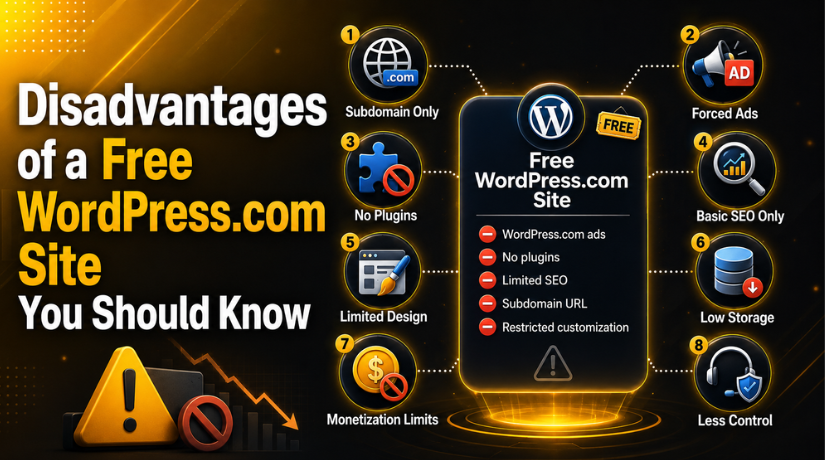
Disadvantages of a Free WordPress.com Site You Should Know
Starting a website for free sounds like a dream — no upfront costs, no hosting bills, no technical headaches. WordPress.com’s free plan lets you get online in minutes, and for many beginners, that simplicity is genuinely appealing. But in 2026, the limitations of a free WordPress.com site are significant enough that they can actually work against you, especially if you have any serious goals for your site.
Whether you’re building a personal blog, a portfolio, or an early-stage business site, understanding what you’re giving up on the free plan is critical before you invest time and energy into a platform that may hold you back. This guide covers every major disadvantage you need to know — so you can make an informed decision from day one.
You Don’t Get a Real Domain Name
This is the first thing most people notice and the one that matters most for credibility. On WordPress.com’s free plan, your website address looks something like yourbusiness.wordpress.com — not yourbusiness.com. That subdomain tells every visitor that you’re using a free hosting platform, and it sends a subtle but damaging message: this site isn’t worth investing in.
For personal blogs or hobby sites, this may not matter much. But if you’re trying to attract clients, land a job, or grow an audience, the domain is part of your brand identity. A branded custom domain builds trust; a WordPress.com subdomain erodes it. Competitors with even a basic paid hosting plan have a professional edge over you from the very first impression.
Getting a custom domain on WordPress.com requires upgrading to at least the Personal plan, which starts the recurring cost cycle and removes much of the appeal of starting for free.
WordPress.com Shows Its Own Ads on Your Site
Here’s one that shocks many new users: on the free plan, WordPress.com places ads on your site — and you earn nothing from them. These are ads chosen by Automattic (the company behind WordPress.com), displayed to your readers, and all revenue goes back to WordPress.com, not to you.
You have no control over which ads appear, what products or services they promote, or whether they align with your content or values. Imagine writing a health and wellness blog only to have ads for fast food or questionable supplements shown alongside your articles. You can’t block them, and your readers see them regardless.
To remove these ads, you must upgrade to a paid plan. This creates a frustrating situation where you’re essentially running a site that advertises for someone else while getting nothing in return.
No Plugin Support — Your Functionality Is Capped
WordPress.org (the self-hosted version) has a plugin library of over 60,000 free tools. Those plugins are what make WordPress so powerful — they add e-commerce functionality, contact forms, SEO optimization, performance improvements, social sharing, booking systems, membership portals, and much more.
On WordPress.com’s free plan, you cannot install any third-party plugins. You’re limited strictly to the built-in features WordPress.com decides to provide. That might be fine if your only goal is to publish blog posts, but the moment you want something more — even something as basic as a custom contact form or an email signup widget — you’re blocked.
Plugins like WooCommerce, Yoast SEO, WPForms, and MonsterInsights are completely off the table. Check out our guide to the 5 Best WordPress SEO Plugins for Better Ranking to understand just how much you’re missing in terms of search optimization tools alone. Without these, growing your site’s traffic becomes a significantly harder uphill battle.
Severely Limited SEO Capabilities
Search engine optimization is how people find your site on Google. A well-optimized site can drive thousands of free visitors every month — but getting there requires the right tools and the freedom to implement SEO best practices.
Free WordPress.com sites are SEO-crippled in several ways:
No SEO Plugins
As mentioned above, plugins like Yoast SEO and Rank Math are unavailable. These tools guide you through optimizing every page — from meta descriptions and title tags to internal linking and readability scores. Without them, you’re flying blind.
No Control Over Technical SEO
You can’t edit your site’s robots.txt, add custom schema markup, configure redirects precisely, or modify the site’s code. These are standard SEO levers that self-hosted WordPress users take for granted.
Subdomain Hurts Search Authority
Your site’s domain authority builds over time as other sites link to you. On a .wordpress.com subdomain, you’re building authority for WordPress.com’s domain — not your own. When you eventually upgrade and move to a custom domain, you largely start over from scratch.
Only a Small Set of Basic Themes
Design matters. Your website’s visual appearance affects how long visitors stay, whether they trust you, and whether they come back. WordPress.com’s free plan gives you access to a limited collection of free themes — and nothing beyond that.
You can’t install premium themes, upload custom themes, or edit theme files directly. You have limited control over fonts, layouts, and color schemes. If the theme you choose doesn’t do exactly what you need, your only option is to switch to another free theme and hope for the best.
For businesses that need a distinct brand identity, this is a serious constraint. Design customization on the free plan is essentially surface-level — you can change a header image and a few colors, but you can’t build the kind of polished, professional look that converts visitors into customers.
Storage Limits Will Catch You Fast
The free WordPress.com plan comes with just 1GB of storage (some sources note up to 3GB depending on current plan details, but it remains extremely limited). That sounds like a lot until you start uploading images, videos, and audio files regularly.
A single high-resolution image can be several megabytes. A short video clip can be dozens. If you’re running any kind of content-heavy site — photography portfolio, food blog, podcast — you’ll hit that ceiling quickly. Once you do, you’ll need to either delete old content or pay to upgrade.


Hosting platforms built for self-hosted WordPress offer far more flexibility here. You can choose a hosting plan that fits your actual needs and scale up as your site grows without being boxed into an arbitrary limit.
You Cannot Monetize Your Site
This is one of the most overlooked disadvantages for people who start free WordPress.com sites with vague intentions of “making money someday.” The free plan effectively blocks all direct monetization paths:
No Ad Networks
You cannot run Google AdSense, Mediavine, Ezoic, or any other ad network. You can’t even place affiliate banners or sponsored posts through traditional means, because you don’t control the ad placements or custom HTML injection points.
No E-Commerce
WooCommerce isn’t available. Basic digital product selling, subscription billing, and any form of transaction processing are out of reach without upgrading to a significantly more expensive plan.
No Affiliate Marketing Tools
While you can technically include affiliate links in your text, the inability to add plugins that manage, cloak, and track affiliate links puts you at a major disadvantage compared to any monetized blog on a self-hosted setup.
If generating revenue is even a remote goal, the free WordPress.com plan will block you almost immediately.
WordPress.com Controls Your Site — Not You
When you build on a free platform, you’re a guest on someone else’s property. WordPress.com’s Terms of Service give them the right to suspend or terminate your site if they believe it violates their guidelines — even inadvertently. And because their free plan generates no revenue from your specific site, there’s little incentive to investigate disputes carefully before taking action.
Your content, your audience, and your links all live at an address WordPress.com controls. If they change their policies, restructure their plans, or decide to sunset the free tier (as many services have done), you could lose everything built there with limited warning.
True ownership means having your own hosting account, your own domain, and full control over your data. To understand the fundamental difference in how these two platforms work, read our detailed breakdown of the Difference Between WordPress.org And WordPress.com.
Migration Pain When You Outgrow the Free Plan
Almost everyone who starts on a free WordPress.com site eventually hits the ceiling and wants to move. The problem is that moving is harder than it sounds. Migrating your content, preserving your SEO, setting up redirects, and recreating your design on a new platform takes real effort — and often requires help from a developer.
Links pointing to your old WordPress.com subdomain don’t automatically redirect to your new domain. If you’ve built any backlinks, social shares, or bookmarked content, that equity doesn’t transfer cleanly. You essentially go back to square one in terms of domain authority.
Starting on a self-hosted platform from the beginning avoids this migration cost entirely. If you’re considering what real hosting options look like, check out our roundup of Top Free WordPress Hosting Options to see how even budget-friendly choices outperform a free WordPress.com plan in flexibility and control.
Limited Customer Support
When something goes wrong on your site — and at some point, something always does — you need fast, reliable support. On the free plan, you’re limited to community forums and support documentation. Direct email support, live chat, and priority response are reserved for paying customers.
For hobby sites, forum-based support is often fine. But if your site supports a business, an audience, or any kind of professional goal, being unable to reach a real person quickly during a critical outage or hack is a significant liability.
Is the Free Plan Ever the Right Choice?
To be fair, there are legitimate use cases for a free WordPress.com site in 2026. If you’re testing whether you enjoy blogging before committing money, learning the WordPress editor for the first time, or running a private family blog with no growth ambitions, the free plan delivers exactly what it promises. The limitations only become problems when you have goals beyond casual personal use.
For anyone building a brand, business, portfolio, or income stream, the free plan will slow you down — and the cost of switching platforms later typically exceeds the savings from starting free.
The Better Path Forward
In 2026, the gap between a free WordPress.com site and a properly self-hosted WordPress site is wider than ever in terms of capability, SEO potential, and earning potential. The free plan trades long-term growth for short-term convenience, and for most people with serious goals, that’s a trade that doesn’t pay off.
If you’re ready to build something real — a site you own, control, and can grow without artificial limits — the 24×7 WP Support team is here to help. From WordPress setup and migration to ongoing maintenance and optimization, we make it easy to get started the right way. Contact us today and let’s build a WordPress site that actually works for your goals in 2026 and beyond.
Related posts:


Brian is a WordPress support specialist and content contributor at 24×7 WP Support. He writes practical, easy-to-follow guides on WordPress troubleshooting, WooCommerce issues, plugin and theme errors, website security, migrations, performance optimization, and integrations. With a focus on solving real website problems, Brian helps business owners, bloggers, and online store managers keep their WordPress sites running smoothly.
