
How Much Does It Cost to Manage a WordPress Website in 2026?
Introduction
Running a WordPress website isn’t just a one-time expense. Whether you built it yourself or hired a developer, the real financial commitment kicks in after launch — when you’re responsible for keeping it secure, fast, and online month after month. If you’ve been wondering exactly how much it costs to manage a WordPress website in 2026, you’re not alone. The answer depends on how hands-on you want to be and what your site actually needs.
This guide breaks down every ongoing cost — from hosting and plugins to professional maintenance services — so you can budget confidently and make smart decisions for your site.
What Does “Managing” a WordPress Website Actually Include?
Before we get into numbers, it helps to understand what website management actually covers. Many site owners underestimate the scope until something breaks at the worst possible moment.
Managing a WordPress website in 2026 typically includes: hosting and server management, WordPress core and plugin updates, theme maintenance, security monitoring and malware scanning, daily or weekly backups, performance optimization, uptime monitoring, and content updates. Some site owners also roll in SEO maintenance, broken link checks, and database optimization.
If you do all of this yourself, your costs are mostly time and tool subscriptions. If you outsource it, you’re paying for expertise and peace of mind. Either way, the costs are real — and they add up faster than most people expect.
WordPress Hosting Costs in 2026
Hosting is the single biggest recurring expense for most WordPress sites. Your options range from bare-bones shared hosting to fully managed cloud environments, and the price gap is enormous.
Shared hosting runs about $3–$10 per month, but performance is limited and you’ll be sharing server resources with dozens or hundreds of other sites. It’s fine for hobby blogs and early-stage projects, but business sites typically outgrow it quickly.
VPS hosting gives you a dedicated slice of a server for around $20–$60 per month. It’s more powerful and configurable, but requires some technical comfort to manage properly.
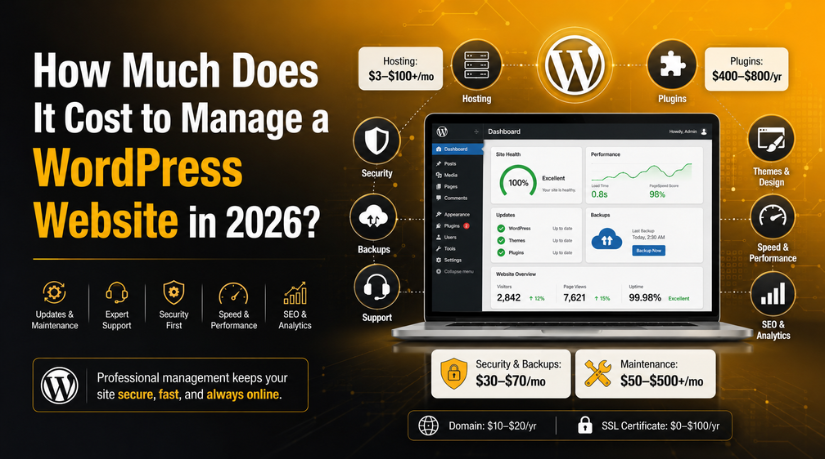
Managed WordPress hosting from providers like WP Engine, Kinsta, or Flywheel runs $30–$100+ per month for a single site. You get automatic WordPress updates, built-in caching, staging environments, and expert WordPress support included. For most business sites, this is the sweet spot — the added reliability and support justify the cost.
Enterprise cloud hosting can run $200–$1,000+ per month for high-traffic or mission-critical sites. This tier includes advanced CDN configurations, multi-server redundancy, and dedicated account management.
Don’t forget your domain name — that’s another $10–$20 per year on top of hosting.
Plugin and Theme Costs
WordPress’s plugin ecosystem is one of its biggest strengths, but premium plugins have real annual costs that many site owners underestimate.
A typical business WordPress site in 2026 runs with a stack of 10–20 plugins. Some are free, but the ones doing the heavy lifting are usually premium:
An SEO plugin like Yoast Premium or Rank Math Pro runs $99–$229 per year. A page builder like Elementor Pro costs $59–$399 per year depending on the license. A security plugin like Wordfence Premium or Solid Security Pro runs $119–$199 per year. A caching and performance plugin like WP Rocket costs $59–$299 per year. A forms plugin like Gravity Forms or WPForms Pro costs $59–$259 per year. Backup plugins like UpdraftPlus Premium add another $70–$145 per year.
When you add it all up, a lean premium plugin stack for a small business site typically costs $400–$800 per year. Larger sites with more specialized needs can easily spend $1,500–$2,500 per year on plugins alone.
Premium themes are a one-time or annual cost ranging from $29 to $299. Theme renewals for continued support and updates usually run $29–$89 per year after the first year.
Security and Backup Costs
Security is the area where cutting corners can be extremely expensive. A compromised WordPress site can result in blacklisting by Google, data loss, stolen customer data, and recovery costs that dwarf what prevention would have cost.
In 2026, WordPress security management involves several layers. A web application firewall (WAF) service like Cloudflare Pro or Sucuri costs $20–$30 per month. Dedicated WordPress security plugins with real-time scanning run $10–$17 per month. SSL certificates are typically included with most modern hosting plans, but standalone certificates cost $0–$200 per year depending on type.
Off-site backups — stored separately from your hosting environment — are non-negotiable for any serious site. Services like BlogVault, ManageWP, or UpdraftPlus Premium charge $10–$20 per month for automated daily backups with one-click restore. If your hosting plan includes backups, you can sometimes skip a standalone backup service, but read the fine print — many hosts only keep backups for 7–30 days.
Budget $30–$70 per month for a solid security and backup setup. You can learn more about keeping your site healthy in our guide to how to enable WordPress maintenance mode — a simple but underutilized tool for protecting your site during updates.
DIY Management vs. Hiring a Professional Service
This is the fork in the road that determines the biggest portion of your WordPress management costs. There’s no universally right answer — it depends on your technical skill, how much your time is worth, and how much downtime or security risk you’re willing to tolerate.
The DIY Approach
If you manage your site yourself, your out-of-pocket costs are mostly tools and subscriptions. A typical DIY setup for a small business site in 2026 looks like this: managed hosting ($30–$60/month), premium plugins ($50–$100/month amortized), security tools ($20–$40/month), and backups ($10–$20/month). That puts you at roughly $110–$220 per month in hard costs.
The hidden cost is your time. Properly managing a WordPress site — running updates carefully, monitoring for security issues, testing after changes, optimizing performance — takes 4–10 hours per month for a moderately complex site. If your time is worth $50–$100 per hour, that’s $200–$1,000 per month in opportunity cost that doesn’t show up in your billing statements.


Professional WordPress Management Services
Professional WordPress management services typically start at $50–$150 per month for basic maintenance (updates, backups, uptime monitoring, and monthly reporting). Mid-tier plans at $150–$500 per month add security monitoring, performance optimization, and priority support. Full-service management at $500–$1,500+ per month includes all of the above plus content updates, SEO maintenance, and dedicated developer hours.
Our guide on when to DIY vs. hire a WordPress professional walks through the specific situations where professional support pays for itself quickly — especially for e-commerce sites and high-traffic blogs where every hour of downtime has a measurable cost.
Managing Multiple WordPress Sites
If you run more than one WordPress site — for different brands, clients, or projects — your management costs don’t scale linearly. The right tools and workflow can dramatically reduce the per-site cost.
Platforms like ManageWP, MainWP, and WP Umbrella let you manage updates, backups, security, and performance across dozens of sites from a single dashboard. Pricing ranges from $1–$4 per site per month, which is far cheaper than paying full price for separate tools on each site. Check out our breakdown of the best tools for managing multiple WordPress sites from one dashboard if you’re juggling more than two or three installations.
One-Time vs. Recurring Costs: A Clear Picture
Understanding which costs are one-time and which are recurring helps you build a realistic budget. Here’s how it breaks down for a typical small business WordPress site in 2026:
One-time costs include the initial theme purchase ($29–$299), custom development work ($500–$5,000+ depending on complexity), and any premium plugins with lifetime licenses. These are upfront investments that don’t repeat unless you rebuild or rebrand.
Annual recurring costs include domain renewal ($10–$20), theme renewal for support ($29–$89), and most premium plugin licenses ($400–$1,500 total depending on your stack).
Monthly recurring costs include hosting ($30–$100+), security tools ($20–$40), backups ($10–$20), and any professional maintenance services ($50–$1,500 depending on the tier).
For a realistic small business site using managed hosting, a standard plugin stack, and basic professional maintenance, budget $250–$500 per month in total ongoing management costs. Larger sites with heavier traffic, complex integrations, or e-commerce functionality will land in the $500–$2,000+ per month range.
How to Reduce WordPress Management Costs Without Cutting Corners
There are smart ways to reduce your WordPress management costs without leaving your site vulnerable or underperforming.
Choose a managed hosting plan that includes backups, staging, and security features built in — this eliminates the need to pay separately for those tools. Audit your plugin stack annually and remove plugins you no longer actively use. Each plugin is a potential security vulnerability and a performance drain. Look for bundle deals — some developers sell plugin bundles that cover multiple needs at a fraction of individual license costs.
If you’re comfortable with WordPress updates but not security hardening or performance tuning, consider a hybrid approach: handle routine updates yourself and hire a professional for quarterly security audits and performance reviews. This gives you expert oversight without the full monthly retainer cost.
If you ever need a developer for specific tasks, check out our article on the cost to hire someone to build or maintain a WordPress website in 2026 — it covers hourly rates, project pricing, and how to evaluate developer quotes.
What’s the Total Cost to Manage a WordPress Website in 2026?
Here’s a realistic summary by site type:
A personal blog or hobby site can be managed for as little as $20–$50 per month if you use shared hosting, free plugins, and handle everything yourself. Don’t expect robust security or performance at this tier, but it works for low-stakes sites.
A small business site realistically costs $150–$400 per month to manage properly — accounting for managed hosting, a solid plugin stack, security tools, backups, and either DIY time or a basic maintenance plan.
A growing e-commerce or membership site should budget $400–$1,000+ per month. The stakes are higher (transactions, user data, uptime expectations), so professional monitoring and faster support response times become non-negotiable.
A high-traffic enterprise WordPress site can cost $1,000–$5,000+ per month to manage, with dedicated hosting infrastructure, enterprise plugin licenses, and a full managed service retainer.
Let the Experts Handle Your WordPress Management
Managing a WordPress website in 2026 is more involved than most site owners realize when they first hit publish. Between hosting renewals, plugin updates, security threats, and performance optimization, it’s easy for costs and complexity to sneak up on you — especially as your site grows.
At 24×7 WP Support, we handle all of it for you. Our WordPress management plans cover updates, security monitoring, daily backups, performance optimization, and round-the-clock expert support — so you can focus on your business instead of your website. Whether you need a basic maintenance plan or full-service management for a complex site, we have a solution that fits your needs and your budget. Get in touch today to find out what professional WordPress management would cost for your specific site.

Brian is a WordPress support specialist and content contributor at 24×7 WP Support. He writes practical, easy-to-follow guides on WordPress troubleshooting, WooCommerce issues, plugin and theme errors, website security, migrations, performance optimization, and integrations. With a focus on solving real website problems, Brian helps business owners, bloggers, and online store managers keep their WordPress sites running smoothly.
