
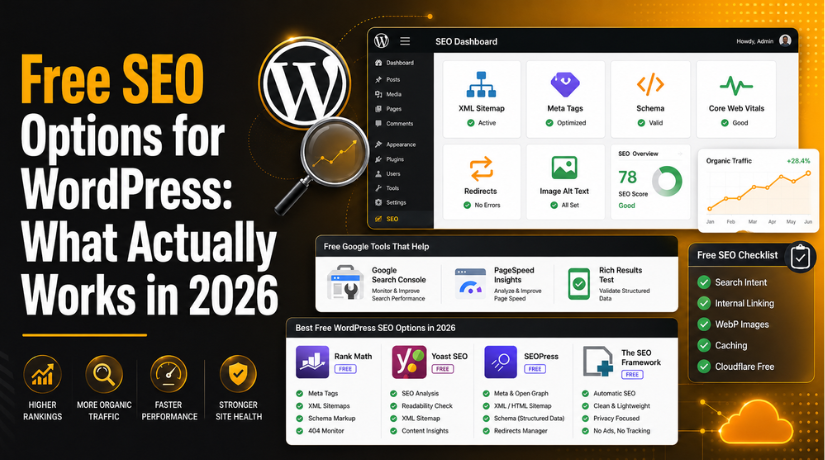
Free SEO Options for WordPress: What Actually Works in 2026
When WordPress site owners ask whether they can get real search rankings without spending money on SEO tools, the honest answer in 2026 is: yes, but only if you use the right free options. There’s no shortage of “free” SEO products that are more upsell than utility. This guide cuts through that noise and focuses specifically on what genuinely moves the needle — free plugins, free external tools, and zero-cost on-site techniques that have a real impact on how Google ranks your WordPress content.
Why Free SEO Is Genuinely Viable in 2026
A few years ago, serious SEO work required a stack of paid tools. That gap has narrowed considerably. The free tiers of the leading WordPress SEO plugins now include schema markup, Google Search Console integration, XML sitemaps, and on-page analysis — features that used to be premium-only. Meanwhile, Google’s own free tools (Search Console, PageSpeed Insights, and Rich Results Test) give you direct access to the data that actually drives ranking decisions.
That said, free SEO has limits. Keyword research at scale, competitor backlink analysis, and rank tracking across hundreds of keywords still benefit from paid tools. But if your goal is to build a well-optimized WordPress site with solid technical foundations and strong on-page SEO, you can accomplish the vast majority of that work without spending a cent.
The Best Free SEO Plugins for WordPress
A good SEO plugin handles the mechanical parts of optimization — meta tags, sitemaps, structured data, redirects — so you can focus on content. Here are the four worth considering in 2026, each with a meaningfully different profile.
Rank Math — The Feature-Rich Choice
Rank Math’s free tier is the most generous of any major SEO plugin. It includes unlimited focus keywords per post, 18+ schema types, a built-in redirect manager, 404 error monitoring, and Google Search Console integration directly inside your WordPress dashboard. The modular setup lets you activate only what you need, which keeps the plugin from bloating your site. For most WordPress sites, Rank Math free provides more functionality than competing plugins’ paid tiers. If you want a comparison of the top options, our guide to the best WordPress SEO plugins for better ranking covers this in depth.
Yoast SEO — The Beginner-Friendly Classic
Yoast remains the most widely installed SEO plugin in the WordPress ecosystem, and its free version handles the essentials well. The focus keyphrase analysis, readability checker, and automatic XML sitemap generation are all available at no cost. Yoast’s readability tool is genuinely useful — it flags passive voice overuse, overly long sentences, and poor heading distribution in a way that improves content quality alongside its search performance. The interface is clear enough that non-technical users can work with it confidently from day one. For a full walkthrough of the plugin’s settings, see our complete guide to using the Yoast SEO plugin.
SEOPress — Privacy-First and Surprisingly Powerful
SEOPress has grown quickly because it prioritizes performance and privacy in ways the other major plugins don’t. It doesn’t phone home to external servers, handles unlimited keywords on the free plan, and generates clean, lightweight meta output. For site owners running membership sites or handling EU traffic where GDPR matters, SEOPress’s privacy stance makes it worth the slight learning curve. The free version covers meta tags, sitemaps, breadcrumbs, social card previews, and Google Analytics integration — more than enough for a small to mid-sized WordPress site.
The SEO Framework — Lightweight and Developer-Trusted
The SEO Framework takes a zero-configuration approach: install it, and it handles meta tags, canonical URLs, and sitemaps automatically without requiring you to configure each post individually. It’s faster and lighter than Rank Math or Yoast because it doesn’t include the scoring interface or content analysis tools. Developers favor it precisely because it stays out of the way. If you’re running a content-heavy site where speed is a priority and you’re comfortable managing your own content quality, The SEO Framework is worth considering.
Not sure whether Rank Math or Yoast is the better fit for your specific setup? We’ve done a detailed head-to-head in our Rank Math vs Yoast SEO comparison that walks through the differences by use case.
Google Search Console: Your Most Powerful Free SEO Tool
No paid tool gives you more actionable SEO data about your own site than Google Search Console, and it’s completely free. It tells you exactly which queries are bringing users to your site, which pages are getting impressions without clicks (a sign your titles and meta descriptions need work), which URLs have indexing errors, and how Google’s crawler sees your site structure.
In 2026, Search Console’s coverage report and Core Web Vitals report have become particularly important. The Core Web Vitals report shows you which pages fail Google’s page experience thresholds — specifically Largest Contentful Paint, Interaction to Next Paint, and Cumulative Layout Shift — and flags whether those failures are likely hurting your rankings. This is data you can act on directly with free caching plugins and image optimization, both covered below. Our complete guide to Google Search Console explains how to set it up and get the most from every report.
On-Page SEO Techniques That Cost Nothing
Tools help, but on-page SEO decisions made at the content level have more impact than any plugin setting. These techniques require no budget, just attention.
Writing for Search Intent, Not Just Keywords
Google in 2026 ranks content that satisfies user intent, not content that repeats a keyword at a high density. Before writing any post, check what type of result Google actually returns for your target query. If the top results are all listicles, a long-form essay is unlikely to rank regardless of how well-optimized it is. If the top results are step-by-step tutorials, match that format. Aligning your content format with what searchers actually want is one of the highest-ROI SEO moves available, and it costs nothing.
Optimizing Title Tags and Meta Descriptions
Your title tag is the single most important on-page ranking signal you directly control. It should include your primary keyword close to the beginning, stay under 60 characters, and give a concrete reason to click. Meta descriptions don’t directly affect rankings, but they influence click-through rate — which affects traffic and signals to Google that your result satisfies intent. Write meta descriptions as genuine pitches: what will the reader get, and why should they pick your result over the nine others on the page?


Using Headings Properly
Use one H1 per page (your post title in WordPress handles this automatically). Use H2 tags for your main sections and H3 for subsections within them. Beyond structure, headings give Google clear signals about what topics your content covers. Including your secondary keywords naturally in H2 tags — without forcing them — is a reliable free technique that many sites still neglect.
Internal Linking: A Free Strategy Most Sites Underuse
Internal links do two things for SEO: they distribute link equity across your site, and they signal to Google how your content is related. Every time you publish a new post, look back through your existing content for natural opportunities to link to it. Conversely, link out from your new post to your existing high-value pages where those links would genuinely help the reader.
A basic internal linking system requires no tools. Create a simple spreadsheet of your most important posts and their target keywords. When writing new content, search your own site for relevant pages and link to them with descriptive anchor text. Doing this consistently over time builds a content structure that Google can navigate and understand — and it’s entirely free.
Image Optimization Without Spending a Dime
Images are one of the most common causes of slow WordPress sites, and slow sites rank lower. Before uploading any image, compress it using a free tool like Squoosh (squoosh.app) or TinyPNG. Aim for WebP format where possible — WebP files are typically 25–35% smaller than equivalent JPEGs at comparable quality, with no visible difference to users.
Beyond file size, always fill in the Alt Text field for every image in WordPress. This isn’t just about accessibility (though that matters too) — it’s a direct signal to Google about what the image depicts, which can drive additional traffic from Google Images. Descriptive, keyword-relevant alt text on every image is a free optimization that pays ongoing dividends.
Site Speed: Free Caching and Performance Tools
Site speed is a confirmed Google ranking factor, and Core Web Vitals are evaluated on a per-page basis. The good news is that meaningful speed improvements are available through free plugins. W3 Total Cache and WP Super Cache are both free and handle browser caching, page caching, and basic minification. LiteSpeed Cache is free and particularly effective on servers running LiteSpeed Web Server — many shared hosts now use it.
Beyond caching, Cloudflare’s free plan adds a global CDN that reduces load times for visitors far from your server, protects against DDoS, and improves Time to First Byte. Setting up Cloudflare requires changing your domain’s nameservers — a one-time task — and then your static content is automatically cached and served from the nearest Cloudflare data center. For sites with international traffic, this single free change can have a noticeable impact on both speed and search performance.
Schema Markup for Free
Schema markup tells search engines what type of content a page contains — an article, a FAQ, a how-to guide, a product — and it’s what enables rich results like FAQ dropdowns and star ratings in Google Search. In 2026, schema also matters for how AI-generated search overviews pull and attribute content.
Rank Math’s free tier supports 18+ schema types including Article, FAQ, How-To, Local Business, Product, and Recipe. Yoast free handles Article schema automatically. For FAQ sections specifically, adding FAQ schema to your posts is a low-effort, high-visibility tactic: a properly marked-up FAQ can expand your search result to include dropdown questions, significantly increasing the real estate your result occupies on the page — at no cost beyond the time to add the markup via your SEO plugin.
What Free SEO Won’t Do
Being clear about limits matters. Free SEO tools and techniques are genuinely effective for on-page optimization, technical foundations, and content quality. Where they fall short is competitive intelligence: understanding what backlinks your competitors have, tracking keyword positions across your entire site at scale, or doing deep keyword research beyond Google’s own free tools. If you’re in a competitive niche, those capabilities eventually become necessary. But for the majority of WordPress site owners — especially in the early to mid stages of building their organic presence — the free options described here are more than enough to see real results.
Getting Expert Help When You Need It
Free SEO tools do the heavy lifting, but implementation matters just as much as the tools themselves. If you’re unsure whether your WordPress site is technically sound, your content is properly optimized, or your SEO plugin is configured correctly, the team at 24×7 WP Support offers hands-on WordPress support and optimization services. We work with sites of all sizes and can audit your current setup, fix technical issues, and help you build an SEO foundation that drives consistent organic traffic. Get in touch with our WordPress experts today and let’s look at what’s holding your site back.

Brian is a WordPress support specialist and content contributor at 24×7 WP Support. He writes practical, easy-to-follow guides on WordPress troubleshooting, WooCommerce issues, plugin and theme errors, website security, migrations, performance optimization, and integrations. With a focus on solving real website problems, Brian helps business owners, bloggers, and online store managers keep their WordPress sites running smoothly.
