
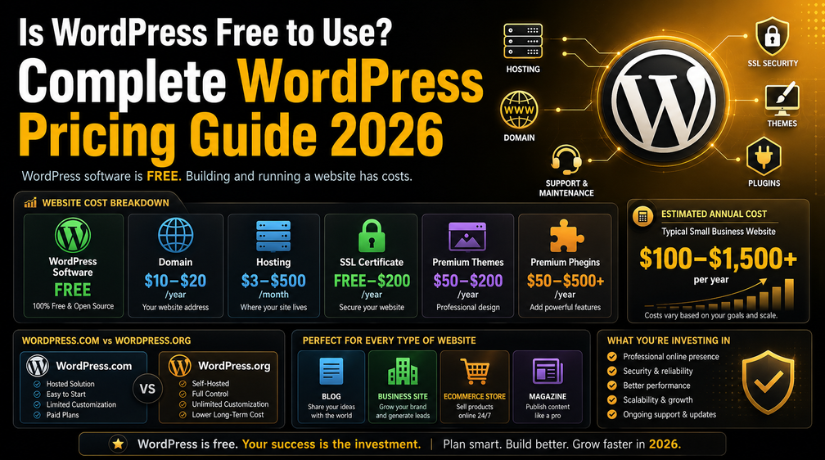
Is WordPress Free to Use? Complete WordPress Pricing Guide 2026
The most common question beginners ask before starting a website is this: Is WordPress free to use? The short answer is yes — and no. WordPress software is absolutely free to download and use. But running a real website comes with unavoidable costs that you need to understand before you begin. This guide breaks down every WordPress cost clearly, so you know exactly what to expect in 2026.
Whether you are starting a personal blog, a small business site, or an online store, this pricing guide covers everything. You will learn the difference between WordPress.com and WordPress.org, what the real hidden costs are, and which option fits your budget and goals.
What Is WordPress and Why Is It “Free”?
WordPress is an open-source content management system (CMS) that powers over 43% of all websites on the internet. Being open-source means its core software is developed and maintained by a global community of volunteers. Anyone can download it, use it, and modify it — completely free of charge.
The WordPress software itself has no license fee. You do not pay to install it or to use its basic features. This is why millions of bloggers, businesses, and developers choose WordPress every year. The software is free — but the infrastructure to run it publicly is not.
Think of it this way: the WordPress software is like a free recipe. But to actually serve the meal, you still need a kitchen, ingredients, and utensils — and those cost money. In website terms, that means paying for hosting, a domain name, and sometimes premium tools.
WordPress.org vs WordPress.com: The Key Difference
Most beginners get confused by the two versions of WordPress, and this confusion directly affects how much you will pay. Let us clear this up once and for all.
WordPress.org is the home of the free, self-hosted WordPress software. You download WordPress from here and install it on your own web server. You own everything — your content, your design, your data. You pay separately for hosting and a domain. This is what most professionals and businesses use.
WordPress.com is a managed hosting platform built on top of WordPress. You do not need to install anything. Everything is handled for you — but at a monthly cost. Free accounts exist, but they come with heavy restrictions. You do not fully own your website on the free plan.
To understand this fully, check out our detailed comparison: WordPress.com or WordPress.org: Which Website Builder Should You Choose?
WordPress.com Plans and Pricing 2026
WordPress.com offers five pricing tiers in 2025. Each plan unlocks more features as you move up the ladder. Here is what each plan includes and costs.
Free Plan — $0/month
The free plan lets you create a basic website or blog at no cost. Your site URL will look like yourname.wordpress.com. WordPress.com places its own ads on your site. You cannot install custom plugins or themes. Storage is limited to 1 GB. It works fine for a hobby blog, but it is not suitable for a professional or business website.
Personal Plan — $4/month (billed annually)
The Personal plan removes WordPress.com ads and allows you to connect a custom domain name. Storage increases to 6 GB. However, you still cannot install third-party plugins. Email support is available. This plan suits simple personal websites and small blogs with no commerce needs.
Premium Plan — $8/month (billed annually)
The Premium plan adds premium themes, simple payment collection tools, and 13 GB of storage. You can earn ad revenue through WordAds. You still cannot install custom plugins. This plan works for bloggers and content creators who want a polished look without complex functionality.
Business Plan — $25/month (billed annually)
The Business plan is the first plan that allows custom plugin installation. This is a major upgrade. You also get unlimited premium themes, 200 GB of storage, advanced SEO tools, and priority support. This is the minimum plan suitable for a real business website with custom features.
Commerce Plan — $45/month (billed annually)
The Commerce plan is built for online stores. It includes everything in Business plus eCommerce features like product pages, payment gateways, shipping tools, and inventory management. This plan costs $540 per year when billed annually.
WordPress.org (Self-Hosted): Real Costs Explained
Running a self-hosted WordPress site from WordPress.org requires you to pay for three essential components separately. Here is a realistic cost breakdown for 2025.
Domain Name — $10 to $20 per year
A domain name is your website address (example: yoursite.com). Registrars like Namecheap, GoDaddy, and Google Domains charge between $10 and $20 per year for a standard .com domain. Premium or branded domains can cost much more, but standard domains are affordable for everyone.
Web Hosting — $3 to $500 per month
Hosting is the server space where your website files live. Shared hosting plans from providers like SiteGround, Hostinger, or Bluehost start at $3 to $10 per month and are ideal for new websites with low traffic. As your site grows, you may need to upgrade to VPS hosting ($20–$80/month) or managed WordPress hosting ($25–$100/month) for better speed and reliability.
Avoid making hosting decisions based on price alone. We have seen many website owners suffer performance problems after choosing the cheapest option. Read our guide on why some popular hosts underperform for WordPress before you commit.
SSL Certificate — Free to $200 per year
An SSL certificate encrypts your website traffic and shows the padlock icon in browsers. Most quality hosting providers include a free SSL certificate via Let’s Encrypt. If you need an extended validation certificate for an eCommerce store or financial site, premium SSL costs $50 to $200 per year.
Total Annual Cost for a Basic Self-Hosted Site
Combining hosting, domain, and SSL, you can launch a basic self-hosted WordPress site for as little as $60 to $200 per year. This is dramatically cheaper than most website builder platforms, and you get full ownership and flexibility.
Hidden Costs of WordPress Most Beginners Miss
Beyond hosting and domains, several optional costs catch beginners off guard. Being aware of them upfront helps you budget more accurately.
Premium Themes — $50 to $200 per year
WordPress has thousands of free themes, and many are excellent. However, premium themes from ThemeForest, Elegant Themes (Divi), or StudioPress offer more design options, better support, and cleaner code. Premium themes cost $50 to $200 as a one-time purchase or annual subscription.


Premium Plugins — $50 to $500+ per year
Most essential plugins are free, including Yoast SEO, WooCommerce, and Contact Form 7. However, advanced plugins for forms, membership sites, page builders, backups, and security often have paid versions. A typical WordPress site uses three to five premium plugins, adding $50 to $500 annually to your costs.
Website Maintenance and Security — $50 to $300 per year
Keeping WordPress updated, secure, and backed up takes regular attention. You can use a plugin like UpdraftPlus for backups and a security plugin for protection. Alternatively, a managed WordPress support plan handles all maintenance for you. Learn more about WordPress security essentials to keep your site safe.
Developer or Designer Fees — Variable
If you need custom design, complex functionality, or help fixing issues, hiring a WordPress developer costs $30 to $150 per hour depending on experience and location. For a straightforward small business site, expect to spend $500 to $3,000 if you hire a professional to build it.
WordPress Cost by Website Type
Different types of websites have very different cost requirements. Here is a realistic estimate for the most common use cases in 2026.
Personal Blog — $60 to $200 per year
A personal blog needs basic shared hosting, a domain, a free or affordable theme, and a couple of free plugins for SEO and caching. You can keep costs very low and still have a professional-looking site.
Small Business Website — $200 to $800 per year
A small business site needs better hosting for reliability, a professional premium theme, contact forms, SEO tools, and possibly a booking or scheduling plugin. Budget $200 to $800 per year for a solid small business presence.
eCommerce Store — $500 to $2,000+ per year
An online store built with WooCommerce requires quality hosting that handles traffic spikes, a secure payment gateway, shipping plugins, and inventory tools. Premium WooCommerce extensions add up quickly. Expect $500 to $2,000 per year for a well-equipped online store.
News or Magazine Website — $300 to $1,200 per year
A content-heavy news or magazine site needs faster hosting, caching solutions, a CDN for media delivery, and a robust theme. Costs range from $300 to $1,200 per year depending on traffic volume and content volume.
WordPress Free Plan: What You Actually Get
The WordPress.com free plan is genuinely useful for some people, but it is important to know its real limitations before committing to it.
On the free plan, your site will use a WordPress.com subdomain (yourname.wordpress.com). You cannot connect a custom domain unless you upgrade. WordPress.com displays its own advertisements on your site, which you cannot remove or control. You are limited to 1 GB of storage, which fills up quickly if you upload images or media. You cannot install third-party plugins or custom themes, which severely limits your site’s functionality and design options.
The free plan works well for a personal journal, a class project, or testing out WordPress for the first time. It is not suitable for any professional, business, or monetisation purpose.
Which WordPress Option Is Right for You?
Choosing between WordPress.com and WordPress.org comes down to three factors: your budget, your technical comfort level, and your long-term goals.
Choose WordPress.com Free or Personal if you are a complete beginner with no technical knowledge, you want a simple blog or personal site, and you have no plans to monetise or grow the site significantly. The managed environment handles everything for you.
Choose WordPress.com Business or Commerce if you want the ease of managed hosting but need plugin access and custom functionality. At $25–$45 per month, this competes with many managed WordPress hosts and is worth considering if technical maintenance is not your strength.
Choose WordPress.org (Self-Hosted) if you want full ownership and control of your website, you plan to grow your site into a business or eCommerce store, and you want the most flexibility at the lowest long-term cost. This is the option that professional developers, bloggers, and business owners almost universally recommend.
For step-by-step help setting up a self-hosted WordPress site, read our complete guide: How to Install WordPress on a Self-Hosted Website.
Conclusion
So, is WordPress free to use? The WordPress software itself is always free. Running a fully functional, public-facing website involves costs for hosting, a domain, and optional premium tools — but these are very affordable compared to other website platforms.
For most people, a self-hosted WordPress.org site is the best value. You can launch one for as little as $60 to $200 per year and scale it as your needs grow. WordPress.com is a solid option if you prefer a hands-off experience and do not mind paying a monthly fee for managed convenience.
The bottom line is this: WordPress gives you more website for less money than almost any alternative. Whether you start free, spend $5 a month, or invest in a fully custom setup, WordPress flexes to match your budget and ambitions. Start with what you can afford today, and upgrade as your site grows.
Need help getting your WordPress site set up correctly? Our team at 24×7 WP Support is available around the clock to assist you with everything from installation to ongoing maintenance..
Related posts:
How to Fix Chinese Characters Appearing on My Website in Google Search Results
How to Build a Careers Page in WordPress (2026 Guide)
WordPress Custom Post Types – What is it and the Best Plugins to Create them
Ghost vs WordPress: Which Platform Is Better for Your Website?
Is Hostinger Managed WordPress Hosting? The Honest 2026 Answer

Brian is a WordPress support specialist and content contributor at 24×7 WP Support. He writes practical, easy-to-follow guides on WordPress troubleshooting, WooCommerce issues, plugin and theme errors, website security, migrations, performance optimization, and integrations. With a focus on solving real website problems, Brian helps business owners, bloggers, and online store managers keep their WordPress sites running smoothly.
