
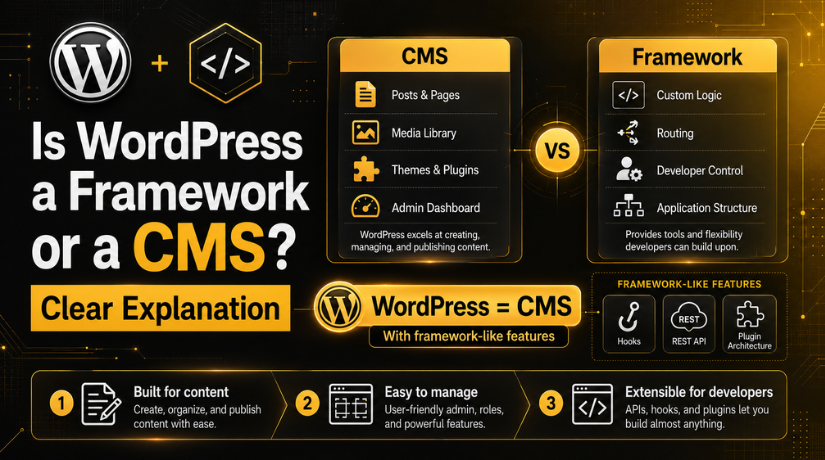
Is WordPress a Framework or a CMS? Clear Explanation
Last updated on June 30th, 2026 at 09:18 am
If you’ve ever Googled “build a website with WordPress” and landed on a developer forum, you’ve probably seen someone ask: Is WordPress a framework or a CMS? The debate comes up more often than you’d think, especially as WordPress has evolved well beyond a simple blogging tool. In 2026, it powers roughly 43% of all websites on the internet — so understanding exactly what it is matters whether you’re a business owner choosing a platform or a developer deciding between WordPress and Laravel.
The short answer is that WordPress is a CMS — a Content Management System. But the longer answer is more interesting, because WordPress has quietly borrowed a lot of ideas from the framework world over the years. Let’s break it all down.
What Is a CMS? A Quick Definition
A Content Management System (CMS) is software that lets you create, organise, edit, and publish content on a website without writing code from scratch. The entire point of a CMS is to separate content from presentation — you fill in a form, click publish, and your content appears on the site. No terminal, no file uploads, no hand-coding HTML for every page.
CMS platforms come with a built-in admin interface, user management, and tools specifically designed for managing content at scale. WordPress, Joomla, and Drupal are the three most recognised open-source CMS platforms, but there are dozens of others. Each is purpose-built for the job of making content easy to manage — which is fundamentally different from what a web framework does.
If you’re new to the WordPress ecosystem, it helps to first understand the difference between WordPress.org and WordPress.com, since they represent two very different ways of using the same underlying CMS.
What Is a Web Framework?
A web framework is a codebase or set of libraries that gives developers a structured way to build web applications. Unlike a CMS, a framework doesn’t come with a ready-made admin panel, a built-in login system, or a post editor. Instead, it provides tools — routing, authentication helpers, database abstraction, templating — that a developer uses to build those things themselves.
Frameworks are designed for flexibility and custom application development. They’re the right choice when you’re building something that doesn’t fit a standard website mould: a SaaS product, a custom marketplace, a multi-tenant application with complex business logic.
PHP Frameworks vs WordPress
The most common comparison people make is between WordPress and PHP frameworks like Laravel or Symfony. Laravel, for example, gives you an elegant routing system, an ORM called Eloquent, and a CLI tool called Artisan. But it doesn’t give you a blog out of the box. You’d need to build every feature yourself — which is powerful, but also time-consuming and expensive.
WordPress, on the other hand, gives you a working website in minutes. The tradeoff is that you work within the constraints WordPress sets: its database schema, its template hierarchy, its hooks system. For most websites, those constraints are perfectly fine. For highly custom applications, they can become a bottleneck.
So, Is WordPress a CMS or a Framework?
WordPress is a CMS. That’s the official answer and the accurate one. It was created in 2003 as a blogging platform, evolved into a general-purpose CMS, and today it’s used for everything from simple blogs to enterprise-level websites and online stores. The WordPress.org homepage itself describes it as a “Blog Tool, Publishing Platform, and CMS.”
However, WordPress is not only a CMS in the traditional sense. Over the years, it has absorbed features that make it behave in some ways like an application framework — things like a hook system, a REST API, and a plugin architecture that lets developers build deeply custom functionality on top of the core. That’s why the question keeps coming up: WordPress has grown into something harder to classify cleanly.
Why WordPress Is Classified as a CMS
The key distinction is intent. WordPress was designed from the ground up to solve a specific problem: making it easy for non-technical users to publish and manage content on the web. Every core design decision reflects that priority.
Built for Content, Not Custom Applications
Open the WordPress admin dashboard and you’ll see Posts, Pages, Media, Comments, and Settings. Every item in the navigation is oriented around content. The database schema is optimised for storing content — posts, post meta, terms, and users — not for modelling complex business entities with custom relationships.
A framework gives you a blank slate and lets you model your data however your application requires. WordPress gives you a pre-defined data model and asks you to work within it. That’s a CMS approach. Understanding WordPress concepts like the difference between posts and pages is fundamental to understanding how WordPress structures content — and that structure is CMS thinking through and through.
No Programming Required to Use It
You can install WordPress, choose a theme, install a few plugins, and publish your first post without writing a single line of code. No framework in existence lets you do that. Frameworks assume you’re a developer. WordPress assumes you might not be — and that’s a philosophy, not just a feature set.
This is what puts WordPress firmly in the CMS category. The admin interface, the visual editor, the one-click plugin installation — all of it exists to serve users who manage content, not engineers who write code.
The Framework-Like Features WordPress Actually Has
Here’s where things get nuanced. WordPress has evolved significantly since its early days, and it now includes features that any serious developer would recognise as framework-like. Ignoring them would give an incomplete picture.
Hooks and Filters
WordPress’s hook system — add_action() and add_filter() — is one of the most powerful and flexible APIs in any CMS. It lets developers intercept almost any process in WordPress (saving a post, rendering a template, processing a form) and modify the behaviour without touching core files. This is fundamentally how modern frameworks allow extensibility — through events and middleware.
Major plugins like WooCommerce are built almost entirely on top of WordPress hooks. The hook architecture is a serious software design pattern, and its presence in WordPress is one of the main reasons experienced developers can build complex, scalable products on top of it.
REST API and Headless Capabilities
Since WordPress 4.7, a fully functional REST API has been built into the core. In 2026, the WordPress REST API is considered mature and production-ready, forming the backbone of headless WordPress setups where WordPress manages content but the frontend is built in a separate framework like Next.js or Nuxt.


This is genuinely framework territory. When you’re using WordPress as a content backend and consuming its API from a modern JavaScript frontend, WordPress is acting less like a traditional CMS and more like a backend application service. WPGraphQL support has also become mainstream, with WPGraphQL v2 adding persisted queries and per-field cache control in 2026.
Plugin Architecture
The WordPress plugin system is essentially a modular application framework hidden inside a CMS. Plugins can register custom post types, add REST API endpoints, enqueue scripts and styles, modify the admin interface, and hook into virtually every part of the WordPress lifecycle. The official plugin directory now contains over 58,000 plugins.
This extensibility is what makes WordPress so hard to pin down. A sufficiently complex WordPress plugin looks like a mini application built on top of an application platform. Whether you call that a “framework” depends on how strictly you’re using the word. Understanding WordPress terminology and concepts — from hooks to custom post types — is much easier with a good reference like the WordPress glossary for beginners.
When Should You Use WordPress Instead of a Framework?
For the vast majority of websites, WordPress is the right choice. Here’s when it makes clear sense:
You need to launch quickly. WordPress can go from installation to a live website in hours, not weeks. For blogs, business sites, portfolios, news sites, and small to mid-sized online stores, the out-of-the-box functionality is more than sufficient.
Content is central to the project. If the primary goal is publishing and managing content — articles, product pages, landing pages, documentation — WordPress was built for exactly this. Its editorial workflow, media library, taxonomy system, and user roles are all oriented around content operations.
Your team includes non-developers. Marketing teams, editors, and business owners can all use WordPress without technical training. No framework can offer this. The ability to hand off content management to non-technical stakeholders is a huge operational advantage.
You need a plugin ecosystem. Instead of building a contact form, an SEO tool, a backup system, or an e-commerce engine from scratch, you can install a plugin. This dramatically reduces development time and cost for standard website features.
When a PHP Framework Might Be a Better Choice
There are scenarios where choosing a PHP framework over WordPress is the right engineering decision:
You’re building a complex custom application. If you’re creating a SaaS platform with a non-standard data model, complex business logic, multi-tenancy, or deeply custom user workflows, WordPress’s pre-defined database schema and opinionated structure will fight you more than help you.
Performance is an extreme priority. A carefully optimised Laravel or Symfony application with a modern tech stack can outperform a WordPress installation, particularly under high load. WordPress’s architecture carries overhead that’s easy to accept for a content site but harder to justify for a high-throughput API or real-time application.
Your team is all developers. If every person who will work on the project is a developer, a framework gives you more control and a cleaner codebase. You’re not gaining anything from WordPress’s admin interface if you never need it.
WordPress as a Headless CMS in 2026
One of the most significant shifts in 2026 is the mainstream adoption of headless WordPress. In a headless setup, WordPress handles content management on the backend while a modern JavaScript framework (Next.js, Gatsby, Nuxt, Remix) renders the frontend. The two communicate via the WordPress REST API or WPGraphQL.
This approach blurs the CMS/framework distinction further. In a headless setup, WordPress is neither the presentation layer nor a traditional framework — it’s a managed content backend. Teams get the familiar WordPress admin experience for content editors while developers get the freedom to build frontends in any technology they choose.
Headless WordPress has moved from experimental to mainstream, and it’s now a legitimate architecture for enterprise-level projects. If you’re exploring multiple sites or advanced WordPress configurations, it’s worth understanding WordPress Multisite, which solves a related problem: managing multiple WordPress sites from a single installation.
The Verdict: WordPress Is a CMS With Serious Developer Capabilities
WordPress is a CMS — but a remarkably capable one that has borrowed extensively from the framework world. For most websites, that’s a feature, not a limitation. You get the content management simplicity that keeps editorial teams productive, plus a plugin ecosystem and developer API that can handle serious complexity when you need it.
If your goal is to build and manage a website — whether it’s a blog, a business site, a membership community, or an online store — WordPress is the right tool in 2026. If you’re building a custom web application where content management is secondary to complex application logic, a PHP framework will give you more control.
The question “is WordPress a framework or a CMS?” reveals something important: the two categories aren’t always mutually exclusive. WordPress started as a CMS and grew into something more, which is exactly why 43% of the web runs on it today.
Need help getting the most out of WordPress? Whether you’re setting up your first site, migrating an existing one, or building something more complex, 24×7 WP Support offers expert WordPress assistance around the clock. From performance tuning to plugin conflicts, our team has you covered — so you can focus on your content while we handle the technical details.
Related posts:

Brian is a WordPress support specialist and content contributor at 24×7 WP Support. He writes practical, easy-to-follow guides on WordPress troubleshooting, WooCommerce issues, plugin and theme errors, website security, migrations, performance optimization, and integrations. With a focus on solving real website problems, Brian helps business owners, bloggers, and online store managers keep their WordPress sites running smoothly.
