
What is the difference between staging and live WordPress?
Introduction
Many WordPress users make changes without checking where they should work. That often leads to errors, broken pages, or poor visitor experience. To avoid this, you must understand staging vs live WordPress clearly. These two versions serve different purposes on the same website. One helps you test changes safely before publishing them. The other is the public version visitors use every day. Knowing the difference between staging and live WordPress helps protect your site. It also helps you avoid downtime, layout issues, and plugin conflicts.
This topic matters for bloggers, business owners, developers, and store managers. Even a small change can create a big problem online. A theme update may break your layout without warning. A plugin update may affect forms, checkout, or login pages. That is why WordPress users should never treat both versions the same. When comparing a WordPress staging site vs live site, the main goal stays simple. Test first in private, then publish safely for real users.
What a Staging Environment Means in WordPress
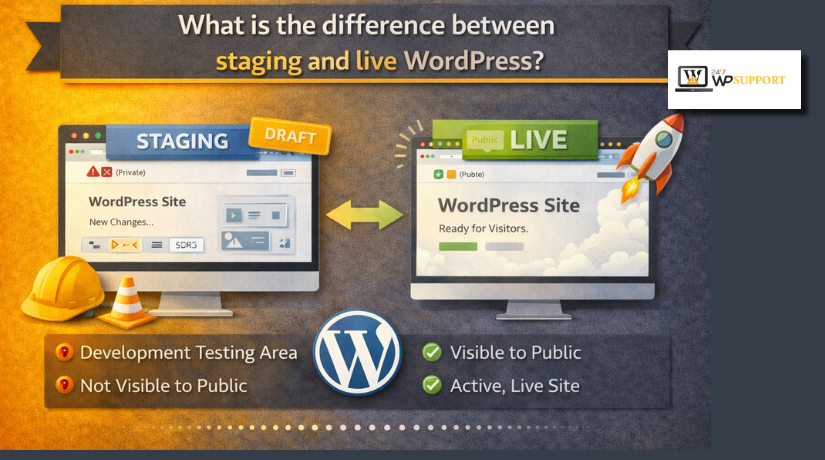
So, what is staging site in WordPress? A staging site is a private copy of your website. It looks very similar to your real website in design and content. However, it is not meant for public visitors or search engines. It gives you a safe place to test changes first.
A staging environment helps you check updates before they reach users. This is useful when your website is active and important. Instead of guessing, you can test everything before going live. That lowers risk and keeps your public website stable.
You can use a staging site to test:
- plugin updates
- theme changes
- design edits
- custom code
- page layout changes
- WooCommerce settings
This setup is helpful because mistakes stay hidden from visitors. If something breaks, only you or your team will see it. Your customers will not face errors during browsing or checkout. That is the biggest reason staging matters in WordPress.
A staging site also supports better planning and safer website management. You can review every change before making it public. This saves time, protects user trust, and prevents avoidable problems. For beginners, this is the easiest way to work safely. For businesses, it is a smart step before important updates. Understanding what is staging site in WordPress is the first step toward safer website changes.
What a Live Website Means in WordPress
To understand this topic fully, you must know the public side. So, what is live site in WordPress? A live site is the real website people visit online. It is the version visible to customers, readers, and search engines. Every public page, form, menu, and product works from this version.
This is the website your business depends on each day. Visitors read blog posts, fill contact forms, and place orders here. If you run a store, customers complete checkout on this site. If you offer services, leads and inquiries also come here. That is why the live site must stay stable and error-free.
A live WordPress site affects many important things, such as:
- user trust
- search visibility
- sales and leads
- site speed
- form submissions
- shopping experience
Even a small issue on the live site can hurt results. A broken button may stop users from taking action. A plugin conflict may stop checkout or form submissions. A layout problem may make the site look unprofessional. That is why the live version needs extra care.
The Main Difference Between the Two
When people ask about WordPress staging site vs live site, they want a clear answer. The main difference is simple. One is for testing. One is for real users.
- Purpose
A staging site helps you test website changes safely first. A live site delivers the final experience to visitors. This is the core of staging vs live WordPress.
- Visibility
A staging site is usually private or password protected. A live site is public and open to users. Search engines can index the live site, not staging. This is a key difference between staging and live WordPress.
- Risk Level
A problem on staging stays hidden from normal visitors. A problem on the live site affects people immediately. That can cause lost trust, fewer leads, or missed sales.
- Performance and Stability
You can experiment more freely on a staging website. On a live site, stability should always come first. Users expect pages to load well and work correctly. This is why WordPress staging vs production should never be treated the same way.
- Data and Real Activity
A live site handles real traffic and real actions daily. It receives orders, comments, leads, and account activity. A staging copy may look similar, but data may differ. It may not show current orders or fresh user actions. That is another major point when comparing WordPress staging vs production.
In simple terms, staging is your safe work area. The live site is your public business front. Understanding what is live site in WordPress helps you protect both.
Why Website Owners Should Not Make Major Changes Directly on the Public Site
Making big website changes on the public version is risky. Your live site is where visitors take action every day. They read pages, send forms, and place orders there. Any mistake can affect real users right away. This is one major reason the difference between staging and live WordPress matters so much.


A live website should stay stable, fast, and easy to use. When you change important settings there, problems can appear without warning. A plugin update may break a contact form. A theme edit may damage the page layout. A code change may cause a white screen. If you run WooCommerce, checkout problems can also appear. That can lead to lost trust, lost leads, and lost sales.
Here are common risks of editing the live site directly:
- broken page layouts
- plugin conflicts
- checkout or cart issues
- login or form errors
- slow loading pages
- visible errors for visitors
This is where staging vs live WordPress becomes important in daily work. A staging site gives you space to test first. The live site should not be your testing area. When people compare WordPress staging site vs live site, this is one of the biggest reasons they choose staging.
When to Use a Staging Environment
A staging site is the safer place for major changes. It lets you check results before updating the public website. That keeps problems away from visitors and customers. If you are asking what is staging site in WordPress, the answer becomes very practical here. It is the best place to test changes before they go public.
You should use staging in these situations:
- before updating WordPress core
- before updating themes or plugins
- before changing custom code
- before redesigning important pages
- before testing WooCommerce features
- before fixing a bug that may affect users
These updates may look small at first. Still, they can affect many parts of a site. A plugin update may change how forms work. A design edit may affect mobile layout. A code change may create hidden issues later. Testing in staging helps you catch these problems early.
This is also why many people discuss WordPress staging vs production. The production site is your real business website. The staging site is your safe testing copy. Knowing when to use each one helps you work more carefully. It also helps you protect traffic, user trust, and daily website performance.
When Working Directly on the Live Site May Be Acceptable
Not every website update needs a staging environment first. Some small changes are usually safe on the public site. These edits do not change core functions or important settings. They also carry a lower risk for visitors and customers.
You may work directly on the live site for:
- fixing a spelling mistake
- updating a phone number
- replacing a simple image
- editing short text blocks
- changing a non-critical setting
Even then, you should still work with care. A small change can still cause problems on busy websites. This is another part of staging vs live WordPress that matters. Low-risk edits may be fine on live. Larger updates should still stay on staging first.
How Changes Usually Move from Staging to Live
A good workflow keeps your website safer and more stable. This is where WordPress staging vs production becomes practical, not technical. The process is usually simple and easy to follow.
Most website owners handle changes in this order:
- create a staging copy of the live site
- make updates on the staging version
- test pages, forms, and important functions
- review the final result carefully
- push approved changes to the live site
This process helps you catch mistakes before visitors see them. It also gives you time to check speed and layout. You can test mobile design, forms, menus, and checkout pages. That is a major benefit of a WordPress staging site vs live site setup.
Many hosting companies now offer built-in staging tools. These tools make testing and moving changes much easier. Still, you should always review everything before publishing. Careful testing helps protect user experience and business results.
Common Mistakes Users Make With Staging and Live Sites
Many website problems start with simple avoidable mistakes. Users often rush updates without a safe testing process. That creates issues that could have been prevented earlier.
Common mistakes include:
- editing the live site before testing anything
- forgetting to take a backup first
- not checking theme or plugin compatibility
- leaving the staging site open to search engines
- assuming staging data always matches live data
- pushing changes without full testing
These errors can affect traffic, design, forms, and sales. That is why the difference between staging and live WordPress should never be ignored. A careful process helps reduce stress and avoid public mistakes.
Conclusion
The main difference between staging and live WordPress is simple. Staging is for safe testing. Live is for real visitors. Once you understand what is live site in WordPress and staging, smarter website management becomes easier. Use staging for major updates. Use live only for small, low-risk edits. That simple habit protects site performance, user trust, and daily business activity. If you need expert help with staging setup, live site updates, or safe WordPress changes, 24x7wpsupport can help you manage them with care and confidence.
FAQs
1. What is the main difference between staging and live WordPress?
A staging site is a private copy of your website for testing. A live site is the public version visitors use. This is the basic difference between staging and live WordPress.
2. What is staging site in WordPress used for?
A staging site is used to test plugin updates, theme changes, design edits, and custom code before applying them to the public website. It helps you find problems early and avoid showing errors to visitors.
3. What is live site in WordPress?
A live site is the real website that users, customers, and search engines can access. It is the version where people read content, submit forms, and complete purchases.
4. Should I make changes directly on my live WordPress site?
You can make very small changes on the live site, such as fixing text or replacing an image. For major updates, staging is the safer option because it reduces the risk of breaking your public website.
5. Is WordPress staging vs production the same thing as staging vs live?
Yes, in most cases, production means the live website. So WordPress staging vs production usually means the same comparison as staging versus live WordPress.
Related posts:


Brian is a WordPress support specialist and content contributor at 24×7 WP Support. He writes practical, easy-to-follow guides on WordPress troubleshooting, WooCommerce issues, plugin and theme errors, website security, migrations, performance optimization, and integrations. With a focus on solving real website problems, Brian helps business owners, bloggers, and online store managers keep their WordPress sites running smoothly.
