
How Much Does WordPress Cost? Complete Pricing Guide 2026
Introduction
If you're thinking about building a website with WordPress, one of the first questions you'll ask is: how much does WordPress cost? The short answer is—it depends. WordPress itself is free, but running a WordPress site involves a few unavoidable costs and some optional ones that can add up quickly.
In this guide, we'll break down every WordPress cost you need to know in 2026—from domain names and hosting to themes, plugins, and custom development—so you can plan your budget before you start building.
WordPress.org vs WordPress.com: Two Very Different Platforms
Before we dive into costs, it's important to understand that "WordPress" refers to two different things:
- WordPress.org – This is the self-hosted, open-source version of WordPress. You download the software for free, but you need to pay for hosting and a domain name separately. This is the most popular version and gives you complete control over your website.
- WordPress.com – This is a hosted platform that runs on WordPress software. It handles hosting for you, but comes with its own pricing tiers and restrictions.
Most websites you see using WordPress are using the self-hosted WordPress.org version. When people talk about "WordPress costs," they're usually referring to the costs associated with running a self-hosted site. We'll cover both below.
WordPress.com Plans and Pricing
If you want to avoid managing hosting yourself, WordPress.com offers several paid plans:
| Plan | Monthly Cost (billed yearly) | Best For |
|---|---|---|
| Free | $0 | Hobby blogs with WordPress subdomain |
| Personal | $9/month | Basic personal sites, custom domain |
| Premium | $18/month | Bloggers, monetization features |
| Business | $40/month | Growing sites, plugin access |
| Commerce | $70/month | Full eCommerce stores |
The main limitation with WordPress.com is flexibility. On lower-tier plans, you can't install custom plugins or themes. If you want the full power of WordPress, the Business plan ($40/month) or self-hosting is the way to go.
Breaking Down WordPress.org Costs
Now let's look at what it actually costs to run a self-hosted WordPress website. Here are the essential items you'll need to budget for.
1. Domain Name: $10–$20 per Year
Your domain name is your website's address on the internet (e.g., yoursite.com). Domain names typically cost between $10 and $20 per year for a standard .com domain. Premium domains or less common extensions (.io, .co) can cost more.
Many hosting providers offer a free domain for the first year when you sign up for a hosting plan, so keep an eye out for those deals.
2. Web Hosting: $3–$144 per Month
Hosting is usually the biggest recurring WordPress cost. Your hosting plan determines how fast your site loads, how much traffic it can handle, and how secure it stays. Here's a rough breakdown by hosting type:
- Shared Hosting: $3–$15/month – Best for beginners and small sites. Multiple websites share the same server resources. Providers like Bluehost, SiteGround, and Hostinger offer good entry-level plans.
- Managed WordPress Hosting: $15–$60/month – Optimized specifically for WordPress, includes automatic updates, backups, and better security. WP Engine, Kinsta, and Flywheel are popular choices.
- VPS Hosting: $20–$100/month – More resources and control than shared hosting. Good for growing sites with moderate traffic.
- Dedicated Hosting: $80–$400+/month – An entire server for your website alone. Best for large, high-traffic sites with demanding performance needs.
For most beginners and small businesses, shared or managed WordPress hosting in the $10–$30/month range is more than enough to get started.
3. WordPress Theme: Free or $30–$100 (One-Time)
WordPress has thousands of free themes available in the official WordPress theme directory. Many are perfectly professional and suitable for most use cases. However, premium themes offer more design flexibility, better support, and additional features.
Premium themes typically cost $30–$100 as a one-time purchase from marketplaces like ThemeForest or directly from theme developers. Some themes also charge an annual renewal fee for updates and support.
4. WordPress Plugins: Free to $299+/Year
Plugins extend the functionality of your WordPress site. There are over 60,000 free plugins in the WordPress plugin directory covering everything from contact forms to SEO tools.
That said, many premium plugins with advanced features carry annual license fees. Here are some common plugin categories and typical costs:
- SEO Plugin (e.g., Yoast SEO Premium): Free version available; premium around $99/year
- Security Plugin (e.g., Wordfence): Free version available; premium $99–$199/year
- Backup Plugin (e.g., UpdraftPlus): Free version available; premium from $70/year
- Page Builder (e.g., Elementor Pro): $59–$89/year
- eCommerce (e.g., WooCommerce): Core plugin is free; extensions $49–$299/year each
- Forms (e.g., WPForms): $49–$259/year
A typical small business site might spend $100–$300/year on premium plugins. The good news is many free plugins are genuinely excellent and may be all you need when starting out.
5. SSL Certificate: Free (Usually Included)
An SSL certificate secures your website and shows the padlock icon in browsers. Most modern web hosts include a free SSL certificate via Let's Encrypt. If your host doesn't include one, you can get a basic SSL for free or pay $10–$100/year for advanced SSL certificates.
6. Custom Development: $300–$30,000+
If you need a custom theme, specific functionality, or professional setup help, hiring a WordPress developer is an additional cost. Freelance WordPress developers typically charge $50–$150/hour, while WordPress agencies can charge significantly more.
If you need professional WordPress support—whether it's troubleshooting, plugin conflicts, or custom development—our WordPress experts at 24x7 WP Support are available around the clock to help.
WordPress Cost by Website Type
To make this more practical, here's what you can expect to spend based on what type of site you're building:
Personal Blog or Portfolio: $50–$300/Year
A simple personal blog or portfolio can be built and maintained for very little. With shared hosting (~$36–$120/year), a domain (~$15/year), and free plugins and themes, you're looking at $50–$150/year total. Add a premium theme or a couple of plugins and you're still well under $300/year.
Small Business Website: $100–$500/Year
A small business website needs a bit more—better hosting, a professional theme, SEO tools, a contact form, maybe a booking or appointment plugin. Budget $200–$500/year for a well-equipped small business site. If you're hiring someone to set it up initially, add $500–$3,000 in one-time development costs.
eCommerce Store: $300–$1,500+/Year
Running an online store with WooCommerce involves more costs—better hosting to handle transactions, payment gateway fees (typically 2–3% per transaction), WooCommerce extensions, and possibly a premium theme optimized for eCommerce. Expect $500–$1,500/year for hosting, plugins, and extensions, not counting payment processing fees.
Hidden WordPress Costs to Watch Out For
- Plugin and theme renewals: Many premium plugins offer a discounted first-year price but renew at full price. Read the renewal terms before purchasing.
- Website migration: If you move from one host to another, some hosts charge for migration or you may need to hire someone to do it.
- Email hosting: WordPress doesn't include business email. Services like Google Workspace start at $6/user/month.
- CDN (Content Delivery Network): For faster global load times, a CDN like Cloudflare (free plan available) or a premium CDN can be an additional cost.
- Maintenance and updates: If you're not comfortable managing updates yourself, a WordPress maintenance service typically costs $50–$200/month.
How to Keep Your WordPress Costs Low
- Start with shared hosting and upgrade only when your traffic demands it.
- Use free plugins from the official WordPress repository before investing in premium versions.
- Choose a lightweight free theme like Astra or GeneratePress—both are fast, flexible, and free.
- Take advantage of hosting deals. Many hosts offer deep discounts for the first term—just watch renewal pricing.
- Learn the basics yourself. The more comfortable you get with WordPress, the less you'll need to pay for support. Check out our guide to installing WordPress to get started.
Final Thoughts on WordPress Cost
So, how much does WordPress cost? Here's a quick summary:
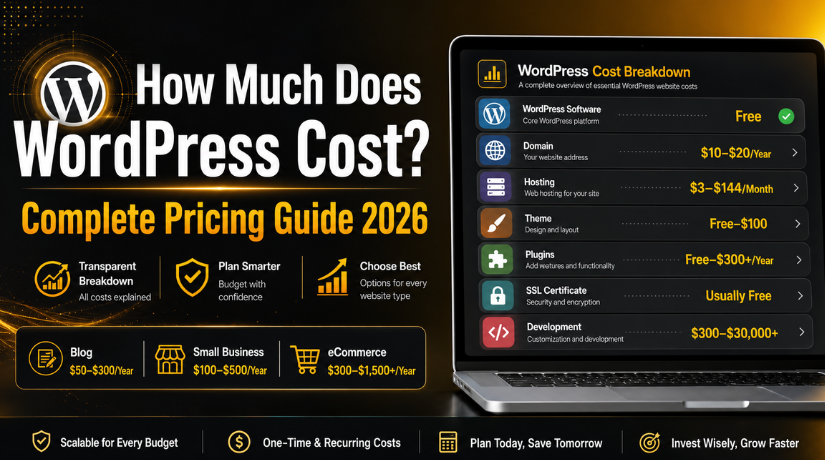
- WordPress software: Free
- Domain name: $10–$20/year
- Web hosting: $3–$144/month
- Theme: Free to $100 one-time
- Plugins: Free to $300+/year
- Custom development: $300–$30,000+ (optional)
For most people, a fully functional WordPress website costs between $100 and $500 per year—a fraction of what a custom website would cost. The beauty of WordPress is that it scales with your needs and budget.
Whether you're just starting out with a basic blog or building a full-featured business site, WordPress gives you the flexibility to start small and grow over time. And when you run into issues—because every WordPress site eventually does—having reliable WordPress support makes all the difference.



Brian is a WordPress support specialist and content contributor at 24×7 WP Support. He writes practical, easy-to-follow guides on WordPress troubleshooting, WooCommerce issues, plugin and theme errors, website security, migrations, performance optimization, and integrations. With a focus on solving real website problems, Brian helps business owners, bloggers, and online store managers keep their WordPress sites running smoothly.
