
Slider vs Carousel in WordPress: Key Differences
Introduction
Many WordPress websites use moving content sections for better design. You may see them on homepages, landing pages, blogs, and product pages. These sections often show images, text, buttons, offers, or featured services.
However, many users confuse sliders and carousels. They look similar, but they work in different ways. This difference matters when building a clean and useful website. A wrong layout can confuse visitors and slow down your page.
The topic of slider vs carousel in WordPress is important for website owners. It helps them choose the right display style for their content. A better choice can improve user experience, mobile design, and conversions.
This guide explains both options in a simple way. It also helps you understand where each one works best.
What Is a WordPress Slider?
A WordPress slider is a moving section that shows one main slide at a time. Each slide can include an image, heading, short text, button, or video. Most sliders appear at the top of a page.
So, what is a WordPress slider in simple words? It is a visual display block. It highlights one message before showing the next one. Visitors can move through slides using arrows, dots, or swipe controls.
Many WordPress website owners use sliders for strong visual impact. They help show important content without filling the whole page.
A slider is commonly used for:
- Homepage hero banners
- Main service highlights
- Product promotions
- Event announcements
- Portfolio previews
- Limited-time offers
A slider works best when your website needs one clear message. For example, a service website may show its main offer first. An online store may show a sale banner. A business website may show its top service.
A good WordPress slider should be simple and fast. It should not have too many slides. The text should be clear on mobile and desktop screens. Buttons should also be easy to click.
When used correctly, a slider can guide visitors quickly. It can also make your main message more visible.
What Is a WordPress Carousel?
A WordPress carousel is a moving section that shows multiple items together. It usually displays content in a row or grid style. Visitors can move left or right to view more items.
So, what is a WordPress carousel in simple words? It is a content display area that helps users browse related items. Unlike a slider, it does not focus on one large message only. It shows several small content blocks at the same time.
Many websites use carousels to save space and improve browsing. They are common on business websites, blogs, and online stores. A carousel can show useful content without making the page too long.
A WordPress carousel is often used for:
- Product cards
- Customer testimonials
- Client logos
- Blog post previews
- Service boxes
- Team member profiles
- WooCommerce product rows
A carousel works well when content items belong together. For example, an online store can show featured products. A service website can show customer reviews. A blog can show related posts after an article.
A good carousel should be easy to control. Users should see clear arrows, dots, or swipe options. The layout should also work smoothly on mobile screens.
Main Difference Between Slider and Carousel
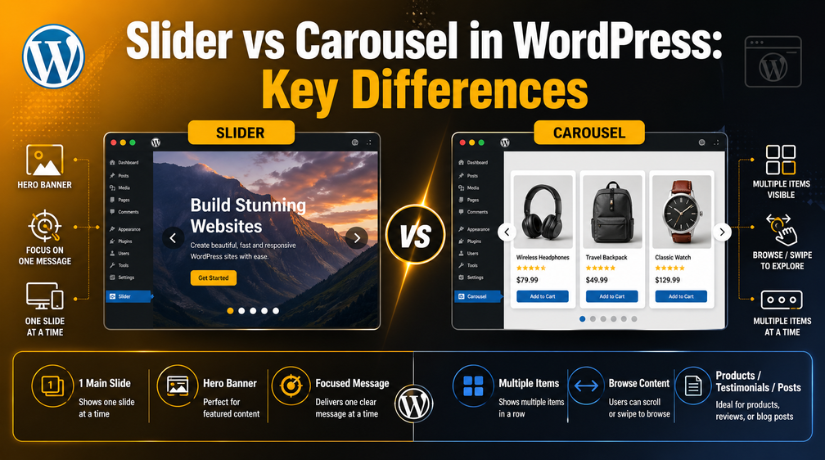
The main difference between slider and carousel is content display. A slider usually shows one main item at a time. A carousel shows multiple related items in one view.
This makes each option useful for different goals. A slider is better for one strong message. A carousel is better for browsing many items.
In WordPress slider vs carousel comparison, the purpose matters most. A slider works like a visual banner. A carousel works like a content showcase.
Both options may include:
- Arrows for navigation
- Dots for slide position
- Swipe control on mobile
- Autoplay movement
- Smooth animation effects
However, they should not be used only for style. Each one should support the visitor’s next action. A slider should guide attention to one message. A carousel should help users compare or view more content.
So, choose based on your website goal. Use a slider for focus. Use a carousel for variety.
Slider vs Carousel in WordPress Use Case Comparison
Choosing between a slider and carousel depends on your content goal. Both options can improve page design when used correctly. However, each one supports a different website purpose.
A WordPress slider vs carousel comparison becomes easier with use cases. A slider works best when one message needs full attention. A carousel works best when several related items need display space.
When to Use a WordPress Slider
Use a WordPress slider when your page needs strong visual focus. It is helpful when you want visitors to notice one message first. This makes sliders useful for homepages and landing pages.


A slider is a good choice for:
- Homepage hero banners
- Main service promotions
- Limited-time offers
- Portfolio showcases
- Event announcements
- Single product highlights
For example, a local service business can show its main offer. An online store can promote a seasonal sale. A portfolio site can highlight its best work.
A slider should not include too many messages. Keep each slide short and clear. Use readable text, strong images, and clear buttons. This helps visitors understand the message quickly.
When to Use a WordPress Carousel
Use a WordPress carousel when users need to browse multiple items. It works well when all items belong to one group. This makes carousels helpful for product pages and blog sections.
A carousel is a good choice for:
- WooCommerce product rows
- Blog post cards
- Customer testimonials
- Partner or client logos
- Team member profiles
- Related service sections
For example, a store can show popular products together. A business can display several client reviews. A blog can show related posts under an article.
In carousel vs slider for website planning, purpose matters most. Choose a slider when you need attention on one message. Choose a carousel when users need more choices. A clear purpose keeps your WordPress layout useful and easy.
Which Option Is Better for User Experience?
The better option depends on your content and visitor needs. A slider works well when users should focus on one message. A carousel works better when users need more browsing choices.
Good user experience starts with simple design. Visitors should understand the section without extra effort. They should also control movement easily on every device.
For better user experience, follow these points:
- Keep text short and easy to read.
- Use clear arrows and dot controls.
- Avoid fast autoplay on important content.
- Make buttons large enough for mobile users.
- Keep image and text contrast clear.
- Test swipe controls on phones and tablets.
A slider can feel clean when it has fewer slides. However, too many slides may hide important content. Many users may not wait for later slides.
A carousel can help users scan more items quickly. But it should not feel crowded or confusing. Each item should have enough space and clear labels.
Which One Is Better for SEO and Page Speed?
SEO depends on speed, usability, and content access. Sliders and carousels can affect these points indirectly. They should not slow down your WordPress website.
Large images can increase page loading time. Heavy animation effects can also reduce performance. This may hurt user engagement, especially on mobile devices.
To keep your layout SEO-friendly:
- Compress all images before uploading them.
- Use lazy loading for below-the-fold sections.
- Avoid too many slides or carousel items.
- Do not hide key text inside images only.
- Choose lightweight plugins with clean code.
- Check the layout on mobile and desktop.
Both options can work well when optimized correctly. The best choice is not only about design. It should also support speed, readability, and visitor action.
Common Mistakes to Avoid
Many WordPress users add sliders or carousels without planning first. This can hurt design, speed, and user experience. A clean section always works better than a crowded one.
Avoid these common mistakes:
- Adding too many slides or carousel items.
- Using large images without compression.
- Setting autoplay too fast for users.
- Hiding important content after the first slide.
- Using weak text color over busy images.
- Ignoring mobile layout and swipe controls.
- Installing heavy plugins with unused features.
Each slider or carousel should have a clear purpose. It should guide users toward the next helpful action.
How to Choose the Best WordPress Slider or Carousel Plugin
The best WordPress slider or carousel plugin should match your website needs. Do not choose a plugin only for fancy effects. Choose one that supports speed, mobile design, and easy editing.
Check these points before installing any plugin:
- Mobile responsive layout
- Lightweight code
- Simple editing options
- SEO-friendly structure
- Regular updates
- Good user reviews
- WooCommerce support, if needed
- Clear navigation controls
A good plugin should help users manage content easily. It should also keep your website fast and stable.
Conclusion
The topic of slider vs carousel in WordPress is simple when you know the purpose. Use a slider when you need one focused message. Use a carousel when you need to show multiple related items.
Both options can improve your WordPress design. But they must be clear, fast, and mobile-friendly. Always test them before publishing.
Need help choosing or fixing a slider or carousel? 24×7 WP Support can help improve your WordPress design, speed, and usability.

Brian is a WordPress support specialist and content contributor at 24×7 WP Support. He writes practical, easy-to-follow guides on WordPress troubleshooting, WooCommerce issues, plugin and theme errors, website security, migrations, performance optimization, and integrations. With a focus on solving real website problems, Brian helps business owners, bloggers, and online store managers keep their WordPress sites running smoothly.
