
What Is CiviCRM for WordPress and How Does It Work?
Introduction
Many nonprofit websites need more than a simple contact form. They need a better way to manage people, donations, members, and events. A normal website can collect basic details. But it may not help teams manage long-term supporter relationships.
This is where CiviCRM for WordPress becomes useful. It adds strong CRM features to a WordPress website. It helps nonprofits store contact records, track donations, manage members, and organize communication.
For charities, community groups, and associations, this can save time. It can also reduce manual work for small teams. Instead of using many separate tools, teams can manage important data from one system.
CiviCRM is helpful for organizations that want better control. It supports daily tasks like donor tracking, member updates, and event records. It also helps teams understand how people connect with their mission.
What Is CiviCRM?
CiviCRM is an open-source customer relationship management system. In nonprofit work, it is often called a constituent relationship management system. This means it is built to manage people connected with an organization.
These people may include:
- Donors who support your cause
- Members who join your organization
- Volunteers who help with events
- Supporters who receive updates
- Partners who work with your team
CiviCRM helps store these details in one place. It can keep names, email addresses, phone numbers, donation history, activities, and notes. This makes it easier to understand each contact.
For example, a nonprofit can see who donated last month. A membership group can check who needs renewal. A charity can review which supporters joined an event.
This makes CiviCRM a strong WordPress CRM for nonprofits. It supports real nonprofit needs, not just sales tracking. Many basic CRM tools focus on leads and customers. CiviCRM focuses more on supporters, donors, members, and communities.
It can also work as a nonprofit CRM for WordPress websites. WordPress manages the public website. CiviCRM manages the relationship data behind it.
This setup helps organizations stay organized. It also helps teams build better communication with their supporters.
Does CiviCRM Work with WordPress?
Yes, CiviCRM works with WordPress through a plugin-based setup. Many users ask, does CiviCRM work with WordPress for nonprofit websites? The answer is yes. It can connect CRM features with a WordPress website.
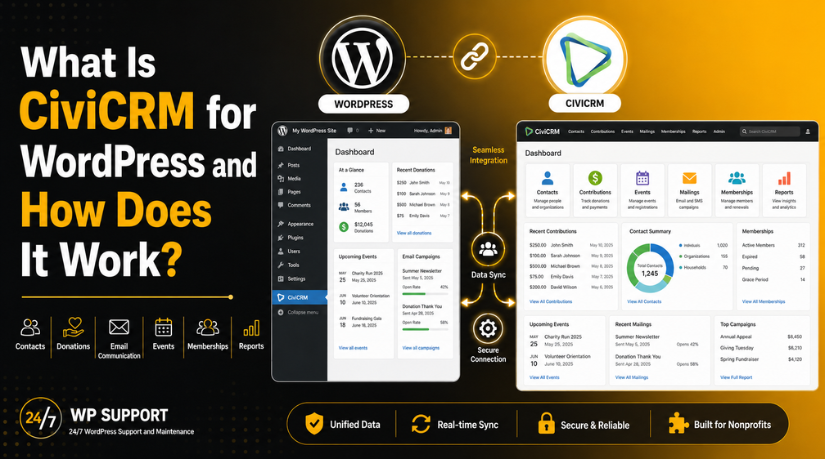
WordPress works as the main website platform. It manages your pages, blog posts, menus, images, and design. CiviCRM works behind the website. It manages contacts, donations, members, events, and activity records.
This setup is useful for nonprofits and membership groups. They can keep their website and CRM connected. Visitors can use forms on the website. The data from those forms can then move into CiviCRM.
For example, a donor may fill out a donation form. A member may register for an event. A volunteer may submit their contact details. CiviCRM can help store these records in an organized way.
This makes the website more useful for daily work. It does not only show information to visitors. It also helps the team manage real supporter data.
CiviCRM also gives admins more control over records. Teams can search contacts, view history, and track actions. This can reduce manual work and improve follow-up.
How CiviCRM Works Inside WordPress
The CiviCRM WordPress plugin helps connect CiviCRM with WordPress. After setup, CiviCRM becomes part of the WordPress environment. Admin users can access CRM tools from the website dashboard.
A basic CiviCRM WordPress integration works in a clear way:
- WordPress displays the public website pages.
- CiviCRM stores contact and activity data.
- Forms can be added to WordPress pages.
- Visitor details can be saved in CiviCRM.
- Admin users can manage records from the backend.
This process helps nonprofits collect and manage important information. A visitor may submit a form on the website. That information can become a contact record in CiviCRM. The team can then use that record for future updates.
CiviCRM is not just a simple form tool. It is a full CRM system. It helps connect website activity with supporter management. This makes it useful for organizations that need more than basic WordPress features.
With the right setup, CiviCRM can support donations, memberships, events, and communication from one connected system.
Main Features of CiviCRM for WordPress Users
CiviCRM gives WordPress websites many useful CRM features. These features are helpful for nonprofits, charities, clubs, and member groups. They help teams manage people, activities, and support records in one place.
With CiviCRM for WordPress, organizations can turn a simple website into a better management system. It supports daily tasks that many nonprofit teams handle often.
-
Contact Management
Contact management is one of the main features of CiviCRM. It helps organizations store supporter details in a clear way. These contacts may include donors, members, volunteers, staff, and partners.
Teams can save names, email addresses, phone numbers, notes, and activity history. This helps them understand each contact better. It also makes follow-up easier and more organized.


For example, a nonprofit can check past donations quickly. A team can also see if a supporter attended an event.
-
Donation Management
Donation management is important for many nonprofit websites. CiviCRM helps organizations collect and manage donation records. It can store donor details, donation amounts, dates, and payment status.
Using CiviCRM donation forms WordPress, nonprofits can collect support through website pages. Donors can fill out the form online. The information can then be saved inside CiviCRM.
This helps teams track donations without manual spreadsheets. It also helps them review giving history and donor activity.
-
Membership Management
CiviCRM also supports membership management. This is useful for associations, clubs, and community groups. Teams can manage member profiles, membership levels, renewal dates, and status.
This makes it easier to know who is active. It also helps teams follow up before memberships expire. Clear member records can support better service and communication.
-
Event Registration
Many nonprofits host events, meetings, workshops, and fundraisers. CiviCRM can help manage event registration from the website. Visitors can sign up through online forms.
The team can then view attendee records inside CiviCRM. This helps with planning, check-ins, and follow-up messages. It can also reduce confusion during event management.
-
Email and Communication
CiviCRM helps teams keep communication more organized. Organizations can send updates, notices, and campaign messages. They can also keep a history of contact activity.
This helps staff know what was already shared. It also helps avoid repeated or missed messages.
-
Reports
Reports help organizations understand their activity better. CiviCRM can help review contacts, donations, memberships, events, and campaigns.
These reports support better decisions. Teams can see what is working and where they need improvement. This makes CiviCRM a useful tool for long-term nonprofit growth.
Basic CiviCRM WordPress Installation Process
A proper CiviCRM WordPress installation needs careful planning. It is not like adding a simple contact form plugin. CiviCRM stores important contact, donation, and member data. So, setup should be done with care.
Before installation, check your hosting environment first. Your server should support the required WordPress and PHP settings. A good hosting setup helps CiviCRM run smoothly.
You should also take a full website backup. This includes files, database, plugins, themes, and media. A backup protects your website if something goes wrong.
The basic setup process includes these steps:
- Check WordPress and hosting compatibility.
- Take a complete website backup.
- Download and add the CiviCRM plugin.
- Activate the plugin in WordPress.
- Run the CiviCRM setup process.
- Configure basic contact and system settings.
- Test forms, emails, donations, and access roles.
After setup, you should test each important feature. Check if forms save data correctly. Test email delivery and payment settings carefully. Also review admin access and user permissions.
Beginners may need expert help during setup. CRM systems need more testing than basic plugins. A wrong setting can affect forms, emails, or donation records.
Things to Know Before Using CiviCRM
CiviCRM is powerful, but it needs regular care. It works best when your WordPress website is stable. Poor hosting can slow down the CRM system.
You should keep backups before updates. Plugin, theme, and WordPress updates must be handled carefully. Payment forms should also be tested after major changes.
Email settings are also important. If emails are not configured well, supporters may miss updates. Admin alerts may also fail.
Good planning helps avoid data issues. It also keeps the system safe and useful.
Conclusion
CiviCRM for WordPress can help nonprofits manage key tasks better. It supports contacts, donations, memberships, events, and reports in one system. With the right setup, it can make daily work easier.
For safe setup, testing, or WordPress support,24×7 WP Support can help guide your team.
Related posts:


Brian is a WordPress support specialist and content contributor at 24×7 WP Support. He writes practical, easy-to-follow guides on WordPress troubleshooting, WooCommerce issues, plugin and theme errors, website security, migrations, performance optimization, and integrations. With a focus on solving real website problems, Brian helps business owners, bloggers, and online store managers keep their WordPress sites running smoothly.
