
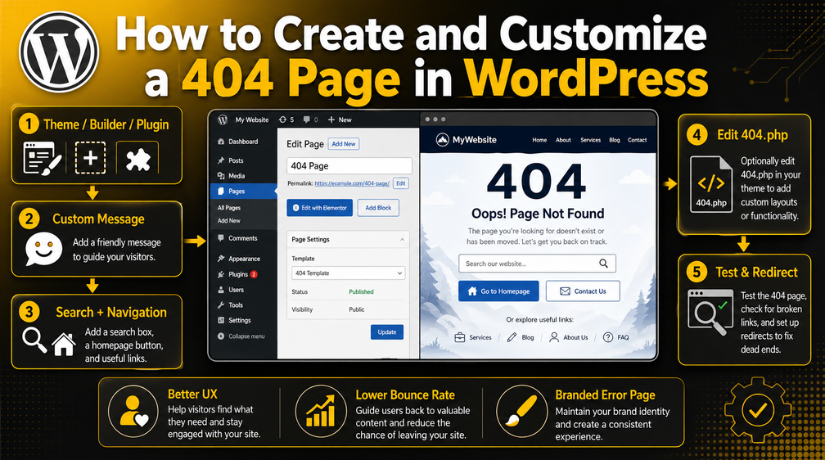
How to Create and Customize a 404 Page in WordPress
Introduction
A 404 page appears when visitors open a missing page. This usually happens when a link is broken or changed. It can also happen after deleting a page or post. Many WordPress websites show a basic error message by default. That message often gives users no helpful next step.
This is where a custom 404 page WordPress setup becomes useful. It helps visitors find their way again. Instead of losing traffic, you can guide users to helpful pages. You can send them to your homepage, blog, services, or contact page.
A good 404 page should not only show an error. It should support the user’s journey on your website. It should also match your brand and design style. This makes your website look more professional and trusted.
In this guide, you will learn the basics first. Then, you can understand why 404 pages matter in WordPress.
What Is a 404 Page in WordPress?
A 404 page is an error page in WordPress. It appears when WordPress cannot find the requested URL. The website may still work properly, but that page is missing.
Visitors may see a 404 page for many reasons:
- The page URL was typed incorrectly.
- The page or post was deleted.
- The permalink structure was changed.
- An old menu link still exists.
- Another website linked to an outdated page.
- A WooCommerce product is no longer available.
A WordPress custom error page helps users after this issue happens. It gives them clear options instead of confusion. For example, you can add a search box. You can also add links to important website pages.
This makes the error page more helpful. It also keeps visitors connected with your website. A clear 404 page can turn a bad visit into a useful one.
Why Should You Customize Your WordPress 404 Page?
A default 404 page often gives very little help. It may only tell users that the page is missing. This can make visitors leave your website quickly. That is why you should customize 404 page WordPress layouts with care.
A custom 404 page gives users a clear next step. It helps them continue browsing instead of closing the website. This is useful for blogs, service websites, and online stores.
Improve User Experience
Visitors should not feel stuck on an error page. A helpful message can guide them back to useful content. You can add links to your homepage, blog, services, or shop page.
This improves the user journey and reduces confusion. It also shows that your website is well managed.
Reduce Bounce Rate
Many users leave when they see a plain error page. A better 404 page can hold their attention. You can add a search box or helpful buttons.
These small options can help users find another page. This may reduce lost traffic from broken or old links.
Protect Brand Trust
A branded 404 page looks more professional. It can use your website colors, tone, and layout. This makes the error page feel like part of your website.
Users trust websites that handle errors clearly. A clean 404 page shows care and attention.
Support SEO Indirectly
A 404 page does not directly improve rankings. However, it can improve how users behave on your site. If users find helpful pages, they may stay longer.
This supports better engagement and helps protect useful traffic.
What Should a Good WordPress 404 Page Include?
A good 404 page should be simple and helpful. It should explain the issue in plain language. It should also guide users toward the right page.
You can include these basic elements:
- A short and friendly error message.
- A search box for finding content.
- A homepage button for quick navigation.
- Links to popular pages or services.
- A contact option for extra help.
A strong WordPress 404 page template should not look empty. It should give users easy choices and clear direction.
What Should a Good WordPress 404 Page Include?
A good 404 page should guide users with simple choices. It should not only say that the page is missing. It should help visitors find another useful page quickly.
Start with a clear and friendly message. Avoid technical words that may confuse users. A simple line works well, such as “Sorry, this page cannot be found.”
Then, add helpful navigation options. These options keep users moving through your website. They also reduce the chance of visitors leaving immediately.
A useful 404 page can include:
- A homepage button for a quick return.
- A search box to find posts or pages.
- Links to top blog posts or service pages.
- Product category links for WooCommerce stores.
- A contact link for direct support.
These elements make the page more useful and user-friendly. They also help visitors find what they need faster.
Best Layout Tips for a Helpful 404 Page
A clean layout makes your 404 page easier to use. The design should match your website’s normal style. Use the same colors, fonts, buttons, and spacing.
When you create 404 page in WordPress, keep the layout simple. Do not add too many links or large images. Too many items can confuse users again.


A strong layout should include one main message first. Then, place the search box and homepage button below it. After that, show a few useful links.
You can also add a small support message. This is helpful for service websites and business sites. For example, users can contact support if they need help.
A good layout feels calm, clear, and easy. It turns a lost page into a helpful website path.
How to Create a 404 Page in WordPress
You can create a 404 page in WordPress in different ways. The right method depends on your theme, builder, and skill level. Beginners should use theme settings, a builder, or a plugin. Advanced users can edit theme files carefully.
Method 1: Use Your Theme Options
Many WordPress themes include 404 page settings. This is the easiest method for many users. You can often change the message, button, and page layout.
Follow these simple steps:
- Open your WordPress dashboard.
- Go to theme settings or customizer.
- Find the 404 page settings.
- Add a clear error message.
- Add a homepage button or useful links.
- Save changes and test the page.
This method is safe because it avoids code changes. It also keeps the page connected with your theme design.
Method 2: Use a Page Builder
A page builder gives more design control. Elementor, Divi, and similar tools often support 404 templates. You can create a custom layout with drag-and-drop blocks.
This method is helpful when you want branded design. You can add a heading, search box, buttons, and links. You can also match the page with your website style.
Use this method when you want more visual control. It is also useful for business websites and WooCommerce stores.
Method 3: Use a WordPress Plugin
A plugin is another beginner-friendly option. It helps you set a custom 404 page WordPress layout without coding. Many plugins let you choose any page as your 404 page.
Choose a lightweight and updated plugin. Avoid plugins with poor ratings or old updates. A trusted plugin keeps your website safer and faster.
How to Edit the 404 Page Manually in WordPress
If you know basic code, you can edit the 404 file. This file is usually called 404.php. It works as the main WordPress 404 page template inside your theme.
Before you start, take a full website backup. Also, use a child theme for safe changes. Never edit the parent theme directly if possible. Theme updates can remove your changes later.
Here is the basic process:
- Open your hosting file manager or FTP.
- Go to your active theme folder.
- Find the 404.php file.
- Add your custom message and links.
- Add a search form if needed.
- Save the file and test the page.
Many users search for how to edit 404 page in WordPress because they want full control. Manual editing gives control, but it needs care. A small coding mistake can break the page layout. For beginners, a plugin or builder is usually safer.
Best Practices for Customizing a WordPress 404 Page
A 404 page should be simple, fast, and helpful. It should guide visitors without making them feel lost. When you customize 404 page WordPress layouts, focus on clarity first.
Use a friendly message and clear navigation. Add only useful links that support the visitor’s next step. You can link to your homepage, blog, services, or shop page.
Follow these simple best practices:
- Keep the message short and helpful.
- Add a search box for quick content discovery.
- Use buttons that are easy to notice.
- Match your website colors and fonts.
- Avoid heavy images, videos, or scripts.
- Track 404 errors using Search Console.
- Fix important broken links with redirects.
A good 404 page should feel like part of your website. It should not look like a separate error screen.
Common Mistakes to Avoid
Many websites leave the default 404 page unchanged. This gives visitors no helpful direction. It may also make the website look unfinished.
Avoid these common mistakes:
- Using long or confusing error text.
- Not adding a search box.
- Hiding the homepage link.
- Adding too many links or buttons.
- Using a design that does not match your site.
- Ignoring broken URLs after finding them.
A clean WordPress custom error page works best when it stays focused. It should guide users, not overload them.
Conclusion
A 404 page is more than an error message. It is a useful chance to guide lost visitors. A helpful 404 page can reduce lost traffic. It can also improve the user journey across your site.
You can build it with theme settings, plugins, builders, or code. Choose the method that fits your skill level.
Need help creating or fixing your WordPress 404 page? Contact 24×7 WP Support for professional WordPress help.




Brian is a WordPress support specialist and content contributor at 24×7 WP Support. He writes practical, easy-to-follow guides on WordPress troubleshooting, WooCommerce issues, plugin and theme errors, website security, migrations, performance optimization, and integrations. With a focus on solving real website problems, Brian helps business owners, bloggers, and online store managers keep their WordPress sites running smoothly.
