
get_posts() vs WP_Query() in WordPress: Key Differences
Last updated on June 3rd, 2026 at 08:23 am
Introduction
WordPress uses queries to find and display content from the database. Every post, page, product, and custom post type is stored inside the WordPress database. When someone visits a page, WordPress checks what content should appear there. This process happens through a query.
Most of the time, WordPress handles this automatically. However, custom websites often need extra content sections. For example, you may want to show recent posts in a sidebar. You may also want to display featured posts on a homepage. In these cases, developers use a WordPress post query function to fetch selected content.
Two common options are get_posts() and WP_Query(). Both help developers get posts from WordPress. Still, both are not used for the same purpose. Many beginners feel confused about the difference between get_posts and WP_Query because both can return similar content.
This guide will explain both options in simple words. It will help you understand which function works better for each task. Choosing the right option can improve code quality, speed, and website maintenance.
What Is get_posts() in WordPress?
get_posts() is a simple WordPress function used to fetch posts. It is best for small and direct content needs. This function returns an array of post objects by default. Developers can then use this array to display posts wherever needed.
The main benefit of get_posts() is its simplicity. It works well when you do not need advanced loop control. It also does not change the main WordPress query. This makes it useful for safe and simple display sections.
You can use get_posts() for recent posts, related posts, featured posts, or sidebar content. It is also helpful for custom blocks and small homepage sections. A basic get_posts WordPress example can fetch five latest posts with short code.
Many users ask when to use get_posts in WordPress. The best answer is simple. Use it when your query is small, direct, and does not need pagination. It is a good choice when you want clean code for a simple content list.
What Does the get_posts() Function Return in WordPress?
The get_posts() function returns an array of post objects in WordPress. Each object contains post details like title, ID, date, author, content, status, and post type. Developers can loop through this array and display the required post data on the website.
This function is useful when you need a simple list of posts. For example, you can fetch recent posts, related posts, or featured posts. Since it returns an array, it is easy to manage for small content sections.
However, get_posts() does not return a full query object like WP_Query. That means it gives less loop control. It is best for simple post fetching, not advanced custom layouts.
What Is WP_Query in WordPress?
WP_Query is a powerful WordPress class for fetching content. It helps developers create advanced post queries inside themes and plugins. Unlike get_posts(), it gives more control over the complete loop. This makes it useful for custom layouts, archive pages, and dynamic sections.
Developers use WP_Query when the default WordPress query is not enough. For example, a blog page may need posts from selected categories. A service page may need related case studies or custom post types. An online store may need product posts based on special filters. In these cases, WP_Query can handle more detailed query rules.
Many users ask when to use WP_Query in WordPress. The best answer depends on the content goal. Use it when you need pagination, custom sorting, taxonomy filters, or meta queries. It is also useful when you need full control over how posts appear.
A WordPress custom query built with WP_Query can include many conditions. You can fetch posts by category, tag, author, date, keyword, or custom field. You can also control the number of posts shown on each page. This flexibility makes WP_Query a strong choice for custom WordPress development.
WP_Query is commonly used for:
- Custom blog layouts with separate post loops.
- Archive pages with advanced filtering options.
- Custom post type displays for services or portfolios.
- Search results with specific content rules.
- Paginated post lists for better user experience.
Main Differences Between get_posts() and WP_Query
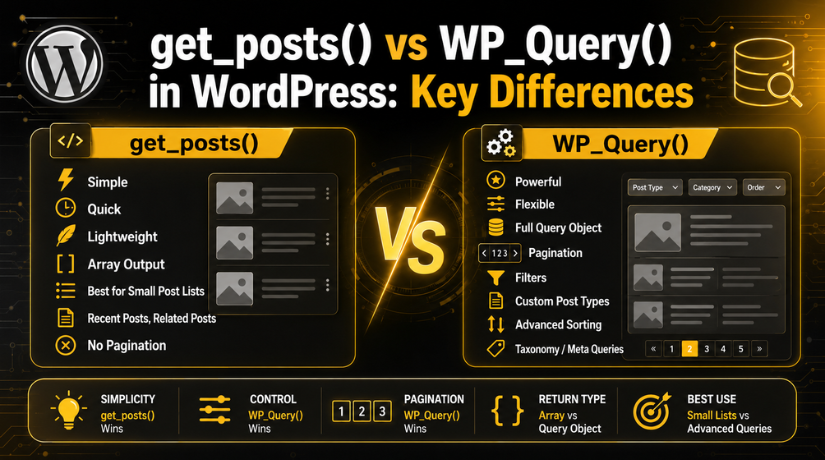
The main WP_Query vs get_posts comparison starts with control. Both methods fetch posts from the WordPress database. However, they are built for different levels of work. get_posts() is simple and direct. WP_Query is more flexible and detailed.
get_posts() works well for small content lists. It is better when you need quick results without pagination. It returns a simple array of post objects. This makes it easier for small sections like sidebars or related posts.
WP_Query returns a full query object. This object gives more data and better loop control. It also supports pagination in a cleaner way. That makes it better for blog pages, archives, and custom templates.
Here is a simple way to understand the difference:
Best Use: get_posts() is best for simple post lists. It works well for recent posts, related posts, or featured posts. WP_Query is better for advanced custom loops. It is useful for blog pages, archive pages, and custom templates.
Control: get_posts() gives limited control over the post loop. It is good when you need quick results. WP_Query gives full control over the loop. Developers can manage post output in a detailed way.
Pagination: get_posts() is not ideal for pagination. It works better when posts are shown in small lists. WP_Query supports pagination properly. This makes it better for blog listings and archive pages.
Return Type: get_posts() returns an array of post objects. This makes it simple for basic display sections. WP_Query returns a full query object. This object gives more options and query details.
Skill Level: get_posts() is beginner-friendly and easy to use. It needs less code for simple tasks. WP_Query is more developer-focused. It is better when advanced query logic is required.
So, get_posts() is best for simple fetching. WP_Query is better for advanced custom displays.
When Should You Use get_posts()?
You should use get_posts() when your content need is simple. It works best for small post lists and direct queries. This function is useful when you do not need advanced control. It also keeps your code short, clean, and easy to manage.


Many developers use get_posts() for simple website sections. These sections usually need a fixed number of posts. For example, you may want to show recent blog posts. You may also want to display related posts below an article.
This is when to use get_posts in WordPress for better results:
- Recent Posts: Show the latest posts in a sidebar.
- Related Posts: Display posts from the same category.
- Featured Posts: Show selected posts on a homepage section.
- Custom Blocks: Add small post lists inside custom layouts.
- Admin Tools: Fetch posts for simple backend display needs.
get_posts() is also useful when pagination is not needed. It is not the best choice for large blog pages. It works better when the query returns limited results. For example, fetching five posts is a good use case.
This function also avoids changing the main WordPress query. That makes it safer for simple display areas. It helps developers add content without affecting page structure.
When Should You Use WP_Query?
You should use WP_Query when your query needs more control. It is best for advanced layouts and dynamic content sections. Developers use it when the default WordPress loop is not enough.
This is when to use WP_Query in WordPress for stronger control. Use it when you need pagination, filters, or custom sorting. It also works well with custom post types and taxonomies.
A WordPress custom query with WP_Query is useful for:
- Custom Blog Pages: Build unique blog listing designs.
- Archive Pages: Show posts with proper pagination.
- Custom Post Types: Display services, portfolios, or case studies.
- Taxonomy Filters: Show posts by category, tag, or custom terms.
- Meta Queries: Fetch posts using custom field values.
- Advanced Sorting: Sort posts by date, title, menu order, or fields.
WP_Query is better for larger content sections. It gives developers full control over the WordPress loop. You can define what content appears and how it appears.
Use WP_Query when the layout needs advanced logic. It is also better when users browse multiple pages. This makes it the stronger choice for custom templates.
Simple Code Examples for Better Understanding
Code examples make both functions easier to understand. A simple get_posts WordPress example is useful when you need a small post list. For example, you can fetch five recent posts and show them in a custom section.
$recent_posts = get_posts(array(
‘numberposts’ => 5,
‘post_status’ => ‘publish’
));
foreach ($recent_posts as $post) {
setup_postdata($post);
echo ‘<h3>’ . get_the_title() . ‘</h3>’;
}
wp_reset_postdata();
This example fetches five published posts from WordPress. It works well for recent posts, sidebars, or featured sections. The code is short and easy to manage. It also does not need a full custom loop structure. That makes get_posts() useful for simple display needs.
A WP_Query WordPress example is better for advanced layouts. It gives more control over the loop and output. Developers often use it for custom blog pages, archive pages, or custom templates.
$args = array(
‘post_type’ => ‘post’,
‘posts_per_page’ => 5,
‘post_status’ => ‘publish’
);
$custom_query = new WP_Query($args);
if ($custom_query->have_posts()) {
while ($custom_query->have_posts()) {
$custom_query->the_post();
echo ‘<h3>’ . get_the_title() . ‘</h3>’;
}
}
wp_reset_postdata();
This is a basic WordPress custom query using WP_Query. It checks if posts exist before showing them. Then it runs a proper WordPress loop. This method is better when you need pagination, filters, or custom post layouts.
Common Mistakes to Avoid While Using These Functions
Many users choose the wrong WordPress post query function for their task. This can make the code harder to manage. It may also affect website speed on larger sites.
Avoid these common mistakes:
- Using WP_Query for very small tasks: Use get_posts() for simple lists.
- Using get_posts() for pagination: Use WP_Query when pages need navigation.
- Skipping wp_reset_postdata(): Always reset post data after custom loops.
- Fetching too many posts: Limit results to protect website performance.
- Ignoring query purpose: Choose the function based on real needs.
The right choice keeps your WordPress code clean and stable. It also helps your website load better for users.
Which One Is Better for Your WordPress Website?
There is no single winner in the WP_Query vs get_posts comparison. Both options are useful in WordPress development. The better choice depends on your content goal, layout need, and query size.
Use get_posts() when you need a small and simple post list. It is helpful for recent posts, featured posts, related posts, or sidebar sections. It keeps the code short and easy to manage. This is usually when to use get_posts in WordPress for clean results.
Use WP_Query when you need more control over the loop. It is better for custom blog pages, archive pages, filters, and pagination. This is usually when to use WP_Query in WordPress for advanced layouts. It also works well with custom post types, taxonomies, and meta fields.
You can follow this simple rule:
- Use get_posts() for small and direct post lists.
- Use WP_Query for advanced custom post displays.
- Use WP_Query when pagination or filters are required.
- Use get_posts() when you want quick and simple output.
So, the right choice depends on the job. A simple task needs a simple function. A complex layout needs a stronger query class.
Conclusion
Understanding both options helps you write better WordPress code. get_posts() is simple, fast, and beginner-friendly. It is best for small content sections. WP_Query is more powerful and flexible. It is better for advanced custom templates and larger content displays.
Before choosing any method, check your real website need. If the section is small, use get_posts(). If the layout needs pagination or filters, use WP_Query. This approach keeps your website clean, stable, and easier to maintain.
Need help with custom WordPress queries, theme fixes, or post layout issues? Contact 24×7 WP Support for expert WordPress development help.
Related posts:




Brian is a WordPress support specialist and content contributor at 24×7 WP Support. He writes practical, easy-to-follow guides on WordPress troubleshooting, WooCommerce issues, plugin and theme errors, website security, migrations, performance optimization, and integrations. With a focus on solving real website problems, Brian helps business owners, bloggers, and online store managers keep their WordPress sites running smoothly.
