
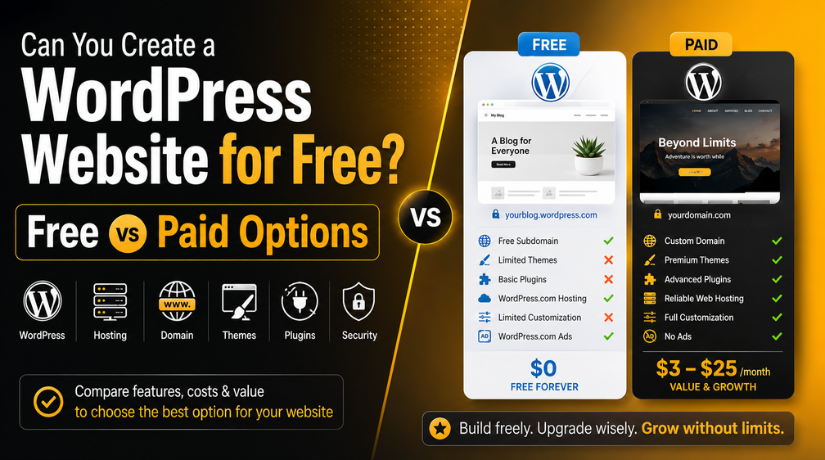
Can You Create a WordPress Website for Free? Free vs Paid Options
Last updated on May 25th, 2026 at 06:15 am
Introduction
One of the most common questions people ask before starting their first website is: Can I build a WordPress website for free? It is a fair question, and the honest answer is yes — but with conditions that most beginner guides skim over. Before you spend hours setting up a site only to hit a frustrating wall, it is worth understanding exactly what “free” means in the WordPress world, what it leaves out, and when it makes sense to invest even a little.
This guide breaks it all down clearly so you can make an informed decision from the very start.
The Short Answer: Yes — But It Depends on What You Mean by “Free”
WordPress the software is 100% free. It is open-source, licensed under the GPL, and you can download, install, and use it without paying anyone anything. That part will never change. However, a website is not just software — it also needs a place to live on the internet (hosting) and an address people can find it at (a domain name). Those two things are where costs typically come in.
The confusion usually starts because there are two very different products that both go by the name “WordPress,” and they behave very differently when it comes to what is actually free.
Understanding the Two Types of WordPress
This distinction is the single most important thing to understand before you start. Most articles mention it briefly and move on — but it deserves a proper explanation because choosing the wrong one can waste your time and limit your site’s potential.
WordPress.com — The Hosted Platform
WordPress.com is a commercial platform run by Automattic, the company co-founded by WordPress creator Matt Mullenweg. It handles your hosting, updates, security, and backups. You sign up for an account, choose a plan, and your site is live in minutes. There is a free tier — but it comes with meaningful restrictions that we will cover shortly.
WordPress.org — The Self-Hosted Software
WordPress.org is where you download the actual open-source software. You install it on your own hosting server, which you pay for separately. This version gives you complete control: install any theme, any plugin, change any code, sell products, run ads, build anything. This is what most professional websites and blogs run on.
For a deeper comparison of these two platforms, see our full guide on the Difference Between WordPress.org and WordPress.com.
What the Free WordPress.com Plan Actually Includes
WordPress.com’s free plan has genuinely improved over the years. In 2026, it gives you access to a basic website with a selection of built-in blocks and patterns, 1 GB of storage, access to a limited set of themes, and basic site statistics. You can publish pages and blog posts, build a simple portfolio, and share your content with the world.
On the surface, that sounds reasonable. The issues arise when you look at what the free plan does not include.
Limitations You Need to Know About
The free plan on WordPress.com comes with restrictions that can be genuinely limiting depending on what you want to do:
- No custom domain: Your website address will be something like yourname.wordpress.com. You cannot use a .com, .net, or any other custom domain without upgrading to a paid plan.
- WordPress.com ads: Automattic displays third-party ads on your site to offset the cost of free hosting. You have no control over what ads appear or where, and you earn nothing from them.
- No plugin installation: You cannot install third-party plugins on the free plan. If you want contact forms, SEO tools, e-commerce features, or a booking system, you are out of luck unless it is already built into the platform.
- Limited theme options: Only a curated selection of free themes is available. You cannot upload custom themes or purchase premium themes from third-party marketplaces.
- No monetization: You cannot run your own ads, add affiliate links in a structured way, or sell products. The free plan is not designed for earning money.
- Limited SEO control: Advanced SEO settings, custom meta descriptions, and integrations with tools like Google Search Console are either limited or require upgrades.
- 1 GB storage: For a site with lots of images, videos, or downloadable files, 1 GB fills up quickly.
Can You Build a “Real” Website on the Free Plan?
It depends entirely on your goals. If you want a personal hobby blog to share your thoughts, a basic portfolio to show a few samples of your work, or a simple site for learning how WordPress works — the free plan can genuinely work. You do not need to spend a cent to get started.
However, if you have any of the following goals, the free plan will hold you back from day one:
- Building a business website with a professional domain
- Starting a blog you plan to monetize through ads or affiliate marketing
- Running an online store
- Creating a client website
- Building a site you want to rank seriously in Google search results
For anything beyond personal use, the limitations of the free plan quickly become more costly in time and opportunity than simply paying for a basic hosting plan from the start.
Free WordPress Hosting: What’s the Catch?
If you go the WordPress.org route (self-hosted), you can still find free hosting options. Several providers offer free tiers specifically for WordPress, including InfinityFree, 000webhost (now limited), and some others. These can be tempting, especially if you are on a tight budget.


Understanding what you are really getting — and not getting — with these services is essential before committing to them.
Common Free Hosting Providers in 2026
Free self-hosted WordPress hosting providers typically give you server space, a WordPress installation, a MySQL database, and a subdomain. A subdomain means your site lives at something like yoursite.infinityfree.net rather than a proper custom domain. You are still installing real WordPress.org software, which means you have more flexibility than WordPress.com’s free tier — but the server limitations remain significant.
Hidden Costs and Performance Trade-offs
The “free” label on these hosts tends to obscure some real issues:
- Slow load times: Free servers are shared among thousands of users. When resources run thin, your site slows down or becomes temporarily unavailable. Slow sites lose visitors and rank lower in search results.
- No custom domain: Just like WordPress.com’s free tier, you typically get a subdomain. Custom domains cost around $10–$15 per year and are essential for professional credibility.
- Limited support: Free hosts offer little to no technical support. If something breaks, you are on your own.
- Reliability concerns: Free hosts have been known to shut down services or change terms with little warning. Your site data could be at risk.
- No SSL certificate (sometimes): Some free hosts do not include free SSL, which means your site will show as “not secure” in browsers — a serious red flag for visitors and search engines alike.
For a detailed look at what good hosting looks like at different price points, see our guide on How Much Does WordPress Hosting Cost in 2026?
Free vs Paid: A Practical Side-by-Side Comparison
Here is a clear breakdown of what you actually get with free versus paid WordPress setups in 2026:
| Feature | Free (WordPress.com) | Paid (Self-Hosted) |
|---|---|---|
| Custom domain | ❌ No | ✅ Yes |
| Plugin access | ❌ No | ✅ 59,000+ free plugins |
| Theme flexibility | Limited selection | ✅ Unlimited |
| Ads on your site | ❌ Yes (WordPress.com ads) | ✅ Your choice |
| Monetization | ❌ Not allowed | ✅ Full control |
| SEO control | Limited | ✅ Full (with Yoast/RankMath) |
| Storage | 1 GB | ✅ Typically 10 GB+ |
| Monthly cost | $0 | From ~$3/month |
When Does Paying for WordPress Make Sense?
The honest answer is: almost always, if you have any intention of growing your site. The good news is that “paid” does not have to mean expensive. Here is when you should skip the free options and invest in a proper setup:
- You want a professional brand: A custom domain is non-negotiable for businesses, freelancers, and anyone building a brand. Yourname.wordpress.com simply does not look credible to potential clients or customers.
- You plan to earn money from your site: Whether through ads, affiliate marketing, selling products, or offering services, the free plan blocks you at every turn.
- SEO matters to you: Ranking on Google requires full control over your SEO settings, fast hosting, and the ability to use dedicated SEO plugins. Free plans limit all three.
- You want to grow: Starting on a free plan and migrating later is more work than starting right. Save yourself the headache.
Budget-Friendly Paid Options in 2026
A professional WordPress setup does not have to break the bank. Here is what a realistic starter budget looks like in 2026:
- Domain name: $10–$15 per year from registrars like Namecheap or Google Domains
- Shared hosting: $2.95–$5.00 per month from providers like Hostinger, SiteGround, or Bluehost (many include a free domain for the first year)
- Free WordPress themes: Thousands available at no cost from the WordPress.org theme directory
- Free plugins: The essentials — Yoast SEO, Contact Form 7, WooCommerce, Wordfence — are all free
For around $50–$75 per year, you can have a fully functional, professionally branded WordPress website with no restrictions. Compare that to the hidden costs of the free route — in lost credibility, limited features, and eventual migration pain — and the value is clear.
To understand the full picture of what goes into a WordPress budget, read our detailed breakdown: Is WordPress Free to Use? Complete WordPress Pricing Guide 2026.
Free WordPress Themes and Plugins — Are They Enough?
One area where “free” genuinely delivers is themes and plugins, provided you are on a self-hosted WordPress.org setup. The official WordPress theme directory has thousands of well-coded, professionally designed free themes that are perfectly adequate for most personal sites, blogs, and even small business websites. Similarly, the plugin repository contains over 59,000 free plugins covering virtually every functionality you could need.
The key difference between free and paid plugins is not always features — it is often support and update frequency. Free plugins from reputable developers are regularly updated and work reliably. Premium plugins tend to offer priority support, more advanced features, and dedicated documentation. For a basic site, the free ecosystem is genuinely excellent.
Where you might eventually need to invest is in page builder tools for more complex layouts or in premium plugins for specific needs like advanced e-commerce, membership sites, or professional booking systems.
The Real Cost of “Free” WordPress in 2026
The most important thing to understand about free WordPress options is what they cost you in ways that do not show up on an invoice. A site built on WordPress.com’s free tier, with a .wordpress.com address and third-party ads running on it, sends a clear signal to visitors: this is not a serious, professional operation. In a world where first impressions are made in seconds and trust is hard to earn, that impression can cost you clients, readers, and revenue.
Free self-hosted hosting carries its own hidden tax: downtime, slow speeds, and the hours you will spend troubleshooting when things go wrong without proper support. Your time has value. Every hour spent wrestling with an unreliable server is an hour not spent creating content, building your business, or doing what you actually enjoy.
The question is not whether free WordPress exists — it does. The question is whether it is right for what you are trying to build. For experimentation and learning, absolutely. For a site you want to grow and rely on, a small monthly investment in real hosting pays dividends almost immediately.
Ready to Launch Your WordPress Site the Right Way?
At 24×7 WP Support, we help individuals, bloggers, and businesses get their WordPress websites set up, optimised, and running smoothly — without the confusion or technical headaches. Whether you are starting from scratch or migrating from a free plan that has outgrown your needs, our team is here to help every step of the way. Get in touch with our WordPress experts today and let us build something great together.
Related posts:
Does WordPress Have a Testing or Sandbox Environment?

Do UI/UX Designers Use WordPress? How Design and WordPress Fit
How To Fix WordPress “Briefly Unavailable For Scheduled Maintenance Error”
Where Is Popup Maker in WordPress? Popup Builder Explained
How to Limit WordPress Registration to Specific Email Domains in 2026

Brian is a WordPress support specialist and content contributor at 24×7 WP Support. He writes practical, easy-to-follow guides on WordPress troubleshooting, WooCommerce issues, plugin and theme errors, website security, migrations, performance optimization, and integrations. With a focus on solving real website problems, Brian helps business owners, bloggers, and online store managers keep their WordPress sites running smoothly.
