
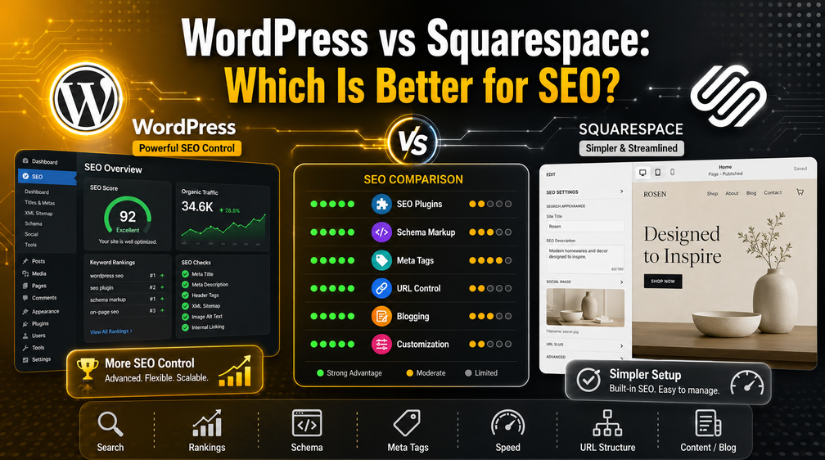
WordPress vs Squarespace: Which Is Better for SEO?
Introduction
Choosing the right website platform can shape your SEO results. It can affect how search engines read your website. It can also affect how users move through your pages. That is why the WordPress vs Squarespace SEO comparison matters for many website owners.
SEO goes beyond placing keywords on a page. It also depends on clean structure, fast loading, simple navigation, and useful content. A good platform should help search engines understand each page clearly. It should also help visitors find answers without confusion.
WordPress and Squarespace both support basic SEO needs. Both platforms let you optimize titles, descriptions, image alt text, and blog content. Both platforms can also rank on Google with the right strategy. However, they offer different levels of control.
WordPress gives more freedom for SEO settings and changes. It supports many SEO plugins and custom tools. This helps users improve technical SEO, content structure, and site performance.
Squarespace keeps SEO simple with built-in features. It is useful for users who want fewer setup tasks. However, it may not offer enough flexibility for advanced SEO needs.
For USA businesses, this choice can affect long-term growth. A service website, blog, or business site needs flexible SEO options. The platform should support growth as traffic and content increase.
Quick Answer: Which Platform Is Better for SEO?
Is WordPress better than Squarespace for SEO? WordPress is typically the better option. It gives more control over technical SEO, content SEO, and plugin support. It also works better for websites that plan long-term growth.
Squarespace is still a good option for simple websites. It works well for small portfolios, basic business sites, and users who want easy setup. Its built-in SEO tools are helpful for beginners.
Here is the simple comparison:
- Choose WordPress for more SEO control and flexibility.
- Choose Squarespace for simple SEO and easier management.
- Choose WordPress if your website will grow over time.
- Choose Squarespace if your website has basic SEO needs.
Your website’s objectives will determine the final decision. If SEO growth is your main goal, WordPress is usually better.
SEO Control and Customization
SEO control is one major difference between both platforms. This is where WordPress often becomes the stronger choice. It allows users to manage many SEO settings in detail. You can manage SEO titles, meta details, URLs, headings, image text, and internal links.
When comparing WordPress SEO vs Squarespace SEO, flexibility is the biggest point. Numerous reliable SEO plugins are compatible with WordPress. Yoast SEO, Rank Math, and All in One SEO are popular choices. These tools help users improve each page with clear SEO suggestions. They also support advanced features for growing websites.
With WordPress, users can also manage schema markup, breadcrumbs, redirects, and indexing rules. This makes the website easier for search engines to comprehend. It also gives website owners better control over search appearance.
Squarespace also includes useful SEO options. Users can add SEO titles, descriptions, custom URLs, and image alt text. It also creates clean pages and simple site structures. This helps beginners handle basic SEO without extra tools.
However, Squarespace gives fewer advanced options than WordPress. Users cannot customize every SEO setting deeply. This may not matter for a small website. But it can become limiting as SEO goals grow.
For users seeking greater control, WordPress is preferable. Squarespace is better for users who want simple management. Your comfort level and SEO objectives will determine which option is best for you.
Key differences include:
- WordPress gives deeper SEO control.
- Squarespace gives easier built-in SEO settings.
- WordPress supports advanced SEO plugins.
- Squarespace works better for simple websites.
- WordPress is stronger for long-term SEO growth.
Technical SEO Features
Technical SEO facilitates the crawling and comprehension of your website by search engines. It also supports better site performance and clean indexing. Both platforms offer technical SEO support, but in different ways.
WordPress gives stronger technical SEO control. Users can manage XML sitemaps, robots.txt files, canonical URLs, redirects, and schema markup. They can also improve crawl settings with plugins or custom code. Because of this, WordPress may be used for more complex websites.
Additionally, WordPress gives you more flexibility over the layout of your website. Users can create custom categories, tags, menus, and content types. This helps search engines understand page relationships. It also helps visitors move through the website easily.
Squarespace handles many technical SEO basics automatically. It creates sitemaps, adds clean URLs, and supports basic redirects. Users who don’t want technical work will find this useful. It also reduces setup steps for beginners.
Still, Squarespace vs WordPress for SEO becomes clearer with advanced needs. Squarespace is good for basic technical SEO. WordPress is better when users need deeper changes. For example, WordPress offers more control over schema, indexing, and plugin-based fixes.
Technical SEO often grows with the website. A small website may only need basic settings. A larger website may need redirects, speed fixes, structured data, and crawl control. WordPress gives more room for these improvements.
In simple terms, Squarespace manages the basics well. WordPress gives more power to improve technical SEO over time.


Content SEO and Blogging Capabilities
Content plays a major role in SEO growth. A website needs helpful pages and useful blog posts. Content that responds to actual user inquiries is favored by search engines. This makes blogging an important part of any SEO plan.
WordPress is very strong for content SEO and blogging. From the beginning, it was designed with publishing in mind. Users can create blog posts, service pages, guides, and landing pages easily. They can also organize content with categories and tags.
This structure helps both users and search engines. Visitors can find related posts without extra effort. Search engines can also understand topic groups more clearly. This can support better rankings over time.
WordPress also gives more control over each blog post. SEO plugins can help improve titles, descriptions, headings, links, and readability. These tools guide users while they write and update content.
WordPress also makes internal linking easier for growing websites. You can connect related blogs, service pages, and support pages. This enhances the user experience and facilitates deeper page crawling by search engines.
Squarespace also supports blogging and basic content SEO. It allows users to create posts, add headings, and update descriptions. This works well for small websites with simple content needs.
However, Squarespace can feel limited for large content plans. It does not offer the same level of blog control. It may also be less flexible for advanced content structure.
If your goal is long-term content growth, WordPress is often better. Many users consider it the best website platform for SEO when content is the main focus.
Website Speed and Core Web Vitals
Website speed also affects SEO and user experience. Users may leave a slow website quickly. Search engines also look at page experience signals. So, speed should be part of every SEO plan.
WordPress can load very fast when optimized correctly. Good hosting, a clean theme, and image compression help a lot. Caching plugins can also improve loading speed. A skilled setup can make WordPress perform very well.
However, WordPress can become slow with poor setup. Too many plugins can add extra code. Heavy themes can also reduce speed. Large images can make pages load slowly.
Squarespace manages hosting and many speed settings for users. This makes it easier for beginners. Users do not need to manage servers or caching tools. The platform handles many technical tasks in the background.
Still, Squarespace gives less backend speed control. Users cannot optimize every performance setting deeply. This may be fine for simple websites. But growing websites may need more control later.
Neither platform is automatically fast or slow. Performance depends on design, images, scripts, and setup quality. For deeper speed optimization, WordPress gives more control. For easier management, Squarespace keeps things simpler.
Ease of Use vs Long-Term SEO Growth
Ease of use matters when choosing a website platform. Many users want a simple website setup. They also want SEO features that are easy to manage. This is where Squarespace can be helpful for beginners.
Squarespace gives users built-in SEO tools. You can update page titles, descriptions, URLs, and image alt text. To begin, you don’t need many other tools. This makes Squarespace useful for simple websites.
WordPress may take more time to set up. Users must choose hosting, themes, plugins, and SEO settings. However, this setup gives more long-term control. It allows website owners to improve SEO as their needs grow.
For a small website, basic SEO tools may be enough. But a growing website needs more flexibility. It may need better content structure, redirects, schema, speed fixes, and plugin support.
WordPress gives more room for these improvements. That is why many growing websites prefer it. It supports long-term SEO work with better control.
Conclusion
The final choice depends on your website goals. If you want simple SEO management, Squarespace can work well. It manages several fundamental SEO activities and is simple to use.
If you want stronger SEO control, WordPress is usually the better choice. It supports advanced SEO tools, plugins, content growth, and technical changes. This makes it more useful for serious long-term SEO plans.
For many growing businesses, WordPress is the best website platform for SEO. If your WordPress site needs a better SEO structure, faster speed, or proper plugin setup,24×7 WP Support can help review and improve it.
Related posts:
How to Schedule Posts in WordPress in 2026
Validation Error- PayPal IPN Response From A Different Email Address In WordPress
add_filter vs apply_filters in WordPress: Key Differences
How to Optimize Database Performance in WordPress (2026 Guide)
Best WordPress Access Control Plugins for Managing Content and Users

Brian is a WordPress support specialist and content contributor at 24×7 WP Support. He writes practical, easy-to-follow guides on WordPress troubleshooting, WooCommerce issues, plugin and theme errors, website security, migrations, performance optimization, and integrations. With a focus on solving real website problems, Brian helps business owners, bloggers, and online store managers keep their WordPress sites running smoothly.
