
Fastest WordPress Hosting Providers Compared in 2026
Introduction
Speed is no longer a nice-to-have for WordPress sites. It is the difference between ranking on page one or getting buried in the results, between a visitor converting or bouncing, and between a business growing or stagnating. In 2026, with Google’s Core Web Vitals baked firmly into its ranking algorithm, the hosting provider you choose has never mattered more.
This guide cuts through the marketing noise and compares the genuinely fastest WordPress hosting providers based on real-world benchmark data, TTFB measurements, and full page load times. Whether you are running a blog, a WooCommerce store, or a client site, there is a speed-first option here for your budget and use case.
Why Hosting Speed Is a Ranking Factor You Cannot Ignore in 2026
Google has made it clear: slow sites lose. Analysis of ranking data across millions of search results shows that sites in positions 1 through 3 have a median Time to First Byte (TTFB) of 180ms, while sites in positions 7 through 10 have a median TTFB of 420ms. That gap is not a coincidence — it reflects how strongly Google weights performance signals when determining where your content appears.
The business impact is equally stark. Conversion rates drop by approximately 4.4% for each additional second of load time between zero and five seconds. For a site generating $100,000 per month in eCommerce revenue, shaving one second off the load time could mean recovering $4,400 per month in otherwise lost sales. Sites where 75% or more of page loads achieve a “Good” LCP score (under 2.5 seconds) receive, on average, 23% more organic traffic than comparable sites with poor LCP performance. That gap has widened from around 15% just two years ago, suggesting Google is continuing to increase how much weight it assigns to performance signals.
None of this happens without a fast hosting foundation. Caching plugins, CDNs, and image optimizers help, but if your server’s baseline response time is slow, you are building performance improvements on a shaky foundation. To understand how Google measures your site’s performance, check out our guide on what Google PageSpeed Insights is and why it matters.
What You Should Actually Be Measuring: TTFB, Load Time, and Core Web Vitals
Before comparing providers, it helps to understand what you are measuring.
Time to First Byte (TTFB) is the time between a user’s browser sending a request and receiving the first byte of data back from the server. Google recommends a TTFB under 800ms for a “Good” rating, but top-performing managed WordPress hosts routinely achieve under 200ms — and the best can hit under 100ms with server-side caching active. TTFB is almost entirely a hosting-layer metric: your plugin stack, theme, and CDN do not affect it as dramatically as the raw server response does.
Full page load time measures how long it takes for all assets — HTML, CSS, JavaScript, fonts, and images — to fully render. This depends on a combination of server speed, CDN reach, image optimization, and code efficiency. A well-optimized WordPress site on a fast host should load in under 1.5 seconds.
Core Web Vitals — specifically LCP, INP (Interaction to Next Paint), and CLS (Cumulative Layout Shift) — are Google’s current performance scoring framework. LCP is the most hosting-dependent of the three: the faster your server delivers the main content, the better your LCP score.
The Fastest WordPress Hosting Providers in 2026
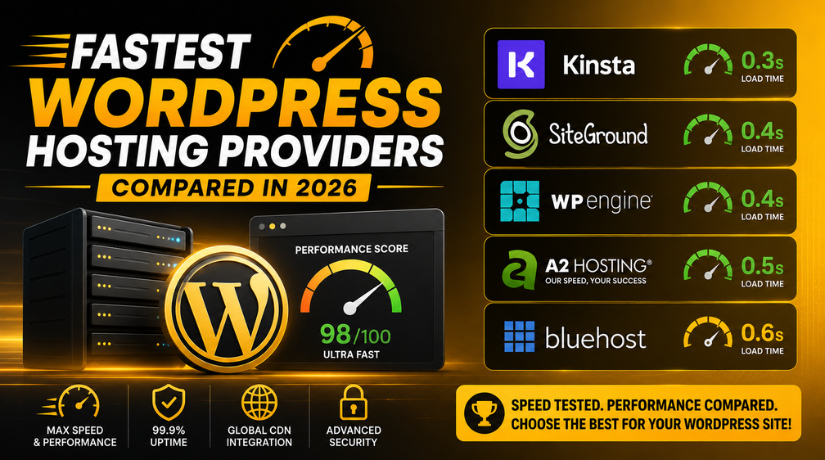
Here is how the leading providers stack up based on independent benchmark data compiled across thousands of tests through early 2026.
Kinsta — Consistently the Speed Leader
Kinsta continues to set the benchmark for managed WordPress hosting speed in 2026. Benchmark testing puts Kinsta’s average TTFB at 158ms, with full page loads around 1.2 seconds on a standard WordPress install. Kinsta runs on Google Cloud Platform’s premium tier network, uses LXD containers to isolate each site, and includes a Cloudflare-powered edge caching layer that brings cached TTFB down to around 85ms.
Kinsta is not cheap — plans start at $35 per month for a single site — but for businesses where performance directly affects revenue, it is one of the strongest investments available. Their dashboard is clean, their staging environments are one-click, and their 24/7 support team is genuinely technical.
WP Engine — Enterprise-Grade Performance
WP Engine is a staple of the managed hosting market for good reason. Independent testing in 2026 shows average TTFB around 210ms and full load times of approximately 1.5 seconds. WP Engine uses its own EverCache technology alongside a Cloudflare CDN integration, and their infrastructure is purpose-built exclusively for WordPress.
Where WP Engine shines is in enterprise use cases: multi-site management, advanced staging workflows, and developer tools including SSH access and WP-CLI. Plans begin at $30 per month, making them slightly more accessible than Kinsta at the entry level, though feature sets differ at scale.
SiteGround — Best Performer in the Budget Tier
SiteGround consistently punches above its price point. Testing puts their average TTFB at 230ms and full load times around 1.6 seconds — results that outperform most shared hosting providers by a wide margin. SiteGround uses Google Cloud infrastructure, runs NGINX-based server-side caching through their proprietary SuperCacher, and includes a free CDN on all plans.
For small businesses, bloggers, and growing sites, SiteGround’s GrowBig and GoGeek plans (starting around $6–$15 per month on renewal) offer a genuinely fast experience without the managed hosting price tag. Their on-the-fly image optimization and SG Optimizer plugin add meaningful performance gains out of the box.
Pressable — Elite TTFB at Scale
Pressable may not have Kinsta’s brand recognition, but its benchmark numbers are exceptional. Independent data puts Pressable’s average TTFB at 341ms — lower than many managed hosts in real-world multi-location testing — with particularly strong performance for US-based audiences. Pressable is owned by Automattic (the team behind WordPress.com) and uses WordPress.com’s VIP infrastructure at a more accessible price point. Plans start around $25 per month.
A2 Hosting — Turbo Speed on a Shared Budget
If managed hosting is outside your budget, A2 Hosting’s Turbo plans are the fastest shared hosting option available for WordPress in 2026. Their LiteSpeed server stack, A2-optimized WordPress configuration, and Turbo Cache deliver load times that rival entry-level managed hosting. Independent comparisons rank A2 Hosting among the top three fastest providers overall — alongside Bluehost and Kinsta — with an average load time of 0.44 seconds on their Turbo tier in optimal conditions. Turbo plans start around $10–$12 per month on renewal.
Managed WordPress Hosting vs. Shared Hosting: The Speed Gap Is Real
The performance difference between managed WordPress hosting and traditional shared hosting is not subtle. In 2026 benchmark testing covering 34 hosts, managed providers outperformed shared hosts across every metric tested: TTFB, full load time, and uptime. The reason is architectural: managed hosts allocate dedicated server resources per site and run WordPress-specific caching stacks. Shared hosts split CPU and RAM across hundreds of websites simultaneously, which means a traffic spike on a neighbor’s site directly affects your page load time.


For high-traffic sites, the math is simple: the cost of downgraded performance in lost conversions, ad revenue, or SEO rankings typically exceeds the price difference between shared and managed hosting within months. If you are currently on a cheap shared host and wondering why your Core Web Vitals scores refuse to improve, the hosting layer may be the ceiling preventing further progress.
We cover one practical fast-hosting option at a more accessible price point in our guide to using EasyWP for fast WordPress hosting, which is worth reading if you want solid performance without a managed hosting price tag.
Features That Make a Hosting Provider Genuinely Fast
Not all speed claims are equal. When evaluating a provider’s performance credentials, look for these specific technical features rather than relying on marketing copy.
NVMe SSD storage is the current standard for fast disk I/O. Older SSD-based plans are faster than spinning disk drives, but NVMe is significantly faster still — particularly for database-heavy WordPress sites with lots of queries running per page load.
Server-side caching at the infrastructure level (not just a plugin) eliminates the PHP and database processing overhead for repeat visitors. The best hosts run this at the server or container level, so cached pages are served before WordPress even loads.
A CDN with a wide global edge network ensures that static assets — images, CSS, JavaScript, fonts — are delivered from a server geographically close to each visitor. For international audiences, a CDN can cut load times by 40–60% compared to serving everything from a single data center.
PHP 8.x support is non-negotiable. PHP 8.1 and 8.2 are roughly twice as fast as PHP 7.x for WordPress workloads. If your host is still defaulting to PHP 7.4, that is a red flag worth investigating.
How Your Hosting Choice Affects WordPress SEO Directly
Beyond Core Web Vitals, hosting speed touches your SEO in several ways that are easy to overlook. Googlebot has a crawl budget — the number of pages it will crawl on your site within a given timeframe. Slow server response times cause Googlebot to crawl fewer pages per visit, which means new content takes longer to get indexed. For large sites publishing frequently, this is a meaningful ranking delay.
Server uptime is also a quiet SEO factor. If Googlebot repeatedly encounters a server error or timeout when trying to crawl a URL, it will eventually start reducing that page’s crawl priority. Hosts with 99.9% uptime guarantees backed by SLA commitments (and independent uptime monitoring to verify it) protect your indexation rate. Kinsta, WP Engine, and SiteGround all report 99.99% uptime across third-party monitoring over rolling 12-month periods in 2026 data.
What to Look for Beyond Raw Speed
Raw benchmark numbers are one input, not the whole picture. A few other factors determine whether a hosting provider is actually the right fast host for your specific situation.
Geographic server location matters. A host with a TTFB of 150ms measured from New York might deliver 600ms for a user in Sydney if there is no CDN and the nearest data center is in Virginia. Always verify where a provider’s primary data centers are relative to your audience, and confirm their CDN edge location count.
Support quality is a speed issue in disguise. When a slow query, a misconfigured plugin, or a PHP memory error causes a performance regression, the time it takes to get expert help determines how long your site underperforms. Managed hosts like Kinsta and WP Engine provide access to WordPress engineers who can diagnose issues that a general-purpose hosting support team would escalate for hours.
Scalability under traffic spikes prevents the real-world performance failure that benchmarks miss. A host might achieve excellent TTFB under controlled test conditions but throttle or crash under a sudden burst of traffic. Look for hosts with autoscaling or explicit traffic handling guarantees.
Is Your Current Hosting Holding Your WordPress Site Back?
If you have optimized your images, installed a caching plugin, connected a CDN, and your Core Web Vitals scores are still poor, your hosting provider may be the bottleneck. It is one of the most impactful changes you can make for both user experience and search rankings — and it is one that cannot be fixed at the plugin or theme level.
For sites on a tight budget exploring free or entry-level options before upgrading, our breakdown of the top free WordPress hosting options is a useful starting point to understand the landscape before committing to a paid plan.
At 24×7 WP Support, we work with WordPress sites at every level — from optimizing shared hosting configurations to migrating complex WooCommerce stores to managed infrastructure. If you are unsure whether your current host is limiting your site’s performance, our team can run a full performance audit and recommend the right path forward. Get in touch with our WordPress experts and let us help you build a faster, higher-ranking WordPress site in 2026.



Brian is a WordPress support specialist and content contributor at 24×7 WP Support. He writes practical, easy-to-follow guides on WordPress troubleshooting, WooCommerce issues, plugin and theme errors, website security, migrations, performance optimization, and integrations. With a focus on solving real website problems, Brian helps business owners, bloggers, and online store managers keep their WordPress sites running smoothly.
