
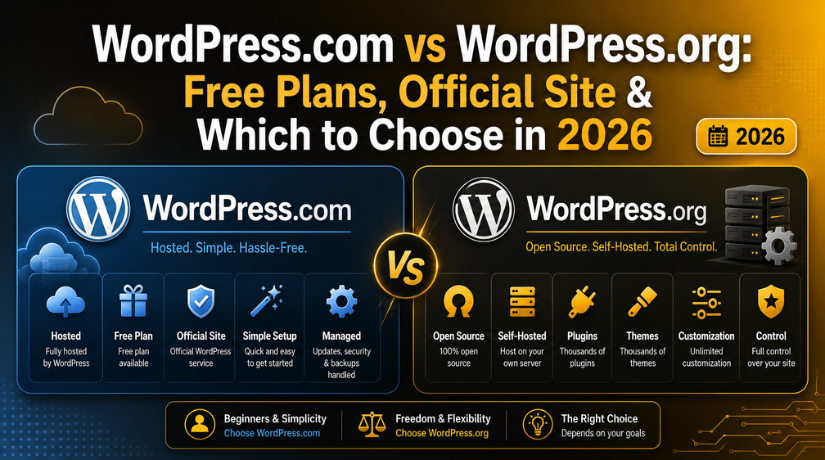
WordPress.com vs WordPress.org: Free Plans, Official Site & Which to Choose in 2026
Introduction
If you’ve ever Googled “start a WordPress website,” you’ve probably landed on two very different websites — WordPress.com and WordPress.org — and wondered what on earth the difference is. You’re not alone. It’s one of the most common points of confusion for anyone new to building a website, and honestly, the naming doesn’t help.
Both are built on the same core WordPress software, both are legitimate platforms, and both have their place. But they work very differently, and choosing the wrong one can cost you time, money, and a lot of frustration down the road. This guide breaks down everything you need to know to make the right call for your situation in 2026.
The Core Difference: Hosted vs. Self-Hosted
Here’s the clearest way to understand it: WordPress.org is free, open-source software that you download and install on your own web hosting server. WordPress.com is a commercial hosting service built on that same software, run by a company called Automattic.
Think of it this way: WordPress.org gives you the recipe and all the ingredients. You still need to rent a kitchen (a hosting plan) to cook in. WordPress.com, on the other hand, hands you a finished meal — convenient, ready to eat, but you don’t get to choose every ingredient.
WordPress.org is often called “self-hosted WordPress” because you’re responsible for your own hosting. WordPress.com handles the hosting for you as part of its service — though that convenience comes with limitations, especially on the lower-tier plans.
What Is WordPress.com? Plans, Pricing & Free Tier Explained
WordPress.com offers a tiered subscription model. You can get started for free, but the free plan comes with some significant restrictions you should know about before you commit.
WordPress.com Free Plan
The free plan gives you a website hosted on a WordPress.com subdomain (e.g., yoursite.wordpress.com). You get 3GB of storage, access to a set of built-in themes, and basic publishing features. The catch? WordPress.com places its own ads on your site, you cannot install custom plugins, you can’t use a custom domain name, and monetization is off the table — no running your own ads, no WooCommerce store, no selling anything.
For a personal journal or a simple hobby blog where none of that matters, the free plan can work. For anything business-related or anything you want to grow, it’s going to hold you back quickly.
WordPress.com Paid Plans in 2026
WordPress.com’s paid tiers unlock progressively more features. As of 2026, the plans run roughly as follows:
- Personal (~$4/month): Remove WordPress.com ads, use a custom domain, but still no custom plugins.
- Premium (~$8/month): Adds monetization tools and premium themes, but custom plugins are still locked.
- Business (~$25/month): Unlocks custom plugin installation and theme uploads — this is where WordPress.com starts to feel more like WordPress.org.
- Commerce (~$45/month): Adds full WooCommerce integration for online stores.
Worth noting: you can’t install custom plugins at all until the Business plan at $25/month. Meanwhile, a comparable self-hosted WordPress.org setup typically costs between $5 and $15/month, all in.
What Is WordPress.org? The Official Open-Source Platform
WordPress.org is the home of the original open-source WordPress software, which powers more than 43% of all websites on the internet as of 2026. The software itself is completely free to download, but you’ll need two things to use it: a domain name and a web hosting plan.
Once you have those, you install WordPress, and you get the full, unrestricted platform. That means access to over 59,000 free plugins in the official plugin directory, thousands of themes (free and premium), unlimited customization, full control over your site’s code, and complete ownership of your data.
What Does WordPress.org Actually Cost?
The WordPress software is free. Your costs come from:
- Domain name: Typically $10–$15/year
- Web hosting: Ranges from $3/month for shared hosting to $30+/month for managed WordPress hosting
- Premium themes (optional): $30–$100 one-time or subscription
- Premium plugins (optional): Varies — many powerful plugins are completely free
A lean but fully functional business website on WordPress.org can run for well under $100/year if you’re selective about free plugins and themes. That’s a fraction of what WordPress.com’s Business plan alone would cost you annually.
Need help selecting a hosting provider? Our guide to free and affordable WordPress hosting options covers the top providers worth considering in 2026.
Control, Customization & Plugins: Where the Real Gap Shows
This is where the two platforms diverge most dramatically, and it’s the reason most serious site owners end up on WordPress.org.
Plugins on WordPress.com vs WordPress.org
On WordPress.org, you can install any plugin from the official WordPress directory or from a third-party developer. That includes Yoast SEO, WooCommerce, Elementor, WPForms, Mailchimp integrations, advanced caching plugins, backup tools, and tens of thousands of others. Plugins are how you add virtually any functionality to a WordPress site.
On WordPress.com’s free, Personal, and Premium plans, custom plugin installation is completely blocked. You’re limited to whatever features Automattic has baked into the platform. Even on the Business plan where plugins unlock, you’re technically on managed hosting with some restrictions on what you can run.
Themes and Design Flexibility
WordPress.org gives you full access to every free theme in the official directory plus any premium or custom theme you purchase or build. Page builders like Elementor, Divi, and Beaver Builder work seamlessly, and you can modify any aspect of your theme’s code if you want to.
WordPress.com limits you to themes from its own curated collection on lower-tier plans. You can’t upload a custom or third-party theme until the Business plan, and even then, some themes may behave differently in the managed environment.


Looking for theme options? We’ve rounded up the best free responsive WordPress themes that work beautifully on self-hosted WordPress sites.
Ownership, Data & Monetization
One of the most important — and least discussed — differences is who actually owns your website.
On WordPress.com
Your content lives on Automattic’s servers under Automattic’s terms of service. While they’re generally reasonable, your site can be suspended if you violate those terms, and you’re subject to policy changes you don’t control. Migrating your content away from WordPress.com is possible but can be complicated, especially for media-heavy sites.
On WordPress.org
You own everything. Your content, your files, your database — it all lives on your hosting account and you control it entirely. You can back it up, move it to a different host, or hand it over to someone else without restriction. There’s no platform policy that can shut down your site (unless your hosting provider has issues, which is why choosing a reliable host matters).
On the monetization front, WordPress.org is completely unrestricted. You can run Google AdSense, display affiliate links, build an online store with WooCommerce, create a membership site, or sell digital downloads — all without paying a cut to anyone except your payment processor.
Maintenance & Technical Responsibility
This is one area where WordPress.com genuinely wins for certain users.
With WordPress.com, Automattic handles updates, security patches, server maintenance, and performance optimization. You never have to think about keeping WordPress core or plugins updated — it just happens.
With WordPress.org, you’re responsible for your site’s maintenance. That includes updating WordPress core, updating plugins and themes, monitoring security, and managing backups. For many people, this sounds more intimidating than it actually is — most good hosts offer automatic updates and daily backups, and there are excellent free plugins that handle security and backups with minimal setup.
If the technical side feels overwhelming, that’s exactly what professional WordPress support services exist for. At 24×7 WP Support, we handle everything from routine maintenance to emergency fixes, so you can focus on your content and business.
Which Platform Should You Choose in 2026?
Here’s a direct answer based on different situations:
Choose WordPress.com If…
- You want a simple personal blog or hobby site with zero technical involvement
- You’re not planning to monetize or customize extensively
- You want everything managed for you and don’t mind the platform restrictions
- You just want to try WordPress before committing to a self-hosted setup
Choose WordPress.org If…
- You’re building a business website, portfolio, or eCommerce store
- You need specific plugins for SEO, email marketing, forms, or custom functionality
- You want full ownership and control over your data and design
- You want to monetize through ads, affiliates, or selling products/services
- You’re thinking long-term and want a site that can scale with you
For most people with any kind of serious goal for their website, WordPress.org is the better long-term investment. The upfront hosting cost is modest, the flexibility is incomparable, and you’ll never hit a wall because the platform won’t let you install a plugin or run an ad.
What About WooCommerce?
If you’re planning any kind of online store, this is a decisive factor. WooCommerce — the world’s most widely used eCommerce plugin — runs on WordPress.org. On WordPress.com, eCommerce functionality only becomes available on the Commerce plan at $45/month, and it’s still more limited than what you’d get with a fully self-hosted WooCommerce setup.
Thinking about building an online store or getting professional help with your site? Check out our guide on how much it costs to hire someone to build a WordPress website in 2026 — it covers everything from DIY costs to professional development rates.
Can You Migrate from WordPress.com to WordPress.org?
Yes, and many people do exactly this as their sites grow. WordPress.com does allow you to export your posts and pages in an XML file that WordPress.org can import. Images and media require additional steps, and more complex sites with lots of custom features may require professional help to migrate cleanly.
The lesson: if you think you might eventually want more control, it’s often easier to start on WordPress.org from day one than to migrate later. Setting up a self-hosted WordPress site has become genuinely straightforward in 2026, with most major hosts offering one-click installs.
Final Verdict
WordPress.com and WordPress.org serve different audiences at different stages. WordPress.com’s free plan is a reasonable starting point for pure personal publishing with no commercial ambitions. But the moment you want to grow, monetize, customize, or build something that reflects your brand — WordPress.org is the platform built for that.
The good news is that getting started on self-hosted WordPress is easier than ever. Hosting is affordable, the installation takes minutes, and a massive community of tutorials, plugins, and professionals is available to help you at every step.
If you’re ready to launch a WordPress site the right way or need expert help managing an existing one, 24×7 WP Support is here around the clock. From setup and migrations to ongoing maintenance and troubleshooting, our team keeps your WordPress site running at its best — so you can focus on what you do best.
Related posts:
What Is Imagick in WordPress and How to Enable It in 2026
Where to Buy Premium WordPress Themes: Best Marketplaces in 2026
Best WooCommerce Points and Rewards Plugins

WordPress featured image not showing – The Probable Reasons and How to Resolve this Issue?

Hide Page Title in WordPress Using These Zero-Fuss Ways

Brian is a WordPress support specialist and content contributor at 24×7 WP Support. He writes practical, easy-to-follow guides on WordPress troubleshooting, WooCommerce issues, plugin and theme errors, website security, migrations, performance optimization, and integrations. With a focus on solving real website problems, Brian helps business owners, bloggers, and online store managers keep their WordPress sites running smoothly.
