
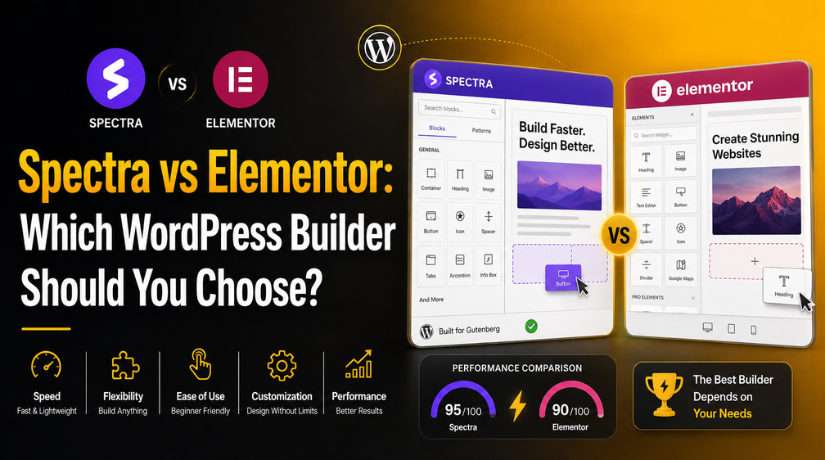
Spectra vs Elementor: Which WordPress Builder Should You Choose?
Why Choosing the Right WordPress Builder Matters
Choosing the right WordPress builder can shape your whole website. It affects design, speed, editing, SEO, and future updates. Many website owners want a builder that saves time. They also want clean pages that work well for visitors.
That is why the Spectra vs Elementor discussion matters. Both builders help users create pages without custom coding. Both can support professional websites when used the right way. However, they are not built for the same working style.
Spectra is more connected with the default WordPress editor. It works inside the block-based editing system. This makes it simple for regular WordPress users. Elementor gives a separate visual design experience. It offers more control over layouts, sections, and styling.
A business website needs more than a good-looking page. It should load fast, guide users clearly, and support search visibility. A builder should also be easy to manage after launch. This is important for small business owners and teams.
Before choosing any builder, users should think about:
- How much design control they need.
- How often they will update content.
- How important website speed is.
- How simple the editing process should be.
- What features the website may need later.
The right choice depends on the website’s actual purpose. A basic service website may need a lighter setup. A custom landing page may need stronger design tools.
Basic Difference Between Spectra and Elementor
A clear Spectra vs Elementor comparison starts with their editing approach. Spectra extends the native WordPress block editor. It adds useful blocks, templates, and layout options. Users can build pages without leaving the WordPress editing screen.
This setup feels natural for users already using Gutenberg. It also keeps the editing process clean and familiar. Spectra is often preferred for simple pages, blogs, and service websites. It works well when users want a lightweight design process.
Elementor works differently from Spectra. It uses its own drag-and-drop visual editor. Users can design pages by moving elements on the screen. This gives more freedom to adjust spacing, colors, sections, and layouts.
Elementor is helpful when a website needs custom design. It works well for landing pages and creative business pages. Designers also like Elementor because it offers deeper visual control. It can handle more advanced layout needs without custom code.
Still, more control can also mean more decisions. Users must manage design settings carefully. Too many effects, sections, or widgets can make pages heavier.
Spectra is better for users who want simplicity and speed. Elementor is better for users who want design flexibility. Both builders are useful, but the best choice depends on your website goals.
Features and Design Control: Which Builder Gives More Flexibility?
Features matter when you want control over your WordPress design. A builder should help you create clean and useful pages. It should also match your editing comfort and website goals. This is where Spectra vs Elementor features become important.
Both builders help users design pages without writing code. However, their design experience is very different. Spectra keeps things simple inside the WordPress editor. Elementor gives deeper visual control through its own builder.
Spectra Features for Simple and Clean Website Building
Spectra works inside the default WordPress block editor. It adds extra blocks and layout options to Gutenberg. This makes page building easier for regular WordPress users.
Users can create service pages, blog layouts, and landing sections. They can also use ready-made templates for faster design work. The editing process feels simple because everything stays inside WordPress.
Spectra is useful for websites that need clean layouts. It does not feel heavy for basic content pages. It also helps users avoid too many design complications.
Spectra may work well for:
- Small business websites with simple service pages.
- Blogs that need clean content layouts.
- Website owners who prefer Gutenberg editing.
- Users who want fewer design settings.
- Teams that update content often.
Spectra gives enough design control for many regular websites. It is not overly complex for non-technical users. This makes it easier to manage after launch.
Elementor Features for Advanced Visual Design Control
Elementor offers a full drag-and-drop visual editing experience. Users can design pages while seeing changes live. This makes the design process more visual and direct.
Elementor gives more control over spacing, colors, columns, and sections. Users can adjust layouts without depending on theme settings. This is useful for custom websites and landing pages.
Elementor also offers many widgets for advanced page sections. These can include forms, sliders, tabs, icons, and pricing boxes. Elementor Pro adds more options for business-focused websites.
Elementor may work well for:
- Custom landing pages with strong visual appeal.
- Agencies creating unique layouts for clients.
- Business websites needing advanced design sections.
- Users who want full control over page styling.
- Websites that need more marketing-focused elements.
Elementor gives strong flexibility for detailed website design. However, users should build pages carefully. Too many effects or widgets may make pages harder to manage.
Balanced Feature View for Better Decision Making
Spectra is better when you want simple website building. It supports clean pages and easy content updates. Elementor is better when you need advanced design freedom.
A simple website may not need many complex design tools. A custom business website may need more visual flexibility. The right builder depends on your real website needs.
Speed and Performance: Which Builder Is Lighter?
Website speed matters for every WordPress business website. Fast pages help visitors stay longer and take action. Slow pages can increase exits and reduce trust quickly. That is why the Spectra vs Elementor speed topic matters.
Spectra is often seen as a lighter builder option. It works closely with the native WordPress block editor. This helps keep the editing setup simple and clean. For many basic websites, this can support faster loading pages.


Spectra can be useful for service pages, blogs, and content websites. It is suitable when the design does not need heavy effects. Simple sections, clean blocks, and fewer scripts can improve performance. This makes Spectra a practical choice for speed-focused users.
Elementor offers more design control and visual styling options. It helps users build detailed layouts without custom coding. However, advanced widgets and effects can add more page weight. This does not mean Elementor is always slow. It means users must build pages with better care.
Website speed does not depend only on the builder. Many other factors can affect loading time.
Important speed factors include:
- Hosting quality and server response time.
- Theme quality and code structure.
- Image size and file format.
- Number of active plugins.
- Third-party scripts and tracking tools.
- Caching and CDN setup.
A clean Elementor website can still perform well. A poorly optimized Spectra website can also load slowly. The builder is only one part of website performance.
For USA business websites, mobile speed is very important. Many visitors browse services from mobile devices. A fast website can support better user experience and conversions.
SEO Value: Which Builder Supports Search-Friendly Websites Better?
SEO depends on much more than a page builder. A builder can support SEO, but cannot replace strategy. Content quality, structure, speed, and technical setup all matter. This makes the Spectra vs Elementor SEO comparison important.
Spectra supports clean layouts through the WordPress block editor. This can help users create simple and organized page structures. Clean sections also make content easier to read. Search engines prefer helpful pages that serve users well.
Elementor can also support strong SEO performance. It gives more layout control for landing pages. Users can create clear sections, strong CTAs, and helpful content blocks. However, every page needs proper structure and optimization.
Both builders need the right SEO setup. Users should follow basic best practices on every page.
Important SEO points include:
- Use one clear H1 heading.
- Add helpful H2 and H3 headings.
- Write unique title tags and meta descriptions.
- Add image alt text where needed.
- Build strong internal links.
- Use schema where it supports user understanding.
- Keep pages fast and mobile-friendly.
Spectra may suit users who want simple SEO-friendly layouts. Elementor may suit users needing better design for conversions. Both builders can work well when optimized correctly.
Pricing and Value for Money
Pricing is an important part of every builder decision. However, the cheapest option is not always the best choice. A builder should match your website needs, business goals, and future plans. This makes Spectra vs Elementor pricing important for website owners.
Spectra can be a good choice for budget-focused users. It works well for simple websites, blogs, and service pages. It also suits users who want a clean editing process. Many website owners may not need advanced design tools.
Elementor may offer better value for advanced website needs. It is useful when you need custom layouts and design control. Elementor Pro can support more business-focused features and layouts. These tools can help with landing pages and conversion sections.
Before choosing any plan, compare your real needs first. Think about what your website must do now. Also consider what features you may need later.
You should review:
- Number of websites you manage.
- Required design control.
- Landing page needs.
- WooCommerce layout needs.
- Form and popup requirements.
- Long-term editing comfort.
The best value depends on usefulness, not only price. A simple website may work better with Spectra. A custom website may need Elementor’s deeper control.
Which Builder Should You Choose for Your Website?
The right builder depends on your website purpose. Both builders can create professional WordPress websites. Still, each one fits a different type of user.
Choose Spectra when you want a simple website setup. It is useful for clean pages and easy updates. It also works well for users who prefer Gutenberg. Spectra can be a strong option for speed-focused websites.
Spectra may suit you when:
- You want a lightweight WordPress website.
- You prefer the default block editor.
- You need simple service pages.
- You publish blog content often.
- You want easy content management.
Choose Elementor when you need more design control. It is helpful for detailed landing pages and custom layouts. It also suits users who want a visual editing experience. Elementor gives more freedom for creative website sections.
Elementor may suit you when:
- You want full visual editing control.
- You need custom landing page layouts.
- You want advanced design sections.
- You manage a more complex website.
- You need stronger layout flexibility.
Conclusion
The Spectra vs Elementor choice depends on your website goals. Spectra is better for simple, clean, and speed-focused websites. Elementor is better for advanced design and custom layouts.
Both builders can support strong WordPress websites when used correctly. The final result depends on setup, content, speed, and SEO structure. Website owners should choose the builder that matches their real needs.
For help choosing the right WordPress builder, connect with 24x7wpsupport The team can review your website goals, speed needs, SEO setup, and design structure.
Related posts:



Brian is a WordPress support specialist and content contributor at 24×7 WP Support. He writes practical, easy-to-follow guides on WordPress troubleshooting, WooCommerce issues, plugin and theme errors, website security, migrations, performance optimization, and integrations. With a focus on solving real website problems, Brian helps business owners, bloggers, and online store managers keep their WordPress sites running smoothly.
