
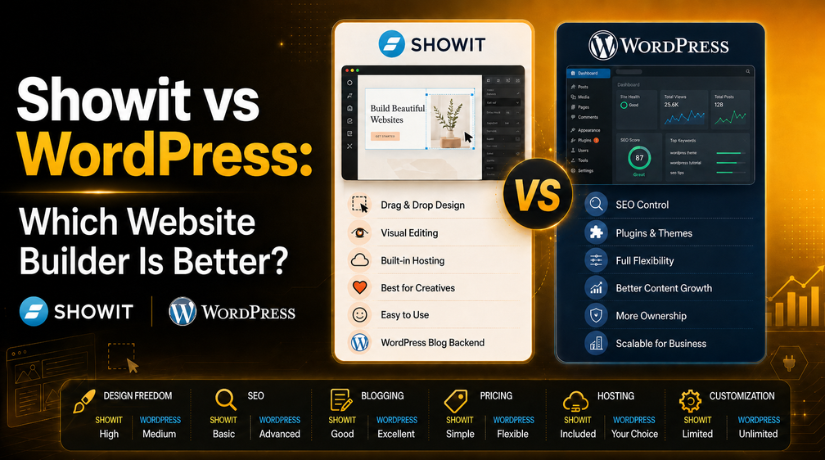
Showit vs WordPress: Which Website Builder Is Better?
Introduction
Choosing the right website builder is an important business decision. Your website is not only an online page. It is the main place where users learn about your brand, services, and trust level. This is why many business owners compare Showit vs WordPress before building a new website.
Both platforms can help you create a professional website. However, they work in different ways. Showit focuses more on visual design and creative freedom. WordPress focuses more on content control, SEO growth, and long-term website flexibility.
This comparison is helpful for:
- Small business owners
- Bloggers and content creators
- Coaches and consultants
- Photographers and designers
- Service-based companies
- Website owners planning a redesign
A good website builder should match your goals. It should support your content, design needs, budget, and growth plan. If your website depends on search traffic, structure and SEO control become important. If your website depends on visual branding, design freedom may matter more.
What Is Showit?
Showit is a visual drag-and-drop website builder. It allows users to design custom pages without using code. Many creative professionals like Showit because it gives strong design control. You can move text, images, sections, and buttons with more freedom.
Showit is often used by photographers, wedding brands, coaches, designers, and personal brands. These users need websites that look unique and polished. Showit helps them create beautiful layouts with less technical work.
For blogging, Showit uses WordPress in the backend. This means users can design their website in Showit and manage blog posts through WordPress. This setup can be useful for design-focused blogs.
What Is WordPress?
WordPress is a powerful content management system. It helps users create blogs, business websites, service pages, landing pages, and online stores. It is flexible and can grow with your business.
WordPress gives more control over themes, plugins, hosting, SEO, security, and website features. It may take more time to learn, but it offers better long-term freedom. For users who want strong content management and SEO control, WordPress is often a better choice.
Ease of Use, Design, and Blogging Compared
Ease of use matters when choosing a website builder. A simple platform saves time and reduces stress. It also helps business owners manage small updates without waiting for a developer. In this part, we compare how Showit and WordPress perform for design, daily use, and blogging.
Ease of Use: Which Platform Is Easier?
Showit is easier for users who like visual editing. Its drag-and-drop editor lets you design pages freely. You can move images, text, buttons, and sections with ease. This makes Showit helpful for users with less technical knowledge.
WordPress works in a different way. It uses themes, blocks, plugins, and page builders. This gives users more control, but it also needs more learning. New users may need time to understand settings, updates, and plugins.
Showit may feel easier at the start. WordPress may feel stronger after regular use.
Design Flexibility: Showit vs WordPress
Showit gives strong design freedom. You can create custom layouts without writing code. This is useful for creative brands that need a unique look. Photographers, designers, and coaches often like this design control.
WordPress also offers many design options. Users can choose themes, block editors, or page builders. However, full design control may need plugins or custom work. This can make WordPress more flexible, but also more complex.
For visual design, Showit feels more direct. For complete website control, WordPress gives more options.
Blogging Features Compared
Many users ask, is Showit good for blogging, before choosing it. The answer depends on website goals. Showit can work well for design-focused blogs. It uses WordPress for blog management, which adds strong blogging support.
Showit is good when blog design matters a lot. It helps users create stylish blog pages. However, WordPress is better for large blogs and content-heavy websites.
WordPress gives more control over:
- Categories and tags
- SEO plugins
- Blog structure
- Internal linking
- Content planning
For casual blogging, Showit can work well. For long-term content growth, WordPress is usually stronger.
SEO Features and Ranking Potential
SEO is an important factor in this comparison. A website should not only look good. It should also help users find your business on Google. Good SEO depends on content, speed, structure, keywords, and user experience. Both Showit and WordPress can support SEO, but they offer different levels of control.
SEO Control in Showit
Showit can support SEO when the website is set up correctly. Users can add page titles, meta descriptions, headings, image alt text, and keyword-focused content. These basic SEO settings help search engines understand each page better.
Showit also gives strong design control. This can improve user experience when pages are clear and easy to read. A clean layout can help visitors stay longer on the website. This may support better engagement.
For blog content, Showit uses WordPress in the backend. This gives users access to WordPress blogging features. It also helps with blog post structure and basic SEO settings. However, site owners still need to optimize images, page speed, and content quality.
Important Showit SEO tasks include:
- Add clear page titles
- Write helpful meta descriptions
- Use proper heading structure
- Compress large images
- Add alt text to images
- Keep pages mobile-friendly
SEO Control in WordPress
WordPress gives more SEO control for growing websites. It supports many SEO plugins that help manage titles, descriptions, sitemaps, schema, and redirects. These tools make technical SEO easier for website owners.


WordPress is also strong for content-heavy websites. Users can manage categories, tags, internal links, and blog archives with better control. This helps search engines crawl and understand the website structure.
WordPress also gives more options for speed improvement. Users can use caching plugins, image tools, clean themes, and better hosting. These features can improve page experience and loading speed.
Which Platform Is Better for SEO?
When comparing Showit vs WordPress SEO, WordPress is usually stronger for long-term SEO growth. It gives more control over technical settings, content structure, and optimization tools.
Showit can still work well for SEO-focused users. It is suitable for creative websites with strong visuals and simple content needs. However, WordPress is better for large blogs, service websites, and businesses that depend on organic traffic.
Pricing, Ownership, and Maintenance Compared
Pricing is a key point when choosing a website builder. A platform may look affordable at first. But the total cost can change with hosting, tools, updates, and support. This is why users should compare both short-term and long-term costs.
Showit Pricing Overview
Showit uses a monthly or yearly subscription model. This makes the cost easier to understand. Most plans include hosting, design tools, and platform support. Users do not need to buy separate hosting for the main website.
However, blog plans may cost more than basic website plans. This is because Showit uses WordPress for blogging. So, users who need a blog should check the right plan before signing up.
Showit pricing may suit users who want:
- Simple monthly costs
- Built-in hosting
- Less technical setup
- Visual design tools
- Platform support in one place
When comparing Showit vs WordPress pricing, Showit can feel more predictable. It is useful for users who want fewer setup steps.
WordPress Pricing Overview
WordPress itself is open-source software. But users still need to pay for website basics. These costs can be low or high, based on the website needs.
Common WordPress costs include:
- Domain name
- Website hosting
- Premium theme
- Page builder plugin
- Security plugin
- Backup tools
- Speed optimization tools
- Developer or support service
WordPress can be cheaper for small websites. But the cost may grow with premium plugins and expert help. Still, it gives more control over where money is spent.
Ownership and Control
Showit is easier to manage because hosting and tools stay together. It reduces many technical tasks for website owners. This makes it useful for users who want simple management.
WordPress gives more ownership and control. Users can choose hosting, plugins, themes, and custom features. They can also move the website more freely.
However, WordPress needs regular care. Users must handle updates, backups, security, and speed checks. With proper support, WordPress can become a stronger long-term choice.
Who Should Choose Showit?
Showit is a good choice for users who want a design-first website. It works well for creative brands that need a unique look. Users can create custom layouts without learning code.
Showit may be suitable for:
- Photographers
- Designers
- Coaches
- Consultants
- Wedding professionals
- Portfolio-based service providers
Many users ask, should I switch from WordPress to Showit, when they want more visual freedom. Switching may make sense if design is your main goal. It may also help if you do not need complex website features.
Who Should Choose WordPress?
WordPress is a better choice for users who want more control. It is helpful for websites that need strong SEO, regular content, and long-term growth. It also works well for larger business websites.
WordPress may be better for:
- Large blogs
- SEO-focused websites
- Service business websites
- Ecommerce websites
- Membership websites
- Content-heavy websites
WordPress gives more control over plugins, hosting, speed, security, and custom features. It may need more care, but it offers better flexibility.
Conclusion
Before choosing or switching platforms, review your website goals carefully. Check your SEO needs, design style, budget, and content plan. Showit can help if your website needs strong visual appeal. WordPress is better if you need SEO control, content growth, and long-term flexibility.
If you already use WordPress and feel unsure about performance, SEO, design, or maintenance,24×7 WP Support can help you review your website needs. A proper website check can help you decide whether to improve your current WordPress site or consider another platform.
Related posts:


Brian is a WordPress support specialist and content contributor at 24×7 WP Support. He writes practical, easy-to-follow guides on WordPress troubleshooting, WooCommerce issues, plugin and theme errors, website security, migrations, performance optimization, and integrations. With a focus on solving real website problems, Brian helps business owners, bloggers, and online store managers keep their WordPress sites running smoothly.
