
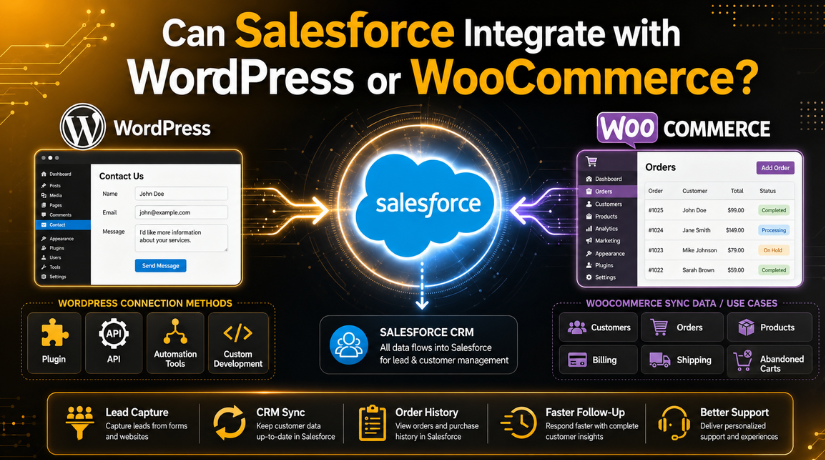
Can Salesforce Integrate with WordPress or WooCommerce?
Introduction
Can Salesforce Work with WordPress or WooCommerce? Yes, Salesforce can work with WordPress and WooCommerce. This connection helps businesses manage website data better. Many USA businesses use WordPress for service websites. Many online stores also use WooCommerce for product sales.
Salesforce helps teams manage leads, customers, sales, and support records. But problems start when website data stays separate from CRM data. Teams may need to copy details manually. This can waste time and create mistakes.
A proper Salesforce WordPress integration can solve this problem. It can send website data directly into Salesforce. This may include form entries, contact requests, quote requests, and customer details.
For example, a visitor may fill out a contact form. That lead can move into Salesforce automatically. Your sales team can then follow up faster. This improves response time and customer handling.
Why Businesses Need Salesforce Integration with WordPress
Businesses need this integration to keep customer data organized. WordPress websites often collect useful customer information. This data can come from many areas, such as:
- Contact forms
- Quote request forms
- Newsletter signups
- Service inquiry forms
- Support request forms
When you connect Salesforce with WordPress, this data becomes easier to manage. Your team does not need to enter each lead manually. Salesforce can store the lead in the right place.
This also helps sales and support teams work better. They can see customer details, past messages, and lead status. It also reduces missed leads and slow replies.
For growing businesses, this setup saves time every day. It supports better follow-up, cleaner records, and stronger customer service. It also helps your website become a better sales tool.
How Salesforce Can Integrate with WordPress
Salesforce can integrate with WordPress in several practical ways. The right method depends on your website needs. Some businesses need simple lead capture. Others need custom workflows and advanced data mapping.
A basic setup may only send contact form data. An advanced setup may sync leads, users, orders, and support requests. So, you should choose the method carefully.
-
Using a WordPress Plugin
A WordPress Salesforce plugin is often the easiest option. It helps connect your website forms with Salesforce. Many plugins support contact forms, lead forms, and custom fields.
This method works well for small business websites. It reduces coding work and saves setup time. You can map WordPress form fields to Salesforce fields. After that, new leads can move into Salesforce automatically.
Before using a plugin, check these points:
- Plugin compatibility with your WordPress version
- Support for your contact form plugin
- Field mapping options
- Security and update history
- Reviews and support quality
-
Using Salesforce API
Salesforce API is useful for custom integration needs. It allows WordPress to send or receive CRM data. This option is better for complex business workflows.
For example, a company may need custom lead rules. Another business may need two-way data sync. In such cases, API-based setup gives more control.
However, API integration needs technical knowledge. It also needs proper testing before going live.
-
Using Third-Party Automation Tools
Third-party tools can also connect both platforms. They help move data between WordPress and Salesforce. These tools are useful for simple tasks and quick setup.
For example, a new form entry can create a Salesforce lead. A newsletter signup can update a CRM contact.
-
Using Custom Development
Custom development is best for advanced business needs. It works well when plugins cannot handle your workflow. It also helps when Salesforce uses custom fields.
Before starting, review your forms, fields, permissions, and data security. This helps prevent missing records and broken lead flow.
Can Salesforce Integrate with WooCommerce?
Yes, Salesforce can integrate with WooCommerce for better store management. This setup helps online stores manage customers and sales data. WooCommerce collects important details from every order and customer action. Salesforce can organize that data for sales and support teams.
A Salesforce WooCommerce integration is useful for growing online stores. It helps store owners understand buyers in a better way. It can also reduce manual work for the team. Instead of copying order details by hand, data can move automatically.
This integration can help with many store activities, such as:
- Tracking new customers
- Managing repeat buyers
- Reviewing order history
- Supporting customer questions
- Following up after purchases
- Studying product sales
For example, a customer may place an order online. That customer record can then appear inside Salesforce. The sales team can view purchase history and contact details. The support team can also handle issues faster.
This makes WooCommerce more useful for customer management. It also helps Salesforce become a stronger business tool.
What Data Can Sync Between WooCommerce and Salesforce?
WooCommerce and Salesforce can share different types of store data. The exact sync depends on your plugin or custom setup. Some stores only sync customer details. Others sync orders, products, payments, and shipping information.
This type of WooCommerce CRM integration helps teams keep clean records. It also gives better visibility into customer behavior.
WooCommerce and Salesforce can share many useful details. Customer details can move into Salesforce to create or update CRM contacts. This helps your team keep buyer records clean and current.


Order details can help Salesforce track each customer’s purchase history. Your team can see what a customer bought and when. Product data can also help review sales performance. It shows which products get more orders and attention.
Billing details can improve customer account records inside Salesforce. Shipping details can support delivery follow-ups and customer service requests. Abandoned cart data can also help sales or marketing teams. They can follow up with interested buyers and improve conversions.
Customer details may include name, email, and phone number. Order details may include product name, price, and date. Billing and shipping data can support service follow-ups.
Before syncing data, check your field mapping carefully. Wrong mapping can create missing or duplicate records. A tested setup keeps your store data accurate and useful.
Best Ways to Connect Salesforce with WooCommerce
There are different ways to connect WooCommerce with Salesforce. The best option depends on your store needs. Some stores need simple order sync. Others need advanced customer and sales workflows.
A plugin is often the easiest choice for beginners. It can connect WooCommerce data with Salesforce quickly. This works well for basic customer and order syncing. Store owners can manage leads, contacts, and purchases better.
A custom setup is useful for complex business needs. It helps when your store uses custom checkout fields. It also works well with custom Salesforce fields. This method gives more control over data flow.
An automation platform can help with simple tasks. For example, it can send new order data. It can also update customer records after purchases. This option is useful for small ecommerce workflows.
An API-based setup gives the highest level of control. It can support larger stores and special rules. However, it needs skilled setup and careful testing.
The right Salesforce integration for WooCommerce should match your goals. Always review your data, budget, and workflow before starting.
Key Benefits of Salesforce Integration for WordPress and WooCommerce
Salesforce integration gives clear benefits to website owners. It helps teams manage leads, customers, and sales faster. It also reduces manual work across daily operations.
For WordPress websites, it improves lead management. Form entries can move into Salesforce without manual effort. Sales teams can follow up while interest is still fresh.
For WooCommerce stores, it improves customer tracking. Teams can view order history, contact details, and buyer activity. This helps support teams answer questions with better context.
Main benefits include:
- Faster lead handling
- Cleaner customer records
- Fewer manual data errors
- Better sales follow-up
- Improved ecommerce reporting
- Stronger customer support
- Easier marketing management
This setup also supports better business decisions. Store owners can understand customer behavior more clearly. Sales teams can focus on real opportunities. Support teams can solve customer issues faster.
For growing USA businesses, this integration can save time. It also helps create a better customer experience.
Things to Check Before Integration
Before starting the setup, check your website and Salesforce access. A careful review can prevent errors later. It also helps protect customer and order data.
Start with your WordPress admin access and Salesforce login details. Then check whether WooCommerce is working correctly. If your store has errors, fix them first.
You should also review these important points:
- Salesforce account permissions
- WordPress admin access
- WooCommerce checkout fields
- Required Salesforce fields
- Plugin compatibility
- API access settings
- Data privacy rules
- Full website backup
Field mapping is also very important. Each website field should match the right Salesforce field. Wrong mapping can create missing leads or duplicate contacts. It can also break order sync in WooCommerce.
A tested setup makes Salesforce WordPress integration safer and cleaner. It also helps your team trust the data.
When Should You Get Expert Help?
Simple integrations may work well with a plugin. But complex websites often need expert support. This is important when your site uses custom forms.
You may also need help with large WooCommerce stores. Custom Salesforce fields can make setup harder. Two-way sync also needs careful planning and testing.
24×7 WP Support can help with WordPress setup, WooCommerce checks, plugin settings, and integration issues. This support can save time and reduce costly mistakes.
Conclusion
Salesforce can integrate with WordPress and WooCommerce effectively. It helps manage leads, customers, orders, and sales data. A proper setup improves follow-up and reduces manual work.
For smooth Salesforce integration for WooCommerce or WordPress, expert help can be useful. Contact 24×7 WP Support for reliable setup and troubleshooting.
Related posts:
What Is the Fediverse in WordPress? Beginner Guide
WordPress Freelancer & Designer Pricing: Hourly Rates & Project Costs in 2026
WordPress Latest Version 2026: What's New & How to Update
Best Drag and Drop WordPress Theme Builders (Paid + Free)
How to Add Klaviyo Forms and Popups to WordPress Easily (Detailed Guide)

Brian is a WordPress support specialist and content contributor at 24×7 WP Support. He writes practical, easy-to-follow guides on WordPress troubleshooting, WooCommerce issues, plugin and theme errors, website security, migrations, performance optimization, and integrations. With a focus on solving real website problems, Brian helps business owners, bloggers, and online store managers keep their WordPress sites running smoothly.
