
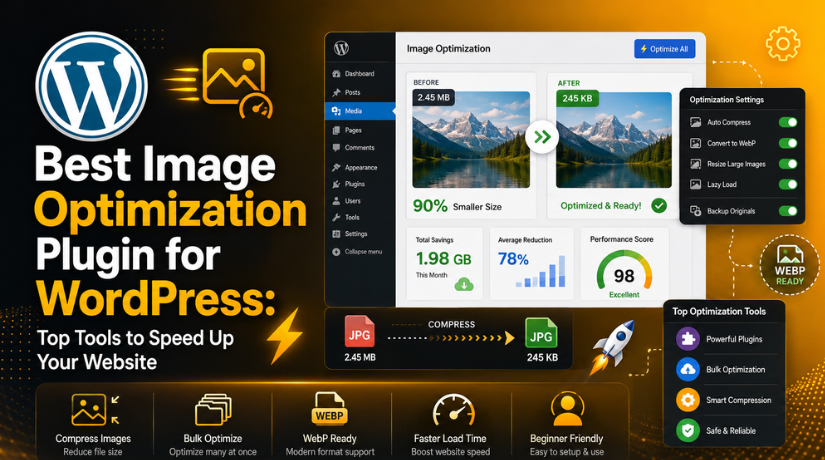
Best Image Optimization Plugin for WordPress: Top Tools to Speed Up Your Website
Introduction
Every WordPress website relies heavily on images. They give pages a clear, practical, and expert appearance. Helpful photos make a blog post look better. A product page requires crisp product images. Good graphic support is also necessary for a service page. However, big image files might soon cause your website to lag. This is when the top WordPress image optimisation plugin comes in handy.
When images are too large, pages take more time to load. This can affect visitors, mobile users, and search performance. A slow website can also reduce leads and sales. Many users leave a page when it loads slowly. So, website speed is not only a technical need. It is also important for user trust and business growth.
A good WordPress image optimization plugin helps solve this problem. It can reduce image file size without hurting quality too much. It can resize large images and compress files automatically. Some plugins also convert images into WebP or AVIF formats. These modern formats help websites load faster on many devices.
Image optimization is also linked with WordPress speed improvement. Many users search for the best WordPress plugins for speed because images are often a major reason for slow pages. A powerful image optimizer WordPress plugin can improve loading time, reduce page size, and support better performance. It is useful for blogs, business websites, portfolios, and WooCommerce stores.
What Is an Image Optimization Plugin in WordPress?
One tool for decreasing image size is an image optimisation plugin. It functions within your media library and WordPress dashboard. Making picture files lighter is its primary function. Smaller images require less server space and load more quickly. This is done automatically by a competent WordPress image compressing plugin after upload.
WordPress generates several image sizes when a picture is uploaded. These sizes help themes show images in different areas. But if the original image is very large, it can still slow down pages. A WordPress image optimizer plugin helps by compressing and resizing those images. It can also optimize thumbnail images created by WordPress.
The main benefit is simple. You can compress images WordPress websites without doing everything manually. The plugin handles the process in the background. Some plugins also scan your media library. Then they optimize old images in bulk. This is useful for websites with many blog posts or product images.
A plugin can also keep image quality balanced. This means your images still look clear after compression. Some tools offer different compression levels. You can choose stronger compression for small file sizes. You can choose light compression for better image quality. This helps website owners control speed and visual quality.
Why Your WordPress Website Needs Image Optimization for Better Speed
Image optimization is important for every WordPress website. Images make your website useful, attractive, and easy to understand. But large image files can create speed problems. They can increase page size and slow loading time. This can affect users, SEO, and business results. That is why you should optimize images WordPress websites carefully. A good WordPress image optimization plugin can reduce image size automatically. It can also improve speed without hurting image quality too much.
Large Images Can Slow Down Your WordPress Website Quickly
One of the primary reasons for slow websites is large photos. A lot of people post photos straight from their phones or cameras. These images can be very large and heavy. WordPress may resize them, but the file can remain large. This can make pages load slowly on mobile and desktop. A slow page can create a poor browsing experience. It can also increase bounce rate and reduce user trust. When you compress images WordPress websites, pages become lighter. Lighter pages load faster and use fewer server resources. A good image optimizer WordPress plugin handles this process automatically.
Slow Pages Can Affect User Experience and Website Engagement
Users do not like waiting for slow pages. They expect pages to open fast and smoothly. If images take too long, users may leave. This is a major issue for service pages, blogs, and stores. A slow website can reduce calls, leads, and sales. It can also make your brand look less professional. Visitors may think your website is not well managed. A best image compression plugin WordPress option can help here. It reduces image size and improves page loading speed. Better speed helps users browse more pages with ease.
Image Optimization Can Support Better SEO Performance
Search engines prefer websites that give users a better experience. Website speed is one important part of that experience. If your pages load faster, users can access content quickly. This can support better engagement and lower bounce rates. Optimized images also help search engines crawl pages better. Heavy images can slow down crawling and page rendering. A WordPress image optimizer plugin can reduce this problem. It keeps images lighter and pages easier to load. That is why many users choose a WordPress speed optimization plugin. Image compression is a key part of website speed improvement.
Image Optimization Helps Improve Core Web Vitals Scores
Core Web Vitals measure real user loading experience. Images can directly affect these performance signals. A large hero image can delay page loading. This may affect Largest Contentful Paint, also called LCP. Images without proper size can also move page content. This can affect layout stability and user experience. Lazy loading can help with below-page images. But the main banner image should load without delay. A good image compression plugin for WordPress can improve these areas. It can resize, compress, and serve images more efficiently. This helps your website feel faster and more stable.
Image Optimization Helps WooCommerce Stores Load Product Pages Faster
WooCommerce stores use many product images every day. Product pages, category pages, and galleries need clear images. But heavy product images can slow down the shopping experience. Slow product pages can reduce sales and customer trust. Buyers may leave before viewing product details properly. Optimized product images load faster and still look sharp. This helps users compare products and complete orders easily. A reliable WordPress image optimization plugin is helpful for stores. It can compress product images and improve loading speed. It also helps large stores manage many images better.
Smaller Images Can Save Hosting Bandwidth and Storage Space
More bandwidth and server space are required for large photos. This may have an impact on shared hosting websites. Additionally, when traffic is heavy, it may increase server load. Images that are smaller load faster and require less hosting resources. This may improve the stability of your website when people visit it. Additionally, it may lessen the size of backups and storage usage. Using the finest WordPress image optimisation plugin makes managing images simpler. The plugin has the ability to optimise both fresh and old photos. This maintains the speed, cleanliness, and better management of your website.
Features to Check Before Choosing the Best Image Optimization Plugin for WordPress
Selecting the correct plugin is crucial. Not all plugins function in the same way. Some plugins only concentrate on basic compression. Some provide slow loading, CDN, AVIF, and WebP. Some work better for novices, while others are more suitable for more experienced users. Examine the primary features thoroughly before selecting the fastest WordPress plugins. The ideal plugin should fit your budget, image requirements, and website size.
Check Image Compression Options Before Installing Any Plugin
Image compression is the main feature of these plugins. It reduces image file size and improves loading speed. Most plugins offer lossy and lossless compression options. Lossy compression makes files smaller but may reduce quality. Lossless compression keeps quality better but saves less space. You should choose a plugin that offers both choices. This helps you control image quality and file size. For blogs, stronger compression may work well. For portfolios or products, balanced compression is better. A good image compression plugin for WordPress should offer flexible settings.
Choose a Plugin With WebP and AVIF Image Support
WebP and AVIF are modern image formats. They usually create smaller files than JPG and PNG. Smaller files help pages load faster on many devices. Many updated plugins now support these formats. This feature is useful for blogs, stores, and business sites. WebP is widely used and supported by many browsers. AVIF can offer even smaller file sizes in many cases. A strong WordPress image optimizer plugin should include modern format support. This helps your website stay updated with current speed needs. It also improves mobile loading and page performance.
Use Bulk Image Optimization for Old Media Library Files
Many websites already have hundreds of uploaded images. These old images can slow down blog posts and pages. Bulk optimization helps optimize all old images together. This saves time and avoids manual compression work. It is very useful for old websites and stores. It also helps websites with many product or blog images. A good image optimizer WordPress plugin should include bulk processing. You should also check if it optimizes thumbnails. WordPress creates many thumbnail sizes for different areas. Optimizing them can reduce total website weight.
Select Automatic Optimization on Upload for Easy Management
For website owners, automatic optimisation saves time. Following upload, each new image is compressed. Manual use of external tools is not required. This maintains your media library’s initial optimisation. It is useful for blogs with regular content updates. It also helps WooCommerce stores adding new products often. A good WordPress image optimization plugin should handle uploads automatically. This feature keeps your workflow simple and smooth. It also reduces the chance of uploading heavy files. This makes image optimization easier for non-technical users.
Check Image Resizing Features for Oversized Uploads
Many users upload images larger than required. Some images may be 3000px or 4000px wide. Most website layouts do not need images this large. Large image dimensions increase file size and loading time. A resizing feature can reduce image dimensions automatically. This keeps images suitable for web display. It also helps improve page speed and server storage. You should choose a plugin with custom resize controls. This gives you better control over uploaded image sizes. It is a useful feature for every WordPress website.
Check Lazy Loading Support for Long Pages and Blogs
Lazy loading helps images load only when needed. Images below the first screen load later. This can improve the first page loading experience. It is helpful for long blog posts and galleries. It is also useful for product category pages. However, lazy loading must be used carefully. The main hero image should not load too late. It should appear quickly when users open the page. A good WordPress speed optimization plugin gives control over lazy loading. This helps improve speed without hurting visual experience.
List Of 5 Best Image Optimization Plugins for WordPress (Top Picks)
#1 ShortPixel Image Optimizer
ShortPixel Image Optimizer is a strong option for users who want complete image control. It helps compress images, resize large files, and optimize old media files in bulk. This WordPress image optimization plugin also supports modern formats like WebP and AVIF. It works well for blogs, business websites, agencies, and WooCommerce stores that need faster pages and cleaner image delivery.
Features of ShortPixel Image Optimizer
- It supports lossy, glossy, and lossless image compression.
- It converts images into WebP and AVIF formats.
- It can optimize old images in bulk quickly.
- It optimizes new images automatically after upload.
- It supports image resizing and lazy loading features.
Pros of Using ShortPixel Image Optimizer
- It is a good all-round image optimizer WordPress plugin.
- It supports modern image formats for faster loading.
- It works well for large media libraries.
- It is useful for WooCommerce product image optimization.
- It offers backup options for original image files.
Cons of Using ShortPixel Image Optimizer
- The free plan has monthly image limits.
- Large websites may need paid image credits.
- Some settings may confuse new WordPress users.
- Bulk optimization can take time on large websites.
- Image quality should be checked after strong compression.
Download Link: ShortPixel Image Optimizer
#2 Smush Image Optimization
Smush is a popular choice for beginners and small website owners. It gives users an easy way to compress images WordPress websites without advanced settings. This image compression plugin for WordPress can reduce file size, enable lazy loading, and optimize images in bulk. It is useful for blogs, service websites, and simple business websites that need easy speed improvements.


Features of Smush Image Optimization Plugin
- It compresses images automatically after upload.
- It supports lazy loading for better page speed.
- It offers bulk image optimization for old files.
- It can detect images with incorrect sizes.
- It supports modern image optimization features.
Pros of Using Smush Image Optimization Plugin
- It is simple and easy for beginners.
- It has a clean and user-friendly dashboard.
- It works well for small business websites.
- It helps improve speed with lazy loading.
- It is one of the popular WordPress image tools.
Cons of Using Smush Image Optimization Plugin
- Some advanced features need a paid plan.
- Free compression may not suit large websites.
- Advanced users may want more control options.
- CDN features may need premium access.
- Bulk optimization can be limited on free plans.
Download Link: Smush Image Optimization
#3 Imagify Image Optimizer
Imagify is a clean and simple plugin for WordPress image optimization. It helps users optimize images with easy settings and clear controls. This WordPress image optimizer plugin can compress files, resize large images, and convert images into modern formats. It is a good option for bloggers, portfolios, service websites, and users looking for the best image compression plugin WordPress setup.
Features of Imagify Image Optimizer
- It offers one-click image optimization for WordPress users.
- It supports WebP and AVIF image conversion.
- It can resize large images during optimization.
- It provides bulk optimization for media library images.
- It includes backup and restore options for safety.
Pros of Using Imagify Image Optimizer
- It has a simple and clean user interface.
- It gives good compression with clear image quality.
- It is easy to set up for beginners.
- It works well for blogs and portfolio websites.
- It helps users optimize images WordPress websites faster.
Cons of Using Imagify Image Optimizer
- The free plan has monthly usage limits.
- Large media libraries may need paid plans.
- Strong compression may affect some image quality.
- Some features depend on account limits.
- It may not suit users needing unlimited free optimization.
Download Link: Imagify Image Optimizer
#4 EWWW Image Optimizer
EWWW Image Optimiser is a versatile plugin for users who require further control. It assists with file optimisation, image compression, and huge upload resizing. Large blogs, service websites, and stores with a lot of media can all benefit from our WordPress image optimisation plugin. Lazy loading, CDN options, and WebP conversion are also supported. Users seeking more robust picture control and deeper settings will find it appealing.
Features of EWWW Image Optimizer
- It supports bulk image optimization for large media libraries.
- It helps convert images into WebP image format.
- It offers local image optimization options for users.
- It includes lazy loading for better page speed.
- It provides CDN support through Easy IO service.
Pros of Using EWWW Image Optimizer
- It works well for websites with many images.
- It gives more control over image optimization settings.
- It can optimize images from different website areas.
- It is useful for technical WordPress website owners.
- Its CDN option can improve global image delivery.
Cons of Using EWWW Image Optimizer
- Its interface may feel technical for beginners.
- Some advanced features need paid service access.
- Setup may take more time than simple plugins.
- Server-based optimization may depend on hosting quality.
- Too many settings can confuse new WordPress users.
Download Link: EWWW Image Optimizer
#5 Optimole Image Optimization
Optimole is a WordPress plugin for cloud-based image optimisation that speeds up delivery. It provides appropriate sizes and real-time image optimisation. This WordPress image compression plugin also supports lazy loading, WebP, AVIF, and CDN delivery. It is helpful for international websites and pages with lots of images. It enhances desktop and mobile picture performance while lessening server burden.
Features of Optimole Image Optimization Plugin
- It offers cloud-based image optimization for WordPress websites.
- It includes a global CDN for faster image loading.
- It supports WebP and AVIF image format delivery.
- It resizes images based on each visitor’s device.
- It includes lazy loading for better first-page speed.
Pros of Using Optimole Image Optimization Plugin
- It is useful for websites with global visitors.
- It can reduce load on your hosting server.
- It delivers device-based images for better performance.
- Its CDN can improve image loading speed worldwide.
- It works well for image-heavy blogs and stores.
Cons of Using Optimole Image Optimization Plugin
- It needs an account connection before full use.
- CDN-based setup may not suit every website owner.
- The free plan may have monthly visit limits.
- Some users may prefer local image optimization.
- Advanced features may require a paid plan.
Download Link: Optimole Image Optimization
Choose a Simple Image Optimization Plugin for a Small Blog Website
A small blog usually needs easy image compression. It does not always need complex CDN settings. Bloggers should choose a simple WordPress image optimizer plugin with automatic compression. Smush or Imagify can work well for this need. These plugins help you compress images WordPress websites without much setup. They are also useful for regular content publishing. A small blog should focus on speed, quality, and simple control.
Choose a Balanced Plugin for a Business WordPress Website
A business website needs fast pages and professional images. Service pages should load quickly on mobile devices. Visitors should see clear images without waiting too long. ShortPixel, Imagify, or Smush can work well here. These plugins can help optimize images WordPress websites with easy settings. They can also support better landing page performance. A business website should choose a plugin with compression, resizing, and backup features.
Choose a Strong Plugin for a WooCommerce Store
A WooCommerce store needs fast and sharp product images. Product photos help buyers understand items before buying. If images load slowly, users may leave quickly. ShortPixel, Optimole, or EWWW can work well for stores. These tools can help compress product images and thumbnails. They can also support faster category and product pages. The best image compression plugin WordPress option should protect product image quality. Always test product pages after changing compression settings.
Choose a Quality-Focused Plugin for Photography or Portfolio Websites
Photography and portfolio websites need careful image handling. Image quality matters more for these websites. Strong compression can sometimes make images look poor. Imagify or ShortPixel can work well for this need. These plugins offer control over compression strength. They also include backup options for safer testing. A portfolio website should not only focus on small files. It should balance clean visuals, fast loading, and image quality.
Choose a Bulk Optimization Plugin for Large WordPress Websites
Large websites may have thousands of images. These websites need strong bulk optimization features. EWWW, ShortPixel, or Optimole can work well here. They help process many images and reduce page weight. Bulk optimization saves time and manual effort. It also helps old blog posts and pages load faster. Large websites should also check pricing and usage limits. This helps avoid problems during heavy optimization work.
Choose CDN-Based Image Optimization for Global Website Visitors
Websites with global visitors need faster image delivery. A CDN can serve images from nearby locations. This can improve speed for users in different countries. Optimole is a strong choice for this purpose. It combines cloud optimization, CDN delivery, and lazy loading. This makes it useful for global blogs and online stores. CDN image delivery can also reduce hosting server load. It is helpful when traffic grows across different regions.
Conclusion
Image optimization is important for every WordPress website. It helps improve speed, user experience, and SEO performance. It can also support better Core Web Vitals scores. A good WordPress speed optimization plugin should handle images properly. Large images can slow down blogs, stores, and service pages. That is why image optimization should never be ignored.
The ideal WordPress image optimisation plugin will depend on your requirements. A good all-around choice is ShortPixel. Smush is simple and beginner-friendly. Imagify has a clean and easy interface. EWWW gives more control for large websites. Optimole is great for cloud and CDN image delivery. These tools are also among the best WordPress plugins for speed because images affect loading time.
Before choosing any plugin, check your website type first. Look at image count, traffic, hosting, and budget. Also test image quality after compression. The right plugin should make your website faster. It should also keep your images clean and sharp.
If your WordPress website is slow because of large images, plugin conflicts, or poor settings, 24×7 WP Support can help. Our team can check your website speed, set up the right image optimization plugin, compress images safely, fix performance issues, and improve your WordPress loading experience. Visit 24x7wpsupport today for expert WordPress help and faster website performance.



Brian is a WordPress support specialist and content contributor at 24×7 WP Support. He writes practical, easy-to-follow guides on WordPress troubleshooting, WooCommerce issues, plugin and theme errors, website security, migrations, performance optimization, and integrations. With a focus on solving real website problems, Brian helps business owners, bloggers, and online store managers keep their WordPress sites running smoothly.
