
add_action vs do_action vs add_filter in WordPress: Full Guide
Introduction
WordPress hooks help developers change website behavior safely. They allow custom code to run without editing WordPress core files. This makes the website easier to update and maintain.
Hooks are used in themes, plugins, and custom code snippets. They help add features, change layouts, load files, and connect functions. This is why every WordPress developer should understand hooks clearly.
There are two main hook types in WordPress. These are actions and filters. Actions run custom tasks at specific points. Filters change data before WordPress shows or saves it.
Many beginners get confused between add_action, do_action, and add_filter. These functions sound similar, but they work differently. This guide explains them in a simple and practical way.
Understanding these functions helps you write cleaner WordPress code. It also reduces errors when customizing websites.
What Is add_action in WordPress?
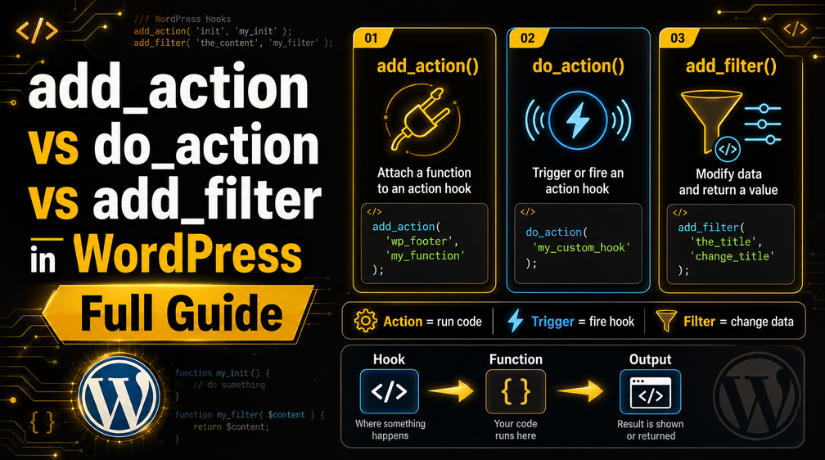
add_action() is a WordPress function used to attach custom code. It connects your function to a specific WordPress action hook. When that hook runs, WordPress also runs your custom function.
In simple words, add_action in WordPress tells the website when to run your code. For example, you can run code when a page loads. You can also add scripts, show messages, or send emails.
So, what is add_action in WordPress? It is a way to register your function with an action hook. It does not create the hook itself. It only connects your function to an existing hook.
Developers commonly use add_action() for many tasks, such as:
- Loading CSS and JavaScript files.
- Adding code inside the header or footer.
- Running code after a post is published.
- Sending emails after a form submission.
- Adding custom dashboard notices.
The basic syntax is simple:
add_action( ‘hook_name’, ‘callback_function’ );
Here, hook_name is the action hook name. The callback_function is your custom function. WordPress runs that function when the selected hook is triggered.
This makes add_action() very useful for safe WordPress customization.
WordPress add_action Example for Beginners
Understanding a practical example makes WordPress hooks easier to learn. A simple example helps beginners understand how add_action() works inside a website.
This WordPress add_action example shows how to add custom content inside the website footer. Many developers use this method for tracking scripts, messages, or notices.
Here is a simple code example:
function custom_footer_message() {
echo ‘<p>Welcome to our WordPress website.</p>’;
}
add_action( ‘wp_footer’, ‘custom_footer_message’ );
This code has two important parts. The first part creates a custom function. The second part connects that function using add_action().
Let’s understand each part clearly:
- custom_footer_message() is the custom callback function.
- wp_footer is the action hook name.
- add_action() connects the function to that hook.
- WordPress runs the function before the closing body tag.
When the footer section loads, WordPress triggers the wp_footer hook. Then it automatically runs the connected function.
This method is useful for many website customization tasks, such as:
- Adding custom footer text.
- Loading tracking scripts safely.
- Showing promotional messages.
- Adding popup or analytics code.
- Running custom plugin functions.
Developers also use priority values with add_action(). Priority controls the order of execution when multiple functions use the same hook.
Example with priority:
add_action( ‘wp_footer’, ‘custom_footer_message’, 20 );
Here, 20 is the priority number. Lower numbers run earlier. Higher numbers run later.
What Is do_action in WordPress?
do_action() is another important WordPress hook function. It works differently from add_action().
The do_action() function triggers or fires an action hook. It tells WordPress to run all connected functions immediately.
In simple words, do_action() creates the execution point. Then add_action() connects functions to that point.
Here is a simple example:
do_action( ‘custom_hook_name’ );
When WordPress reaches this line, it runs every function attached to custom_hook_name.
Theme and plugin developers use do_action() to create flexible customization areas. Other developers can then attach custom functions without changing original files.
This makes WordPress development cleaner, safer, and easier to maintain.
add_action vs do_action: Main Difference
The topic add_action vs do_action often confuses WordPress beginners. Both functions work with action hooks, but their roles are different. One connects code to a hook. The other runs that hook at a specific place.
The simplest difference between add_action and do_action is this: add_action() registers your custom function, while do_action() fires the hook. So, add_action() waits for an event. do_action() creates or triggers that event.
Think of do_action() as a switch. It tells WordPress, “Run all functions attached here.” Think of add_action() as the wire connected to that switch. It tells WordPress which function should run when the switch turns on.
Here is a simple example:
function show_custom_notice() {
echo ‘<p>This is a custom notice.</p>’;


}
add_action( ‘my_custom_hook’, ‘show_custom_notice’ );
do_action( ‘my_custom_hook’ );
In this code, add_action() attaches show_custom_notice() to my_custom_hook. Then do_action() triggers my_custom_hook. After that, WordPress runs the connected function.
You can understand both functions with this:
- Main role: add_action connects a function to a hook. do_action runs the hook.
- Purpose: add_action registers custom code. do_action creates an execution point.
- Used for: add_action adds custom behavior. do_action triggers connected behavior.
- Common use: add_action is used for theme or plugin customization. do_action is used for custom hook locations.
- Works like: add_action works like a listener. do_action works like a trigger.
Use add_action() when WordPress already provides the hook. For example, use it with wp_footer, wp_head, or init. These hooks already exist in WordPress.
Use do_action() when you want to create your own action point. This is useful in custom themes and plugins. It helps other developers extend your code safely.
So, add_action() and do_action() are not replacements. They work together in the WordPress hook system. One attaches the function, and the other starts the action.
What Is add_filter in WordPress?
add_filter() is a WordPress function used to change data. It connects a custom function to a filter hook. WordPress then passes data through that function before using it.
Filters are different from actions. Actions run a task at a specific point. Filters receive data, change it, and return it again.
Developers use add_filter() when they want to edit output safely. For example, they can change a post title. They can also update excerpt text or modify content before display.
Common uses of add_filter() include:
- Changing post titles before display.
- Editing excerpt length or ending text.
- Modifying content before it appears.
- Changing WooCommerce product text.
- Updating custom plugin output.
A filter function must return the final value. This is very important. If it does not return data, the output may break.
Here is a simple example:
function change_post_title( $title ) {
return $title . ‘ – Updated’;
}
add_filter( ‘the_title’, ‘change_post_title’ );
In this example, WordPress sends the title into the function. The function changes it and returns the updated title.
add_action vs add_filter: Key Difference
The topic add_action vs add_filter is important for WordPress beginners. Both functions connect custom functions to hooks. However, they do different jobs.
The main difference between add_action and add_filter is simple. add_action() performs a task. add_filter() changes a value.
Use add_action() when you want WordPress to run code. For example, you can load scripts, send emails, or show notices. It usually does not need to return any value.
Use add_filter() when you want to change existing data. For example, you can edit titles, content, excerpts, prices, or labels. A filter should always return the changed value.
You can understand the difference this way:
- Main use: add_action() performs an action. add_filter() modifies data.
- Return value: add_action() usually needs no return. add_filter() must return data.
- Hook type: add_action() works with action hooks. add_filter() works with filter hooks.
- Best example: add_action() can load CSS files. add_filter() can change a post title.
- Common mistake: Beginners use filters without returning values.
Both functions help customize WordPress safely. They also reduce the need to edit core files. When used correctly, they make websites easier to manage.
When Should You Use add_action, do_action, or add_filter?
Use each WordPress hook function for its correct purpose. This keeps your code clean, safe, and easier to update.
Use add_action() when you want to run custom code. It is helpful for loading files, sending emails, adding notices, or running plugin tasks.
Use do_action() when you want to create a custom action point. This is useful inside custom themes, plugins, or reusable code blocks.
Use add_filter() when you want to change existing data. It works well for titles, content, excerpts, labels, and output text.
You can follow this simple rule:
- Use add_action() to perform a task.
- Use do_action() to fire a custom hook.
- Use add_filter() to change returned data.
Common Mistakes Beginners Should Avoid
Beginners often mix these functions because names look similar. However, each one has a different job inside WordPress.
Avoid using do_action() when you need add_action(). do_action() only fires a hook. It does not attach your function.
Do not use add_filter() without returning a value. Filters must return the final data. Otherwise, WordPress may show empty or broken output.
Also, avoid editing WordPress core files directly. Use hooks instead for safer customization.
Common mistakes include:
- Using the wrong hook name.
- Forgetting the return value in filters.
- Adding code in unsafe theme files.
- Ignoring priority when many functions run.
- Testing code directly on a live website.
Conclusion
Understanding these functions makes WordPress customization much easier. add_action() connects code to action hooks. do_action() fires custom action hooks. add_filter() changes data before WordPress uses it.
When you understand their roles, you can write safer code. You can also customize themes and plugins more professionally.
For expert WordPress help, custom code support, or hook-related issues, 24×7 WP Support can guide you with reliable technical support.
Related posts:
How to Import Elementor Templates into WordPress

WordPress Default Admin Login: Credentials, URL, and Complete Access Guide 2026

Showit vs WordPress: Which Website Builder Is Better?
What Is Amelia Booking System in WordPress? Free Version and Setup Guide

Duda vs WordPress: Which Is Better for Your Website?

Brian is a WordPress support specialist and content contributor at 24×7 WP Support. He writes practical, easy-to-follow guides on WordPress troubleshooting, WooCommerce issues, plugin and theme errors, website security, migrations, performance optimization, and integrations. With a focus on solving real website problems, Brian helps business owners, bloggers, and online store managers keep their WordPress sites running smoothly.
