
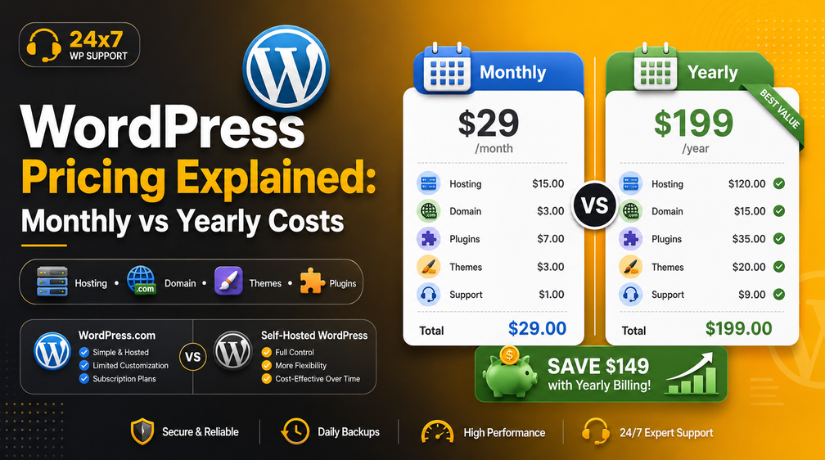
WordPress Pricing Explained: Monthly vs Yearly Costs
Introduction
One of the most common questions new site owners ask before they commit to WordPress is a deceptively simple one: Does WordPress charge a monthly fee or a yearly fee? The honest answer is — it depends on which version of WordPress you’re using, and the billing model you choose. In 2026, both WordPress.com and self-hosted WordPress.org give you real flexibility, but the cost structures are very different, and choosing the wrong path can cost you significantly more over time.
In this guide, we’ll break down exactly how WordPress charges you — monthly, yearly, or not at all — and help you figure out which option gives you the best value for your specific situation.
First Things First: WordPress.com vs WordPress.org
Before diving into the pricing breakdown, it’s critical to understand that “WordPress” actually refers to two different products, and confusing them is one of the most common mistakes beginners make.
WordPress.org is the free, open-source software you download and install on your own web server. The software itself costs nothing — zero, ever. What you do pay for is web hosting, a domain name, and any premium themes or plugins you choose to add. There’s no monthly or yearly subscription to WordPress.org itself.
WordPress.com is a hosted platform built on the same underlying software. It handles your hosting for you in exchange for a monthly or yearly subscription fee. It’s more like a SaaS product — you’re paying for the convenience of not having to manage your own server.
Understanding this distinction is step one. If you’ve been wondering why some sources say “WordPress is free” while others quote you monthly prices, this is exactly why. As we explain in more detail in our guide to whether WordPress is truly free to use, the answer depends entirely on which version you’re using and how much you want to customize your site.
WordPress.com Pricing: Monthly vs Yearly Billing in 2026
WordPress.com operates on a tiered subscription model. Every plan is available as either a monthly payment or an annual (yearly) payment, and the savings from going annual are substantial — sometimes as much as 50% or more.
Here’s how the 2026 plan pricing compares:
Free Plan
WordPress.com still offers a free tier in 2026, but it comes with significant limitations. You get a subdomain (yoursite.wordpress.com), limited storage, and WordPress.com ads displayed on your site. It’s fine for experimenting, but not suitable for any serious business or professional project.
Personal Plan
Billed monthly, the Personal plan costs around $9/month. Switch to annual billing and that drops to approximately $4/month (billed as a lump sum each year). You get a custom domain, basic email support, and the removal of WordPress.com ads. Ideal for personal blogs and simple portfolio sites.
Premium Plan
The Premium plan runs about $18/month on a monthly billing cycle, or roughly $8/month on annual billing. It adds monetization tools, advanced design options, and significantly more storage. If you’re a content creator or small blogger who wants to look professional without a big tech overhead, this is a strong middle-ground option.
Business Plan
The Business plan is where WordPress.com gets genuinely powerful — and genuinely expensive on a monthly billing cycle, at around $40/month. Annual billing brings that down to approximately $25/month. This is the first tier that unlocks plugin installation and theme uploads, making it functionally closer to a self-hosted setup. If you’re building a real business website, this is the minimum WordPress.com tier worth considering.
Commerce Plan
Designed for online stores, the Commerce plan costs around $70/month on monthly billing, or approximately $45/month billed annually. It includes WooCommerce integration and advanced eCommerce features. For any store doing serious volume, however, a self-hosted solution with your own WooCommerce setup will almost always give better value.
The Monthly vs Yearly Verdict for WordPress.com
The math is clear: annual billing saves you anywhere from 40–55% compared to paying month-to-month on WordPress.com. The only real reason to choose monthly billing is if you genuinely need the flexibility to cancel within a few months — for example, testing the platform for a temporary project. For anything ongoing, annual billing is the financially sensible choice.
WordPress.org Costs: No Subscription, But Real Annual Expenses
Self-hosted WordPress.org doesn’t have a subscription fee, but running a real website has unavoidable ongoing costs. Understanding these is essential if you’re trying to compare apples to apples with WordPress.com.
Web Hosting
Your single biggest recurring cost will be web hosting. In 2026, shared hosting plans suitable for new sites typically start between $3 and $10 per month — that’s $36 to $120 per year. Managed WordPress hosting, which offers better performance and dedicated support, runs between $20 and $50 per month ($240 to $600 per year). If your site grows and you need a VPS or dedicated server, costs can climb much higher.
We go deep on this topic in our guide to WordPress hosting costs in 2026, including a comparison of the major hosting providers and what you actually get for your money at each price point.
Domain Name
A standard .com domain name costs between $10 and $20 per year from most registrars. Some hosting providers include a free domain for the first year as a promotional offer, but renewal rates are typically the same after that. Budget around $15/year as a reasonable ongoing cost.
SSL Certificate
SSL (the padlock in your browser address bar) is non-negotiable for any site in 2026 — Google factors it into rankings and most browsers warn users about sites without it. The good news: most reputable hosting providers include a free Let’s Encrypt SSL certificate. If your host doesn’t, budget $50 to $100/year for a commercial SSL certificate.


WordPress Themes
The free theme directory on WordPress.org has thousands of options, and many are excellent. If you want something premium, one-time purchases range from $30 to $100 for most themes. Some theme club memberships cost $89 to $249/year for unlimited access to multiple designs, which can make sense if you manage multiple sites.
Plugins
This is where self-hosted costs can vary most dramatically. Many essential plugins — contact forms, basic SEO, caching, security — have solid free versions. However, commercial-grade plugin licenses add up quickly. A realistic annual budget for a small business WordPress site might include SEO tools ($79–$299/year), security ($59–$199/year), backup solutions ($39–$99/year), and form builders ($49–$99/year). Budget $200 to $500/year in plugin licenses if you’re building a properly equipped business site.
Real Total Annual Cost Comparison
Let’s put the numbers together to make a real-world comparison for different use cases in 2026:
Basic Personal Blog or Portfolio
On WordPress.com Personal (annual billing): approximately $48/year. On self-hosted WordPress.org with shared hosting and free plugins: approximately $60–$120/year. In this case, WordPress.com actually wins on pure cost — as long as you don’t need plugin access or a custom theme.
Small Business Website
On WordPress.com Business (annual billing): approximately $300/year. On self-hosted WordPress.org with quality shared or entry-level managed hosting, a premium theme, and essential plugins: approximately $200–$400/year. The costs are comparable, but self-hosted gives you significantly more control, flexibility, and ownership of your data.
eCommerce Store
On WordPress.com Commerce (annual billing): approximately $540/year. On self-hosted WordPress.org with WooCommerce: approximately $300–$700/year depending on hosting quality and which WooCommerce extensions you need. For stores with real transaction volumes, self-hosted wins on both cost and flexibility.
Why Most Professionals Recommend Annual Billing
Whether you’re on WordPress.com or paying for hosting on self-hosted WordPress, annual billing almost always makes more financial sense. Here’s why:
First, the discount is significant. On WordPress.com, you’re leaving real money on the table by paying month-to-month. Many hosting providers similarly offer 40–70% off their listed prices when you commit to an annual or multi-year term. Second, annual billing reduces administrative overhead — one payment per year versus twelve monthly charges to track. Third, it signals commitment: you’re more likely to invest time actually building and growing your site when you’ve committed to a full year upfront rather than operating month-to-month.
The main downside of annual billing is reduced flexibility. If you want to switch hosts or platforms mid-year, you may lose money on the remaining months. Mitigate this by researching your provider carefully before committing — read reviews, test support responsiveness, and check their refund policy.
Hidden Costs to Watch Out For
The advertised price is rarely the total price, and there are a few areas where new WordPress site owners consistently get surprised:
Domain Renewal vs First-Year Promotions
Many hosting packages advertise a free domain for year one. The renewal price in year two can be significantly higher — sometimes $15 to $25/year more than you’d pay at a dedicated registrar. It’s worth registering your domain separately to avoid being locked into a registrar you don’t control.
Email Hosting
WordPress — whether .com or .org — does not include professional email (you@yourdomain.com) by default. Google Workspace starts at around $6/user/month, and Microsoft 365 Business Basic at around $6/user/month. If you need professional email, this is a real additional cost to budget for.
Introductory vs Renewal Hosting Prices
Shared hosting is notorious for deeply discounted first-year pricing that jumps significantly on renewal. A plan advertised at $2.99/month may renew at $10.99/month. Always check the renewal price, not just the promotional price, before signing up.
Which Option Is Right for You in 2026?
If you want the simplest possible setup and don’t need extensive plugin customization, WordPress.com on annual billing is a perfectly legitimate choice. It’s especially strong for personal blogs, newsletters, and portfolio sites where managed infrastructure matters more than control.
If you’re building a real business website, an online store, or any site where you need full plugin access, custom code, and complete ownership of your data, self-hosted WordPress.org gives you more for your money — but only if you’re willing to manage the technical side or work with a support provider who will. As we outline in our guide to the ongoing cost of maintaining a WordPress website, the real investment in a professional site isn’t the software license — it’s the ongoing care, updates, and optimization that keep it performing well.
Final Thoughts
WordPress doesn’t charge a monthly or yearly fee for the software itself — that’s always been free. What you’re paying for is the infrastructure, tools, and services that turn that free software into a functioning website. Whether you pay monthly or annually comes down to your commitment level and cash flow, but in almost every case, annual billing saves you meaningful money over time.
If you’re unsure which path is right for your specific project — WordPress.com vs self-hosted, monthly vs yearly, shared hosting vs managed — the team at 24×7 WP Support can help you map out the right setup from day one. We offer expert WordPress support, migration services, and ongoing maintenance plans so you never have to figure it out alone. Get in touch with our team today and let’s build something great together.
Related posts:



Brian is a WordPress support specialist and content contributor at 24×7 WP Support. He writes practical, easy-to-follow guides on WordPress troubleshooting, WooCommerce issues, plugin and theme errors, website security, migrations, performance optimization, and integrations. With a focus on solving real website problems, Brian helps business owners, bloggers, and online store managers keep their WordPress sites running smoothly.
