
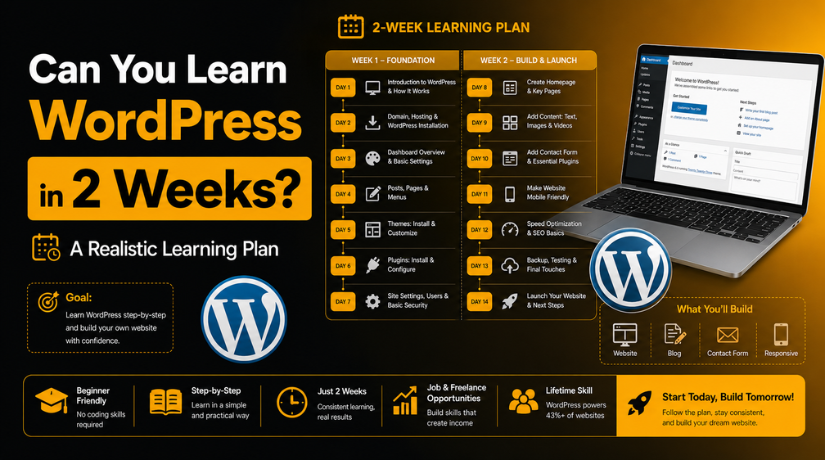
Can You Learn WordPress in 2 Weeks? A Realistic Learning Plan
Introduction
Here’s the question thousands of aspiring website owners type into Google every single week: Can I really learn WordPress in just two weeks? Maybe you’ve been putting off building your own site because it feels overwhelming. Maybe you have a launch deadline looming. Or maybe you’re just curious whether it’s possible to go from zero to functional website in fourteen days.
The honest answer is yes — but with an important asterisk. You can absolutely build a real, working WordPress website in two weeks, but only if you understand what “learning WordPress” actually means, and you follow a focused plan rather than wandering through YouTube tutorials at random. This guide gives you exactly that plan, plus a realistic picture of what you will and won’t be able to do when those two weeks are up.
What “Learning WordPress” Actually Means
Before we dive into the day-by-day schedule, it’s worth defining what we’re aiming for. WordPress is not a single skill — it’s a platform with layers. You can learn to log in, write posts, and change your theme in a single afternoon. Building a custom WooCommerce store with bespoke checkout flows? That’s a different conversation entirely.
For the purpose of this guide, “learning WordPress in 2 weeks” means reaching what most people call functional beginner proficiency: you can set up a website, publish content, install and configure essential plugins, handle basic SEO, and keep your site updated and secure — all without touching a single line of code. That is a genuinely achievable goal in fourteen days, and it’s also the skill level that covers the needs of the vast majority of small business owners, bloggers, and freelancers.
If you’ve ever wondered what WordPress actually is and how it works under the hood, that foundational knowledge will make your two-week sprint feel much more logical rather than just memorizing button locations.
What You Need Before You Start
You don’t need to know how to code. You don’t need a background in design. What you do need is the right setup and the right mindset.
On the practical side, you’ll need a domain name and a hosting account before day one. There’s no point learning WordPress in a vacuum — you learn by doing, and doing requires a live (or at minimum, a staging) environment. The cost to build a WordPress website is lower than most beginners expect, with basic hosting starting around $3–5 per month and many registrars bundling a free domain for the first year.
On the mindset side, commit to 1–2 hours per day. That’s it. Cramming 14 hours on a Sunday doesn’t stick the same way that a consistent daily practice does. Treat these two weeks like a short course, not a weekend binge-watch.
Week 1: Building the Foundation
The first week is about getting comfortable with the platform and building something real — even if it’s rough around the edges.
Days 1–2: Your Dashboard and First Setup
Spend your first two sessions exploring the WordPress dashboard without worrying about making anything look good. Click every menu item. Read every label. Understand the difference between Posts and Pages. Set your site title, tagline, and permalink structure (go to Settings → Permalinks and choose “Post name” — you’ll thank yourself later for the clean URLs).
Create your first test post and your first test page. Publish them even if the content is just placeholder text. The goal is familiarity with the interface, not perfection.
Days 3–4: Themes and Visual Setup
On day three, tackle your theme. Go to Appearance → Themes, browse the free options in the WordPress repository, and install one that fits your site’s purpose. Don’t overthink this — you can always switch later, and many excellent free WordPress themes are professional enough for a real website.
Day four is about customization. Use the WordPress Customizer (Appearance → Customize) to set your logo, colors, and font if your theme allows it. Build a simple navigation menu with your Home, About, and Contact pages linked. By the end of day four, your site should look recognizably like a website — not just a default installation.
Days 5–7: The Block Editor and Content Creation
WordPress runs on the Gutenberg block editor, and learning it well is the single most valuable skill you can develop in week one. Spend days five through seven creating real content using blocks: paragraphs, headings, images, buttons, columns, and lists. Learn how to reuse patterns, add featured images to posts, and organize content into categories and tags.
By day seven, build a complete “About” page using multiple block types. It doesn’t have to be a masterpiece, but it should feel deliberate. You’re practicing the muscle memory that will make everything else faster.
Week 2: Real Skills for Real Results
Week two is where everything accelerates. You already know your way around — now you’re adding the capabilities that make a website actually work for you.
Days 8–9: Essential Plugins
Plugins are what turn a blank WordPress installation into a fully featured website. On days eight and nine, install and configure the essentials. Every WordPress site needs at minimum: an SEO plugin (Yoast SEO or Rank Math), a security plugin (Wordfence or Solid Security), a backup plugin (UpdraftPlus), and a caching plugin (WP Super Cache or LiteSpeed Cache).
Don’t install twenty plugins trying to cover every scenario. The best WordPress plugins for beginners are the ones that solve a real problem your site has right now. Install each plugin, configure its basic settings, and understand what it’s doing before moving on.


Days 10–11: Basic SEO and Site Settings
Day ten is your SEO foundation. Inside Yoast SEO or Rank Math, set your site’s default title format, add a meta description to your homepage, connect to Google Search Console, and submit your XML sitemap. These aren’t glamorous tasks, but they’re the difference between a site Google can find and one it ignores.
Day eleven is for the settings that trip up beginners: making sure your site is set to “Allow search engines to index this site” (Settings → Reading), configuring your comment moderation settings, setting your timezone, and verifying your admin email address is one you actually check.
Days 12–14: Build Something Complete
Your final three days are integration practice. Using everything you’ve learned, build a complete, coherent section of your website from scratch. If you’re starting a blog, write and publish three real posts with images, categories, and proper SEO titles. If you’re building a business site, create a complete Services page with a contact form (install WPForms Lite for this — it takes about ten minutes to set up).
On day fourteen, run through a simple pre-launch checklist: test your site on mobile, check that all navigation links work, verify that your contact form sends emails, and look at your site in an incognito browser window as a fresh visitor would see it. Fix anything that looks broken or confusing.
What You’ll Be Able to Do After 2 Weeks
After following this plan consistently, you’ll have a genuine, functional skill set. You’ll be able to create and publish posts and pages with confidence, install and manage plugins without fear, customize your theme without breaking anything, handle basic site maintenance like updates and backups, and set up foundational SEO so your content has a fighting chance in search results. Most importantly, you’ll have developed the troubleshooting instinct — you’ll know where to look when something doesn’t work the way you expected.
For a blogger, a small business owner, or a freelancer building portfolio sites, this skill level is completely sufficient for day-to-day work.
What You Won’t Master Yet (And That’s Fine)
Honesty matters here. Two weeks of focused effort will not make you a WordPress developer or even an intermediate power user. Custom theme development, PHP template editing, WooCommerce configuration, multisite management, and performance optimization for high-traffic sites all require significantly more time and experience.
The good news is that you don’t need to master everything before you can have a genuinely useful website. Plenty of real businesses run successfully on WordPress with only beginner-level in-house knowledge, supplementing with professional help when a task is outside their skill set — which is a perfectly reasonable and cost-effective strategy.
Tips to Learn Faster and Retain More
A few practices will dramatically improve how much sticks over these fourteen days. First, always practice in a real environment — not just by watching videos. Every new concept should be tested on your actual site within the same session you learned it. Second, keep a simple notes document with the settings you changed and why. This becomes an invaluable reference when you return to your site weeks later and can’t remember why you configured something a certain way.
Third, don’t be afraid to break things. The best learning in WordPress happens when something goes wrong and you have to figure out how to fix it. If you have a backup plugin installed (and after day eight, you will), you can restore your site from before a mistake in minutes. That safety net should give you confidence to experiment rather than stick only to the steps you’ve already memorized.
Finally, lean on the WordPress community. The official learn.wordpress.org platform offers free structured courses, and the WordPress.org support forums have answers to nearly every beginner question you could have.
When It Makes More Sense to Get Expert Help
Even after two weeks of solid learning, there will be tasks that are genuinely beyond beginner level — and recognizing that boundary is a skill in itself. If you’re dealing with a site that’s been hacked, a plugin conflict you can’t diagnose, a migration between hosting providers, or a custom functionality request that requires code, the smartest move is usually to call in a professional rather than spend days struggling through something outside your current skill set.
The time you save by getting expert help on complex tasks is almost always worth more than the cost of the help itself — especially when you’re trying to keep a real business running while you’re learning.
Start Your 2-Week WordPress Journey Today
Two weeks is genuinely enough time to go from complete beginner to confident WordPress user — if you follow a structured plan and put in consistent daily practice. The plan above gives you a clear path, a realistic set of expectations, and the foundation to keep growing long after those fourteen days are up.
If you hit a wall at any point during your learning journey — whether it’s a plugin acting up, a layout that won’t cooperate, or an error message that makes no sense — the team at 24×7 WP Support is here to help. We offer expert WordPress support around the clock so you can get unstuck quickly and keep moving forward. Reach out any time — no question is too basic, and no problem is too complex.

Brian is a WordPress support specialist and content contributor at 24×7 WP Support. He writes practical, easy-to-follow guides on WordPress troubleshooting, WooCommerce issues, plugin and theme errors, website security, migrations, performance optimization, and integrations. With a focus on solving real website problems, Brian helps business owners, bloggers, and online store managers keep their WordPress sites running smoothly.
