
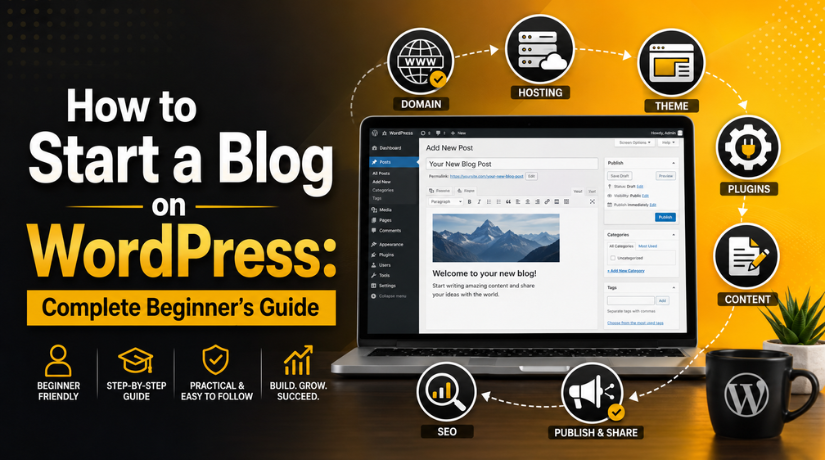
How to Start a Blog on WordPress: Complete Beginner’s Guide
Introduction
Starting a blog in 2026 has never been more accessible — and WordPress remains the platform of choice for millions of bloggers worldwide. Whether you want to share your expertise, build a personal brand, or eventually turn your blog into a source of income, WordPress gives you the tools, flexibility, and control to do it right from day one.
This guide walks you through every step — from picking a niche to publishing your first post — without the technical jargon that usually trips up beginners. Let’s get started.
Why WordPress Is the Best Blogging Platform in 2026
When people say “start a blog on WordPress,” they almost always mean WordPress.org (self-hosted), not WordPress.com. The difference matters enormously. Self-hosted WordPress gives you full ownership of your content, the ability to monetize freely, access to thousands of themes and plugins, and no restrictions on your design or functionality.
WordPress powers over 43% of all websites on the internet in 2026. It’s open-source, free to use, and backed by a massive global community of developers and designers. If you’re weighing your options, see how WordPress compares to other popular blogging platforms before making your decision — but for most bloggers, WordPress wins hands down.
The total cost is modest: roughly $3–10/month for hosting and $10–15/year for a domain name. You get professional-grade tools at a fraction of what a custom-built website would cost.
Step 1 — Choose Your Blog Niche
Before you touch WordPress, you need a clear idea of what your blog is about. Your niche is the specific topic or audience you’ll serve. A well-chosen niche helps you attract the right readers, rank better in search engines, and build authority faster than a blog that covers everything under the sun.
Look for the intersection of three things: something you’re genuinely interested in, something you have knowledge or experience in, and something people are actively searching for online. Popular niches in 2026 include personal finance, health and wellness, technology, travel, food, parenting, and digital marketing.
Don’t aim too broad. “Technology” is a category. “WordPress tips for small business owners” is a niche. The more specific your focus, the easier it is to stand out and build a loyal audience that actually comes back.
Step 2 — Register a Domain Name
Your domain name is your blog’s address on the web — for example, yourblognamehere.com. A good domain is short, easy to spell, easy to remember, and directly related to your niche or brand. Avoid hyphens, numbers, or anything that forces you to spell it out letter by letter when telling someone about your blog.
A few quick tips for picking a domain name in 2026: stick to .com if at all possible since it’s still the most trusted extension globally; keep it under 15 characters when you can; avoid trademarked names or anything that closely resembles a well-known brand; and consider buying your domain directly through your hosting provider since many include a free domain for the first year. Once your domain is registered, it’s yours as long as you keep renewing it annually.
Step 3 — Get Reliable WordPress Hosting
Web hosting is the server where your blog’s files live. Without it, nobody can access your site. Quality WordPress hosting has become very affordable, and most providers make the setup process nearly effortless for beginners.
When choosing a hosting plan, look for one-click WordPress installation (saves time and technical headaches), a free SSL certificate (required for security and for Google to rank your site), daily automated backups, a 99.9% or better uptime guarantee, and responsive support for when things go sideways. Shared hosting is perfectly fine for a brand-new blog. As your traffic grows, you can upgrade to managed WordPress hosting or a VPS.
If you’re budget-conscious, check out these top WordPress hosting options for new bloggers to find a plan that fits your needs without cutting corners on performance.
Step 4 — Install WordPress
Once your hosting account is set up, installing WordPress is genuinely the easiest part of this entire process. Nearly every reputable hosting provider offers a one-click WordPress installer through their control panel.
Using One-Click Installation
Here’s the typical flow: log into your hosting account, find the WordPress Installer or Softaculous option, choose your domain name and fill in your site title, admin username, and password, then click Install. WordPress is live in under five minutes. Once installed, you’ll access your WordPress dashboard at yourdomain.com/wp-admin. Bookmark this URL — you’ll use it every time you log in to write posts, manage plugins, or adjust your design.
Configure Permalinks Immediately
One critical step right after installation: change the default permalink structure. Go to Settings → Permalinks and select “Post name.” This creates clean, SEO-friendly URLs like yourdomain.com/my-first-blog-post instead of the confusing date-based format WordPress uses by default. This is one of the most overlooked beginner steps, and changing it later on an established site can create broken links.
Step 5 — Choose a WordPress Theme
Your theme controls how your blog looks — layout, fonts, colors, and overall visual style. WordPress offers thousands of free and premium themes, which can feel overwhelming at first. Don’t overthink this step: you can always change your theme later without losing any of your content.
For 2026, look for a theme that is mobile-responsive (most of your readers will visit from a phone), lightweight and fast (page speed affects both user experience and Google rankings), regularly updated by an active developer, and fully compatible with WordPress’s Gutenberg block editor. Popular beginner-friendly themes include Astra, Kadence, and GeneratePress — all of which offer strong free versions.


For a curated selection, browse this collection of the best free responsive WordPress themes to find one that matches your blog’s style and goals.
Step 6 — Install Essential Plugins
Plugins extend what WordPress can do. You don’t need dozens of them when you’re starting out, but a few are non-negotiable for a professional, well-optimized blog.
SEO Plugin
Install either Yoast SEO or Rank Math. These plugins handle on-page optimization, XML sitemaps, meta descriptions, and schema markup. Without one, you’re flying blind when it comes to search engine visibility — something no serious blogger can afford in 2026.
Security Plugin
WordPress sites are frequent targets for automated attacks. Install Wordfence or Solid Security to add a firewall, block brute-force login attempts, and run malware scans. This takes five minutes to set up and can prevent months of recovery work later.
Backups and Contact Forms
Install UpdraftPlus for automated backups — this is arguably the most important plugin on this list. If a plugin update breaks your site or a hacker gets through, a recent backup is the difference between a 10-minute fix and losing everything you’ve built. Add WPForms Lite for your contact form so readers, brands, and potential collaborators can reach you easily.
Step 7 — Write and Publish Your First Blog Post
You’ve set up your blog — now it’s time to actually use it. Head to Posts → Add New in your WordPress dashboard to open the block editor. A strong first post follows a simple structure: a specific, benefit-driven headline (“5 Things I Learned Starting a Cooking Blog” beats “Welcome to My Blog” every time), a brief introduction that tells readers who you are and what they’ll get from reading your blog, a body divided into clear H2 and H3 sections for easy scanning, and a conclusion with a call to action inviting readers to comment, subscribe, or read another post.
Before hitting Publish, fill in your SEO plugin fields: add a focus keyphrase, write a meta description under 160 characters, and make sure your URL slug is clean and keyword-friendly. These small steps dramatically improve your chances of ranking in Google over time — and they take less than two minutes per post once you get the hang of it.
Once your post is live, don’t stop there. Share it on social media, link to it from your About page, and reply to every comment you receive in the early days. Reader engagement is gold for new blogs — it signals to Google that real people find your content worth their time, and it builds the kind of community that turns one-time visitors into loyal subscribers.
Common Mistakes New WordPress Bloggers Make (And How to Avoid Them)
Not building an email list from day one. Social media algorithms change constantly and platforms disappear. Your email list is yours permanently. Add a simple opt-in form to your blog before you publish your second post — even a basic Mailchimp integration will do.
Covering too many topics. A blog about fitness, cooking, travel, and personal finance isn’t a blog — it’s a digital journal. Niche down, become the go-to resource on a specific topic, and expand only once you’ve built real authority in that space.
Ignoring page speed. A slow-loading blog loses readers before they even finish the first paragraph. Compress your images before uploading them, use a caching plugin like W3 Total Cache, and choose a hosting provider known for performance.
Using “admin” as your WordPress username. The default username “admin” is the very first credential hackers try in brute-force attacks. Change it to something unique the moment you install WordPress.
Skipping legal pages. In 2026, a Privacy Policy page isn’t optional if you collect any user data — even just email addresses. WordPress provides a template under Settings → Privacy. It takes five minutes to set up and protects you from compliance headaches down the road.
If you’re still weighing self-hosted WordPress against hosted alternatives, read this detailed comparison of WordPress.org vs WordPress.com to make a fully informed decision before you commit any money.
Starting a WordPress blog in 2026 is one of the smartest investments of time and energy you can make — whether your goal is creative expression, professional visibility, or building an online business from scratch. The platform is mature, endlessly flexible, and backed by a global ecosystem that has your back at every stage. Take it one step at a time, focus on creating genuinely useful content, and the results will come.
Need expert help setting up, optimizing, or maintaining your WordPress blog? The team at 24×7 WP Support provides round-the-clock WordPress support, troubleshooting, and maintenance so you can stay focused on what matters most — writing great content. Contact us today and let’s build something great together.
Related posts:


Brian is a WordPress support specialist and content contributor at 24×7 WP Support. He writes practical, easy-to-follow guides on WordPress troubleshooting, WooCommerce issues, plugin and theme errors, website security, migrations, performance optimization, and integrations. With a focus on solving real website problems, Brian helps business owners, bloggers, and online store managers keep their WordPress sites running smoothly.
