
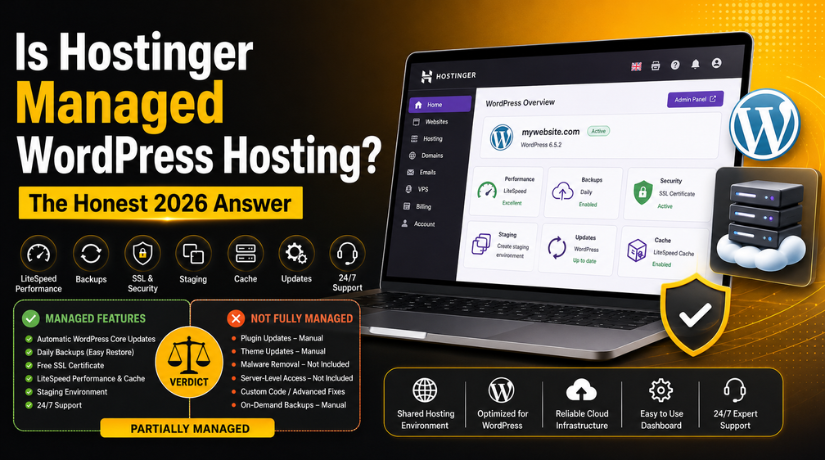
Is Hostinger Managed WordPress Hosting? The Honest 2026 Answer
Introduction
If you’ve been shopping for WordPress hosting in 2026, you’ve almost certainly come across Hostinger. With prices that seem almost too good to be true and a heavy marketing push, it’s one of the most searched hosting providers online. But one question keeps coming up: is Hostinger actually managed WordPress hosting?
The short answer is: it depends on how you define “managed.” The longer — and more useful — answer is what this article is all about. By the end, you’ll know exactly what Hostinger offers, what managed WordPress hosting really means, and whether Hostinger is the right fit for your website in 2026.
What Does “Managed WordPress Hosting” Actually Mean?
Before we judge Hostinger, we need to be clear on what managed WordPress hosting actually means — because the term gets thrown around loosely by a lot of hosting companies.
True managed WordPress hosting means the hosting provider takes full responsibility for the technical side of running your WordPress site. That includes automatic WordPress core updates, plugin and theme updates, daily backups with easy one-click restore points, proactive security monitoring and malware cleanup, performance optimisation at the server level, and dedicated WordPress support from people who know the platform inside out.
Premium managed WordPress providers charge significantly more — often $25–$50/month or more for entry-level plans — because they’re genuinely managing every aspect of your site, not just hosting it.
Standard shared hosting, by contrast, simply gives you server space and a WordPress installer. You handle everything else: updates, security, backups, performance tuning. It’s cheap, but it puts the technical burden squarely on you.
Hostinger sits somewhere in the middle — and understanding exactly where is the key to making an informed decision.
What Hostinger’s WordPress Hosting Actually Includes
Hostinger markets its WordPress plans as “managed hosting for WordPress — premium performance made affordable.” That’s a bold claim. Let’s break down what you actually get.
LiteSpeed Web Server with Object Caching
This is Hostinger’s biggest technical differentiator. All WordPress plans run on LiteSpeed Enterprise servers — the same server software used by many premium managed providers. LiteSpeed handles traffic spikes far more efficiently than Apache, and Hostinger layers on LiteSpeed Cache for WordPress (LSCache) at the server level. This means caching happens before PHP even processes the request, resulting in noticeably faster page loads without any plugin configuration on your part.
Automatic WordPress Core Updates
Hostinger handles automatic WordPress core updates on all WordPress hosting plans. This is a genuine managed feature — your WordPress installation stays current without you lifting a finger, which directly reduces your exposure to known security vulnerabilities.
Free SSL and Security Hardening
Every plan includes a free SSL certificate, DDoS protection, and ModSecurity-based firewall rules specifically tuned for WordPress. It’s solid baseline security — better than bare shared hosting — but it stops short of the active malware scanning and cleanup that fully managed providers deliver. For a deeper look at keeping your WordPress site locked down, check out our complete guide on WordPress security in 2026.
Daily Backups
The Business plan and above include daily automated backups. The entry-level Premium plan offers weekly backups. Fully managed providers typically offer hourly or real-time backups with one-click restore — so Hostinger isn’t quite at that level, but daily backups still provide meaningful protection for most sites.
WordPress Staging Environment
Available from the Business plan upward, Hostinger’s staging environment lets you test theme changes, plugin updates, or major redesigns before pushing them live. This is a feature you’d normally only expect from premium managed plans, so its inclusion at Hostinger’s price point is a genuine bonus.
hPanel — A Purpose-Built Control Panel
Instead of the industry-standard cPanel, Hostinger built their own control panel called hPanel. It’s cleaner, more modern, and significantly easier to navigate — especially for beginners getting started with WordPress for the first time. WordPress-specific tasks like cloning a site, accessing staging, enabling auto-updates, and managing domains are all handled from one unified dashboard without digging through menus.
Performance: How Fast Is Hostinger WordPress Hosting in 2026?
Speed has never mattered more. Google’s Core Web Vitals directly influence search rankings, and visitors abandon pages that take more than two or three seconds to load. So how does Hostinger actually perform in the real world?
Independent testing in 2026 consistently places Hostinger among the top performers in the affordable hosting category. Average Time to First Byte (TTFB) on Hostinger WordPress plans typically lands between 150ms and 300ms — competitive with providers charging considerably more. The LiteSpeed server stack is the primary reason. Unlike Apache-based shared hosts where concurrent requests queue up and slow each other down, LiteSpeed handles multiple simultaneous connections far more efficiently.
Business plans and above also use NVMe SSD storage — significantly faster than standard SSDs, with read/write speeds up to 7x higher. For WordPress, which makes frequent database reads and file lookups on every page load, this translates directly to faster page generation times even when traffic spikes.
One area where Hostinger’s performance has room to grow is global consistency. Visitors located far from Hostinger’s nearest data centre may experience higher latency. Using a free CDN (content delivery network) alongside your Hostinger plan solves most of this at no extra cost and is worth setting up from day one.
Where Hostinger Falls Short of Full Management
In the interest of giving you a complete picture, here’s where Hostinger’s “managed” positioning shows its limits.


No Active Malware Removal
Hostinger provides monitoring and will alert you to suspicious activity, but they won’t clean up a compromised WordPress site for you. Fully managed plans at premium providers include hands-on malware removal as part of the service. If your Hostinger site gets hacked, you’ll need to handle the cleanup yourself — or call in a specialist. This is one situation where having expert WordPress support on standby, like the team at 24×7 WP Support, makes a real difference.
Plugin and Theme Updates Are Not Automatic by Default
WordPress core updates happen automatically, but plugin and theme updates do not. You’ll need to enable auto-updates yourself within WordPress settings or manage them manually on a regular schedule. This matters more than most people realise — outdated plugins are the leading cause of WordPress hacks. Our list of essential WordPress plugins for beginners in 2026 includes the security and update management tools you should install on any Hostinger WordPress site.
Shared Server Resources
Despite the WordPress-specific optimisations, Hostinger’s WordPress plans still operate on shared servers. Your site shares CPU and RAM with other users on the same machine. At low to moderate traffic levels this is perfectly fine — LiteSpeed’s efficiency means you rarely feel the impact. But if your site experiences sudden traffic surges or sustained high concurrency, you may encounter resource limits that dedicated managed hosting would handle without breaking a sweat.
Support Is Generalist, Not WordPress-Specialist
Hostinger’s 24/7 live chat support is responsive and works well for straightforward issues. However, their agents are generalists rather than WordPress specialists. For deeper troubleshooting — plugin conflicts, theme errors, database issues, or broken updates — you’ll get faster and more accurate help from a team that focuses exclusively on WordPress.
Hostinger WordPress Hosting Plans and Pricing in 2026
Hostinger’s WordPress plans come in three tiers, all with promotional introductory pricing for long-term commitments:
Premium WordPress — Starting around $2.69/month (introductory, 48-month term). Covers 1 website, 100 GB SSD storage, free SSL, weekly backups, LiteSpeed caching, and automatic WordPress core updates. A solid starting point for a personal blog or simple portfolio.
Business WordPress — Starting around $3.99/month (introductory). Adds unlimited websites, 200 GB NVMe storage, daily backups, a staging environment, and WordPress object caching. This is the plan most site owners should choose — the staging environment and daily backups alone justify the small price difference.
Cloud Startup — Starting around $9.99/month (introductory). Dedicated cloud resources, higher performance ceilings, and priority support. This is as close as Hostinger gets to a fully managed experience and suits sites that have grown beyond basic shared hosting limitations.
One important detail to watch: introductory prices apply only to the initial term. Renewal rates are significantly higher — often 2–3x the advertised price. Always confirm the renewal cost before committing to a long-term plan.
Who Should Use Hostinger WordPress Hosting in 2026?
Hostinger’s WordPress offering hits a genuine sweet spot for a specific type of user. Here’s who benefits most — and who should consider a different path.
Hostinger Is an Excellent Fit If You Are…
A beginner launching your first WordPress site who wants sensible defaults, an easy-to-use dashboard, and managed core updates without a steep learning curve. A blogger or content creator running a site with moderate traffic (under 50,000 monthly visitors) who doesn’t require enterprise-grade infrastructure. A small business owner who wants meaningfully better hosting than bare-bones shared plans, at a price that doesn’t require a significant budget. A developer or agency managing multiple client sites who needs affordable, WordPress-optimised infrastructure with staging environments baked in.
Consider a Different Option If You Need…
Completely hands-off management for a high-traffic or revenue-critical WordPress site. Guaranteed malware removal with active security response included in your plan. WordPress-specialist support available 24/7 for complex technical issues. Dedicated server resources with SLA-backed uptime guarantees regardless of traffic volume.
The Verdict: Is Hostinger Managed WordPress Hosting?
Here’s the honest answer: Hostinger offers partially managed WordPress hosting. It goes well beyond standard shared hosting — the LiteSpeed server stack, automatic core updates, server-level caching, daily backups, and staging environment are all genuine managed features that reduce the technical burden on you. But it doesn’t deliver the complete, hands-off management experience that fully managed providers offer at much higher price points.
Think of it as managed-lite. Hostinger handles the foundations so you don’t have to, while leaving more advanced responsibilities — plugin updates, security hardening, malware response — to you or your chosen plugins and support partners.
For most small to medium WordPress sites in 2026, that balance works extremely well. Hostinger punches well above its price point on raw performance, delivers key managed features out of the box, and its hPanel dashboard makes ongoing WordPress management genuinely easy. If you’re budget-conscious and willing to stay on top of plugin updates and security yourself, Hostinger’s Business WordPress plan is a very strong choice.
Need Expert WordPress Support Alongside Your Hosting?
Regardless of which host you’re on, WordPress will occasionally throw you a challenge — a failed update, a security alert, a site that goes offline without warning. That’s where 24×7 WP Support comes in. Our team provides round-the-clock WordPress maintenance, security monitoring, and hands-on support for sites of every size. Get the managed experience Hostinger can’t fully provide — let us handle the technical side while you focus on growing your business.

Brian is a WordPress support specialist and content contributor at 24×7 WP Support. He writes practical, easy-to-follow guides on WordPress troubleshooting, WooCommerce issues, plugin and theme errors, website security, migrations, performance optimization, and integrations. With a focus on solving real website problems, Brian helps business owners, bloggers, and online store managers keep their WordPress sites running smoothly.
