
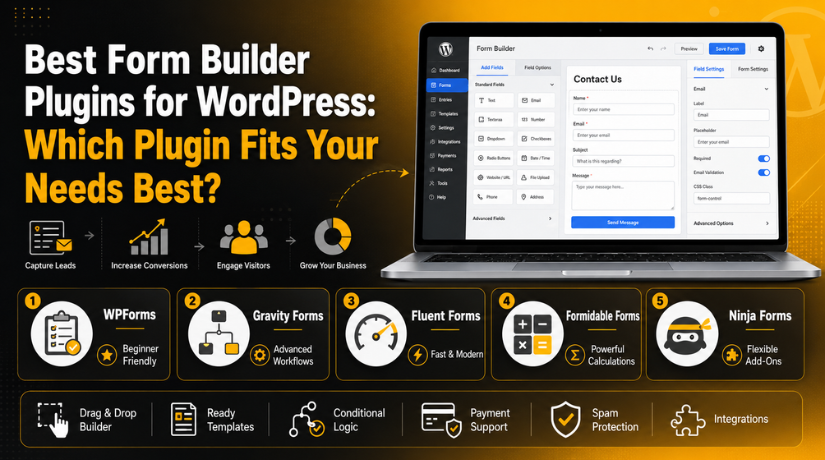
Best Form Builder Plugins for WordPress: Which Plugin Fits Your Needs Best?
Introduction
Every WordPress website needs a simple way to collect user details. A form helps visitors contact you without any extra steps. It can collect names, emails, phone numbers, messages, and service requests. A good form can also help you get leads faster. That is why choosing the best form plugin for WordPress is very important. Today, forms are not only used for contact pages. They are also used for bookings, payments, surveys, quotes, and newsletter signups. A strong WordPress form plugin can turn a basic website into a useful business tool. It helps you answer customers faster and manage requests better. It also makes your website look more professional and trusted.
Many users leave a website when forms look confusing or broken. A clean form gives users a better experience. It also helps them complete the action without stress. The best WordPress form builder should be easy, fast, secure, and mobile-friendly. It should help beginners create forms without coding. It should also support useful features for growing websites. This guide will help you understand the top form plugins WordPress users can choose today. It will also make the WordPress forms plugin comparison easier for you.
What Is a WordPress Form Builder Plugin and How Does It Work?
One tool for making forms on websites is a WordPress form builder plugin. It operates within the WordPress dashboard. It may be used to create forms without knowing any code. A basic drag-and-drop form builder is included in most plugins. You can add fields like name, email, phone, message, file upload, dropdown, and checkbox. Labels, buttons, and form options are also simple to modify. WordPress users can send messages directly to the owner of the website by installing a contact form plugin.
Additionally, some plugins save form data inside WordPress. This enables you to later review previous leads and client requests. Automatic email alerts are another feature of a form builder plugin. Both the admin and the user may receive these notifications. Third-party tools and payment fields are supported by many current form plugins. They can be linked to automation platforms, CRMs, and email marketing solutions. For business websites, this facilitates form management. The appropriate plugin facilitates the systematic collection of data. Additionally, it facilitates the safe and speedy submission of information by your visitors.
Why WordPress Form Builder Plugins Matter for Your Website
A form is not only used for contact messages. It helps your website collect leads, payments, bookings, feedback, and support requests. A good WordPress form plugin makes this process simple and fast. It helps visitors share details without calling or sending emails. The best form plugin for WordPress should also protect your site from spam. It should send alerts, store entries, and connect with useful tools. This makes your website more helpful and business-ready.
They Improve Communication With Website Visitors
Every visitor can communicate easily with forms. Your website allows users to send their information at any moment. It is not necessary for them to look up your email address. Names, emails, phone numbers, and messages can be gathered using a contact form plugin that WordPress users can rely on. Instant alarms can also be sent to the administrator. This enables you to respond to enquiries more quickly and effectively.
They Help Generate More Leads From Website Traffic
A form can turn visitors into real leads. You can place forms on service pages, landing pages, and blog posts. This helps users contact you when they are interested. The best WordPress form builder can collect clear details like service type, budget, and project needs. It can also connect with email tools or CRM platforms. This saves time and improves lead follow-up.
They Support Online Payments and Bookings
Many form plugins support payment fields. This helps collect fees, donations, bookings, and service payments. You can connect forms with Stripe, PayPal, or Square. This is useful for agencies, coaches, event websites, and service providers. A payment-ready WordPress form plugin can reduce the need for a full online store. It also makes transactions easier for users.
They Improve User Experience With Smart Forms
A user-friendly form enhances the experience. A lengthy form may mislead users and discourage submissions. Conditional logic and other clever features only display necessary fields. Long forms are broken up into smaller portions by multi-step forms. Additionally, the finest WordPress form plugin should be compatible with mobile devices. Simple buttons, uncluttered fields, and obvious labelling make it easier for users to finish forms.
They Save Time and Reduce Development Work
Form builder plugins help users create forms without coding. You can add fields, edit labels, and update settings from WordPress. This saves time and reduces developer work. Ready templates also make setup faster. The best WordPress form builder should help beginners create forms quickly. It should also support advanced needs as the website grows.
What to Look for in the Best WordPress Form Builder Plugin
Before choosing a plugin, compare the main features carefully. A proper WordPress forms plugin comparison helps you avoid the wrong choice. The plugin should match your website goals, budget, and future needs. It should be easy to use, secure, mobile-friendly, and regularly updated. It should also support spam protection, email alerts, entries, payments, and integrations.
Easy Drag-and-Drop Builder
A drag-and-drop builder helps you create forms without code. You can add, move, and edit fields easily. This is useful for beginners and small business owners. A simple builder saves time and makes form creation stress-free.
Ready-Made Templates
Templates help you build forms faster. You can choose contact forms, quote forms, signup forms, and feedback forms. Then you can edit fields as needed. This saves time and gives your form a professional structure.
Conditional Logic
Conditional logic makes forms smarter. It shows or hides fields based on user answers. This keeps forms short and clean. It is useful for quote forms, surveys, bookings, and support forms.
Payment Gateway Support
Payment support is important for business websites. It helps collect payments through forms directly. Look for support for Stripe, PayPal, or Square. This feature is useful for bookings, donations, orders, and service payments.
Spam Protection
Spam protection keeps your form entries clean. Look for CAPTCHA, reCAPTCHA, hCaptcha, Akismet, or honeypot protection. These tools help block fake submissions. Good spam control saves time and protects your inbox.
Email Notifications and Entry Management
Email notifications help you respond quickly. The admin gets an alert after each submission. Entry management stores form data inside WordPress. This helps you review old leads and missed inquiries later.
Third-Party Integrations
Integrations connect forms with other tools. Your forms can send leads to Mailchimp, HubSpot, Google Sheets, or CRM tools. This saves manual work and improves business automation.
Mobile-Friendly Design
Your form must work well on phones and tablets. Many users submit forms from mobile devices. A mobile-friendly form improves user experience. It also helps increase form completion rates.
Performance and Security
A form plugin should not slow your website. It should be lightweight, secure, and regularly updated. A safe plugin protects user data and keeps your website stable.
List Of 5 Best Form Builder Plugins for WordPress (Top Picks)
Choosing the right WordPress form plugin can make form creation easier. It can help you collect leads, messages, payments, and bookings. Each plugin has different features, pricing, and use cases. This section covers five top form plugins WordPress users can consider. This list will also help you with a clear WordPress forms plugin comparison before choosing one.
#1 WPForms
WPForms is a popular and easy contact form plugin WordPress users often choose. It helps beginners create forms without writing code. You can build contact forms, payment forms, survey forms, and newsletter forms. Its drag-and-drop builder makes the process simple. WPForms also offers templates, spam protection, payment options, and email alerts. It is a strong choice for small businesses and bloggers.
Features
- Drag-and-drop form builder
- Ready-made form templates
- Smart conditional logic
- Payment form support
- Spam protection and email alerts
Pros
- Very easy for beginners
- Clean and simple dashboard
- Good free version available
- Useful for lead generation
- Strong support and documentation
Cons
- Advanced features need paid plans
- Some integrations are premium only
- Limited for complex workflows
- Higher plans can be costly
- Not ideal for developer-level forms
Download Link: WPForms
#2 Gravity Forms


Gravity Forms is a premium WordPress form plugin for advanced users. It is useful for business forms, payment forms, registrations, and custom workflows. It offers a visual editor, conditional logic, automation, and many integrations. Developers also like it because it gives strong control. Gravity Forms works well for agencies and websites that need more than a simple contact form.
Features
- Visual form editor
- Advanced conditional logic
- Online payment collection
- Workflow automation
- Developer-friendly integrations
Pros
- Powerful and flexible
- Good for advanced workflows
- Strong integration support
- Useful for agencies
- Great for payment forms
Cons
- No free version available
- Can feel advanced for beginners
- Premium pricing may feel high
- Some features need add-ons
- Setup can take more time
Download Link: Gravity Forms
#3 Fluent Forms
Fluent Forms is a modern best WordPress form builder option for fast websites. It helps create contact forms, quizzes, surveys, payment forms, and calculator forms. Its interface is clean and easy to use. Fluent Forms also supports conditional logic, form styling, PDF generation, and many integrations. It is a good choice for users who want speed, features, and value.
Features
- Drag-and-drop form builder
- Conversational forms
- Quiz and survey forms
- Calculation fields
- Form to PDF support
Pros
- Fast and lightweight
- Modern user interface
- Good free version
- Useful for surveys
- Good value for businesses
Cons
- Advanced options need Pro
- Smaller add-on ecosystem
- Advanced settings need learning
- Some integrations are premium
- Less known than older plugins
Download Link: Fluent Forms
#4 Formidable Forms
Formidable Forms is a strong WordPress form plugin for advanced forms. It is useful for calculators, surveys, quizzes, directories, listings, and data-based forms. It can also display submitted data on your website. This makes it more powerful than a basic contact form tool. Formidable Forms is a good option for businesses and developers that need complex form features.
Features
- Drag-and-drop form builder
- Calculator form support
- Surveys and quizzes
- Advanced form views
- Conditional logic
Pros
- Great for advanced forms
- Strong calculator features
- Useful for directories
- Good for data display
- Flexible for developers
Cons
- Learning curve for beginners
- Best features need premium
- Interface may feel advanced
- Not ideal for simple forms
- Setup needs more planning
Download Link: Formidable Forms
#5 Ninja Forms
Ninja Forms is a flexible contact form plugin WordPress users can start with for free. It offers a free core plugin and paid add-ons. You can create contact forms, quote forms, payment forms, file upload forms, and business forms. Its modular system lets you add only needed features. Ninja Forms is useful for growing websites that need flexible form options.
Features
- Drag-and-drop form builder
- Free core plugin
- Official add-ons
- File upload support
- Submission export tools
Pros
- Beginner-friendly interface
- Free version available
- Flexible add-on system
- Good for basic forms
- Useful for growing websites
Cons
- Add-ons can become costly
- Advanced features need extensions
- Payment features are paid
- Pricing may confuse beginners
- Conditional logic is not fully free
Download Link: Ninja Forms
How to Choose the Right Form Builder Plugin for Your Website
Choosing the best form plugin for WordPress depends on your needs. A simple website may need only a contact form. A business website may need payments, bookings, or automation. So, do not choose a plugin only by popularity. Compare features, pricing, speed, and support first.
Choose Based on Your Form Type and Website Goal
First, decide what type of form you need. A basic contact page needs a simple contact form plugin WordPress users can manage easily. A service website may need quote request forms. An event website may need booking and payment forms. A business website may need lead forms with CRM support. Your form goal should guide your plugin choice.
Choose Based on Your Skill Level and Ease of Use
If you are a beginner, choose a simple drag-and-drop builder. WPForms, Fluent Forms, and Ninja Forms are easier for basic users. They help you create forms without coding. If you are a developer, Gravity Forms or Formidable Forms may suit you better. These plugins offer more control for advanced form setups.
Choose Based on Your Budget and Plugin Pricing
Free plugins are enough for basic contact forms. They work well for small websites with simple needs. Premium plugins are better for payments, automation, file uploads, and advanced logic. Always check yearly pricing before choosing any plugin. Some plugins also need paid add-ons for important features. This matters during any WordPress forms plugin comparison.
Choose Based on Website Speed and Performance
Your form plugin should not slow your website. A heavy plugin can affect loading speed and user experience. Choose a lightweight plugin that loads only needed files. Also check if the plugin works well with your theme. The best WordPress form builder should create smooth and fast forms on all devices.
Choose Based on Integrations and Future Growth
Check if the plugin connects with your business tools. Many websites need Mailchimp, HubSpot, Google Sheets, Zapier, or CRM support. Payment websites need Stripe, PayPal, or Square support. Also think about future needs. Choose a plugin that can grow with your website. This helps you avoid switching plugins later.
Simple Plugin Recommendation for Faster Selection
If you want a simple form builder for novices, go with WPForms. If you require sophisticated workflows and connectors, pick Gravity Forms. If you want modern forms, speed, and value, go with Fluent Forms. If you require data-based forms or calculators, select Formidable Forms. If you want basic forms and adaptable add-ons, go with Ninja Forms.
Conclusion
The right form plugin can improve your website experience. It can help you collect leads, messages, payments, and bookings. It can also save time and reduce manual work. WPForms is great for beginners. Gravity Forms is better for advanced workflows. Fluent Forms is good for speed and value. Formidable Forms works well for calculators and data forms. Ninja Forms is useful for flexible form needs. Before choosing, check features, pricing, integrations, spam protection, and support. The top form plugins WordPress users choose should match real website goals.
Need help choosing or setting up the best form plugin for WordPress? The team at 24x7WPSupport can help you install, configure, and customize your forms. We can create contact forms, quote forms, booking forms, payment forms, and lead forms for your website. We can also fix form errors, spam issues, email problems, and plugin conflicts.





Brian is a WordPress support specialist and content contributor at 24×7 WP Support. He writes practical, easy-to-follow guides on WordPress troubleshooting, WooCommerce issues, plugin and theme errors, website security, migrations, performance optimization, and integrations. With a focus on solving real website problems, Brian helps business owners, bloggers, and online store managers keep their WordPress sites running smoothly.
