
What Is the Difference Between WPForms and Gravity Forms?
Why This Comparison Matters
Choosing the right form plugin affects how your website collects leads. Forms now handle contact requests, support messages, bookings, payments, and signups. That makes the WPForms vs Gravity Forms comparison important for many site owners. Both plugins are built for WordPress and help users create forms faster. WPForms presents itself as an easy, drag-and-drop builder for fast setup. Gravity Forms positions itself as a trusted choice for professional and advanced workflows. This guide begins by showing what each plugin is and why the choice matters. For USA business websites, that choice can affect speed, workflow, and ease of use.
Why users compare them so often:
- They want simple form building without wasting setup time.
- They need forms that match business goals and user needs.
- They want the best WordPress form plugin WPForms or Gravity Forms.
What Is WPForms?
WPForms is a WordPress form builder designed for quick, no-code setup. Its official site highlights a drag-and-drop builder and pre-built templates. That makes it appealing to beginners, small businesses, and busy site owners. Users can create contact forms, surveys, donation forms, and order forms. The interface is built to feel simple from the start. In simple terms, WPForms focuses on speed, ease, and a friendly setup experience. That is one reason WPForms vs Gravity Forms for beginners is a common search topic.
What Is Gravity Forms?
Gravity Forms is also a WordPress form builder, but its focus feels deeper. Its official pages emphasize control, automation, conditional logic, payments, and secure data collection. That makes it attractive for agencies, developers, and complex business websites. It can handle basic forms, but its strength is advanced workflow building. It also suits projects that need more customization over time. This is where the difference between WPForms and Gravity Forms starts becoming clear. Later sections can compare WPForms vs Gravity Forms features and overall value. That context helps readers choose the right plugin before comparing pricing later fully.
Main Difference Between WPForms and Gravity Forms
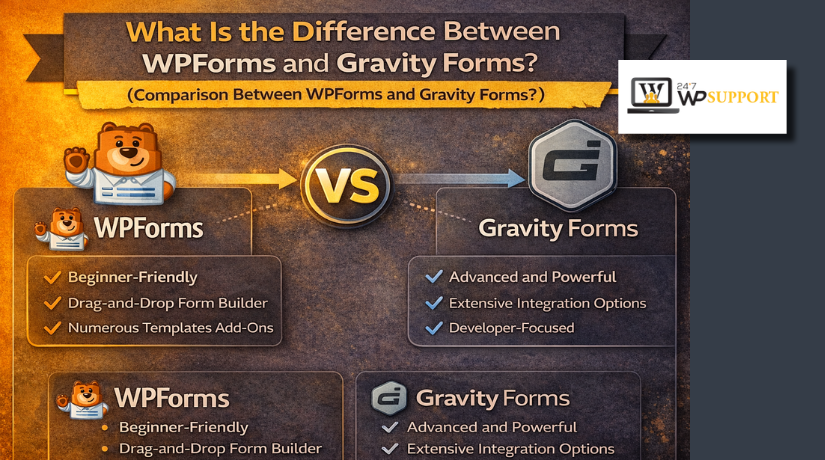
The main difference between WPForms and Gravity Forms is their overall purpose. Both plugins help users build forms inside WordPress websites with ease. They are, nevertheless, made for various user types and objectives. WPForms focuses more on simplicity, speed, and a smoother setup process. Gravity Forms focuses more on control, flexibility, and advanced form behavior. That is the biggest point in the WPForms vs Gravity Forms debate.
WPForms is made for users who want fast results with less effort. Its builder feels friendly, clean, and easy to understand from the start. You can create common forms without dealing with many technical settings. Because of this, it’s a great option for beginners and small enterprises. It works well for contact forms, lead forms, and basic site requests.
Gravity Forms takes a more advanced path from the beginning. It gives users deeper control over how forms should work. That includes stronger logic, more complex workflows, and custom setup options. It is often chosen by developers, agencies, and websites with larger needs. So, when comparing both plugins, the real difference is simple. WPForms keeps form building easier. Gravity Forms makes form building more flexible.
Ease of Use and Learning Curve
Many readers base their ultimate decision on ease of use. WPForms is often easier to use during the first setup stage. The builder feels direct and less crowded for new users. Most options are easy to find and understand without confusion. That matters a lot when building forms without technical support.
Gravity Forms is still well organized, but it feels more advanced. To fully understand its configuration, certain users might require additional time It offers more control, but that also creates a steeper learning curve. Users who already know WordPress may feel comfortable with it sooner.
For WPForms vs Gravity Forms for beginners, WPForms usually feels more natural. It reduces stress and helps users launch forms much faster. Gravity Forms is better for users who need deeper control later. So, ease depends on skill level, project type, and form complexity.
WPForms and Gravity Forms Features Comparison
When comparing features, both plugins cover the most common form needs. Each one helps users build forms for websites without much delay. Still, the real WPForms vs Gravity Forms features difference appears in depth.
WPForms gives users a smooth builder with ready-made form templates. It helps users create contact forms, quote forms, payment forms, and surveys. The layout feels clean, so form building takes less time. This makes WPForms useful for site owners who want faster results.
Gravity Forms also supports core form building, but with more control. It is built for users who need stronger logic and advanced setups. In everyday use, this clearly distinguishes Gravity Forms from WPForms.
Basic Form Building Tools
Both plugins include useful tools for standard website forms. These often include:
- Drag-and-drop field placement
- Email notifications after form submission
- File upload support for users
- Multi-page form creation
- Spam protection options
WPForms handles these tools in a simple and beginner-friendly way. Gravity Forms also offers them, but often with deeper setup options.
Advanced Features and Flexibility
Advanced features matter when a business needs more than basic forms. This is where Gravity Forms usually feels stronger for technical projects. It gives more room for custom logic, detailed workflows, and extended control. That makes it useful for larger sites and special business processes.
WPForms also offers helpful advanced tools, but its focus stays practical. It is better for users who want power without too much complexity. So, in many cases, WPForms keeps advanced tools easier to manage.
Integrations, Templates, and Entry Handling
WPForms stands out with simple templates and quicker form setup. That saves time for users building common forms on busy websites. Gravity Forms may require more planning, but it supports broader customization later.
Both plugins support integrations, payment handling, and entry management. The main difference is how those features feel during setup. WPForms favors convenience. Gravity Forms favors deeper control.
So, when users compare WPForms vs Gravity Forms, the better choice depends on need. For ease and speed, go with WPForms. For greater versatility, go with Gravity Forms.


Pricing and Overall Value
Price matters, but value matters even more over time. A plugin should match your website goals, not only your budget. This is where WPForms vs Gravity Forms pricing becomes important for buyers.
WPForms usually feels more friendly for users starting their first website. It is more manageable, quicker to set up, and easier to comprehend. That can save time, and saved time also has real value. Small business owners often care more about quick results than deep control.
Gravity Forms can feel more valuable for advanced website projects. It is often chosen when forms need more logic and custom behavior. In that case, the extra flexibility may justify the higher cost. So, pricing should always be measured against long-term business needs.
A smart pricing check should include:
- How complex your forms need to be
- How much control you need later
- How comfortable you are with WordPress tools
- How much time you can spend on setup
So, in the WPForms vs Gravity Forms comparison, value depends on use.
Which Plugin Is Better for Beginners
WPForms is the simpler option for the majority of new users. Its layout feels simple, clear, and less stressful during setup. You can create a working form without much technical knowledge. That is why WPForms vs Gravity Forms for beginners is such a common search.
WPForms facilitates quicker and less confusing progress for beginners. It suits bloggers, small businesses, and users managing their own websites. The builder is direct, and the steps feel easier to follow. That makes daily form editing less tiring for non-technical users.
Gravity Forms is still a strong plugin, but it feels different. It asks users to think more about logic and setup choices. That is useful for advanced projects, but harder for beginners. Thus, WPForms or Gravity Forms are frequently the best WordPress form plugins for novice users.
In simple terms, beginners usually need ease before flexibility. In this section, that is the primary distinction between Gravity Forms and WPForms.
Which Plugin Is Better for Advanced Users and Complex Projects
Advanced projects need more than simple fields and basic form rules. They often require custom logic, flexible workflows, and deeper control. Gravity Forms typically takes the lead in this situation.
Larger company websites, developers, and agencies all benefit from Gravity Forms. It is a strong choice when forms must handle complex actions. These may include multi-step flows, detailed conditions, and custom integrations. That makes it useful for websites with technical goals and changing needs. In many cases, this is the clearest difference between WPForms and Gravity Forms.
Gravity Forms is often better for:
- Custom business workflows
- Advanced conditional logic
- Developer-focused projects
- Complex form behavior
- Long-term flexible form building
WPForms can still support many business websites very well. It handles contact forms, quote forms, payment forms, and lead forms smoothly. Users who desire practical tools without additional setup stress will also find it to be effective. But when projects become more technical, Gravity Forms often gives more room to grow. When comparing the functionality of WPForms with Gravity Forms, that is a crucial point.
Conclusion
Your skill level and website objectives will determine which plugin is best for you. For every kind of user, there isn’t a single solution. That is why the WPForms vs Gravity Forms debate continues.
Choose WPForms if you want:
- Faster setup
- Easier form building
- Less technical work
- A better beginner experience
Choose Gravity Forms if you need:
- More control over form behavior
- Better support for complex workflows
- Stronger flexibility for advanced projects
So, what is the best WordPress form plugin WPForms or Gravity Forms? For beginners, small businesses, and users managing forms alone, WPForms is often the smarter choice. For developers, agencies, and complex form needs, Gravity Forms is often better.
The final answer is simple. WPForms wins on ease and speed. Gravity Forms wins on depth and flexibility. When comparing WPForms vs Gravity Forms pricing, features, and long-term value, the best choice depends on what your website truly needs.
If you still feel unsure about the right form plugin for your website, 24x7WPSupport can help. Our team can review your website needs, suggest the right plugin, and help you set up forms the right way for better results.





Brian is a WordPress support specialist and content contributor at 24×7 WP Support. He writes practical, easy-to-follow guides on WordPress troubleshooting, WooCommerce issues, plugin and theme errors, website security, migrations, performance optimization, and integrations. With a focus on solving real website problems, Brian helps business owners, bloggers, and online store managers keep their WordPress sites running smoothly.
