
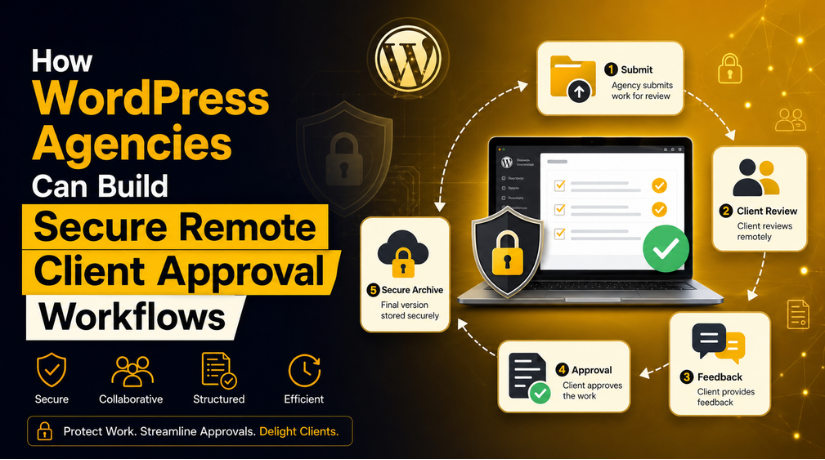
How WordPress Agencies Can Build Secure Remote Client Approval Workflows
WordPress projects often involve people working across different offices, cities, and time zones. A structured electronic signature remote work process gives agencies a practical way to obtain signatures and approvals without asking clients to print, scan, or physically deliver documents. It also helps teams separate formal authorization from informal discussions in email or chat.This matters because a website project contains several decision points. A client may need to approve the scope, confirm access responsibilities, accept a design, authorize extra work, or sign a maintenance agreement. When those decisions remain buried in message threads, misunderstandings become more likely. A defined electronic document workflow gives each approval an owner, a purpose, and a durable record.
Why Remote WordPress Projects Need Formal Approvals
A remote project can move quickly, but speed does not remove the need for accountability. Developers may begin work after a short message, while the client assumes the message only approved a discussion. A designer may treat feedback as final even though another stakeholder has not reviewed it. These gaps can create rework, delayed launches, and disputes over deliverables. Formal approvals create clear checkpoints. The agency can define what the client is accepting, who must approve it, and what happens next. This approach is especially useful for fixed-scope projects, ongoing support retainers, emergency work, migrations, and websites that handle sensitive business information.
Documents a WordPress Agency Can Place in the Workflow
Not every conversation needs a signature. Agencies should reserve formal eSign steps for decisions that affect scope, money, security, legal responsibility, or project completion. Typical documents include proposals, statements of work, maintenance agreements, confidentiality agreements, change requests, data-processing terms, launch approvals, and project handover forms. A client can also fill and sign an onboarding document that identifies the approved contacts and technical environment. Using a consistent document name and version number is important. “Website Scope – Final – Version 2” is easier to audit than several files named “final,” “final latest,” and “final corrected.”
A Practical Approval Workflow from Enquiry to Handover
1. Define the Approval Before Sending Anything
The agency should first decide what the signature will prove. A proposal signature may confirm price and commercial intent. A statement of work may authorize specific development tasks. A launch approval may confirm that the client reviewed the final site and accepted known limitations. The document should identify the project, parties, deliverables, exclusions, payment terms, and next action in plain language. Teams should avoid combining unrelated decisions into one vague approval. When each document has a clear purpose, the signer can understand the consequence and the agency can act without interpreting an ambiguous email response.
2. Assign the Correct Signers and Internal Owners
A signature from the wrong person can delay a project even when the document itself is correct. During onboarding, the agency should identify who can approve commercial terms, creative work, technical changes, and launch decisions. These roles may belong to different people. The internal project owner should verify names and email addresses before a document is sent for signature. For higher-risk documents, the agency can use two-factor authentication as an additional security control. signNow supports 2FA and maintains audit trails, which can help document the signing activity and preserve a clearer record of the process.
3. Connect Approval Status to Project Work
The team should not rely on memory to decide whether work may begin. Each approval stage should correspond to a project status such as “awaiting signature,” “approved for development,” “approved for launch,” or “handover complete.” Developers should receive a task only after the required approval is recorded. If the client requests a change after approval, the project manager can document the effect on cost and delivery before sending a change request for signature. This creates a simple control: discussions can continue freely, but work that changes the agreed baseline starts only after clear authorization.
Applying the Workflow to Common WordPress Services
Website Design and Development
A development project benefits from approvals at several milestones. The client can sign the initial scope before discovery begins. After wireframes or page designs are reviewed, a design approval can confirm that development may proceed. A separate change request can cover pages, integrations, or functions added later. Before launch, the agency can provide a final checklist covering content, forms, payment settings, redirects, backups, and known pending items. The client’s approval should refer to a specific staging version or review date. This prevents a later change from being mistaken for part of the originally approved release.
Maintenance, Security, and Emergency Support
Maintenance agreements should state the covered websites, response terms, exclusions, billing model, and client responsibilities. For emergency support, the authorization should be short enough to avoid unnecessary delay but specific enough to define access and payment. Security work may involve administrator, hosting, database, or DNS access. The document should explain who may provide credentials, how access will be withdrawn, and whether the agency may contact third-party hosting providers. An electronic signature does not replace secure credential handling. Passwords, recovery codes, and API keys should remain outside the agreement and should never be placed in ordinary project documents.
WooCommerce and Business-Critical Integrations
WooCommerce projects may affect payments, taxes, shipping, inventory, subscriptions, and customer communications. An approval should identify the exact store environment and the systems involved. Before a significant change, the client can confirm the maintenance window, backup plan, testing responsibility, and rollback conditions. After testing, a release approval can document which checkout paths and business rules were reviewed. This is particularly important when several parties manage the store, such as the WordPress agency, payment provider, fulfilment team, and the client’s finance department. Clear approvals help prevent one party’s assumption from becoming another party’s production problem.
Industry-Specific Examples for Agency Clients
Real estate website projects may require approval of listing feeds, lead-routing rules, and consent language. Healthcare projects need careful handling of patient-related information; when HIPAA applies to signNow use, a Business Associate Agreement is required. Finance clients may need named reviewers for disclosures and form changes. Legal firms may require approval before publishing practice-area content or intake questions. HR portals may use electronic documents for onboarding acknowledgements and internal policies. In each case, the WordPress agency should define the website work separately from the client’s legal or regulatory responsibility and ask qualified advisers to review industry-specific requirements.
Security and Compliance Considerations
Remote approval workflows should protect both the document and its history. According to the verified information supplied for this article, signNow uses TLS 1.2/1.3 for data in transit and AES-256 encryption for data at rest. It also provides audit trails and 2FA. Its listed compliance coverage includes ESIGN, UETA, SOC 2 Type II, GDPR, 21 CFR Part 11, PCI DSS, ISO 27001, CCPA, eIDAS, and HIPAA when a BAA is in place. These controls can support a workflow, but an agency must still configure access carefully, verify recipients, limit unnecessary data, and follow the rules that apply to the client’s industry.


Cost and Capacity for Distributed Teams
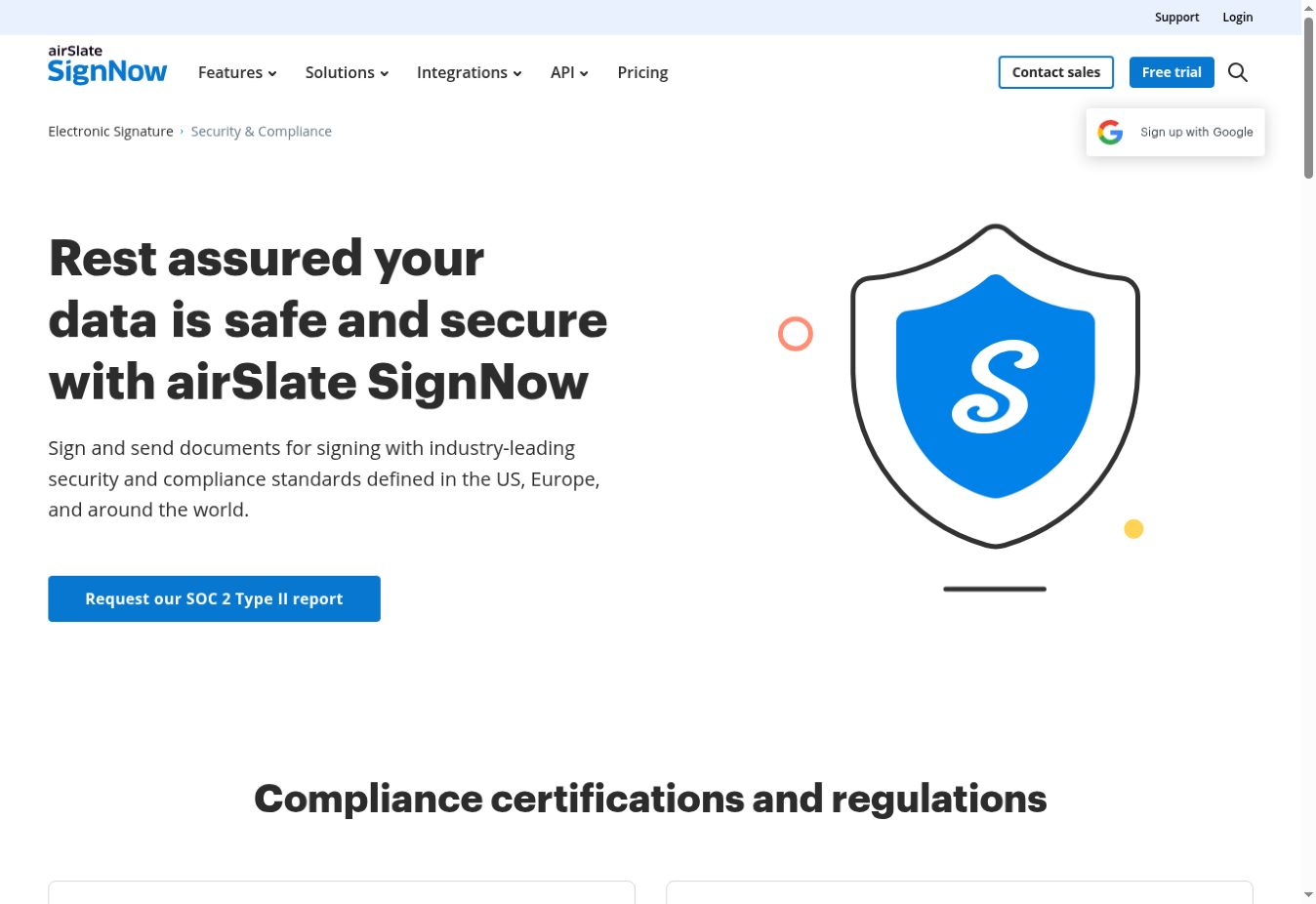
Pricing becomes important when account access must extend beyond one project manager. signNow’s Business plan starts at $8 per user per month when billed annually. The supplied product facts also state that all paid plans allow unlimited users and do not impose an envelope cap. This structure may suit agencies that want several team members involved in document workflows without routing every action through one employee. Cost should still be assessed against actual needs, including the number of projects, approval frequency, administrative ownership, security requirements, and retention practices. A lower monthly price provides little value if the agency has not defined when documents should be sent or who manages them.
How to Keep the Process Efficient
A good workflow should reduce administration rather than create another layer of delay. Agencies can start with a small set of approved document templates and assign one person to maintain them. Every document should use consistent client names, project identifiers, dates, and version labels. The team should review pending signatures at a defined interval and avoid sending duplicate copies through different channels. After completion, the signed document should be associated with the correct project record. signNow reports an average 700% first-year ROI, savings of up to six hours per employee each week, and an 80% document completion rate. Results for an individual agency will depend on its process and usage.
Common Mistakes to Avoid
The most common mistake is treating an eSignature as a substitute for a clear agreement. A poorly written document remains unclear after it is signed. Agencies should also avoid using an outdated template, sending a document to an unverified contact, mixing credentials with contract information, or starting work before the required approval is complete. Another mistake is requesting signatures for minor discussions that only need a project comment. Excessive formality can slow collaboration and encourage signers to approve documents without reading them. The objective is to apply formal approval at meaningful risk and decision points while keeping ordinary communication simple.
Frequently Asked Questions
Are electronic signatures valid for remote WordPress service agreements?
Electronic signatures can support U.S. agreements under the ESIGN Act and UETA, but validity depends on the document, transaction, consent process, and applicable law. A WordPress agency should obtain legal advice for high-value, regulated, or unusual agreements instead of assuming every document can use the same process.
Which WordPress project documents should be sent for signature?
Use signatures for documents that approve scope, price, responsibility, risk, or final delivery. Common examples include statements of work, maintenance agreements, confidentiality agreements, change requests, launch approvals, and handover records. Routine design comments and everyday task updates normally do not require a formal signature.
Does an eSignature replace client identity verification?
No. The agency should still confirm that the recipient has authority to approve the document and that the email address is correct. For sensitive or higher-risk agreements, additional authentication may be appropriate. signNow provides 2FA and audit trails that can support this part of the process.
Can signNow be used for healthcare-related document workflows?
signNow lists HIPAA among its compliance coverage, but a Business Associate Agreement is required when HIPAA applies. The agency and healthcare client must also control what information enters the document, who can access it, and how the overall WordPress system handles protected health information.
How should a remote agency store completed approvals?
Associate each completed document with the correct client, project, date, and version. Limit access to people who need it and follow the agency’s retention policy. The project record should make it easy to identify what was approved without relying on private inboxes or searching through unrelated chat messages.
When should an agency request a new signature after a change?
Request a new approval when a change affects scope, price, delivery date, security responsibility, integrations, or the accepted launch baseline. Small clarifications can remain in the project record. The deciding question is whether the change alters an obligation or risk that the earlier signed document defined.
Related posts:





Brian is a WordPress support specialist and content contributor at 24×7 WP Support. He writes practical, easy-to-follow guides on WordPress troubleshooting, WooCommerce issues, plugin and theme errors, website security, migrations, performance optimization, and integrations. With a focus on solving real website problems, Brian helps business owners, bloggers, and online store managers keep their WordPress sites running smoothly.
