
HTTP vs HTTPS in WordPress: What Is the Difference?
Why This Difference Matters for Every WordPress Site
Many WordPress users see two similar website versions online. One starts with HTTP. The other starts with HTTPS. At first glance, both may look the same. But they do not work in the same way.
Understanding http vs https in WordPress is important for every site owner. It affects website security, visitor trust, and browser behavior. It also affects how safe your site feels to users.
Today, most visitors expect a secure website connection. If your site still uses HTTP, browsers may warn users. That warning can make visitors leave your website quickly. It can also reduce trust before they view your content.
This is why the difference between http and https in WordPress matters so much. It is not only a technical setting. It is also part of user experience and website safety.
This topic matters most for pages that handle private details, such as:
- WordPress login pages
- Contact forms
- Checkout pages
- Account registration forms
A secure setup helps protect data while users browse your site.
What HTTP Means in a WordPress Website
HTTP stands for HyperText Transfer Protocol. It is the standard method used to move website data. It sends information between a visitor’s browser and your server.
In a WordPress website, HTTP allows pages to open normally. But there is one major problem. HTTP does not protect the data during transfer. That means the connection is not secure.
This is one reason why WordPress site says not secure in some browsers. The website may still load, but the connection lacks protection. For modern websites, that is a serious weakness.
What HTTPS Means and Why It Is Safer
HTTPS is the secure version of HTTP. The extra “S” means secure. It uses an SSL certificate to protect data during transfer.
When your website uses HTTPS, the connection becomes encrypted. This means outside users cannot easily read transferred data. That makes the website safer for both owners and visitors.
A strong WordPress HTTPS setup helps protect logins, forms, and user details. It also improves trust when users open your site. In simple terms, WordPress http to https is a move from an insecure connection to a secure one.
That is the real base of http vs https in WordPress. One is open. The other is protected.
Main Differences Between the Two on a WordPress Site
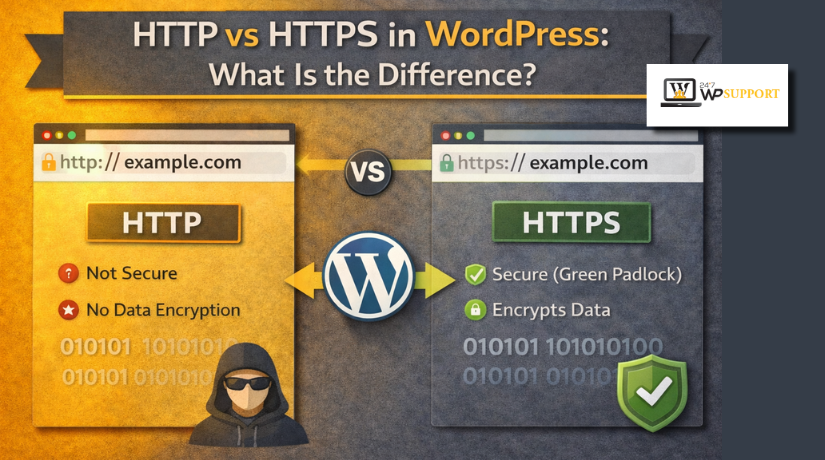
The main difference between http and https in WordPress is security. Both help browsers open website pages. But they handle data in very different ways.
HTTP sends website data without extra protection. HTTPS sends data through a secure encrypted connection. This makes a big difference for WordPress websites.
Here is a simple comparison:
| Point | HTTP | HTTPS |
| Security | Not secure | Secure |
| Data transfer | Open | Encrypted |
| Browser warning | May show warning | Usually trusted |
| User trust | Lower | Higher |
| SEO value | Weaker | Better |
- Security and Data Protection
HTTP does not protect data during transfer. This means login details can be exposed more easily. HTTPS protects that data with encryption. This makes your website safer for visitors and admins.
This matters a lot on pages such as:
- Login pages
- Checkout pages
- Contact forms
- Account pages
If users enter private details, security becomes very important.
- Browser Trust and User Confidence
Browsers now treat secure websites as the normal standard. If a site still uses HTTP, users may see a warning. That warning often says the website is not secure.
This is one reason site owners compare http vs https in WordPress today. Visitors trust a website more when it loads securely. A trusted site keeps users comfortable while browsing.
- SEO and WordPress Performance Value
HTTPS also supports better SEO value. Search engines prefer websites with secure connections. A secure site looks more reliable and professional. That can help support long-term search visibility.
Also, a proper WordPress HTTPS setup helps reduce trust issues. It also supports a more modern WordPress environment. This is important for business websites, blogs, and online stores.
Why HTTPS Is Important for Modern WordPress Websites
Today, HTTPS is no longer an extra feature. It is now a basic need for most websites. Visitors expect secure browsing from the first click.
A secure connection helps protect user details and site activity. It also helps build confidence before visitors read your content. That trust matters for leads, sales, and signups.
For this reason, WordPress http to https is a smart step. It improves security, trust, and overall website quality. When people ask about how to change http to https in WordPress, they usually want a safer and more trusted website.


In simple words, HTTP is outdated for active websites. HTTPS is the better choice for modern WordPress use.
Why a WordPress Site May Show “Not Secure”
Many site owners ask why WordPress site says not secure suddenly. This warning usually appears when the website still uses HTTP. It can also appear when HTTPS is only partly active.
The browser shows this warning to protect visitors from risk. It tells users the connection is not fully protected. That warning can reduce trust very quickly.
A WordPress site may show “Not Secure” for these reasons:
- No SSL certificate is installed on the domain
- The site still opens with an old HTTP address
- WordPress settings still use the non-secure website URL
- Images, scripts, or styles still load through HTTP
- A theme or plugin calls insecure external files
- Cache or CDN settings keep serving the old version
Mixed content is a very common reason behind this problem. This happens when the page opens with HTTPS, but some files still load with HTTP. In that case, the browser sees the page as only partly secure.
This is why the difference between http and https in WordPress matters in real use. It is not only about the website address. It also affects how every file loads on the page.
What Happens When You Move a WordPress Site to a Secure Version
Moving a site from HTTP to HTTPS involves more than one step. It is not just about installing an SSL certificate. A proper WordPress http to https move needs full setup.
First, the website must load with the secure version everywhere. Then WordPress Address and Site Address should use HTTPS. This tells WordPress to treat the secure version as the main one.
Next, old internal links and media paths may need updates. Some themes and plugins may still point to HTTP files. Those old paths can cause mixed content warnings after the change.
Redirects are also very important during this process. They send visitors and search engines to the secure version. Without redirects, both versions may stay active and cause confusion.
When people ask how to change http to https in WordPress, they often miss these details. A full WordPress HTTPS setup means checking settings, links, files, and redirects together.
Once the setup is complete, the browser sees one secure version. Visitors get a safer experience, and the site looks more trustworthy. That is the real value of moving from HTTP to HTTPS.
Important Checks After the Secure Setup
After switching to HTTPS, do not stop at the first result. A website may look secure at first. But some parts may still use old HTTP links. That is why a full WordPress HTTPS setup always needs testing.
Start by opening your homepage in a new browser tab. Check if the website loads with HTTPS automatically. Then test a few important pages one by one.
Focus on these areas first:
- Homepage
- Login page
- Contact page
- Form pages
- Checkout or account pages
If any page still opens with HTTP, the setup is incomplete. This often happens when redirects are missing or site settings remain old.
Next, check for mixed content warnings. A page may use HTTPS, but some files may still load through HTTP. These files can include images, style sheets, scripts, or font files. When this happens, browsers may still show a warning.
You should also clear all cache after the update. This includes:
- WordPress cache
- Plugin cache
- Server cache
- CDN cache
- Browser cache
Old cached files can make the website show the wrong version. This can confuse site owners during a WordPress http to https move.
Last, test your redirects properly. Type the old HTTP version in the browser. It should move to the secure version right away. This is an important step in how to change http to https in WordPress correctly.
Which One Should a WordPress Site Use?
The answer is simple. A modern WordPress website should use HTTPS. It protects data, improves trust, and supports a safer browsing experience.
The full difference between http and https in WordPress comes down to protection. HTTP sends data without security. HTTPS adds encryption and helps protect user activity.
This is also the reason why WordPress site says not secure on many old websites. Browsers now expect websites to use secure connections by default.
When people compare http vs https in WordPress, HTTPS is the better choice. It is safer, more trusted, and better for modern website use. For almost every active site today, HTTPS is the right standard.
Conclusion
Understanding http vs https in WordPress helps you make better website decisions. Both may load your site, but only one protects users properly. HTTP is the older and less secure option. HTTPS adds protection and builds stronger visitor trust. That is the real difference between http and https in WordPress. It also explains why WordPress site says not secure in many cases. For modern websites, HTTPS should be your standard setup. It protects logins, forms, and other important visitor actions. A proper WordPress HTTPS setup also helps your website look more reliable. If you need help with WordPress http to https migration or secure setup fixes, 24x7wpsupport can help you move your site safely and correctly.
FAQs
1. What is the main difference between HTTP and HTTPS in WordPress?
HTTP is not secure. HTTPS is secure and encrypted. HTTPS helps protect user data and improves trust.
2. Why does my WordPress site say not secure?
This usually happens when your site still uses HTTP, has no SSL certificate, or loads mixed content.
3. Is HTTPS necessary for every WordPress website?
Yes, in most cases. HTTPS is now the standard for secure browsing and better user trust.
4. Can I change my WordPress site from HTTP to HTTPS?
Yes. You can do it by installing SSL, updating WordPress URLs, fixing mixed content, and setting redirects.
5. Does HTTPS help WordPress SEO?
HTTPS supports trust and better technical SEO. Search engines also prefer secure websites.
Related posts:
Sure Shot Way to Fix 405 Method Not Allowed Error
How to Fix Destination Folder Already Exists Error in WordPress
Why and How to Use Facebook Debugger to Fix Image Issues in Shared Posts?
How to Fix the Mailchimp Form Not Working Issue on WordPress
How to Fix File and Folder Permissions Error in WordPress

Brian is a WordPress support specialist and content contributor at 24×7 WP Support. He writes practical, easy-to-follow guides on WordPress troubleshooting, WooCommerce issues, plugin and theme errors, website security, migrations, performance optimization, and integrations. With a focus on solving real website problems, Brian helps business owners, bloggers, and online store managers keep their WordPress sites running smoothly.
