
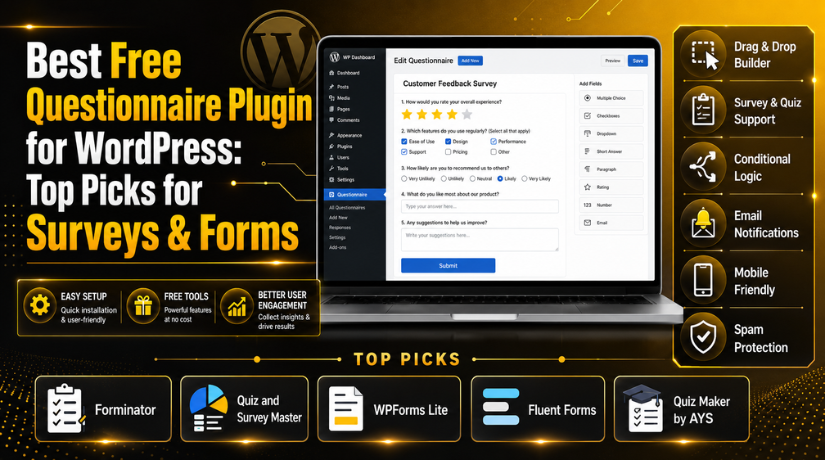
Best Free Questionnaire Plugin for WordPress: Top Picks for Surveys & Forms
Introduction
A website should not only show information to visitors. It should also collect useful details from them. This is where a questionnaire plugin for WordPress becomes very helpful. It allows you to ask questions, collect answers, and understand visitor needs better. Many business owners use questionnaires to collect feedback, leads, service requests, and user opinions. Bloggers use them to improve content ideas.
Online stores use them to understand buyer choices. Service websites use them to collect project details before contact. A good WordPress questionnaire plugin can make this process simple and fast. You do not need coding skills to create useful forms. You can build questions with fields, choices, ratings, and text boxes. A best free questionnaire plugin for WordPress helps small websites start without extra cost. It gives basic tools to create surveys, feedback forms, and simple quizzes.
This is useful for beginners and growing businesses. Many users first look for a free survey plugin WordPress option. They want easy setup, clean design, and simple response collection. A questionnaire also improves user engagement on your website. Visitors feel involved when they can share their thoughts. Their answers can help you improve products, services, and content. This makes your website more useful and more user-focused.
What Is a Questionnaire Plugin in WordPress and How Does It Help?
A WordPress questionnaire plugin is a tool for creating question-based forms. It lets you add questions to your WordPress website easily. These questions can collect answers from visitors, customers, students, or clients. You can use it for surveys, quizzes, feedback forms, and lead forms. A WordPress survey plugin free option is useful for simple data collection. It helps you create forms without hiring a developer. Most plugins include fields like name, email, phone, dropdowns, checkboxes, and radio buttons. Some plugins also support ratings, file uploads, and long answers. A best WordPress form plugin can also send responses to your email.
Some plugins store entries inside the WordPress dashboard too. This makes it easy to check and manage answers later. A questionnaire plugin works like a bridge between you and visitors. It helps you ask the right questions at the right time. You can place the form on pages, posts, sidebars, or landing pages. Many plugins also support shortcodes and blocks. This makes placement easy for non-technical users.
What Are the Main Uses of a Questionnaire Plugin in WordPress?
A questionnaire plugin for WordPress can support many website goals. It helps you collect details from visitors in a clear way. You can use it for feedback, surveys, quizzes, leads, and service forms. A good WordPress questionnaire plugin makes this process simple for beginners. You do not need custom coding or complex tools. You can create questions, publish forms, and collect answers quickly. Many website owners search for the best free questionnaire plugin for WordPress because they need a simple starting point. Free plugins are useful for small websites and growing businesses. They help collect useful data without extra cost.
Customer Feedback Forms Help Businesses Improve Their Services
Customer feedback is one of the best uses of a questionnaire plugin. You can ask customers about their service experience. You can also ask what they liked or disliked. This helps you find weak points in your service process. A WordPress survey plugin free tool can collect feedback after each order or service. You can ask simple questions with rating fields and comment boxes. For example, you can ask about support quality, delivery speed, or website experience. These answers can help you make better business decisions. They also show what customers expect from your brand. A well-designed feedback form should be short and clear.
Website Experience Surveys Help You Understand Visitor Problems
A website experience survey helps you understand user behavior better. Visitors may face issues with navigation, speed, layout, or content. A WordPress questionnaire plugin can collect these details easily. You can ask users if they found the needed information. You can also ask whether the website loaded fast enough. These answers help you improve the website experience. A free survey plugin WordPress tool is helpful for this purpose. It allows you to collect answers directly from real visitors. This is better than guessing what users need. You can place the survey on landing pages, blog posts, or service pages. Simple questions can show where users face confusion.
Product Recommendation Questionnaires Help WooCommerce Stores Guide Buyers
WooCommerce stores can use questionnaires to guide product selection. Many buyers do not know which product suits them best. A questionnaire plugin for WordPress can ask about their needs first. Then, the store owner can suggest better product options. For example, a clothing store can ask about size, color, and style. A skincare store can ask about skin type and concerns. A tech store can ask about budget and feature needs. This makes shopping easier for visitors. It can also improve buyer confidence before checkout. A best WordPress form plugin can collect these answers clearly. Some advanced plugins may also support conditional question paths.
Lead Generation Forms Help Businesses Collect Better Client Details
Lead generation is another important use of questionnaire plugins. Many service websites need client details before making contact. A normal contact form may not collect enough information. A WordPress questionnaire plugin can ask targeted questions first. You can ask about name, email, phone, budget, timeline, and service needs. This helps your team understand the request before replying. A best free questionnaire plugin for WordPress can work well for simple lead forms. You can place the form on service pages or landing pages. Good lead forms save time for both sides. They also help you qualify serious clients faster. A clear questionnaire can reduce back-and-forth emails. It gives your team better details from the first message.
Quiz-Based Engagement Helps Blogs Keep Visitors Active
Quizzes can make a website more interactive and enjoyable. A blog can use a free quiz plugin WordPress option for engagement. Quizzes encourage visitors to answer questions and see results. This keeps users active on your website for longer. You can create knowledge quizzes, personality quizzes, or topic-based tests. For example, a WordPress blog can create a plugin knowledge quiz. A travel blog can create a destination choice quiz. A fitness blog can create a workout style quiz. Quiz-based content can also increase social sharing. Visitors often enjoy sharing quiz results with others. A quiz can also collect email leads when used correctly. This makes quizzes useful for both engagement and marketing.
Student Tests and Assessments Support Education Websites
Education websites can use questionnaire plugins for simple tests. Teachers can create assessments, practice questions, and course quizzes. A free quiz plugin WordPress tool can help with this need. It allows students to answer questions directly on the website. Some plugins also show scores or results after submission. This is useful for online classes and training websites. You can add multiple-choice questions, true-or-false questions, and short answers. A WordPress survey plugin free option may also work for simple assessments. These plugins help teachers save time.
Appointment and Service Inquiry Forms Make Communication Easier
Service businesses need clear details before booking appointments. A questionnaire can collect these details in advance. Clinics, agencies, consultants, and local businesses can use it. A questionnaire plugin for WordPress can ask about service type, preferred time, location, and concerns. This helps the business prepare before contacting the client. It also makes the visitor feel guided and supported. A best WordPress form plugin can make this form easy to manage. You can send form details to your email automatically. You can also store responses inside WordPress, depending on the plugin.
Market Research Surveys Help Businesses Understand Customer Demand
Market research is useful before launching new services or products. A free survey plugin WordPress tool can help collect opinions. You can ask users about needs, pricing, features, and expectations. This helps you test ideas before spending more money. A WordPress questionnaire plugin can collect answers from existing visitors. You can also share the survey link through email or social media. These answers can guide future business decisions. For example, you can ask which service users need most. You can also ask what problems they want solved first.
Features to Look for in a Free Questionnaire Plugin for WordPress
Choosing the right plugin is very important. Not every free plugin offers the same features. The best free questionnaire plugin for WordPress should be easy, flexible, and reliable. It should help you create forms without technical stress. It should also collect responses safely and clearly. Before choosing a plugin, check its features carefully. Some plugins are best for simple forms. Some are better for surveys, quizzes, or advanced forms. Your choice should match your website goal. A plugin with too many features may feel confusing. A plugin with too few features may limit your work later. The best choice should balance ease, speed, and useful options.
Easy Drag-and-Drop Builder for Faster Form Creation
A drag-and-drop builder helps beginners create forms quickly. You can add fields without touching code. This makes form creation easy for non-technical users. A good WordPress questionnaire plugin should offer a clean builder. You should be able to add, remove, and arrange questions easily. This saves time and reduces setup mistakes. It also helps you create better forms faster. A drag-and-drop builder is useful for business owners, bloggers, and teachers. You can build forms without hiring a developer. This is one reason many users prefer a best WordPress form plugin with visual editing.
Multiple Question Types for Better User Responses
A questionnaire needs different question types for better answers. Simple text fields are not enough for every form. A good plugin should support short answers and long answers. It should also include checkboxes, dropdowns, radio buttons, and ratings. Email and phone fields are also useful for lead forms. Multiple question types make your form more flexible. They also help visitors answer questions quickly. For example, radio buttons work well for single-choice answers. Checkboxes work well for multiple selections. Rating fields work well for feedback forms. A free survey plugin WordPress option should include enough fields for basic surveys.
Ready-Made Templates Save Time for Beginners
Ready-made templates help users create forms faster. Many beginners do not know where to start. Templates give a simple structure for common forms. You can use templates for feedback, surveys, quizzes, and contact forms. Then, you can edit questions based on your needs. This saves time and keeps the form organized. A best free questionnaire plugin for WordPress should offer useful templates. Templates are also helpful for agencies and busy teams. They can create forms quickly for different website pages. A good template should be simple, clean, and easy to customize.
Conditional Logic Makes Questionnaires More Personal
Conditional logic is a useful feature for smart forms. It shows or hides questions based on user answers. This keeps the questionnaire short and focused. For example, if a user selects “Yes,” another related question appears. If they select “No,” that question stays hidden. This improves the user experience and reduces form length. A questionnaire plugin for WordPress with conditional logic can feel more personal. It also helps collect more accurate answers. Some free plugins offer limited conditional logic. Advanced rules may require a paid version. Still, this feature is helpful for growing websites.
Email Notifications and Entry Management Keep Responses Organized
Email notifications help admins respond faster. When someone submits a questionnaire, the admin gets an alert. This is useful for leads, support requests, and inquiries. Entry management is also important. It stores submitted answers inside WordPress. This helps you review, filter, and manage responses later. A WordPress survey plugin free tool should offer basic notification settings. Some plugins may require paid plans for advanced entry storage. Before choosing any plugin, check this feature carefully. Response management is very important for business websites. Without it, you may miss useful visitor information.
Spam Protection Keeps Your Questionnaire Safe and Clean
Spam protection is important for every public form. Bots can submit fake entries through website forms. This can fill your inbox with useless messages. A good WordPress questionnaire plugin should offer spam control. Common options include CAPTCHA, reCAPTCHA, honeypot, and anti-spam filters. These tools help block fake submissions. Spam protection also keeps your response data clean. It saves time and protects your website reputation. A best WordPress form plugin should make spam settings easy to enable. Always test spam protection before publishing your form.
Mobile-Friendly Design Helps Visitors Submit Forms Easily
Many users visit websites from mobile phones. Your questionnaire must work well on every screen size. A mobile-friendly form improves the user experience. Visitors should read questions clearly and submit answers easily. If the form looks broken, users may leave quickly. A free survey plugin WordPress option should support responsive design. This means the form adjusts to phones, tablets, and desktops. Buttons should be easy to tap. Fields should not overlap or look too small. Always test your questionnaire on mobile before publishing.
Export Options and Page Builder Support Improve Flexibility
Export options help you download questionnaire responses. You can use exported data for reports and planning. Many businesses need CSV or spreadsheet exports. This makes it easier to review answers with teams. Page builder support is also useful. The plugin should work with Gutenberg, Elementor, widgets, and shortcodes. This helps you place forms anywhere on your website. A best free questionnaire plugin for WordPress should be easy to embed. You should not need complex steps to publish a form.
List Of 5 Best Free Questionnaire Plugin for WordPress (Top Picks)
Choosing the best free questionnaire plugin for WordPress depends on your website goal. Some plugins are best for simple forms. Some plugins work better for surveys, quizzes, and assessments. A good WordPress questionnaire plugin should be easy to use. It should also support useful question fields, mobile design, and response management. Many website owners search for a free survey plugin WordPress option because they want useful features without extra cost. Free plugins can help small businesses, bloggers, teachers, agencies, and store owners. They can collect feedback, leads, reviews, and quiz answers. Below are five useful plugins for creating questionnaires in WordPress.
#1 Forminator
Forminator is a powerful questionnaire plugin for WordPress for forms, quizzes, polls, and feedback forms. It is useful for users who want one plugin for many form needs. You can create contact forms, survey forms, order forms, quiz forms, and feedback forms. It is beginner-friendly and works well for business websites, blogs, and service pages.
Features of Forminator
- Drag-and-drop form builder: You can build forms without writing any code.
- Quiz and poll support: You can create quizzes and polls easily.
- Feedback form options: You can collect user opinions and service feedback.
- Payment form support: You can create simple payment forms when needed.
- Email notification settings: You can receive alerts after each submission.
Pros of Forminator
- Good all-in-one plugin: It supports forms, quizzes, and polls together.
- Beginner-friendly setup: New users can create forms with simple steps.
- Useful for engagement: Quizzes and polls help keep visitors active.
- Flexible for many websites: It suits blogs, stores, and service websites.
- Good free features: The free version offers many useful options.
Cons of Forminator


- May feel heavy for simple forms: Basic users may not need every feature.
- Some advanced features need Pro: More control may need a paid plan.
- Design may need extra styling: Some websites may need custom CSS.
- Many options can confuse beginners: New users may need time to learn.
- Advanced integrations may be limited: Some tools may need premium access.
Download Link: Forminator
#2 Quiz and Survey Master
Quiz and Survey Master is a useful WordPress questionnaire plugin for quizzes, surveys, exams, and assessments. It works well when your website needs question-based content with results. You can create surveys, knowledge tests, feedback forms, and learning assessments. It is a strong choice for education websites, training websites, and blogs that need quiz-style interaction.
Features of Quiz and Survey Master
- Quiz and survey builder: You can create quizzes and surveys easily.
- Question management options: You can organize questions based on your needs.
- Result display settings: You can show results after form completion.
- Multimedia question support: You can add images and videos in questions.
- Email and result options: You can send results or notifications easily.
Pros of Quiz and Survey Master
- Strong for quizzes: It works well for tests and assessments.
- Good for survey websites: It supports detailed question-based forms.
- Useful for education sites: Teachers can create simple online tests.
- Supports detailed questions: You can create different question flows.
- Helps improve engagement: Quiz content can keep visitors active longer.
Cons of Quiz and Survey Master
- Interface may feel detailed: Beginners may need time to understand it.
- Some add-ons are paid: Advanced needs may require premium extensions.
- Styling may need work: You may need design changes for branding.
- Not best for simple contact forms: It focuses more on quizzes.
- Advanced reporting may be limited: More reports may need paid features.
Download Link: Quiz and Survey Master
#3 WPForms Lite
WPForms Lite is a popular best WordPress form plugin for beginners. It helps you create simple forms, feedback forms, contact forms, and basic questionnaires. The plugin has a clean interface and easy setup process. It is useful for users who want a simple WordPress survey plugin free option without complex settings or advanced quiz tools.
Features of WPForms Lite
- Drag-and-drop builder: You can create forms using a visual builder.
- Basic form fields: You can add name, email, text, and choice fields.
- Email notifications: You can receive form entries by email.
- Form confirmation messages: You can show a message after submission.
- Easy embedding options: You can add forms using blocks or shortcodes.
Pros of WPForms Lite
- Very easy to use: Beginners can create forms quickly.
- Fast setup process: You can publish a form in minutes.
- Clean form design: Forms look simple and professional.
- Good for basic questionnaires: It works well for simple question forms.
- Suitable for small websites: It is enough for basic business needs.
Cons of WPForms Lite
- Advanced surveys need paid plan: Survey features are limited in free version.
- Conditional logic is limited: Smart form rules may need Pro.
- Entry storage may need Pro: Free users may rely on email entries.
- Fewer advanced fields: Complex forms may need paid features.
- Not focused on quizzes: It is better for forms than tests.
Download Link: WPForms Lite
#4 Fluent Forms
Fluent Forms is a lightweight questionnaire plugin for WordPress for contact forms, lead forms, survey forms, and simple questionnaires. It offers a clean form builder and useful customization options. It is good for business websites that need flexible forms. Users can create forms quickly without coding. It also works well for mobile-friendly forms and lead collection.
Features of Fluent Forms
- Drag-and-drop form builder: You can create forms with simple controls.
- Custom form fields: You can add fields based on your form needs.
- Responsive layout: Forms adjust well on mobile and desktop screens.
- Email notifications: Admins can receive submission alerts.
- Form styling options: You can adjust form appearance more easily.
Pros of Fluent Forms
- Clean and modern interface: The dashboard feels simple and organized.
- Lightweight form structure: It can be good for website performance.
- Good customization options: You can create different form types.
- Useful for business forms: It works well for leads and inquiries.
- Easy for beginners: New users can start without much confusion.
Cons of Fluent Forms
- Some features need Pro: Advanced options may require paid access.
- Survey tools may be limited: It is not only a survey plugin.
- Advanced reports may need upgrade: Detailed analytics may be paid.
- Learning time may be needed: More options can take time.
- Not built mainly for quizzes: It is better for forms than quiz tests.
Download Link: Fluent Forms
#5 Quiz Maker by AYS
Quiz Maker by AYS is a useful free quiz plugin WordPress users can use for interactive quizzes and tests. It helps create trivia quizzes, personality tests, knowledge tests, and true-or-false questions. It is suitable for blogs, education websites, and engagement-focused websites. It works best when your questionnaire needs quiz-style questions and result-based interaction.
Features of Quiz Maker by AYS
- Interactive quiz creation: You can create quizzes for user engagement.
- Multiple question types: You can add different question formats.
- Personality test support: You can create fun result-based tests.
- True-or-false questions: You can build simple knowledge tests.
- Custom quiz design options: You can adjust quiz style and layout.
Pros of Quiz Maker by AYS
- Good for quiz-style questionnaires: It works well for interactive tests.
- Useful for blogs: Quizzes can improve visitor engagement.
- Supports many quiz formats: You can create different quiz types.
- Good for learning websites: Teachers can create simple practice tests.
- Helps increase interaction: Visitors enjoy answering quiz questions.
Cons of Quiz Maker by AYS
- Not mainly for business forms: It focuses more on quizzes.
- Advanced features may need paid plan: More controls may require Pro.
- Design may need adjustment: Some sites may need extra styling.
- Not ideal for feedback forms: It is better for quiz content.
- May feel feature-heavy: Basic users may not need all tools.
Download Link: Quiz Maker by AYS
How to Choose the Right Questionnaire Plugin for Your WordPress Website
Choosing the right questionnaire plugin for WordPress depends on your website goal. Every website does not need the same plugin features. Some websites need simple feedback forms. Some need surveys, quizzes, assessments, or lead forms. So, you should first understand your exact form purpose. A business website may need client inquiry forms. A blog may need polls or quizzes. An education website may need tests and assessments. A WooCommerce store may need product choice forms. The best free questionnaire plugin for WordPress should match your current needs. It should also support your future growth. Do not choose a plugin only because it is popular. Choose it because it solves your real website problem.
Choose the Plugin Based on Your Main Website Goal
Your website goal should guide your plugin choice. If you need forms, quizzes, and polls together, Forminator can work well. If you need surveys and assessments, Quiz and Survey Master is useful. If you need simple forms, WPForms Lite can be a good choice. If you need flexible business forms, Fluent Forms is a strong option. If you need quiz-style content, Quiz Maker by AYS can help. A free survey plugin WordPress option should make your work easier. It should not make your setup more confusing. For example, a service website needs clear lead forms. An online course website needs quiz and result options. A blog needs engagement tools like quizzes and polls. A store may need product recommendation questions. Match the plugin with your website purpose first.
Check the Free Features Before Installing Any Plugin
Free plugins can be helpful, but features can vary. Before installing any WordPress survey plugin free, check its free feature list. Some plugins offer basic fields only. Some also include quizzes, polls, templates, or entry storage. Some important features may need a paid plan. So, check the plugin details before spending setup time. Look for form fields, email alerts, spam protection, and mobile support. Also check whether entries are stored inside WordPress. If entries are not stored, email alerts become more important. A best WordPress form plugin should offer enough free tools. It should help you create your first form without pressure. Start with the free version if your needs are simple. Upgrade later only when your website requires advanced features.
Think About Future Growth Before Making Your Final Choice
Your website may need more form features later. So, choose a plugin that can grow with you. Today, you may need a basic contact questionnaire. Later, you may need conditional logic, reports, payments, or integrations. A good questionnaire plugin for WordPress should support future upgrades. This prevents plugin switching later. Switching plugins can take time and cause data issues. It may also affect your existing forms and pages. Check whether the plugin supports add-ons or premium features. Also review its documentation and update history. A growing website needs reliable plugin support. The best free questionnaire plugin for WordPress should not only help today. It should also support tomorrow’s website needs.
Check Ease of Use for Beginners and Non-Technical Users
Ease of use matters a lot for WordPress users. Many website owners do not know coding. A good plugin should offer simple form creation. Drag-and-drop builders are very helpful for beginners. They allow users to create forms with clear steps. The dashboard should be clean and easy to understand. Settings should not feel too complex or hidden. A WordPress questionnaire plugin should let you add fields quickly. You should also edit labels, messages, and emails easily. If the plugin feels difficult, it may waste time. For beginners, WPForms Lite and Forminator can feel easier. Fluent Forms also gives a clean form-building experience. Choose a tool your team can manage without stress.
Check Speed, Performance, and Website Loading Experience
Website speed is important for visitors and SEO. A plugin should not slow down your website. Heavy plugins can add extra scripts and files. This may affect page speed and user experience. Before choosing a free survey plugin WordPress, test its impact. Create a sample form and check page loading speed. Avoid adding many form plugins at the same time. Use one plugin that handles your main needs well. A lightweight form plugin can support better performance. Fluent Forms is often preferred for flexible and clean forms. WPForms Lite can also work well for simple forms. If you need quizzes and polls, Forminator may offer more tools. Balance features with performance before making a final choice.
Check Plugin Support, Updates, and Security Status
A plugin should be actively updated and supported. Old plugins can create security and compatibility issues. WordPress, themes, and PHP versions change over time. Your plugin should keep working with these updates. Check the plugin’s update date before installing it. Also check user ratings and support replies. A reliable best WordPress form plugin should have active development. It should also follow WordPress coding standards. Security is very important for public forms. Forms collect names, emails, phone numbers, and messages. So, choose plugins with spam protection and regular updates. Also keep your plugin updated after installation. This protects your site from avoidable risks.
Conclusion
A WordPress questionnaire plugin can make your website more useful. It helps collect feedback, leads, survey answers, and quiz responses. It also improves communication between your business and visitors. Free plugins are a good starting point for most websites. They offer enough features for simple forms, surveys, and quizzes. However, the right plugin depends on your exact purpose.
A service website needs clear inquiry forms. A blog may need interactive quizzes. An education website may need tests and assessments. A store may need product recommendation forms. So, compare features before installing any plugin. Check ease of use, mobile design, spam protection, and updates. Also test the form before publishing it live. With the right tool, your questionnaire can improve user engagement. It can also help you make smarter website decisions.
Choosing and setting up the right plugin can feel confusing. Wrong settings can cause missed entries and broken forms. If you need expert help, 24×7 WP Support can assist you. Our team can help install, configure, and test your form plugin. We can also create clean questionnaires for your website needs. Whether you need surveys, feedback forms, quizzes, or lead forms, we can help. Visit 24×7 WP Support for professional WordPress plugin setup and support.





Brian is a WordPress support specialist and content contributor at 24×7 WP Support. He writes practical, easy-to-follow guides on WordPress troubleshooting, WooCommerce issues, plugin and theme errors, website security, migrations, performance optimization, and integrations. With a focus on solving real website problems, Brian helps business owners, bloggers, and online store managers keep their WordPress sites running smoothly.
