
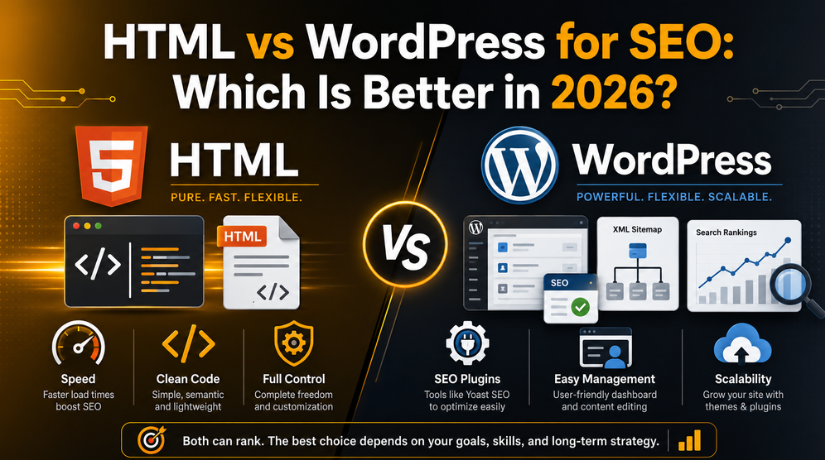
HTML vs WordPress for SEO: Which Is Better in 2026?
If you are building a website and care about ranking on search engines, one question comes up early: should you code the site by hand in plain HTML, or build it on WordPress? Both can rank well. Both are used by successful, high-traffic sites. But they take very different paths to get there, and the right choice depends on who is running the site and what they need it to do.
This guide compares HTML and WordPress purely through the lens of search engine optimization in 2026. We will look at speed, control, content management, technical SEO, maintenance, and cost, then help you decide which fits your situation. There is no universal winner, only the better tool for your goals.
The Core Difference in One Minute
A plain HTML site is a set of hand-written files served exactly as they are. Nothing is generated on the fly, so pages tend to load quickly and you control every line of code. The trade-off is that every change, from a new blog post to a fixed typo, means editing files directly.
WordPress is a content management system. It stores your content in a database and builds pages dynamically, with a dashboard for publishing, plugins for extra features, and themes for design. It trades a little raw speed for enormous convenience and flexibility. For SEO, that convenience often translates into consistency, which search engines reward.
Speed and Core Web Vitals
Page speed is a real ranking factor, and it feeds directly into Core Web Vitals, the loading and stability metrics search engines track. This is the area where hand-coded HTML has a natural edge. With no database queries and no extra scripts, a lean HTML page can load almost instantly.
WordPress pages have more moving parts, so they can be slower out of the box. The good news is that the gap is easy to close. Caching, image compression, and a quality optimization plugin bring most WordPress sites to excellent speed scores. Our guide to the best speed optimization plugin for WordPress shows how to get there without touching code.
It is also worth measuring before you worry. Running any site through a tool like Google PageSpeed Insights tells you exactly where you stand. In practice, a well-optimized WordPress site and a lean HTML site both land in the fast range, so speed alone rarely decides the winner.
Technical SEO Control
Technical SEO covers the behind-the-scenes signals that help search engines crawl and understand your site: clean URLs, meta tags, structured data, sitemaps, and canonical tags.
With HTML, you have total, direct control. You write every meta tag and every piece of structured data yourself, exactly how you want it. For an experienced developer, that precision is powerful. For everyone else, it is a lot of manual work with plenty of room for small mistakes that quietly hurt rankings.
WordPress handles most of this for you. A good SEO plugin adds meta title and description fields to every page, generates an XML sitemap automatically, and outputs structured data without any coding. If you want to see how that works in practice, our complete SEO plugin tutorial walks through the setup step by step. The result is consistent technical SEO across hundreds of pages with almost no effort.
Structured Data and Rich Results
Structured data is the code that helps search engines display rich results, such as star ratings, FAQs, and recipe cards. Adding it by hand in HTML is precise but tedious, and it must be updated every time the underlying content changes. WordPress plugins can generate and maintain this markup automatically as you edit posts, so your rich-result eligibility stays accurate without manual upkeep. For sites that rely on eye-catching search listings, that automation is a quiet but real advantage.
Crawlability and Mobile Experience
Search engines crawl mobile versions of pages first, so a responsive, easy-to-navigate site is essential. A hand-coded HTML site can absolutely be responsive, but you are responsible for writing and testing every breakpoint yourself. WordPress themes are built responsive by default, which removes a common source of mobile-SEO problems for non-developers.
Crawlability also depends on clean internal linking and a logical structure. WordPress generates category pages, tag archives, and automatic navigation that help search engines discover every page. On an HTML site, you build that link structure entirely by hand, and gaps can leave pages orphaned and unindexed. Neither approach is impossible to get right, but WordPress makes good structure the default rather than a manual task.
Managing Content at Scale
Search rankings are built on content, and the more you publish, the more chances you have to rank. This is where the two approaches diverge most sharply.
On an HTML site, every new article is a new file you create, format, and link by hand. Ten pages are manageable. Two hundred pages become a serious chore, and keeping navigation, internal links, and formatting consistent across all of them is harder still.
WordPress was built for exactly this. You write in an editor, click publish, and the system handles the URL, the archive pages, the related links, and the formatting. For content-heavy SEO strategies, blogs, guides, and resource libraries, this efficiency is decisive. Consistent internal linking alone, which WordPress makes easy, is a meaningful ranking advantage.
Permalinks and URL Structure
Clean, descriptive URLs help both users and search engines. HTML gives you direct control over file names and folder structure. WordPress gives you flexible permalink settings that produce readable URLs automatically. If you want to understand how to configure them properly, see our guide on WordPress permalinks and how to set or fix them. Either platform can produce SEO-friendly URLs, but WordPress makes it a one-time setting rather than a per-page decision.


Flexibility and Growth
SEO needs change as a site grows. You might add a blog, a store, multilingual pages, or schema for reviews and events. On an HTML site, each of these features has to be built from scratch, which takes development time and cost.
WordPress adapts through themes and plugins. Need a new content type, a related-posts section, or automatic image optimization? There is usually a setting or plugin for it. This adaptability means your SEO capabilities can grow with your ambitions instead of hitting a wall. For a site you expect to expand, that headroom matters.
Maintenance and Long-Term Health
SEO is not a one-time task. Search engines favor sites that stay fast, secure, and up to date. A hacked or broken site can lose rankings quickly.
An HTML site has very little to maintain in terms of software, which is a genuine plus. There is no database and no plugins to update. However, adding modern features or fixing anything still requires a developer, so ongoing changes are slower.
WordPress needs regular updates to core, themes, and plugins, plus backups and security monitoring. That is real work, but it is well understood and can be handled with a simple routine or a support service. The upside is that a maintained WordPress site keeps pace with SEO best practices far more easily than a static site that no one has touched in two years.
Ease of Use for Non-Developers
Here is a practical truth that gets overlooked: the best SEO platform is the one you will actually keep using. HTML demands coding knowledge for every update. If you are not a developer, that friction often means content stops getting published, and stale sites rarely climb the rankings.
WordPress lets a non-technical owner publish, optimize, and update content without writing code. That accessibility keeps a site active, and an active site sends stronger signals to search engines over time. For most business owners, marketers, and bloggers, this single factor tips the balance toward WordPress.
Cost Considerations
Cost affects SEO indirectly, because your budget determines how much content and optimization you can afford. A basic HTML site can be cheap to host but expensive to change, since you pay a developer for every update. A WordPress site has hosting and occasional plugin costs, but you can make most changes yourself for free.
Over a year of active SEO work, the do-it-yourself flexibility of WordPress usually costs less in both money and time than repeatedly hiring help to edit HTML files. For a site that rarely changes, HTML can be the leaner option. The key question is how often you expect to update and expand your content, because that is where the real cost difference shows up over time.
So, Which Should You Choose?
Choose plain HTML if you are an experienced developer, your site is small and rarely changes, and squeezing out every millisecond of load time matters more than convenience. In those cases, HTML gives you precise control and excellent baseline speed.
Choose WordPress if you plan to publish regularly, want built-in SEO tools, and need a site that a non-developer can manage and grow. For the vast majority of blogs, business sites, and online stores chasing search traffic in 2026, WordPress offers the better balance of control, capability, and ease. Its small speed disadvantage is easily fixed, while its content and technical SEO advantages are hard to replicate by hand.
The honest summary is this: HTML can be marginally faster, but WordPress makes strong SEO practical, repeatable, and sustainable for real people running real websites. If you are still deciding whether you even need extra SEO tools, our overview of WordPress SEO plugins and whether you need one is a helpful next read.
Final Thoughts
Both HTML and WordPress can reach the top of search results, so you are not choosing between winning and losing. You are choosing the workflow that will keep your site fast, well-optimized, and consistently updated. For hands-on developers with static needs, HTML is a fine choice. For nearly everyone else pursuing serious, ongoing SEO, WordPress is the more powerful and forgiving platform.
Whichever route you take, keeping your site fast, secure, and technically sound is what turns a good platform into strong rankings. If you would like expert help optimizing or maintaining your WordPress site for search, the team at 24×7 WP Support is available around the clock. Reach out today and let us help your site climb the results in 2026.



Brian is a WordPress support specialist and content contributor at 24×7 WP Support. He writes practical, easy-to-follow guides on WordPress troubleshooting, WooCommerce issues, plugin and theme errors, website security, migrations, performance optimization, and integrations. With a focus on solving real website problems, Brian helps business owners, bloggers, and online store managers keep their WordPress sites running smoothly.
