
H1 vs Title Tag in WordPress: What Is the Difference and How to Add Them?
Introduction
Many WordPress users feel confused about headings and SEO titles. They often ask about the H1 vs title tag difference. Some also wonder why WordPress shows one title on the page and another title in search results. This confusion is common, especially for beginners managing their own website.
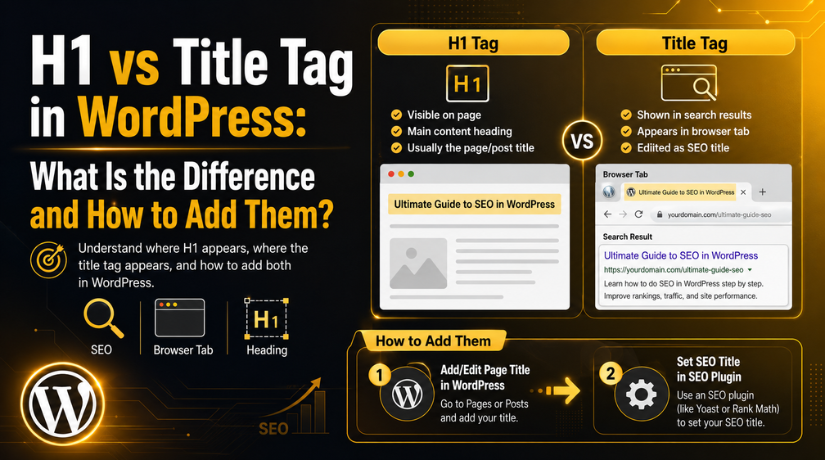
Both the H1 and title tag help explain your page topic. Additionally, they promote improved search prominence and user experience. Still, each one serves a different purpose in WordPress SEO. Visitors see the H1 on the site. The title tag typically shows up in browser tabs and search results.
Understanding SEO title vs H1 helps you create clearer WordPress pages. Additionally, it makes your content easier for search engines to comprehend. When both are written properly, users know what to expect before and after clicking your page.
What Is a Title Tag?
An HTML element used for page identification is called a title tag. It informs search engines of the primary content of your page. Additionally, it helps users in comprehending the page prior to their visit.
Many people ask, what is a title tag in simple terms? It frequently shows up in Google search results as the clickable page title. It may also appear in the browser tab when someone opens your page.
The title tag may be generated automatically in WordPress. However, SEO plugins give you more control over it. This is why many users edit the title tag in WordPress through tools like Rank Math or Yoast SEO.
A WordPress SEO title should be clear, useful, and relevant. It should describe the page topic without sounding forced. It can include the main keyword, but only naturally.
A good title tag can help improve clicks from search results. It tells users why your page is worth opening. For best results, keep it simple and connected to the content.
What Is H1 Tag in SEO?
The primary heading that is seen on a page is the H1 element. After they come, it explains the purpose of the page. The post or page title in WordPress frequently automatically becomes the H1.
Many beginners ask, what is H1 tag in SEO? It is the main heading that gives structure to your content. It helps visitors quickly understand the main topic of the page.
The H1 also helps search engines read your page structure. It should clearly match the topic and user intent. A page should normally have one main H1 heading.
Your H1 should sound natural and helpful for readers. It shouldn’t have an excessive number of keywords. A clear H1 makes the content easier to read and trust.
Main Difference Between H1 and Title Tag
The main H1 and title tag difference is placement and purpose. A title tag works outside the visible page content. The primary heading that is seen on a page is the H1 element. It helps in users’ decision to click on your page.
The H1 is located within the content of the page. It is the main heading visitors see after opening your page. It helps readers confirm they reached the right content. This makes the page easier to understand.
When comparing SEO title vs H1, think about user journey. The SEO title helps users decide to click, while the H1 guides them once they land on the page. Both should support the same topic and search intent.
Another common confusion is page title vs title tag. In WordPress, the page title often becomes the visible H1. However, the title tag can be different when edited through an SEO plugin. This gives website owners more control over search results.
A title tag can be more keyword-focused and click-friendly. An H1 can be more natural and reader-friendly. Still, both should describe the same page clearly.
Simple Example of H1 vs Title Tag
Here is a simple example of H1 vs title tag:
Title tag:
H1 vs Title Tag in WordPress: Key SEO Differences
H1 heading:
H1 vs Title Tag in WordPress: What You Need to Know
Both examples cover the same topic. The title tag sounds more search-focused. The H1 sounds more helpful for readers. This small change can improve clarity without changing the page meaning.
Should H1 and Title Tag Be the Same?
The title tag and H1 may be identical. This works well for many simple WordPress pages. They don’t necessarily have to match, though.
Search results may click on your title tag. Your H1 can guide users once they land. The main rule is simple. Keep both clear, relevant, and closely connected.
How to Add or Edit the H1 in WordPress
Adding or editing an H1 in WordPress is usually simple. The page title becomes the H1 in the majority of WordPress themes. This happens automatically when you create a post or page. Therefore, adding it by hand might not be necessary.


The H1 should clearly explain the main page topic. It should help users understand the content quickly. A clear H1 also supports better page structure. Both people and search engines will find the page simpler as a result.
Follow these simple steps to add or edit an H1:
- Log in to your WordPress Dashboard.
- Go to Posts or Pages.
- Open an existing page or create a new one.
- Add your main title in the title field.
- Click Preview to check the visible heading.
- Update or publish the page after review.
Your page title should describe the content correctly. Avoid using a title that feels unclear or too broad. For example, “SEO Guide” is not very specific. “H1 vs Title Tag in WordPress” gives better meaning.
Some WordPress themes may handle headings differently. So, always preview the page after editing it. You can also inspect the page source if needed. This helps confirm whether the main heading uses H1.
How to Add Title Tag in WordPress
Many users ask how to add title tag in WordPress. WordPress can create a title tag automatically. However, SEO plugins give you better control over it. When you want a unique search title, this is helpful.
In WordPress, a title tag is frequently referred to as the SEO title. It might show up in browser tabs and Google search results. It should describe the page topic in a clear way. Additionally, it ought to align with the user’s search goal.
You can edit the WordPress SEO title using plugins like Rank Math, Yoast SEO, or similar SEO tools. These plugins add SEO settings inside the page editor. From there, you can write a custom title tag.
Follow these steps to add or edit the title tag:
- Log in to your WordPress Dashboard.
- Open the post or page you want to edit.
- Scroll down to the SEO plugin settings.
- Find the SEO Title or Title field.
- Add a clear and relevant title tag.
- Check the SEO preview if available.
- Click Update or Publish to save changes.
Make sure your title tag is brief and helpful. Naturally, the major issue should be included. Do not add too many keywords in one title. A forced title can look spammy and reduce trust.
The WordPress SEO title can be different from the H1. You now have more control over how your search appears. Both should, however, support the same page topic.
H1 and Title Tag in WordPress Page Builders
Custom headers may be available with page builders like as Divi and Elementor. You can choose heading tags inside the builder settings. Make sure the main page heading uses H1. Use H2 and H3 for smaller sections. This keeps your page clean, clear, and SEO-friendly.
Best Practices for H1 and Title Tags
Using H1 and title tags correctly improves page clarity. Additionally, it makes your information easier for readers and search engines to comprehend. The distinction between the title tag and H1 is straightforward. One guides users on the page. The other guides users from search results.
Prioritize having a clear message while writing both. Don’t write just for search engines. Your title should help real users make better choices.
Follow these best practices for better WordPress SEO:
- Use one clear H1 for each main page.
- Keep the title tag short and search-friendly.
- Match both with the actual page content.
- Use keywords only where they sound natural.
- Avoid repeating the same keyword too many times.
- Make the H1 helpful for page visitors.
- Do not use vague titles like “Welcome” or “Home.”
- Keep the same search intent in both titles.
A good H1 vs title tag setup builds user trust. It also keeps your page message clear. Your title tag may attract the first click. After that click, your H1 should validate the page value.
For example, your title tag can include a strong keyword. Your H1 can sound more direct and reader-friendly. Both should still refer to the same topic. This maintains the page’s usefulness and readability.
Conclusion
Understanding SEO title vs H1 helps you manage WordPress pages better. The title tag helps users before they visit your site. The H1 helps users after they open the page.
Both should support the same topic and user intent. They do not need to match word for word. However, they should never confuse readers.
If your WordPress SEO titles, H1 tags, or on-page SEO need review,24×7 WP Support can help you fix them properly.
Related posts:
Google Analytics AI Assistant Traffic in GA4 Explained
Best WordPress Rich Snippet Plugins & Why We Should Use it?
Google Analytics Integration for WooCommerce – Why and How?
Google Console Error ‘Clickable elements too close together’ Fixed: Your Step-by-Step Guide
Google PageSpeed Insights - What It Is and Why It Is Important?

Brian is a WordPress support specialist and content contributor at 24×7 WP Support. He writes practical, easy-to-follow guides on WordPress troubleshooting, WooCommerce issues, plugin and theme errors, website security, migrations, performance optimization, and integrations. With a focus on solving real website problems, Brian helps business owners, bloggers, and online store managers keep their WordPress sites running smoothly.
