
How Do Webhooks Work in WordPress? A Beginner’s Guide
Introduction
Many WordPress websites need to work with other online tools. These tools may include CRMs, email platforms, payment apps, and shipping systems. When these tools connect well, website work becomes faster and easier. This is where webhooks become useful for site owners.
If you are asking, how do webhooks work in WordPress, the answer is simple. Webhooks send automatic updates when something happens on your website. These updates help another tool take the next action quickly.
For example, a customer may submit a contact form. WordPress can send that lead data to your CRM. A user may create an account on your website. WordPress can notify your email tool or support team. A store owner may receive a new WooCommerce order. The order details can move to a shipping or accounting tool.
This process supports better WordPress automation without daily manual work. It also helps business owners avoid delays and data mistakes. For USA-based businesses, this can improve customer response time and workflow quality.
What Is a Webhook in Simple Words?
A webhook is an automatic message between two systems. It starts when a specific event happens on your WordPress website. The website then sends useful data to another app or service.
You can think of a webhook as a real-time alert. It tells another tool, “Something happened here.” Then that tool can take action based on the received data.
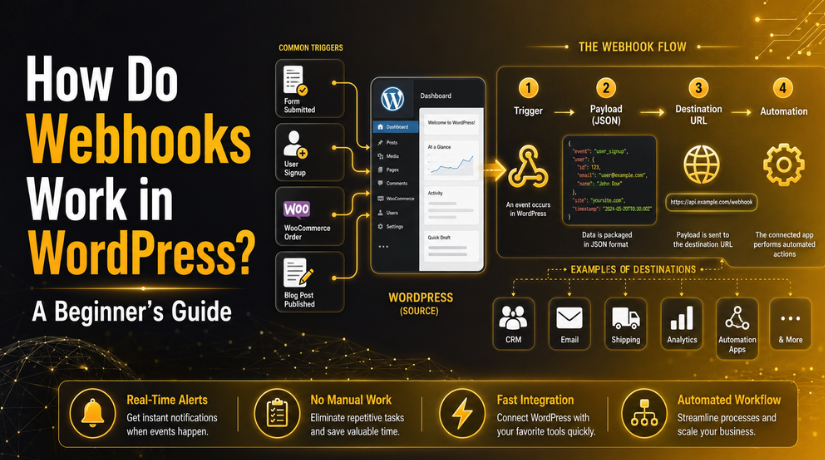
A basic webhook includes three important parts:
- Trigger: The event that starts the webhook.
- Payload: The data sent from WordPress.
- Destination URL: The link where data is received.
For example, a WooCommerce order can act as a trigger. The customer name, email, and order details become the payload. The shipping app’s webhook URL becomes the destination.
This simple flow makes WordPress webhook integration helpful for many websites. It allows WordPress to share data with trusted tools. As a result, website owners can save time and manage tasks better.
How Webhooks Work in WordPress Step by Step
Webhooks follow a simple process inside a WordPress website. They start with an action and end with an automatic task. This process helps website owners save time and avoid manual work. It also supports better WordPress automation for daily business tasks.
A webhook does not run without a reason. It needs a clear event to begin. Once that event happens, WordPress sends selected data to another tool. That tool then uses the data for the next action.
Step 1: An Event Happens on the Website
The first step starts when something happens on your website. This action becomes the webhook trigger. The trigger tells WordPress that data should be sent.
Common WordPress events may include:
- A contact form is submitted.
- A new user creates an account.
- A blog post is published.
- A WooCommerce order is placed.
- A product detail is updated.
- A membership plan is changed.
For example, a customer may place an order on your store. That order event can start a webhook right away.
Step 2: WordPress Detects the Event
After the event happens, WordPress detects it through hooks or plugins. Many plugins use WordPress actions to catch these events. Developers can also create custom functions for special needs.
This step is important because it controls when the webhook runs. If the wrong event is selected, the webhook may not work correctly. A proper setup helps send data at the right time.
Step 3: The Webhook Sends Data
Next, the webhook sends data to another destination URL. This data is often called the payload. It may include names, emails, order details, or form fields.
Most modern webhooks send data in JSON format. JSON is easy for many apps to read. The receiving tool can understand the details quickly.
Step 4: The External Tool Receives the Data
The external tool receives the webhook at its endpoint URL. It checks the data and reads the event details. Then it decides what action should happen next.
For example, a CRM can create a new lead. A shipping tool can prepare an order record. An email tool can start a welcome message.
Step 5: The Automation Runs
In the final step, the connected task runs automatically. This can reduce repeated work for website owners. It also keeps data moving between trusted tools.
This simple process makes WordPress websites more useful and efficient.
WordPress Webhooks vs WordPress API
WordPress webhooks and the WordPress API both connect tools. But they do not work in the same way. A webhook sends data after a specific event happens. An API usually gives data when another tool requests it.
You can understand it with a simple example. An API says, “Give me this data now.” A webhook says, “This event happened, so here is the data.”
A WordPress API webhook can be useful in many workflows. The webhook can alert another tool about a change. Then that tool may use the API for more details.
For example, a new order may trigger a webhook. The connected app receives the first order update. After that, it may use the API to collect full order data.
This makes both systems useful for WordPress websites. Webhooks are best for real-time alerts. APIs are better for deeper data requests.
Common Uses of Webhooks in WordPress
Webhooks are helpful when WordPress must share updates quickly. They reduce manual tasks and keep business tools connected. This is why many site owners use WordPress webhook integration.
A contact form is a common example. When a visitor submits a form, WordPress can send details to a CRM. The sales team can then follow up faster.
Webhooks can also help with user registration. When a new user signs up, WordPress can notify another tool. This may start a welcome email or support task.


Blog publishing can also use webhooks. When a post goes live, a webhook can alert marketing tools. This helps teams share content without delay.
Common webhook uses include:
- Sending contact form leads to a CRM.
- Adding users to an email list.
- Notifying teams about new signups.
- Sending post updates to marketing tools.
- Updating membership or course records.
Membership and course websites can also benefit from webhooks. A user may join, cancel, or upgrade a plan. WordPress can send that update to another trusted system.
These examples show how webhooks support simple, useful automation.
WooCommerce Webhooks for Online Stores
WooCommerce stores often need quick data sharing with other tools. Store owners may use shipping apps, CRM tools, or accounting software. Manual updates can waste time and create small mistakes. This is where WooCommerce webhooks become very useful.
WooCommerce webhooks send store updates when selected events happen. These events can relate to orders, products, or customers. Once the event happens, WooCommerce sends data to another system.
Common WooCommerce webhook events include:
- Order created
- Order updated
- Order deleted
- Product created
- Product updated
- Customer created
For example, a new order can trigger a webhook. WooCommerce can send order details to a shipping tool. The shipping team can then prepare the order faster.
A customer update can also trigger a webhook. The customer details can move into a CRM system. This helps the business manage leads and buyers better.
Product updates are also useful for connected systems. If a product price changes, another tool can receive that update. This can help keep inventory or sales records correct.
Webhooks also help with failed or pending orders. A store team can get alerts about payment issues. This helps them act before the customer leaves unhappy.
For USA-based online stores, speed and accuracy matter a lot. WooCommerce webhooks can support smoother daily store operations.
Webhook Setup in WordPress: Beginner-Friendly Options
Webhook setup in WordPress depends on your website needs. Some websites need simple automation. Others need deeper custom connections with business tools.
Beginners can start with a webhook plugin. Many plugins provide simple settings and clear fields. These plugins reduce the need for custom coding.
WooCommerce users can also use built-in webhook settings. Store owners can create webhooks from the WooCommerce settings area. They can select an event, add a delivery URL, and save it.
Common setup options include:
- Use a WordPress webhook plugin.
- Use WooCommerce built-in webhook settings.
- Use custom code with developer support.
- Use third-party automation tools.
Custom code is better for advanced workflows. A developer can connect special events and secure endpoints. This option is useful for complex business websites.
Third-party tools may also provide webhook URLs. You can paste that URL into your WordPress webhook settings. Always test the connection before using it live.
Important Webhook Security Tips
Webhook security matters because website data moves between tools. A poor setup can expose private details or break workflows. So, every webhook should be planned and tested before use.
Use only trusted tools when connecting your WordPress website. Also, check what data the webhook sends. Avoid sharing customer details that are not required.
Follow these simple safety steps:
- Use HTTPS for every webhook URL.
- Send only the data your tool needs.
- Use secret keys when the option is available.
- Test the webhook before using it live.
- Keep WordPress, themes, and plugins updated.
- Review webhook logs for failed requests.
These steps make WordPress automation safer and more reliable.
Common Webhook Problems Beginners Face
Beginners may face small issues during webhook setup. Most problems happen because of wrong settings or blocked requests.
Common webhook issues include:
- Wrong destination URL
- Webhook not active
- Plugin conflict
- Firewall blocking the request
- Missing authentication
- Server timeout
- Receiving tool rejecting the data
Start by checking the webhook URL. Then review the event trigger and delivery logs. Also, confirm that the receiving tool accepts the data format.
Conclusion
Webhooks help WordPress share data with other tools automatically. They save time, reduce manual work, and support better workflows. A correct setup can improve forms, orders, users, and business tasks.
If your webhook is not working,24×7 WP Support can help review the setup, test connections, and fix WordPress-related issues.

Brian is a WordPress support specialist and content contributor at 24×7 WP Support. He writes practical, easy-to-follow guides on WordPress troubleshooting, WooCommerce issues, plugin and theme errors, website security, migrations, performance optimization, and integrations. With a focus on solving real website problems, Brian helps business owners, bloggers, and online store managers keep their WordPress sites running smoothly.
