
Best Free WordPress Contact Form Plugins for Better Lead Generation (Complete Guide)
Introduction
A contact form is a basic need for every WordPress website. It gives visitors a simple way to contact you. They can ask questions, request quotes, book services, or send support messages. A good form also keeps your website clean and professional. That is why choosing the best free contact form plugin for WordPress matters.
A lot of website owners have their email address visible on the contact page. Although it might appear easy, this could lead to spam problems. From public pages, spam bots can obtain your email address. You might then get unsolicited communications in your mailbox every day. Using a contact form can help keep these spam bots away from your email.
The proper information can easily be gathered using a WordPress contact form. You may request the subject, message, phone number, email address, and name. Communication becomes organised and clear as a result. You don’t have to re-ask for the details that are lacking. Both you and your visitors will save time as a result.
Strong functionalities are currently available in several free plugins. Forms for bookings, quotes, reviews, and contact can all be created. A free WordPress form builder is another function of some tools. They assist you in creating forms without the need for code. Small website owners and novices can benefit from this.
We will go over the top free options in this post. Popular plugins and their key characteristics will be explained to you. Their benefits, drawbacks, and download links will also be clear to you. You can use this advice to select the ideal WordPress form plugin for your website.
Why Every WordPress Website Needs a Contact Form for Better User Communication
It Helps Visitors Contact You Quickly and Easily
A contact form gives visitors a simple way to reach you. They do not need to copy your email address. They also do not need to open another email app. They can enter their details and send the message quickly. This creates a smooth user experience. A good WordPress contact form also helps users feel more confident while contacting your business.
It Protects Your Email Address From Spam Bots
Showing your email address publicly can invite spam messages. Many bots scan websites and collect visible email addresses. After that, your inbox may receive unwanted emails daily. A free contact form plugin WordPress users install can hide your email from public pages. It also adds spam protection features. This keeps your inbox cleaner and safer.
It Helps You Collect the Right Visitor Details
Using a contact form enables you to request accurate information. Name, email, phone, subject, and message are among the fields you can add. Additionally, service type fields can be added to service websites. This facilitates a clear understanding of the visitor’s needs. Using a WordPress form builder plugin simplifies this procedure. You don’t need to ask additional follow-up questions to get pertinent information.
It Improves Lead Generation From Your Website
Visitors who fill out a contact form can become actual leads. Blog posts, landing pages, and service sites can all have forms. Visitors that are interested can easily submit their information. This assists your company in gathering fresh enquiries. Basic lead collection is supported by the greatest free contact form plugin for WordPress. It enables small firms to expand without the need for expensive tools.
It Makes Your Website Look More Professional
Your website’s trust factor increases with a well-designed contact form. A professional website should feature contact information, according to visitors. A straightforward form indicates that your company is operational. Additionally, it indicates that you are prepared to respond to enquiries. Clean forms can be made with the aid of an excellent WordPress contact form plugin. This gives your website a dependable and comprehensive appearance.
It Makes Customer Support More Organized
A contact form helps organize support requests better. You can ask users to choose a topic. You can also ask for order number, website URL, or issue type. This helps your team understand the request faster. A WordPress contact form plugin free option can handle basic support forms. It keeps communication clear and easy to manage.
It Reduces Missing Information in User Messages
Emails often miss important details. Visitors may forget to add phone numbers, order IDs, or service names. A contact form solves this issue with required fields. Users must fill important fields before submitting the form. This saves time during follow-up. A free WordPress form builder helps you create these fields easily.
It Works Well on Service and Business Websites
Business websites need clear communication paths. Contact forms help users request quotes, book calls, or ask questions. Service websites can use forms for consultation requests. Local businesses can use forms for appointment inquiries. A best WordPress form plugin can support these basic needs. It helps visitors contact the business without confusion.
What Makes a Good WordPress Contact Form Plugin for Websites
The choice of form plugin is crucial. A decent plugin should facilitate the quick and easy generation of forms. It should also maintain your website’s cleanliness, security, and usability. You should be able to gather messages without adding to your workload with the best free contact form plugin for WordPress. Additionally, it should be compatible with all devices and include rudimentary spam protection.
Easy Form Builder for Fast Contact Form Creation
An effective WordPress form builder plugin must to be user-friendly. Forms made by beginners should not require code. In this case, a drag-and-drop builder is really beneficial. You may swiftly alter labels, move sections, and add fields. As a result, setup time is reduced. Non-technical users can handle forms later with the aid of a basic constructor.
Mobile-Friendly Form Design for Better User Experience
Today, mobile phones are used by the majority of visitors. Your WordPress contact form must therefore be visually appealing on all screens. It should be simple to read and tap fields. Additionally, buttons must to be easy to see and understand. The user experience is enhanced by a form that is responsive. Additionally, it enables users to send messages without encountering formatting problems.
Spam Protection to Keep Your Inbox Clean
Spam is a common problem with contact forms. A good free contact form plugin WordPress users choose should include spam protection. It may support reCAPTCHA, honeypot, or anti-spam settings. These features block unwanted bot messages. This keeps your inbox cleaner and saves your time.
Email Notification Support for Quick Response
A contact form should send email alerts after each submission. This helps website owners reply quickly. The plugin should allow admin email setup. It should also support user confirmation emails. If emails do not arrive, SMTP setup may help. Business and service websites should have this feature.
Custom Fields for Collecting Useful Visitor Details
A good plugin should offer useful form fields. These fields may include name, email, phone, subject, dropdown, checkbox, and message. A free WordPress form builder should let you create forms based on your needs. Custom fields help collect clear details. This reduces back-and-forth communication with visitors.
Lightweight Performance for Faster Website Loading
A form plugin should not slow your website. Heavy plugins can affect page speed and user experience. The best WordPress form plugin should load only needed scripts. Lightweight plugins are better for performance. This is important for SEO, mobile users, and conversion-focused websites.
GDPR-Friendly Options for Safer Data Collection
Personal information is frequently gathered by websites using forms. Privacy alternatives are therefore crucial. Consent checkboxes should be supported by a decent contact form plugin for WordPress. It ought to facilitate connections to privacy policies as well. This aids users in comprehending how their data is managed. It also makes your website more trustworthy.
Easy Form Placement on Pages and Posts
A contact form should be easy to add anywhere. You may need it on contact pages, service pages, landing pages, or blog posts. Good plugins support shortcodes, blocks, or widgets. Some also work with page builders. This makes form placement simple for every website owner.
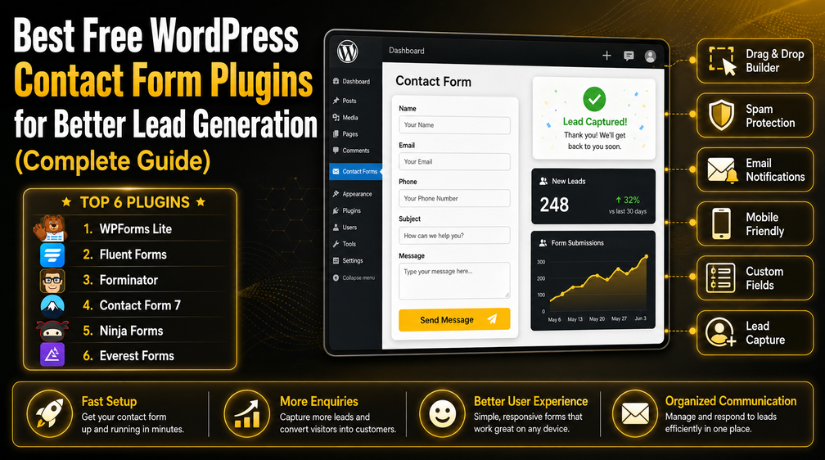
List Of 6 Best Free WordPress Contact Form Plugins (Top Picks)
#1 WPForms Lite
A straightforward and user-friendly form plugin is WPForms Lite. It is an excellent option for users that desire speedy setup. Coding is not necessary to design a simple WordPress contact form. A drag-and-drop builder, templates, and email alerts are all included. Blogs, small businesses, and service websites all benefit greatly from this plugin.
Features of WPForms Lite
- Drag-and-drop form builder
- Ready-made contact form templates
- Email notification settings
- Mobile-friendly form design
- Basic spam protection options
Pros of WPForms Lite
- Very easy for beginners
- Fast form setup process
- Clean and simple dashboard
- Good for basic contact forms
- Works well with WordPress blocks
Cons of WPForms Lite
- Advanced features need paid plans
- Limited integrations in free version
- File upload needs premium version
- Conditional logic needs paid upgrade
- Payment features are limited for free users
Download Link: WPForms Lite
#2 Fluent Forms
The WordPress form builder plugin Fluent Forms is quick and adaptable. Users who seek greater control will find it helpful. A sleek builder and responsive form layouts are provided by the plugin. Forms for service enquiries, leads, and contacts all function nicely with it. It is an excellent option for company websites that require straightforward yet effective forms.
Features of Fluent Forms
- Drag-and-drop visual form builder
- Responsive and mobile-ready forms
- Multi-column form layout options
- Built-in anti-spam protection
- Email notification settings
Pros of Fluent Forms
- Lightweight and fast plugin
- Good free feature set
- Easy for beginners to use
- Modern form design options
- Useful for lead generation forms
Cons of Fluent Forms
- Some integrations need premium version
- Advanced automation needs paid plan
- Payment features may need upgrade
- Some options may feel advanced
- Design testing may be needed with themes
Download Link: Fluent Forms
#3 Forminator
Forminator is a powerful free contact form plugin WordPress users can use for many form types. It is not limited to basic contact forms. You can create forms, polls, quizzes, and feedback forms. It is useful for marketing websites and lead collection pages. This plugin is ideal when you need more features in the free version.
Features of Forminator
- Contact form builder
- Poll and quiz builder
- Payment form options
- Feedback form creation
- Email notification support
Pros of Forminator
- Strong free version
- Supports many form types
- Good for interactive content
- Beginner-friendly form setup
- Useful for marketing campaigns
Cons of Forminator
- May feel heavy for simple forms
- Some settings need learning
- Design may need extra adjustment
- Not always ideal for lightweight sites
- Advanced integrations may need setup
Download Link: Forminator
#4 Contact Form 7
Contact Form 7 is a popular and lightweight contact form plugin for WordPress. It is useful for users who want a simple form without heavy settings. The plugin works with shortcodes and basic form tags. It is better for users who understand simple WordPress setup. It is a good choice for basic websites that need clean and simple forms.
Features of Contact Form 7
- Shortcode-based form placement
- Simple contact form fields
- CAPTCHA support for spam control
- Ajax-powered form submissions
- Custom form markup options
Pros of Contact Form 7
- Completely free to use
- Very lightweight plugin
- Good for simple contact forms
- Developer-friendly form setup
- Works with many free add-ons
Cons of Contact Form 7
- No drag-and-drop builder
- Not very beginner-friendly
- Styling may need custom CSS
- Advanced features need extra plugins
- Email delivery may need SMTP setup
Download Link: Contact Form 7
#5 Ninja Forms
A versatile WordPress form builder plugin for novices and expanding websites is Ninja Forms. It enables users to use a drag-and-drop builder to create forms. You may create registration, feedback, quote, and contact forms. It is easy to use for basic purposes and adaptable to changing needs. Because of this, small businesses and service websites might benefit from it.


Features of Ninja Forms
- Drag-and-drop form builder
- Custom form field options
- Email notification settings
- Anti-spam and reCAPTCHA support
- Form submission management
Pros of Ninja Forms
- Easy form creation process
- Good for beginners
- Clean builder interface
- Flexible for future upgrades
- Useful for business websites
Cons of Ninja Forms
- Advanced features need paid add-ons
- Add-on costs can increase later
- Some settings may take time
- Styling depends on the theme
- Not always the lightest plugin
Download Link: Ninja Forms
#6 Everest Forms
Everest Forms is a simple free WordPress form builder for small websites. It helps users create clean contact forms without coding. The plugin includes a drag-and-drop builder and ready form templates. It is useful for blogs, local businesses, service websites, and basic inquiry forms. If you need a simple WordPress contact form plugin free, Everest Forms can be a good choice.
Features of Everest Forms
- Drag-and-drop form builder
- Ready-made form templates
- Mobile responsive form design
- Email notification settings
- Live form preview option
Pros of Everest Forms
- Simple and beginner-friendly
- Clean form layout options
- Good for small business websites
- Easy form creation process
- Useful templates for quick setup
Cons of Everest Forms
- Advanced features need premium
- Free integrations are limited
- Some design options are basic
- Complex forms may need upgrade
- Payment features may need testing
Download Link: Everest Forms
How to Choose the Right Free Contact Form Plugin for Your WordPress Website
The requirements of your website will determine which plugin is best. The same form features are not necessary for every website. Some consumers require a simple form for contact. Some require feedback forms, quote forms, or lead forms. Your skill level, website objective, and future requirements should all be taken into consideration while selecting the finest free WordPress contact form plugin.
Choose WPForms Lite If You Are a Beginner
WPForms Lite is an excellent option for novices. It provides pre-made form templates and a straightforward builder. A simple contact form in WordPress may be made fast. It doesn’t require technical expertise or code. This plugin is good for quick setup. Blogs and websites for small businesses can also benefit from it.
Choose Fluent Forms If You Want Speed and Flexibility
Fluent Forms is useful when speed matters. It offers a lightweight setup and modern form options. You can create contact forms, lead forms, and inquiry forms easily. This free contact form plugin WordPress users choose is good for performance-focused websites. It is also helpful when you need flexible form layouts.
Choose Forminator If You Need Forms, Polls, and Quizzes
Forminator is a strong choice for advanced free features. It supports contact forms, quizzes, polls, and feedback forms. It works well for marketing websites and user engagement. If your website needs more than a basic form, choose Forminator. It can also help collect leads through interactive forms.
Choose Contact Form 7 If You Want a Lightweight Free Option
Lightweight websites work best with Contact Form 7. It has an easy structure and is completely free. For technical users, it is superior, though. It could take some time for novices to comprehend form tags and shortcodes. This plugin can be useful if you’re looking for a simple contact form for WordPress.
Choose Ninja Forms If You Want a Plugin That Can Grow
Ninja Forms is useful for websites that may grow later. You can start with a simple free form. Later, you can add more features using add-ons. It is a good option for service websites and business websites. This WordPress form builder plugin offers a flexible path for future needs.
Choose Everest Forms If You Want Simple Business Forms
Everest Forms is good for simple business websites. It offers clean templates and easy form building. You can create inquiry forms, feedback forms, and contact forms. It is helpful for local businesses and service providers. If you need a clean WordPress contact form plugin free, Everest Forms is worth considering.
Pick the Plugin Based on Your Main Website Goal
Before installing any plugin, check your main goal first. Do you need a basic contact form? Do you need leads from service pages? Do you need polls, surveys, or quote forms? Your answer will help you choose better. The best WordPress form plugin is the one that solves your exact need.
Check Email Delivery Before Finalizing the Plugin
Form design is not enough. You must also check email delivery. Many WordPress websites face email sending issues. This can happen because of hosting mail limits. After installing any plugin, submit a test form. If emails do not arrive, use an SMTP plugin. This helps make form alerts more reliable.
Test the Form on Mobile Before Publishing
Your form should always be tested on mobile devices. Many tourists make phone calls to businesses. The fields on your form should be simple to tap. The submit button should be clear and visible. The user experience can be enhanced with a mobile-friendly WordPress contact form. Additionally, it may boost service page form submissions.
Common Contact Form Plugin Mistakes WordPress Users Should Avoid
Many website owners install a form plugin without proper checks. This can create email, spam, speed, and layout issues. A WordPress contact form should be simple, safe, and easy to use. You should also test every form before publishing it. These common mistakes can affect leads and user trust.
Using Too Many Contact Form Plugins on One Website
Using many form plugins can create conflicts on your website. Each plugin may load its own scripts and styles. This can slow down pages and affect form design. It may also create email notification issues. Choose one reliable contact form plugin for WordPress. Then use it for all basic forms across your website.
Adding Too Many Fields in a Simple Contact Form
Long forms can stop visitors from contacting your business. Users may leave if the form asks too much. Keep your form short and focused. Ask only for important details like name, email, and message. For service websites, add only needed fields. A clean WordPress contact form can improve form submissions.
Not Adding Spam Protection to Your Contact Forms
Spam is a common issue with online forms. Bots can submit fake messages through unprotected forms. This can fill your inbox with useless emails. A good free contact form plugin WordPress users choose should support spam protection. Use CAPTCHA, reCAPTCHA, or honeypot features. These options help block unwanted form submissions.
Not Testing Email Notifications After Form Setup
Many users create forms but forget testing emails. This is a serious mistake for business websites. Your form may look perfect but still fail silently. Always submit a test message after setup. Check if the admin receives the email. The best WordPress form plugin should support clear email notification settings.
Ignoring SMTP Setup for Better Email Delivery
WordPress emails may not always reach your inbox. Some hosting servers block or delay form emails. This can cause missed leads and support requests. Use an SMTP plugin if emails are not delivered. SMTP sends emails through a trusted mail service. This makes your WordPress contact form more reliable.
Not Checking the Form Layout on Mobile Devices
Many visitors use mobile phones to browse websites. Your contact form must work well on small screens. Fields should be easy to tap and read. The submit button should be clear and visible. Test your form on mobile before publishing it. A mobile-friendly free WordPress form builder improves user experience.
Forgetting to Add a Clear Thank-You Message
A thank-you message confirms successful form submission. Without it, users may feel confused after clicking submit. They may submit the same form again. Add a simple message after every successful submission. You can write, “Thank you, we will contact you soon.” This small step improves trust and user comfort.
Not Adding a Privacy Consent Checkbox
Contact forms collect personal details from visitors. These details may include names, emails, and phone numbers. You should explain how this information will be used. Add a consent checkbox when needed. Also link your privacy policy near the form. A good WordPress form builder plugin should support privacy-friendly fields.
Placing the Contact Form Only on One Page
Many websites add forms only on the contact page. This can limit inquiries from important service pages. Add forms where users may need help. You can place them on landing pages, service pages, and quote pages. A WordPress contact form plugin free option can support simple form placement.
Not Updating the Contact Form Plugin Regularly
Outdated plugins can create security and compatibility issues. They may also stop working after WordPress updates. Always keep your form plugin updated. Updates can fix bugs and improve security. They may also add better features. The best free contact form plugin for WordPress should be actively maintained.
Conclusion
Choosing the right contact form plugin depends on your website goal. Every website has different form needs. Some users need a simple contact form. Others need quote forms, feedback forms, or lead forms. The best free contact form plugin for WordPress should match your exact needs.
WPForms Lite is a strong choice for beginners. It helps users create forms quickly without coding. Fluent Forms is better for speed and flexibility. It works well for business websites and lead forms. Forminator is useful when you need more free features. It supports forms, polls, quizzes, and feedback forms.
Contact Form 7 is good for lightweight websites. It is better for users with basic technical knowledge. Ninja Forms is useful for growing websites. You can start free and add features later. Everest Forms is a good option for simple business forms. It offers a clean setup and beginner-friendly features.
Before choosing any WordPress contact form plugin free, check your main needs. Look at ease of use, spam protection, mobile design, and email delivery. Also test the form after publishing it. A good form should help visitors contact you without confusion.
A reliable WordPress contact form can improve user communication. It can also help collect leads and support requests. It makes your website look more complete and professional. With the right free WordPress form builder, you can create useful forms without extra cost.
If you need help with WordPress forms, 24×7 WP Support can help. Our team can install contact form plugins, fix email delivery issues, reduce spam, and improve form layout. We can also check your WordPress website for plugin errors, speed issues, and user experience problems. Visit 24x7wpsupport today and get expert WordPress support for your website.
Related posts:
Top 5 Feature Rich and Free WordPress Table Plugins

Parallax Effect – What is it and How to Add it to Your WordPress Site?

Most Feature Rich and Free WordPress Table Plugins Installation with Set Up

How to Add Autocomplete Search to Your WordPress Website?

15+ WordPress Plugins for Your WooCommerce Store

Brian is a WordPress support specialist and content contributor at 24×7 WP Support. He writes practical, easy-to-follow guides on WordPress troubleshooting, WooCommerce issues, plugin and theme errors, website security, migrations, performance optimization, and integrations. With a focus on solving real website problems, Brian helps business owners, bloggers, and online store managers keep their WordPress sites running smoothly.
