
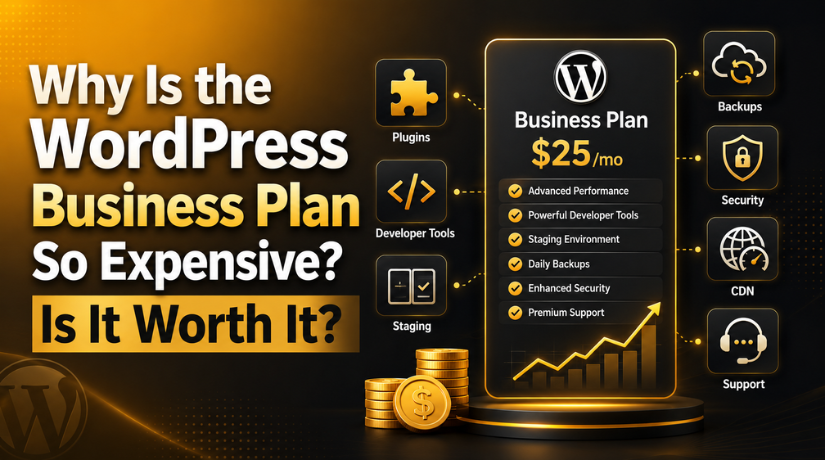
Why Is the WordPress Business Plan So Expensive? Is It Worth It?
Introduction
If you’ve been shopping around WordPress.com plans in 2026, you’ve probably stopped at the Business plan and done a double-take. At $25 per month (billed annually), it sits at a price point that can feel hard to justify — especially when the Personal plan starts at just $4 a month. So what exactly are you paying for, and is it actually worth the investment?
This guide breaks down everything you need to know about the WordPress Business plan — what’s included, why it costs what it does, who it makes sense for, and when you’d be better off going a different route entirely.
What Is the WordPress Business Plan?
WordPress.com offers several tiers: Free, Personal, Explorer, Creator, and Business (with Commerce above it for e-commerce-heavy sites). The Business plan at $25/month is the entry point for what most people would consider a “professional” WordPress.com experience. It’s the first plan that unlocks full plugin access, custom code editing, SFTP/SSH developer access, and a staging environment.
In short, it’s where WordPress.com starts behaving more like the self-hosted WordPress.org experience — while still handling the hosting, security, and infrastructure for you.
What Do You Actually Get for $25/Month?
The Business plan packs in a substantial list of features that help justify its price tag. Here’s what you’re getting:
Full Plugin and Theme Access
Lower-tier plans limit or exclude plugin installation entirely. With the Business plan, you get access to the full WordPress.org plugin directory — that’s over 59,000 plugins. You can install SEO tools like Yoast or RankMath, caching plugins, form builders, booking systems, and anything else your site needs. The same goes for themes: the Business plan supports any theme from the directory, not just WordPress.com’s curated selection.
Developer Tools
The plan includes SFTP and SSH access, WP-CLI, GitHub deployments, MySQL database access via phpMyAdmin, and PHP version switching. If you’re a developer or work with one, these tools give you the hands-on control you need without managing your own server.
Staging Environment
You can create a full staging site to test updates, design changes, and new plugins before pushing anything live. This is a feature that most self-hosted plans charge extra for or require you to set up yourself.
Real-Time Backups and Security
Business customers get real-time backups with one-click restore, Jetpack Scan for malware detection, DDoS mitigation, a web application firewall, and isolated site infrastructure. On a self-hosted setup, these protections require separate plugins and services — many of which are paid.
Performance Infrastructure
The plan includes global edge caching, a global CDN, unrestricted bandwidth, high-frequency CPUs, and automated datacenter failover. These are enterprise-grade performance features that typically cost extra elsewhere.
Advanced SEO Tools
Unlike lower-tier plans that give you limited SEO controls, the Business plan unlocks advanced meta, schema, and sitemap settings. Combined with full plugin access, you can install industry-standard tools like Yoast SEO or Rank Math to build a complete, fully optimized SEO stack. For any site competing in organic search in 2026, this capability is a significant differentiator.
Priority 24/7 Support
Business plan customers get priority support from WordPress.com’s Happiness Engineers via live chat. Response times are faster, and support staff are more technical at this tier — better equipped to help with plugin conflicts, staging deployments, and server-level issues that lower-tier users won’t encounter.
VideoPress and Media Hosting
The Business plan includes VideoPress for ad-free, high-resolution video uploads hosted directly on your site. If you publish video content, this alone can save you money on third-party video hosting services.
Why Does the WordPress Business Plan Feel So Expensive?
The sticker shock is real, and there are a few reasons why $25/month can feel steep:
The Jump from Lower Tiers Is Large
Going from the Personal plan at $4/month to Business at $25/month is a $21/month jump — that’s $252 extra per year. The plans in between don’t fully fill that gap for users who specifically need plugins or developer tools, so many people feel forced to skip straight to Business.
Competitors Appear Cheaper on the Surface
Platforms like Wix or Squarespace offer comparable mid-tier plans at lower prices. The catch is that those platforms are closed ecosystems — you’re limited to their apps, their designs, and their workflows. WordPress’s open-source plugin ecosystem is vastly larger, which is part of what you’re paying for.
Self-Hosting Looks Like a Better Deal — Until You Factor Everything In
The classic comparison: why pay $25/month to WordPress.com when you can get shared hosting for $3–$5/month and use WordPress.org for free? It’s a fair question — but it misses the full picture. On a self-hosted setup, you’ll separately need to pay for: quality backups (Jetpack Backup runs $10–$30/month), security scanning, a CDN, SSL certificates, staging environments, and developer time for maintenance. Hiring someone to manage your WordPress site can easily run $100–$400/month on top of hosting costs.
Breaking Down the True Cost of the Business Plan
At $25/month billed annually, the Business plan costs $300/year. Let’s put that in context against what you’d spend to replicate its features on a self-hosted setup:
- Managed WordPress hosting (Kinsta, WP Engine, or Cloudways): $30–$100/month
- Real-time backups (Jetpack or similar): $10–$25/month
- Security scanning and firewall: $10–$20/month
- CDN service: $5–$20/month
- Staging environment setup/plugin: $5–$15/month
That’s a rough total of $60–$180/month — or $720–$2,160/year — for a self-hosted setup that matches the Business plan’s feature set. Suddenly, $300/year looks like a reasonable bundled deal. The Business plan is expensive compared to entry-level shared hosting. It’s not expensive compared to managed hosting with equivalent features.
There’s also a hidden cost people rarely factor in: time. Setting up backups, configuring a security plugin, connecting a CDN, and creating a staging environment on a self-hosted site takes hours — and more hours whenever something breaks or needs updating. If your time has monetary value, the convenience bundled into the Business plan has real worth beyond the dollar figures.
How the Business Plan Compares to WordPress.com’s Other Tiers
To understand the Business plan’s value, it helps to see where it sits in the full lineup. As of 2026, WordPress.com’s main paid plans are Personal ($4/month), Explorer ($8/month), Creator ($16/month), Business ($25/month), and Commerce ($45/month).
The Personal and Explorer plans are best for basic sites with minimal customization needs. The Creator plan adds more design flexibility and no transaction fees on payments. But none of these plans unlock full plugin installation or developer-level access — that gate opens only at the Business tier. This is a deliberate product decision by WordPress.com: plugin access is their most premium feature because it requires a fundamentally different hosting environment to support safely. That’s a key reason the jump from Creator to Business is larger than any other step in the plan ladder.


When the WordPress Business Plan IS Worth It
The Business plan is a smart choice if you fall into one of these categories:
You Need Plugin Flexibility Without Managing Hosting
If you want to install specific plugins — for booking, memberships, forms, SEO, or marketing — but don’t want the overhead of managing a server, the Business plan delivers that combination. You get the plugin freedom of self-hosted WordPress with the hands-off infrastructure of a managed platform. Explore your WordPress hosting options to understand what you’d need to replicate this elsewhere.
Your Site Has Real Traffic or Business Stakes
For a hobby blog, $25/month is probably overkill. But if your site generates leads, sells services, or supports a team of users, the cost of downtime or a security breach far exceeds $300/year. The real-time backups and security infrastructure alone are worth the price for business-critical sites.
You Want a Staging Environment and Developer Access
The staging site feature is genuinely valuable. Being able to test changes before deploying to your live site prevents costly mistakes. Combined with SFTP, SSH, and WP-CLI access, the Business plan gives technical users everything they need without spinning up their own infrastructure.
You’re Scaling Up from a Lower Plan
If you’ve outgrown the Creator plan and need plugin access or custom code capabilities, the Business plan is the logical next step within the WordPress.com ecosystem — no migration required.
When the WordPress Business Plan Is NOT Worth It
The Business plan isn’t the right fit for everyone. Here’s when you should look elsewhere:
You’re Running a Simple Blog or Portfolio
If you don’t need plugins, custom code, or developer tools, the Creator plan at a lower price point gives you a custom domain, no ads, and plenty of storage. You’re paying for a lot of features you won’t use with the Business plan if your site is simple.
You Need Maximum Plugin and Theme Control
Even the Business plan has some limitations compared to self-hosted WordPress.org. Certain plugins that modify server-level settings or require specific configurations may not work on WordPress.com. If you need absolute freedom, managed hosting options like EasyWP or similar services give you full self-hosted control at competitive prices.
You’re Building an E-Commerce Store
If WooCommerce is your primary goal, the Commerce plan above Business is designed for that. Alternatively, self-hosted WordPress with a quality WooCommerce hosting setup often offers better plugin compatibility and pricing for stores with significant transaction volumes.
You Have Technical Resources to Manage Hosting
Developers and teams with server management skills often find better value in self-hosted setups. You can get more control, flexibility, and cost efficiency on managed VPS or cloud hosting if you have the expertise to run it.
WordPress Business Plan vs. Self-Hosted: The Real Comparison in 2026
The self-hosted vs. managed debate comes down to time and complexity versus cost. Here’s a clear breakdown:
WordPress Business Plan ($25/month): All-inclusive, no server management, automatic updates, real-time backups, global CDN, staging, priority support — everything bundled. Works best for users who want professional features without technical overhead.
Self-Hosted WordPress ($3–$100+/month depending on host): Maximum flexibility, no platform restrictions, potentially cheaper at entry level but requires managing hosting, security plugins, backup solutions, updates, and performance optimization separately. Costs scale significantly as you add quality services.
For most small businesses and content creators who need professional functionality without managing infrastructure, the Business plan offers genuinely good value. For developers and technical users managing multiple sites or large-scale operations, self-hosted setups usually win on cost and control over the long term.
It’s also worth noting that the migration path matters. If you start on WordPress.com and eventually outgrow it, exporting your content is straightforward — but re-setting up your design, plugins, and configurations on a new host takes significant time. Conversely, if you’re starting from scratch and not sure whether you want to manage hosting, starting on WordPress.com’s Business plan and migrating later is a lower-risk path than jumping straight into self-hosted.
Is the WordPress Business Plan Worth It in 2026?
For the right user, yes — the WordPress Business plan is worth it. The $25/month price reflects the genuine value of what’s bundled: a fully managed professional hosting environment with plugin freedom, developer tools, enterprise-grade security, and real-time backups. When you compare it to the cost of assembling equivalent services separately, the math often works in the Business plan’s favor.
That said, it’s not for everyone. If your needs are simple, lower-tier plans cover you well. If your needs are highly technical or e-commerce-heavy, self-hosted WordPress or the Commerce plan may serve you better.
The key is matching the plan to your actual use case — not just your budget.
Get Expert Help With Your WordPress Site
Whether you’re on the WordPress Business plan or running a self-hosted setup, keeping your site fast, secure, and well-maintained takes consistent effort. At 24×7 WP Support, we provide round-the-clock WordPress maintenance, troubleshooting, and optimization services so you can focus on growing your business — not managing your website. Get in touch today and let our WordPress experts handle the technical side for you.
Related posts:

Brian is a WordPress support specialist and content contributor at 24×7 WP Support. He writes practical, easy-to-follow guides on WordPress troubleshooting, WooCommerce issues, plugin and theme errors, website security, migrations, performance optimization, and integrations. With a focus on solving real website problems, Brian helps business owners, bloggers, and online store managers keep their WordPress sites running smoothly.
