
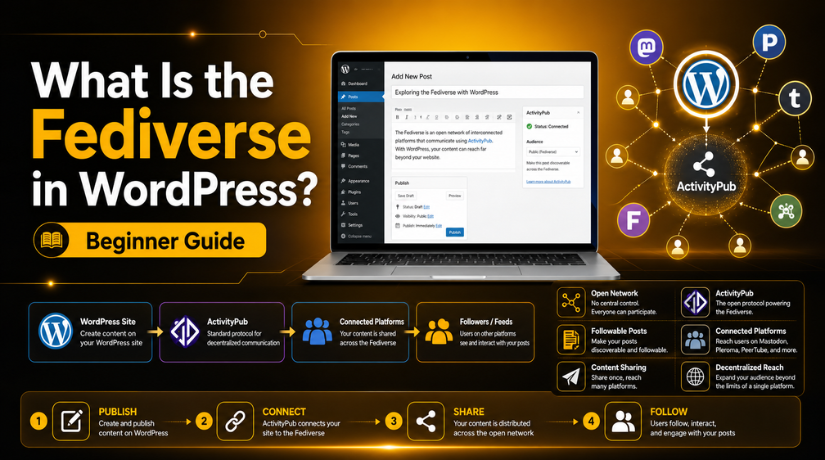
What Is the Fediverse in WordPress? Beginner Guide
Introduction
Many WordPress users now want more control over their content. They publish blog posts, service pages, and updates every week. But most websites still depend on search engines and social media platforms. This creates a common problem for website owners. Their content reach depends on platforms they do not control.
Social media platforms can change rules, reach, and visibility anytime. A post that performs well today may get ignored tomorrow. This is why many website owners now ask, what is the fediverse in WordPress and why does it matter?
The fediverse gives WordPress users another way to share content. It allows content to move across connected online platforms. This can help blogs and publishers reach more people. It also gives readers more ways to follow website updates.
For WordPress users, this idea is useful and timely. It supports open sharing and better content ownership. It does not replace SEO or normal social posting. Instead, it adds another content-sharing channel for active websites.
This beginner guide explains the idea in simple language. It helps WordPress site owners understand the basic concept first.
What Does the Fediverse Mean?
The fediverse is a network of connected online platforms. It is not one single website or one company. Instead, it includes many platforms that can communicate together.
Think of it like email. A Gmail user can send messages to Outlook users. Both platforms are different, but they can still connect. The fediverse works in a similar way for social content.
A user on one supported platform can follow another platform’s content. This means content is not locked inside one website. It can move across connected spaces through open standards.
The fediverse is different from closed social media networks. On many social platforms, users stay inside one system. Their posts, followers, and reach depend on that platform’s rules. In the fediverse, connected platforms can share updates more openly.
For website owners, this gives more content control. They can publish from their own space. They may still reach users across supported fediverse platforms.
The WordPress fediverse idea is important because WordPress powers many websites. If a WordPress site connects with the fediverse, its posts can become easier to follow outside the site. This can support bloggers, publishers, and business owners.
In simple words, the fediverse helps content travel across connected platforms. For WordPress users, it opens a new path for content visibility.
What Is the Fediverse in WordPress?
WordPress is mainly a content management system. It helps users create websites, blogs, and online stores. Many business owners use WordPress to publish helpful content. Bloggers also use it to share guides, stories, and updates.
When people ask what is the fediverse in WordPress, they usually mean one thing. They want to know how WordPress connects with open social platforms. In simple words, it means making a WordPress website part of a connected content network.
The fediverse allows supported platforms to talk with each other. WordPress can join this system with the right setup. After that, a WordPress site can become easier to follow from supported fediverse platforms.
This does not turn WordPress into a social media website. WordPress still remains your main website platform. But your posts can work more like social updates. People may follow your website from another supported platform. Then your new posts may appear inside their feed.
This can help WordPress users reach people beyond normal channels. Usually, website owners depend on search engines, email, and social media. The fediverse adds one more content-sharing path. It gives active websites another way to build visibility.
This can be useful for different WordPress users, such as:
- Bloggers who publish helpful posts often.
- Publishers who share regular news or updates.
- Business websites with active blog sections.
- Community websites that want stronger engagement.
- Personal brands that want direct content followers.
The WordPress fediverse connection can also support better content ownership. Your website remains the main source of your content. You do not need to publish only inside closed platforms. Instead, your WordPress site can share updates outward.
However, the fediverse should not replace normal SEO work. It should not replace email marketing or social sharing. It works best as an extra support channel. A strong website still needs useful content, good structure, and regular updates.
For beginners, the main idea is simple. WordPress can connect with the fediverse through supported tools. This helps your content become followable across open platforms. It can improve reach when used with a clear content plan.
Is WordPress Part of the Fediverse?
Many beginners ask, is WordPress part of the fediverse by default? The simple answer is no. WordPress is a website platform and content management system. It helps users create, manage, and publish website content.
A normal WordPress website does not join the fediverse automatically. It does not send posts to federated platforms by default. It also does not receive fediverse replies without proper support. Website owners need the right setup to enable this connection.
However, WordPress can become part of the fediverse. This happens when ActivityPub support is enabled on the site. ActivityPub is the open system used by many fediverse platforms. It allows different platforms to share updates and interactions.
This means WordPress can connect with supported fediverse platforms. Your blog posts can become easier to follow outside WordPress. Users from supported platforms may follow your website updates. They may also see new posts inside their feeds.


WordPress.com and self-hosted WordPress may work differently here. WordPress.com users may find built-in or supported fediverse options. Self-hosted WordPress users usually need a plugin for this feature. They should check plugin support, theme behavior, and site settings first.
This setup is useful, but it needs careful testing. Every website has different plugins, caching, and security rules. A proper check helps avoid setup issues later.
How the WordPress ActivityPub Plugin Helps
The WordPress ActivityPub plugin helps connect WordPress with the fediverse. It adds ActivityPub support to a WordPress website. This makes the website easier to follow from supported platforms.
The plugin allows a WordPress site to act like a profile. Visitors from supported fediverse platforms can follow site updates. When you publish a new post, followers may receive it. This helps your content reach users beyond your website.
For example, someone using a supported platform may follow your blog. After that, your new posts can appear in their feed. This makes blog updates feel more direct and social.
The plugin can also support outside interactions, based on setup. Some replies or mentions may appear as website comments. This can create a stronger link between content and readers.
The plugin is helpful for active content websites, such as:
- Blogs that publish helpful guides often.
- News websites with frequent updates.
- Publishers that want wider content reach.
- Community websites with regular posts.
- Businesses that use blogging for trust building.
The main benefit is simple. Your WordPress content can move beyond closed platforms. Your website stays the main source of your content. But readers get another way to follow updates.
Still, website owners should test it before full use. They should check performance, comments, caching, and plugin conflicts. This keeps the WordPress fediverse setup safe and stable.
How to Connect WordPress to Fediverse
Many beginners want to know how to connect WordPress to fediverse safely. The process is not very hard. But website owners should follow each step with care.
First, check your website type. WordPress.com and self-hosted WordPress may work differently. WordPress.com may offer supported fediverse options in selected plans. Self-hosted WordPress users usually need plugin-based support.
Next, check your WordPress version and active plugins. Your site should use an updated WordPress version. Old plugins may create errors during setup. A quick compatibility check can prevent many problems.
After that, install or enable ActivityPub support. The ActivityPub plugin helps WordPress connect with supported fediverse platforms. Once enabled, configure the basic profile details. These details may include your site title, author profile, and public settings.
Then publish a test post. This helps confirm the setup works correctly. Check whether your website can be followed from supported platforms. Also review how posts appear inside fediverse feeds.
Website owners should also monitor comments and mentions. Some outside replies may appear as WordPress comments. This depends on your setup and plugin behavior.
Before using it fully, test these areas carefully:
- Website speed after enabling the plugin.
- Comment behavior and spam protection.
- Caching plugin compatibility.
- Security plugin rules.
- Theme layout and post display.
Testing is very important for business websites. It helps keep the setup smooth, safe, and stable.
Should WordPress Website Owners Use the Fediverse?
The WordPress fediverse setup can help active content websites. It is useful for bloggers, publishers, and community websites. It can also help businesses that publish regular blog posts.
However, every website may not need it. A small website with no blog may not benefit much. The fediverse works best when your site publishes useful content often.
It should support your content plan, not replace it. SEO, email marketing, and social sharing still matter.
Conclusion
The fediverse gives WordPress users another content-sharing option. It can help blogs reach more people through open platforms. But setup should be tested properly before full use.
It works best for websites that publish content regularly. It can support your SEO and social sharing plan. It also helps readers follow your updates more easily.
For safe setup, plugin checks, and WordPress support, contact 24×7 WP Support
Related posts:



Brian is a WordPress support specialist and content contributor at 24×7 WP Support. He writes practical, easy-to-follow guides on WordPress troubleshooting, WooCommerce issues, plugin and theme errors, website security, migrations, performance optimization, and integrations. With a focus on solving real website problems, Brian helps business owners, bloggers, and online store managers keep their WordPress sites running smoothly.
