
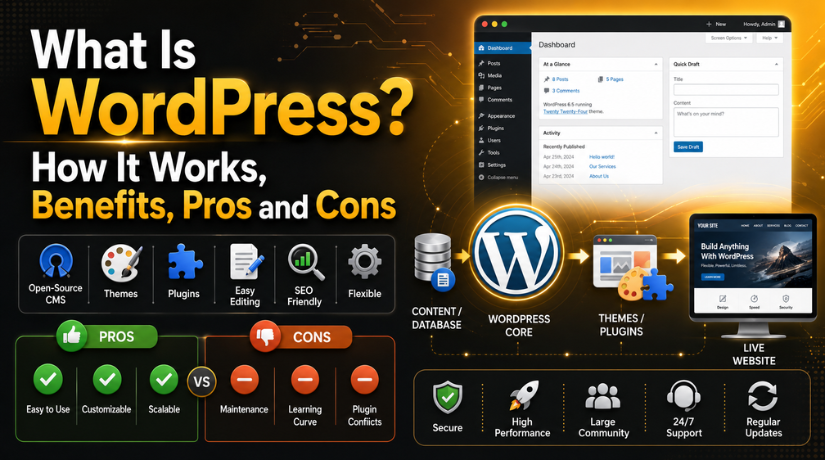
What Is WordPress? How It Works, Benefits, Pros and Cons
Introduction
If you’ve ever searched for how to build a website, you’ve almost certainly come across WordPress. It powers more than 43% of all websites on the internet as of 2026 — from personal blogs and small business sites to major news publications and enterprise-level e-commerce stores. Yet many people who use it every day still struggle to answer one simple question: what exactly is WordPress?
In this guide, we’re going to break it all down. You’ll learn what WordPress is, how it works under the hood, why so many people choose it, and — just as importantly — what its real limitations are. Whether you’re considering building your first site or just trying to understand the platform better, this is the place to start.
What Is WordPress, Exactly?
WordPress is a free, open-source content management system (CMS). At its core, a CMS is software that lets you create, manage, and publish digital content — text, images, video, files — on a website without needing to write raw code for every page.
WordPress was originally released in 2003 by Matt Mullenweg and Mike Little as a simple blogging tool. Over the next two decades, it evolved into something far more powerful: a full-featured web platform capable of running blogs, business websites, portfolios, membership sites, online stores, and virtually anything else you can imagine.
The word “open-source” matters here. WordPress’s underlying code is freely available for anyone to use, modify, and distribute. There’s no single company controlling what you can or cannot do with it. You own your site, your data, and your content — completely.
WordPress.org vs. WordPress.com — The Difference That Trips Everyone Up
Before going further, it’s worth clarifying a common point of confusion: WordPress.org and WordPress.com are two different things.
WordPress.org is the home of the free, self-hosted WordPress software. You download the software, install it on a web hosting server of your choice, and have full control over everything — themes, plugins, code, data, and monetisation. This is the version that powers the majority of WordPress websites in the world.
WordPress.com is a hosted service built on top of the WordPress software. Think of it as a simplified, managed version where the hosting is handled for you. It’s easier to get started, but the free and lower-tier plans come with restrictions on plugins, monetisation, and custom code. You’re renting your platform rather than owning it outright.
When most developers, agencies, and businesses talk about WordPress, they mean WordPress.org — the self-hosted version. That’s the platform this article focuses on.
How Does WordPress Work?
Under the hood, WordPress is primarily built with PHP — a server-side scripting language — and it stores all your content in a MySQL or MariaDB database. When someone visits your website, here’s roughly what happens:
The visitor’s browser sends a request to your web server. WordPress then runs PHP code that pulls the relevant content (posts, pages, settings, menus) from the database. It applies your chosen theme to structure how that content looks, then delivers the finished HTML page back to the visitor’s browser — all in a fraction of a second.
What makes this powerful is the separation of concerns. Your content lives in the database. Your design lives in a theme. Extra functionality lives in plugins. Change one without necessarily touching the others. Want a new look? Switch themes. Need a booking system? Add a plugin. Your content stays intact throughout.
The WordPress Dashboard: Your Control Centre
Everything you do in WordPress happens through its admin dashboard — an interface accessible at yoursite.com/wp-admin. From here you can write and publish posts and pages, manage uploaded images and documents, install and configure themes, browse and activate plugins, manage user accounts and permissions, and configure site settings, menus, and widgets.
No coding required for any of this. The block editor (introduced in WordPress 5.0 and significantly improved in every release since) lets you build pages visually by stacking content blocks — paragraphs, images, buttons, columns, galleries, and more. If you ever run into editor issues, our guide to common WordPress block editor problems and fixes is a useful starting point.
Themes: Controlling How Your Site Looks
A WordPress theme is a collection of template files that control the visual appearance of your site. Think of it as the skin that wraps around your content. Change the theme, change the entire look of the site — without touching a single word of your content.
The official WordPress theme directory alone offers thousands of free themes, with thousands more available commercially. Themes range from minimal blog layouts to fully featured business templates with header customisation, colour palettes, font control, and pre-built page designs.
When choosing a theme, prioritise speed, responsiveness (mobile-friendliness), and regular updates from the developer. Our roundup of the fastest and best free responsive WordPress themes is a great place to find well-maintained options for 2026.
Plugins: Extending What WordPress Can Do
If themes control how your site looks, plugins control what your site does. A plugin is a piece of software that integrates with WordPress to add new features or modify existing behaviour — without touching the core code.
As of 2026, the official WordPress plugin directory hosts over 60,000 free plugins. Need an SEO tool? There’s a plugin. Need an e-commerce store? WooCommerce has you covered. Want a contact form, a membership gate, an image optimiser, a caching layer, or a booking calendar? There’s a plugin — often more than one.
The plugin ecosystem is one of WordPress’s biggest strengths. You can build extremely sophisticated functionality without writing a single line of custom code. The key is choosing well-supported, regularly updated plugins and not overdoing it — too many poorly coded plugins are one of the most common causes of slow sites and security vulnerabilities.


Key Benefits of Using WordPress in 2026
It’s Free and Open-Source
The software itself costs nothing. You pay for hosting (which can start under $5/month), a domain name, and any premium themes or plugins you choose. A professional WordPress site is within reach for most budgets, and small businesses can often launch for less than $100 a year.
You Own Everything
This is perhaps the most underappreciated advantage. With a self-hosted WordPress site, you own your content, your design, and your data completely. You can migrate to a different host, change your theme, or hand the project to a different developer — the platform doesn’t lock you in.
Flexibility at Every Scale
WordPress can run a personal blog with a handful of visitors, and it can run a high-traffic e-commerce store with hundreds of thousands of products. The same platform scales with you, which means you’re not forced to migrate when your business grows.
SEO-Friendly by Design
WordPress generates clean, semantically structured HTML and gives you granular control over URLs, page titles, meta descriptions, and headings. Combined with a dedicated SEO plugin like Yoast or Rank Math, it’s one of the strongest platforms you can use from a search visibility standpoint.
A Massive Community and Ecosystem
Stuck on a problem? The WordPress community is enormous. Forums, documentation, YouTube tutorials, local meetups, and WordCamps mean that almost any question you have has already been answered somewhere — often in multiple formats.
Actively Evolving Platform
WordPress isn’t standing still. WordPress 7.0, released in April 2026, introduced native AI integration through the WP AI Client, real-time collaboration in the block editor, and a new Connectors system for managing AI providers. The platform continues to evolve with the broader web landscape.
The Real Cons of WordPress
You’re Responsible for Maintenance
WordPress core, themes, and plugins all need to be kept updated. Backups need to be scheduled. Security hardening is your responsibility. None of this is particularly difficult, and managed WordPress hosting services can automate most of it — but compared to an all-in-one hosted website builder, there is more ongoing housekeeping involved.
Security Requires Attention
Because WordPress is so widely used, it’s also a popular target for automated attacks. A site running outdated plugins, weak passwords, or poor-quality hosting is genuinely at risk. Good security hygiene — keeping everything updated, using strong credentials, choosing a quality host, and adding a security plugin — addresses the vast majority of risk, but it requires active management.
Performance Depends on Your Choices
A poorly configured WordPress site can be slow. Too many plugins, an unoptimised theme, shared hosting without caching — these are all performance killers. The platform absolutely can be fast, but it takes deliberate effort: caching, image compression, a quality host, and a lean plugin stack.
The Learning Curve Is Real
For complete beginners, WordPress can initially feel overwhelming. The dashboard has many options, and understanding the relationship between hosting, themes, plugins, and the core takes time. That said, the learning curve flattens quickly, and the investment pays off in long-term flexibility and capability.
Plugin Quality Varies Widely
Not all plugins are well coded. Installing the wrong combination can cause conflicts, site errors, or data issues. If you ever encounter a critical error on your WordPress site, our step-by-step guide to fixing the critical error in WordPress walks you through exactly what to do.
Who Is WordPress Best Suited For?
WordPress is an excellent choice for a wide range of users: bloggers and content creators who want full control over their platform, small and medium businesses that need a professional website with room to grow, e-commerce sellers using WooCommerce for flexibility and ownership compared to closed platforms, agencies and developers who build sites for clients at scale, and membership sites or multi-author publications that need robust user management and content workflows.
It’s probably not the best fit for someone who wants zero technical involvement and simply needs a very basic personal page — in that case, a simpler hosted builder might be quicker to launch. But for anyone with medium to long-term growth in mind, WordPress’s combination of power, ownership, and ecosystem depth is genuinely hard to beat.
Getting Started with WordPress
Getting a WordPress site live is more straightforward than many people expect. Choose a hosting provider (look for one with managed WordPress plans and one-click installation), register a domain, install WordPress, choose a theme, install your essential plugins, and start building your pages. Most people can complete those steps in an afternoon.
When you do hit a snag — and at some point, everyone does — it helps to know where to turn. Our guide on WordPress troubleshooting: when to DIY, when to hire, and when to rebuild gives you a clear framework for deciding how to handle any issue that comes up.
The Bottom Line
WordPress is, by almost any measure, the world’s most versatile and widely adopted web publishing platform. It’s free, open-source, endlessly extensible, and backed by one of the largest developer communities in the world. It powers everything from tiny personal blogs to global media sites — and in 2026, it’s still actively improving with every major release.
It does ask something of you in return: a willingness to keep it maintained, to choose plugins and themes thoughtfully, and to take security seriously. For the vast majority of website owners, that’s a worthwhile trade for the level of ownership and flexibility WordPress delivers.
If you’re ready to take the next step — or if your existing WordPress site needs expert attention — the team at 24×7 WP Support is here to help. From initial setup and theme customisation to ongoing maintenance, security hardening, and troubleshooting, we provide professional WordPress support around the clock. Get in touch today and let’s make your WordPress site work exactly the way it should.
Related posts:
WordPress Version History: The Release Timeline from 4.0 to 6.5.2
WordPress Custom Post Types – What is it and the Best Plugins to Create them
Does WordPress Have a Built-In Activity Log? How to View Change History
What Is the WooCommerce Plugin in WordPress? A 2026 Beginner's Guide
How to Optimize Database Performance in WordPress in 2026

Brian is a WordPress support specialist and content contributor at 24×7 WP Support. He writes practical, easy-to-follow guides on WordPress troubleshooting, WooCommerce issues, plugin and theme errors, website security, migrations, performance optimization, and integrations. With a focus on solving real website problems, Brian helps business owners, bloggers, and online store managers keep their WordPress sites running smoothly.
