
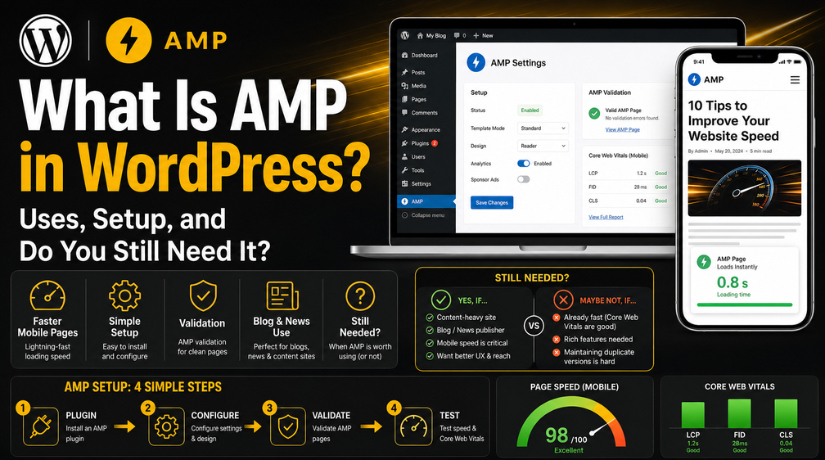
What Is AMP in WordPress? Uses, Setup, and Do You Still Need It?
Introduction
Many WordPress users still ask about AMP in WordPress today. They want faster mobile pages and better user experience. Mobile visitors often leave when pages load slowly. This can affect traffic, leads, and search performance. AMP became popular because it created lighter mobile pages. These pages loaded quickly on phones and slow networks.
However, WordPress performance has changed a lot over time. Today, site speed depends on many important factors. These include hosting, theme quality, images, scripts, and page layout. Google also focuses more on real user experience now. This includes loading speed, layout stability, and smooth mobile browsing.
So, AMP is still useful in some cases. But it is not needed for every WordPress website. A business website may need better mobile optimization instead. A blog or news website may still benefit from AMP. The right choice depends on your website type and goals.
What Is AMP in WordPress and How Does It Work?
Many beginners ask, what is AMP in WordPress and why it matters. AMP stands for Accelerated Mobile Pages. It is a web format made for faster mobile browsing. In WordPress, AMP creates lighter versions of your posts or pages. These versions remove heavy code and extra design elements.
AMP pages usually load faster than normal mobile pages. They use limited CSS, cleaner HTML, and controlled scripts. This helps mobile users open content with less delay. It also creates a simpler reading experience for visitors.
AMP mainly works through a plugin in WordPress. The plugin creates AMP-friendly versions of selected content. It may apply AMP templates to posts, pages, or archives. Some plugins also check errors during the setup process.
AMP can affect how your content looks on mobile devices. Some design features may appear different or limited. Forms, sliders, popups, and tracking scripts may also need checking.
In simple words, AMP pages WordPress setup helps reduce page weight. It can improve mobile loading speed when configured correctly. But it should not break design, tracking, or conversions.
What Is AMP Used For on a WordPress Website?
AMP is mainly used to make mobile pages load faster. It removes heavy elements that slow down page loading. This helps visitors read content without long waiting times. For many blogs, speed can improve the full reading experience.
AMP is useful when a website has many content pages. It works well for blogs, news posts, guides, and updates. These pages usually need clean text, images, and simple layouts. AMP helps present that content in a lighter mobile format.
Website owners may use AMP for these main reasons:
- To reduce mobile page loading time.
- To offer a cleaner mobile reading experience.
- To support users with slower mobile internet.
- To make content pages lighter and easier to open.
- To improve mobile performance for blog-heavy websites.
AMP may also support WordPress AMP SEO in some cases. Faster mobile pages can help users stay longer. Better mobile experience can also support search performance indirectly. However, AMP alone does not guarantee higher rankings. Your content quality, speed, structure, and user experience still matter.
AMP is not always perfect for every website type. It may not suit pages with complex designs. It can also limit popups, forms, sliders, and scripts. So, every website owner should test AMP before using it fully.
What Is a WordPress AMP Plugin?
A WordPress AMP plugin helps create AMP pages without coding. It converts normal WordPress content into AMP-friendly versions. This makes setup easier for beginners and website owners.
The plugin usually controls AMP templates and page output. It may also help manage errors during setup. Some plugins allow AMP for posts, pages, or both. Others may offer design settings for mobile AMP pages.
A WordPress AMP plugin can help with:
- Creating AMP versions of selected content.
- Managing simple AMP-friendly layouts.
- Checking theme or plugin compatibility.
- Finding errors that affect AMP pages.
- Controlling where AMP should appear.
The plugin acts like a bridge between WordPress and AMP. It helps your site follow AMP rules more easily. Still, you should review each AMP page after setup. This ensures your content, images, menus, and buttons work properly.
How to Enable AMP in WordPress Step by Step
Many users want to know how to enable AMP in WordPress correctly. The process is simple when you follow each step carefully. AMP changes how mobile pages appear for website visitors. So, you should test everything before using it fully.
Step 1: Take a Full Website Backup First
Before installing AMP, create a full website backup. This should include website files and the database. AMP can change mobile page layouts and template output. A backup helps restore your website if something breaks.
Step 2: Install a Trusted WordPress AMP Plugin
Now go to your WordPress dashboard. Open the Plugins section and click Add New. Search for a trusted AMP plugin from the plugin directory. Install the plugin, then activate it on your website.
After activation, check the plugin setup screen. Many plugins show a setup wizard for beginners. Follow the basic settings and avoid complex options first.
Step 3: Choose Where AMP Should Appear
Next, select where AMP should work on your site. You can enable AMP for posts, pages, or both. For most blogs, posts are the best starting point. Pages may need extra testing due to custom designs.
You should avoid enabling AMP everywhere without testing. Some pages may include forms, sliders, or tracking scripts. These elements may not work properly in AMP format.
Step 4: Review AMP Page Design Carefully


After setup, open a few AMP pages on mobile. Check the design, content, images, and page spacing. Make sure the page still looks clean and readable.
Review these important areas:
- Header and menu layout
- Featured images and post images
- Internal links and buttons
- Contact forms or newsletter forms
- Tracking scripts and ad placements
Step 5: Validate Your AMP Pages
AMP pages must follow strict technical rules. Use validation tools to check whether pages are valid. If errors appear, review the plugin suggestions carefully. Some errors may come from themes or other plugins.
Step 6: Monitor AMP in Search Console
After publishing AMP pages, check Google Search Console regularly. It can show AMP issues found by Google. Fix errors early to avoid mobile page problems. This keeps your AMP setup clean, stable, and search-friendly.
Common AMP Validation Errors in WordPress
AMP pages must follow strict rules to work correctly. When something breaks those rules, validation errors can appear. An AMP validation error WordPress issue usually comes from themes, plugins, or custom scripts. These errors can stop AMP pages from working properly.
Many WordPress websites use design tools and extra plugins. These tools may add code that AMP does not support. This can create errors on posts, pages, or templates. Website owners should check these issues before using AMP fully.
Common AMP validation errors may include:
- Unsupported JavaScript added by plugins or themes.
- Custom CSS that crosses AMP size limits.
- Forms that do not follow AMP rules.
- Sliders, popups, or galleries using unsupported scripts.
- Tracking codes that are not AMP-friendly.
- Image or video embeds with incorrect markup.
- Third-party widgets that load heavy external scripts.
These errors can affect mobile design and page behavior. A page may load, but some features may fail. Menus, buttons, forms, or ads may stop working correctly. This can hurt user experience and reduce conversions.
To fix AMP errors, start with the plugin report. Then check the affected page or template carefully. Update your theme, plugins, and AMP settings first. If errors continue, disable the conflicting feature on AMP pages. You can also ask a developer to fix the code properly.
AMP vs Core Web Vitals: What Matters More Today?
Many users compare AMP vs Core Web Vitals when improving WordPress speed. AMP is a page format made for faster mobile loading. Core Web Vitals are performance signals that measure real user experience. They check how fast a page loads and responds. They also check whether page elements move while loading.
AMP creates lightweight mobile pages for faster browsing. It does this by limiting heavy scripts and design elements. This can help simple blogs and content-heavy websites. However, AMP may need separate testing and extra setup.
Core Web Vitals work differently. They measure the normal pages users visit every day. These signals apply to all website types, not only blogs. They check speed, layout stability, and user interaction. This makes them more useful for modern WordPress websites.
AMP works best for simple content pages. It may not suit pages with forms or custom layouts. Core Web Vitals help improve the complete mobile experience. They support blogs, service pages, landing pages, and stores.
For many WordPress websites, Core Web Vitals matter more today. They help website owners improve the actual visitor experience. AMP can still help blogs and news websites. But it should not replace proper speed optimization. A fast, stable mobile site is the better long-term goal.
Do You Still Need AMP for a WordPress Website?
Many website owners still ask, do I need AMP for WordPress today. The answer depends on your website type and goals. AMP is no longer a required setup for every site. It can help some websites, but not all websites.
AMP may still be useful for blogs and news websites. These sites often publish simple content for mobile readers. AMP can make those pages lighter and faster. It can also help users read content with fewer delays.
You may use AMP if:
- Your website has many blog posts or news articles.
- Your mobile pages load slowly on weak internet connections.
- Your theme and plugins work well with AMP.
- Your AMP pages look clean and work properly.
- Your content needs a simple mobile reading format.
However, AMP may not be the best choice for every site. Many business websites need forms, tracking, sliders, and custom layouts. WooCommerce stores also need full product and checkout functions. AMP can sometimes limit these important website features.
You may avoid AMP if:
- Your normal mobile pages already load fast.
- Your website depends on forms or custom scripts.
- AMP creates layout, tracking, or validation issues.
- Your business needs strong design and conversion features.
Final Recommendation for WordPress Site Owners
AMP can still be useful in selected cases. But it should not be your first SEO solution. First, test your normal mobile website performance. Check speed, layout stability, forms, images, and user flow. If your regular pages perform well, AMP may not be needed.
If AMP improves speed without breaking features, you can use it. If it causes errors, focus on normal WordPress optimization instead.
Conclusion
AMP can make WordPress mobile pages lighter and faster. But modern websites need more than fast loading pages. They also need strong design, stable layouts, and smooth actions.
If your WordPress site has AMP errors or slow mobile pages, 24×7 WP Support can help review your setup. Our team can guide you toward the best solution.
Related posts:
Spectra vs Elementor: Which WordPress Builder Should You Choose?
Do WordPress Blogs Make Money? How to Monetize Your Blog in 2026
Best WordPress Security Plugins to Protect Your Site in 2026
Fastest WordPress Hosting Providers Compared in 2026
WordPress Troubleshooting: When to DIY, When to Hire, and When to Rebuild

Brian is a WordPress support specialist and content contributor at 24×7 WP Support. He writes practical, easy-to-follow guides on WordPress troubleshooting, WooCommerce issues, plugin and theme errors, website security, migrations, performance optimization, and integrations. With a focus on solving real website problems, Brian helps business owners, bloggers, and online store managers keep their WordPress sites running smoothly.
