
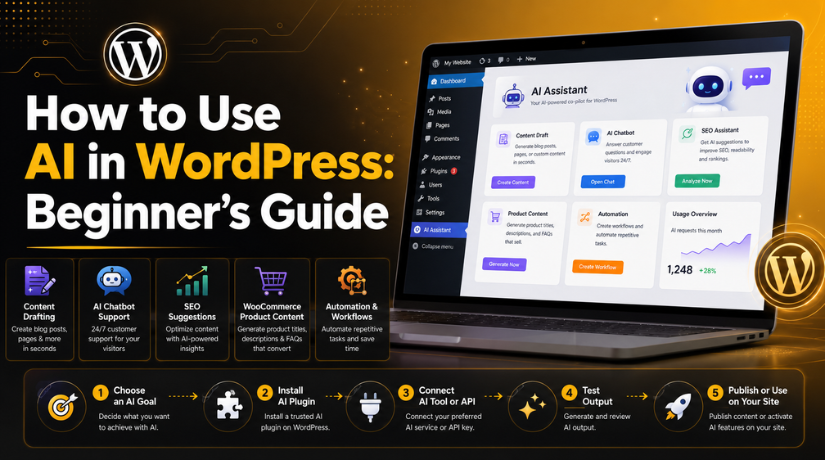
How to Use AI in WordPress: Beginner’s Guide
Last updated on May 11th, 2026 at 05:37 am
Introduction
WordPress is already a simple platform for website owners. It helps beginners create blogs, business websites, and online stores. But many tasks still take time every day. You may need to write content, reply to users, improve pages, or manage updates. This is where AI in WordPress becomes useful for beginners.
AI helps you complete common website tasks faster and smarter. You can use it for content ideas, blog drafts, FAQs, SEO suggestions, and customer support. It can also support simple workflows inside your website. When you use AI in WordPress, you can save time and focus on better planning.
AI does not replace your work or business knowledge. It only helps you create a better starting point. You should always review, edit, and improve AI output before publishing.
What Is AI in WordPress?
AI in WordPress means using smart tools with your WordPress website. These tools can understand instructions and create helpful results. They can help with writing, support, SEO, automation, and website planning.
Many WordPress AI tools work through plugins or external platforms. Some tools help you write blog posts and page content. Some tools help answer visitor questions through chat. Others help with product descriptions, email replies, or task automation.
For example, a beginner can use AI to create:
- Blog outlines and draft content
- FAQ ideas for service pages
- Product descriptions for WooCommerce
- Basic chatbot answers for visitors
- Simple website workflow ideas
These tools can reduce manual work. But the final content should still sound human and useful.
Why Beginners Should Use AI in WordPress
Beginners often feel stuck while managing a new website. They may not know what to write or improve first. WordPress AI tools can guide them with useful suggestions.
AI can help with AI content writing WordPress tasks. It can create first drafts, headings, and topic ideas. This helps users avoid starting from a blank page.
An AI chatbot WordPress setup can also improve visitor support. It can answer common questions and guide users to pages. This is helpful when your team is not online.
Beginners can also use WordPress automation with AI for repeated tasks. AI can support lead replies, content planning, and simple workflows.
Main benefits include:
- Saves time on daily website tasks
- Helps create clear content ideas
- Supports visitor questions faster
- Reduces repeated manual work
- Makes WordPress easier to manage
Overall, AI gives beginners helpful support. It makes WordPress work smoother, faster, and more organized.
How to Use AI in WordPress Step by Step
Step 1: Decide What You Want AI to Do
Before installing any tool, decide your main website goal. This helps you choose the right AI setup. Many beginners install tools without clear planning. This can slow the website and create confusion later.
You can use AI in WordPress for many simple tasks. But you should select one clear need first. For example, you may need help with content writing. You may also need customer support or SEO help.
Common AI tasks include:
- Writing blog drafts and page content
- Creating WooCommerce product descriptions
- Answering visitor questions through chat
- Suggesting SEO titles and meta descriptions
- Automating repeated admin tasks
- Creating FAQs for service pages
A clear goal helps you avoid extra plugins. It also keeps your website clean and easy to manage.
Step 2: Choose the Right WordPress AI Plugin
After choosing your goal, select the right tool. A good WordPress AI plugin should match your exact need. Some plugins help with writing. Some help with chat support. Others support SEO, forms, or automation.
Before installing AI plugins for WordPress, check important details first. Review plugin ratings, active installs, update history, and support. Also check whether the plugin works with your theme.
You should also review pricing before using paid AI features. Some tools need credits or an API key. This cost may increase when website usage grows.
Step 3: Install and Activate the Plugin
Now you can install your selected plugin. Open your WordPress dashboard first. Then go to Plugins and click Add New. Search for the selected plugin name. Click Install Now, then click Activate.
After activation, open the plugin settings page. Many WordPress AI tools add a new menu in the dashboard. Read the setup options carefully before enabling features.
Do not turn on every feature at once. Start with one feature and test it properly. This keeps your website stable and easy to check.
Step 4: Connect the AI Tool or API
Some AI tools need an account or API key. The API key connects your website with the AI provider. You can usually create it inside your AI account dashboard.
Copy the key and paste it into plugin settings. Never share your API key in public places. Do not add it inside blog posts or visible pages.
When you use AI in WordPress, security matters a lot. Use trusted tools only. Also check what data the tool can access.
Step 5: Test AI Before Publishing Anything
Testing is the most important step for beginners. AI can create helpful content, but it can make mistakes. Always review facts, grammar, tone, and service details.
For AI content writing WordPress tasks, add your own experience. Include real examples, helpful tips, and brand details. This makes content more useful for readers.


Before publishing, check these points:
- Is the information correct?
- Does the content sound natural?
- Is the tone clear and helpful?
- Are service details accurate?
- Does the page help real users?
This careful review keeps AI in WordPress safe, useful, and trustworthy.
Best Ways to Use AI in WordPress
Use AI for Blog Content Drafts
AI can help beginners create blog content faster. It can prepare outlines, headings, introductions, FAQs, and first drafts. This makes content planning easier for new website owners. It also helps when you do not know where to start.
You can use AI content writing WordPress tools to create a rough draft. Then you should improve it with your own knowledge. Add real examples, business details, and helpful advice. This makes the content more useful for readers.
AI should not publish content directly without review. Always check facts, grammar, tone, and user value. Google prefers helpful content written for real people. So, your final content must solve the user’s problem clearly.
Use AI Chatbots for Visitor Support
An AI chatbot WordPress setup can support website visitors quickly. It can answer common questions and guide users to pages. This is useful for service websites, blogs, and online stores.
For example, a chatbot can answer questions about pricing, services, booking, support, or order details. It can also collect basic user information through chat. This helps your team respond faster later.
A chatbot can support visitors when your team is offline. But it should not replace human support completely. Complex issues still need a real support person. Keep chatbot answers simple, clear, and accurate.
Use AI for SEO Support
AI can also help with basic SEO planning. Many WordPress AI tools can suggest titles, meta descriptions, FAQs, and headings. They can also help find missing content points.
This is useful when beginners want better page structure. AI can suggest what users may search online. It can also help create clearer headings for blog posts.
Still, AI SEO suggestions need manual review. You should check search intent, keyword placement, and content quality. Do not add keywords too many times. Keep the content natural and helpful.
Use AI for WooCommerce Product Content
Online store owners can use AI in WordPress for product content. AI can help write product titles, short descriptions, long descriptions, and FAQs. It can also create category content for larger stores.
This saves time when you manage many products. However, product details must always be checked manually. Prices, sizes, features, and shipping details must be correct.
Good product content should be clear and useful. It should explain benefits, usage, and important details.
Use AI for Website Automation
WordPress automation with AI can reduce repeated website tasks. It can help with lead replies, form routing, content workflows, and simple admin actions.
For example, AI can help sort form messages. It can also suggest email replies or support answers. This saves time for busy website owners.
Start with small automation tasks first. Test each workflow before using it live. This keeps your website safe, stable, and easy to manage.
Things to Check Before Using AI Tools in WordPress
Before using AI tools, check the plugin quality first. Not every tool is safe for every website. Some tools may slow your site or need extra setup. So, beginners should review each option carefully.
When checking AI plugins for WordPress, look at these details:
- Plugin ratings and recent reviews
- Last update date and active installs
- Support response and help documents
- Pricing, credits, and API usage cost
- Privacy settings and data handling
- Theme and plugin compatibility
- Website speed impact after setup
Good WordPress AI tools should be easy to manage. They should also work well with your website setup. Always test the tool on a small task first. This helps you find issues before using it live.
Common Mistakes Beginners Should Avoid
Beginners often make simple mistakes while using AI in WordPress. These mistakes can affect content quality, speed, and trust. The first mistake is publishing AI content without review. AI can create wrong facts or unclear lines. Always check every sentence before publishing content.
Another mistake is installing too many AI tools. Extra plugins can slow your website and create conflicts. Use only the tools you really need.
You should also avoid ignoring privacy settings. Some tools may process user data through external systems. Read the settings before connecting forms, chats, or customer details.
Common mistakes include:
- Publishing AI content without human review
- Installing many plugins for the same task
- Ignoring website speed after plugin setup
- Not checking privacy and data settings
- Using AI without real experience or examples
Conclusion
AI can make WordPress easier for beginners. You can use AI in WordPress for content, support, SEO, and automation. A good WordPress AI plugin can save time and improve workflow. But every AI result needs careful review before publishing. Human editing makes content more trusted and useful.
If you need help setting up AI tools, chatbots, or automation, 24×7 WP Support can help you configure everything safely and correctly.
FAQs
1. Can beginners use AI in WordPress?
Yes, beginners can use AI in WordPress easily. Many plugins offer simple setup options. You can use AI for content drafts, SEO ideas, chatbot support, and basic automation. Start with one tool first. Then test it before using more features.
2. What are the best uses of AI in WordPress?
The best uses include blog drafts, page content, FAQs, SEO titles, chat support, and workflow automation. Many WordPress AI tools can save time on repeated tasks. They also help beginners manage content and support more easily.
3. Do I need a plugin to use AI in WordPress?
In most cases, yes. A WordPress AI plugin helps connect AI features with your website. Some tools may need an API key. Others work through built-in plugin settings. Always choose trusted AI plugins for WordPress.
4. Can AI write blog posts for WordPress?
Yes, AI can help with blog outlines and first drafts. AI content writing WordPress tools can also suggest headings, FAQs, and meta descriptions. Still, you should review everything. Add your own experience, examples, and final edits before publishing.
5. Is an AI chatbot useful for WordPress websites?
Yes, an AI chatbot WordPress setup can help visitors quickly. It can answer common questions, guide users, and collect basic details. This is useful for service websites and online stores. Human support should still handle complex issues.





Brian is a WordPress support specialist and content contributor at 24×7 WP Support. He writes practical, easy-to-follow guides on WordPress troubleshooting, WooCommerce issues, plugin and theme errors, website security, migrations, performance optimization, and integrations. With a focus on solving real website problems, Brian helps business owners, bloggers, and online store managers keep their WordPress sites running smoothly.
