
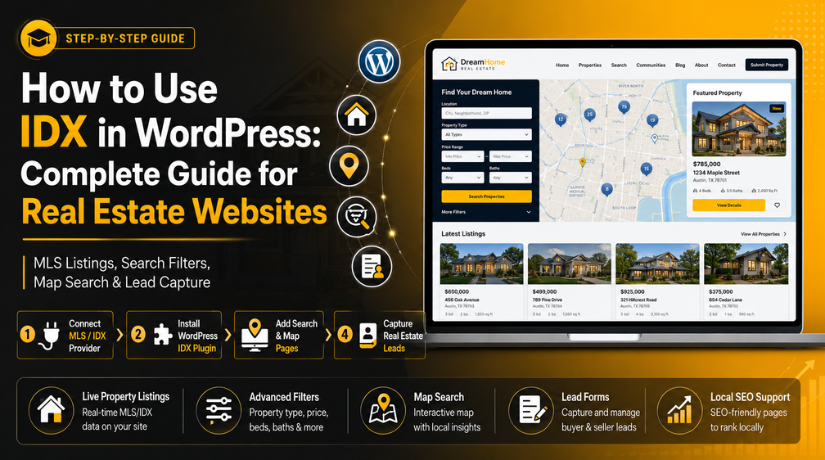
How to Use IDX in WordPress: Complete Guide for Real Estate Websites
Introduction
Most property buyers start their search on the internet today. They want quick access to homes, prices, photos, and locations. A simple real estate website may not be enough now. Visitors expect live property data and easy search options. This is where IDX WordPress features become very useful. IDX helps real estate websites show updated property listings from MLS sources. It allows buyers to search homes without leaving your website. This improves trust, user experience, and lead generation.
For agents and brokers, IDX can turn a basic website into a strong property search platform. A proper WordPress IDX integration helps show listings in a clean and simple way. It can display property details, images, map views, and contact options. This makes the website more useful for serious buyers. It also helps agents collect inquiries from interested visitors. Many real estate businesses now use an IDX website WordPress setup to stay competitive. It gives buyers the tools they need in one place. This guide explains the basic meaning of IDX first. It also explains how IDX works inside WordPress websites.
What Is IDX in WordPress?
Many beginners ask, what is IDX in WordPress and why does it matter? IDX stands for Internet Data Exchange. It is a system used in real estate websites. It allows approved agents and brokers to show MLS listings online. MLS means Multiple Listing Service. It stores property data shared by real estate professionals. IDX takes this approved listing data and shows it on a website. In WordPress, IDX usually works through a plugin or provider. This setup connects MLS data with your WordPress website. A WordPress real estate IDX plugin helps display these listings correctly.
It may show property photos, prices, addresses, features, and status. Buyers can search listings based on their needs. They can filter homes by city, price, beds, baths, or type. This makes IDX real estate WordPress websites more useful for visitors. Without IDX, agents may need to add properties manually. That can take more time and create outdated listing issues. IDX helps reduce this manual work. It keeps the website active with fresh property information.
What Is IDX Used for In WordPress Real Estate Websites?
IDX is used to show live property data on WordPress websites. It helps agents display MLS listings without adding them manually. A proper IDX WordPress setup makes property search easier for buyers. Visitors can browse homes, compare prices, and view property details. They can also contact the agent from the same website. This makes the website more useful and lead-focused. With WordPress IDX integration, agents can create a complete search experience. It supports live listings, search filters, maps, and lead forms. For real estate businesses, IDX is not just a listing tool. It helps build trust and keeps buyers engaged longer. An IDX website WordPress setup also supports local property pages. These pages can target buyers searching in specific cities. This makes IDX helpful for users, agents, and brokers.
Display Live Property Listings Directly on Your WordPress Website
The main use of IDX is showing live property listings. It connects your website with approved MLS listing data. This allows your website to show updated property information. Buyers can view homes without visiting another property portal. A real estate listings WordPress IDX setup can show important details. These may include price, location, photos, bedrooms, bathrooms, and status. It can also show property size, features, and listing updates. This gives visitors the details they need quickly. Live listings also reduce outdated information on your website. Agents do not need to update every property manually. The IDX feed handles many updates through the MLS source. This saves time and improves listing accuracy. It also makes your website look active and professional. Buyers trust websites that show fresh and useful listings.
Add Advanced Property Search Features for Better Buyer Experience
IDX helps add strong property search features to WordPress. Buyers can search homes based on their exact needs. They can filter listings by location, price, and property type. They can also search by bedrooms, bathrooms, and square footage. Some IDX tools also allow searches by listing status. These filters make the search process faster and easier. A good WordPress real estate IDX plugin gives users more control. They do not need to scroll through every property manually. They can find suitable homes with fewer clicks. This improves the user experience on the website. It also keeps visitors engaged for more time. Better search features can increase inquiries from serious buyers. When users find relevant homes faster, they contact agents sooner.
Create Map-Based Property Search for Local Home Buyers
Map-based search is another useful IDX feature for WordPress. It lets buyers search homes by area and location. Visitors can view properties directly on an interactive map. This helps them understand nearby roads, schools, and local areas. Many buyers prefer map search during early research. It gives them a clear idea of property placement. With IDX real estate WordPress, map search feels more natural. Buyers can compare locations before opening full listing details. They can also focus on one neighborhood or nearby area. This makes local property browsing simple and helpful. Map search also improves mobile browsing when designed well. Users can move around the map and check listings quickly. This feature is valuable for agents serving local markets.
Capture Real Estate Leads from Interested Website Visitors
IDX is also used for real estate lead generation. It helps turn property search activity into direct inquiries. Buyers can contact agents from individual listing pages. They can request property details or schedule a showing. They can also save a home or ask a question. Some IDX tools allow visitors to save searches too. These features help agents collect useful buyer information. A proper WordPress IDX integration can connect forms with email. It may also connect leads with a CRM system. This makes follow-up easier for agents and teams. Lead capture is important for every real estate website. Visitors may not call during their first visit. Forms, alerts, and saved searches help continue the conversation.
Build Local Real Estate Pages for City and Neighborhood Searches
IDX can help build useful local real estate pages. Agents can create pages for cities, areas, and neighborhoods. These pages can show listings related to that location. For example, an agent can create city property pages. They can also create pages for condos, luxury homes, or townhomes. This helps visitors search in their preferred areas. It also supports local SEO when used correctly. An IDX website WordPress setup should not depend on listings only. You should add unique content above or below the listings. This may include local market details and area highlights. It can also include buyer tips and neighborhood information. These pages make your website more useful for local buyers. They also help search engines understand your real estate focus.
Benefits of Using IDX in WordPress for Real Estate Websites
IDX gives many useful benefits to real estate websites. It improves listing quality, search experience, and lead generation. It also reduces manual work for agents and brokers. A good IDX WordPress setup keeps the website active. Visitors can search updated listings without leaving the website. This creates a smoother and more trusted user journey. IDX also helps agents compete with large listing portals. They can offer property search on their own branded website. This gives more control over leads and user experience. With the right setup, IDX supports both buyers and sellers. It gives buyers useful listings and gives agents better inquiries. That makes IDX a smart feature for WordPress real estate websites.
IDX Keeps Property Listings Updated With Less Manual Work
One major benefit of IDX is fresh listing information. Property data can change often in real estate markets. Prices may change, homes may sell, or status may update. Manual updates can take time and create mistakes. IDX helps reduce this problem through MLS data updates. This keeps listings more accurate for website visitors. Agents can save many hours each week. They do not need to edit every property manually. Updated listings also improve user trust. Buyers feel more confident when listings look current. A real estate listings WordPress IDX setup supports this need well. It helps your website stay useful without constant manual changes. This makes IDX helpful for busy agents and brokerages.
IDX Improves User Experience and Keeps Visitors Engaged Longer
A good real estate website should be easy to use. Visitors want fast search tools and clear property details. IDX helps provide both features inside WordPress. Buyers can search, filter, compare, and view listings easily. They can also use maps and listing alerts. This creates a better website experience for home buyers. When users find helpful tools, they stay longer. Longer visits can increase chances of inquiry submissions. An IDX real estate WordPress website can support buyer journeys better. It helps visitors move from search to contact naturally. Clear property pages also reduce confusion for users. This better experience can improve trust in the agent. It also makes the website feel more professional.
IDX Helps Generate More Leads for Real Estate Agents
IDX can turn website traffic into real estate leads. Buyers often search many homes before contacting an agent. IDX gives them search tools and contact options together. This makes lead capture easier during the search journey. A WordPress real estate IDX plugin can add inquiry forms. It can also add saved searches and property alert options. These tools collect buyer details for future follow-up. Agents can understand what buyers are looking for. They can then suggest better listings and next steps. This creates a stronger sales opportunity. IDX also helps capture leads from high-intent visitors. These users are already searching active property listings. That makes them more valuable for real estate businesses.
IDX Supports Local SEO Growth When Used Correctly
IDX can support local SEO when paired with unique content. Search engines may not value plain duplicate listing data strongly. That is why agents should add helpful local information. City pages and neighborhood pages can improve website relevance. These pages can target local buyer searches naturally. For example, you can create pages for local home searches. You can also add area guides and market updates. A smart WordPress IDX integration supports this content strategy. IDX listings make the pages useful for buyers. Unique content makes the pages more helpful for search engines. Internal links can also connect blogs with property pages. This creates a stronger local SEO structure. Over time, this can help attract better organic traffic.
IDX Builds Trust and a More Professional Real Estate Image
A website with live listings looks more reliable. Buyers want to work with active and informed agents. IDX helps show that your website provides useful property data. It also gives buyers a reason to return often. When listings update regularly, users trust the website more. An IDX website WordPress setup can improve brand value. It makes the website feel like a complete real estate platform. Visitors can search properties, view details, and contact you directly. This creates a smooth and professional experience. It also helps agents stand apart from basic websites. Trust is very important in real estate decisions. IDX supports that trust through updated and clear information.
IDX Saves Time for Real Estate Agents and Brokers
Real estate agents already manage many daily tasks. They speak with clients, show homes, and manage follow-ups. Manual listing updates can take extra time from this work. IDX helps automate listing display on WordPress websites. It reduces repeated work and keeps pages active. Agents can focus more on leads and client service. Brokers can also manage larger listing needs more easily. With IDX WordPress, the website becomes more useful automatically. It can show active property data with less manual effort. This saves time and lowers the chance of listing mistakes. A better setup also supports long-term website growth. That makes IDX valuable for active real estate professionals.
How to Use IDX in WordPress (Step By Step Guide)
Using IDX in WordPress needs a clear setup process. You must connect your website with approved MLS listing data. This usually happens through an IDX provider and WordPress plugin. A proper IDX WordPress setup helps display listings correctly. It also supports search pages, lead forms, and mobile browsing. Many agents use WordPress IDX integration to save time. It helps them show updated property listings without manual work. However, the setup must be done carefully from the start. Wrong settings can cause listing, speed, or SEO issues later. You should check MLS access, provider support, plugin settings, and forms. You should also test each search page before launch. This helps create a smooth IDX website WordPress experience.
Step 1: Confirm MLS Access Before Starting IDX Setup


- First, confirm that you have active MLS access.
- IDX works only with approved real estate listing data.
- Agents and brokers usually need MLS membership or permission.
- Ask your local MLS about their IDX display rules.
- These rules may control how listings appear online.
- They may require brokerage details, disclaimers, and update notices.
- Check whether your MLS supports your selected IDX provider.
- Not every provider works with every local MLS board.
- This step helps avoid setup delays and compliance issues.
- It also keeps your real estate listings WordPress IDX setup smooth.
Step 2: Choose the Right IDX Provider for WordPress
- Next, choose a trusted IDX provider for your website.
- The provider connects MLS data with your WordPress website.
- Make sure the provider supports your local MLS.
- Compare pricing, features, design options, and support quality.
- Check whether it offers a WordPress real estate IDX plugin.
- Review listing update speed and map search features.
- Check if lead capture forms are included.
- Also review SEO-friendly page options and CRM support.
- The right provider makes WordPress IDX integration easier.
- It also reduces future technical issues on your website.
Step 3: Install the IDX Plugin from the WordPress Dashboard
- Log in to your WordPress admin dashboard.
- Go to Plugins > Add New from the menu.
- Search for your selected IDX plugin by name.
- Click Install Now and activate the plugin.
- Open the plugin settings area after activation.
- Add the account details given by your IDX provider.
- Some plugins may ask for API keys or tokens.
- Save the settings after adding the correct details.
- Check whether the IDX account shows connected status.
- This step starts your IDX real estate WordPress setup.
Step 4: Configure IDX Settings Correctly Inside WordPress
- Open the IDX plugin settings inside your dashboard.
- Add MLS details, account keys, or API credentials.
- Choose your default market area for property searches.
- Select property types you want to show.
- Set filters for price, location, bedrooms, and bathrooms.
- Choose listing layout, sorting, and display style.
- Add required MLS disclaimers and brokerage attribution.
- These details may be required by your local MLS.
- Save all settings and clear website cache.
- Correct settings improve your IDX website WordPress experience.
Step 5: Create Important IDX Pages for Property Searches
- Create the main property search page first.
- Add a map search page for location-based browsing.
- Create a featured listings page for selected properties.
- Add city listing pages for target service areas.
- Create neighborhood pages for local buyer searches.
- Add single property detail pages if supported.
- Keep page titles clear and easy to understand.
- Add these pages to your website menu.
- Link important IDX pages from your homepage.
- Organized pages improve real estate listings WordPress IDX browsing.
Step 6: Add Lead Capture Forms on IDX Listing Pages
- Add contact forms on important listing pages.
- Use forms like request details and schedule showing.
- Add “Ask an Agent” buttons where needed.
- Add saved search forms to collect buyer emails.
- Enable listing alerts if your IDX tool supports them.
- Connect forms with your email or CRM system.
- Keep forms short and simple for buyers.
- Ask only for name, email, phone, and message.
- Test every form after connecting it.
- Good forms improve WordPress IDX integration lead results.
Step 7: Test the Full IDX Setup Before Website Launch
- Search properties from the main search page.
- Test filters for price, location, beds, and baths.
- Open different listing pages and check details.
- Confirm photos, prices, addresses, and status appear correctly.
- Test map search on desktop and mobile devices.
- Submit test inquiries from all lead forms.
- Check whether emails reach the correct inbox.
- Confirm CRM leads are captured properly.
- Review mobile layout for maps and listing cards.
- A tested IDX WordPress setup reduces user issues.
Step 8: Optimize IDX Pages for SEO, Speed, and Leads
- Add SEO titles and meta descriptions to pages.
- Use local keywords naturally in supporting content.
- Add useful content above or below IDX listings.
- Include area details, buyer tips, and market notes.
- Link blog posts with city and neighborhood pages.
- Submit important IDX pages in Google Search Console.
- Check whether pages are included in your sitemap.
- Optimize speed because IDX pages can load scripts.
- Test mobile speed, forms, maps, and listing filters.
- A strong WordPress real estate IDX plugin setup improves results.
Common IDX Problems and Fixes in WordPress Real Estate Websites
IDX can make a real estate website more powerful. However, it can also create technical issues sometimes. These issues may affect listings, search pages, forms, speed, or SEO. A proper IDX WordPress setup needs regular testing and care. Many problems happen because of wrong settings or plugin conflicts. Some issues also happen due to MLS approval delays. A weak hosting setup can also slow IDX pages. These problems can reduce leads and user trust. Buyers may leave if listings fail to load. They may also leave when forms do not work. That is why every IDX website WordPress setup needs proper checks. Below are common IDX problems and simple fixes. These steps can help improve your WordPress real estate website.
IDX Listings Not Showing Correctly on WordPress Website
One common issue is IDX listings not showing properly. This can happen during a new WordPress IDX integration setup. Sometimes, MLS approval is still pending from the provider. In other cases, the IDX account is not connected correctly. Wrong API keys or account details can also block listings. Plugin settings may also be incomplete inside WordPress. First, confirm your MLS approval status with the provider. Then check your IDX account connection inside WordPress. Re-enter API keys or account credentials if needed. Save the settings and clear your website cache. Also clear server cache if your hosting uses one. After that, test the property search page again. If listings still fail, contact your IDX provider. They can confirm whether the MLS feed is active. A correct real estate listings WordPress IDX connection should show listings smoothly.
IDX Search Page Loading Slowly on WordPress Website
Slow IDX pages can hurt user experience and leads. IDX pages often load maps, filters, photos, and scripts. These items can make pages heavier than normal pages. A weak hosting server can make the issue worse. Too many plugins can also slow property search pages. Large listing images may also affect page speed. First, test your IDX pages on desktop and mobile. Then remove plugins that are not needed. Use a lightweight WordPress theme for better speed. Optimize images where your website controls image files. Enable caching carefully, but test IDX search after that. Some IDX search features may not work with aggressive caching. You should also check JavaScript errors in the browser console. A proper WordPress real estate IDX plugin setup should stay fast. If speed remains poor, ask WordPress support to review conflicts.
IDX Pages Not Indexing Properly in Google Search
Sometimes, IDX pages do not appear in Google results. This issue can limit local SEO growth for agents. It may happen when pages are blocked from indexing. SEO plugin settings may also mark IDX pages as noindex. Robots.txt rules can also block important IDX URLs. Some IDX pages may have thin or duplicate content. Search engines may ignore pages with little unique value. First, check the page index settings in your SEO plugin. Then review your robots.txt file for blocked IDX paths. Make sure important pages are included in the sitemap. Add unique local content around IDX listings. This can include area details, buyer tips, and market notes. Create city and neighborhood pages with helpful content. Then submit key URLs in Google Search Console. A smart IDX real estate WordPress SEO setup needs unique content. IDX listings alone may not be enough for ranking.
IDX Plugin Conflict with WordPress Theme or Page Builder
IDX plugins can sometimes conflict with themes or builders. These conflicts may break listing cards, filters, or maps. Theme CSS can change spacing, colors, or listing layouts. JavaScript conflicts can stop search filters from working. Page builders may also affect IDX shortcodes or widgets. Outdated themes can create more display problems. First, update your theme, IDX plugin, and WordPress safely. Always take a backup before making major updates. Then test the IDX page after each update. If the issue continues, switch to a default theme temporarily. This helps confirm whether your theme causes the problem. Check browser console errors for script issues. Add custom CSS only when you know the cause. Avoid editing main theme files directly. A stable IDX website WordPress setup needs clean theme compatibility.
IDX Lead Forms Not Sending Emails Correctly
IDX forms are important for real estate lead generation. If forms fail, agents may lose serious buyers. Email issues often happen because WordPress mail is weak. Many hosting servers do not send WordPress emails reliably. Form notification settings may also be wrong. Emails can also land in spam or junk folders. First, submit a test inquiry from each IDX form. Then check the admin email and notification settings. Install and configure SMTP for better email delivery. Use a trusted sender email from your domain. Check spam folders after sending test forms. Also test forms with more than one email address. If you use a CRM, test lead capture there too. A strong WordPress IDX integration should send leads without delay. Working forms help agents follow up faster with buyers.
IDX Mobile Layout Issues on Property Search Pages
Most buyers search properties from mobile phones today. So, mobile layout issues can reduce inquiries quickly. IDX filters may look too wide on small screens. Map sections can overflow outside the page area. Listing cards may appear broken or hard to read. Popups can also block mobile users from browsing. First, test your IDX pages on different screen sizes. Check search filters, map view, buttons, and forms. Adjust mobile CSS if elements overflow the screen. Make buttons larger and easier to tap. Reduce unnecessary filters on mobile search pages. Avoid heavy popups on property listing pages. Use a responsive WordPress theme with IDX support. A mobile-friendly IDX WordPress setup keeps buyers engaged longer. It also helps users contact agents without layout problems.
IDX Map Search Not Working on WordPress Website
Map search is useful for local property buyers. However, it may stop working due to setup issues. A wrong Google Maps API key can break the map. Disabled billing can also stop map features from loading. Location data problems may also affect map results. Plugin map settings may also be incomplete or incorrect. First, check the API key inside the IDX settings. Confirm that the map service is active and allowed. If Google Maps is used, confirm billing is enabled. Then review allowed domains for the API key. Make sure your website domain is added correctly. Save the settings and clear all cache. Test map search again on desktop and mobile. A working map improves real estate listings WordPress IDX browsing. It helps buyers search homes by preferred locations.
Conclusion
IDX is an important feature for real estate websites. It helps display live listings from approved MLS data. It also improves property search, user experience, and lead capture. A proper IDX WordPress setup can support active buyers well. It can show listings, maps, filters, and contact options. However, IDX must be configured and tested correctly. Poor setup can cause slow pages and missing listings. It can also create form, mobile, and SEO issues. A successful IDX real estate WordPress website needs regular checks. You should test listings, speed, forms, maps, and indexing. You should also add unique local content around IDX pages. This helps buyers and supports better search visibility. When IDX works well, your website becomes more valuable. It can help agents attract, engage, and convert buyers.
If you want to add IDX to your real estate website, 24x7wpsupport can help. Our WordPress experts can support complete WordPress IDX integration from setup to testing. We can help with IDX plugin installation, MLS connection, property search pages,





Brian is a WordPress support specialist and content contributor at 24×7 WP Support. He writes practical, easy-to-follow guides on WordPress troubleshooting, WooCommerce issues, plugin and theme errors, website security, migrations, performance optimization, and integrations. With a focus on solving real website problems, Brian helps business owners, bloggers, and online store managers keep their WordPress sites running smoothly.
