
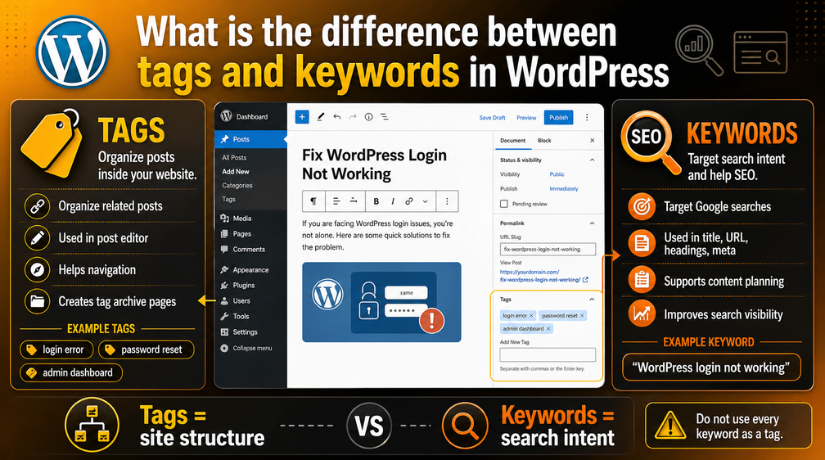
What is the difference between tags and keywords in WordPress
Introduction
Many WordPress users often confuse tags with SEO keywords. This is common because both describe a blog topic. However, they do not work in the same way. Understanding tags vs keywords in WordPress helps you manage content better. It also helps you avoid poor SEO practices.
WordPress tags help organize your blog posts inside the website. They connect related posts through simple labels. SEO keywords help search engines understand your content topic. They also match your content with user searches on Google.
Both are useful when used in the right way. Tags improve content browsing for readers. Keywords improve content planning for search visibility. But using them incorrectly can create problems. Too many tags may create weak archive pages. Repeating keywords too often can also hurt readability.
So, tags should support website structure. Keywords should support search intent and content focus.
What Are WordPress Tags?
WordPress tags are small labels added to blog posts. They describe specific details covered in the article. Tags are a built-in WordPress feature. You can add them from the WordPress post editor.
Tags help group similar posts together. They make it easier for readers to find related topics. For example, a post about a WordPress login issue may use tags like:
- WordPress login
- admin dashboard
- password reset
- login error
These tags tell users what the post covers. They also help users browse similar posts quickly. If someone clicks the “login error” tag, WordPress may show related posts with the same tag.
This is the basic idea behind how to use tags in WordPress. You should use tags only when they help readers. Do not add random tags just for SEO. Tags are not a place to stuff keywords.
Tags are also different from categories. Categories are broad sections of your blog. Tags are more specific labels inside those sections. For example, “WordPress Errors” can be a category. “Login error” or “password reset” can be tags.
Good tags keep your blog clean and organized. They also improve user movement across related posts. But too many tags can confuse readers. So, always choose clear, useful, and relevant tags.
What Are SEO Keywords?
SEO keywords are words or phrases people search online. They show what users want to find on Google. These keywords help you understand the reader’s search need. They also guide your content before writing starts.
For example, a user may search for “WordPress login not working.” This phrase shows a clear problem. The user wants a simple fix for login access. So, your content should answer that issue directly.
SEO keywords can be used in important content areas, such as:
- Page title
- Meta description
- URL slug
- Main heading
- Subheadings
- Body content
- Image alt text
Keywords help search engines understand your page topic. They also help match your content with the right users. But keywords should always feel natural in the content. Repeating them too much can reduce content quality.
For a WordPress login issue, keywords may include:
- WordPress login not working
- fix WordPress login error
- WordPress admin login issue
These phrases are not WordPress tags. They are part of SEO planning. You choose them before creating content. Then you write helpful content around their search intent.
Difference Between Tags and Keywords in WordPress
The difference between tags and keywords is simple. Tags organize posts inside WordPress. Keywords help target searches on Google and other search engines.
Many beginners ask, are WordPress tags the same as keywords? The answer is no. They may look similar sometimes. But they serve different purposes.
WordPress tags are added inside the post editor. They help readers browse related posts. SEO keywords are used across the content. They guide titles, headings, URLs, and meta descriptions.
Here is a simple comparison:
Purpose: WordPress tags organize posts inside your website. SEO keywords target user search intent on Google.
Used for: WordPress tags help users browse related posts. SEO keywords help plan content for better search visibility.
Added in: WordPress tags are added in the WordPress post editor. SEO keywords are used in the title, headings, content, URL, and meta description.
SEO impact: WordPress tags may support SEO indirectly through better navigation. SEO keywords directly support content ranking and search relevance.
Example: A WordPress tag can be “login error.” An SEO keyword can be “WordPress login not working.”
WordPress tags vs SEO keywords should not be treated as one thing. A tag can contain a keyword phrase. But adding keywords as tags will not directly improve rankings.


Use tags to connect related posts. Use keywords to match user searches. This keeps your website clean, useful, and SEO-friendly.
Do WordPress Tags Help SEO?
Many users ask, do WordPress tags help SEO? The simple answer is yes, but only indirectly. Tags do not work like ranking keywords. They do not push a page higher by themselves. However, they can improve your website structure when used correctly.
WordPress tags help readers find related posts faster. They also help organize similar content under one label. This can improve the user journey on your website. When users move easily between related posts, they may stay longer.
Tags can also create tag archive pages in WordPress. These pages list all posts linked with the same tag. If a tag archive has useful posts, it can support content discovery. It may also help search engines crawl related posts more easily.
Still, WordPress tags for SEO should be used with care. Poor tag usage can create low-value pages. For example, a tag with only one post may look weak. Many similar tags can also create duplicate archive pages.
Common tag issues include:
- Creating too many tags for one post.
- Using tags with only one related article.
- Adding many similar tags with small spelling changes.
- Using SEO keywords as tags without a clear reason.
Tags should support readers first. They should not replace keyword research. Use them only when they improve blog navigation.
How to Use Tags Correctly in WordPress
Learning how to use tags in WordPress helps keep your blog clean. Good tags make your content easier to browse. Bad tags make your website messy and confusing.
Start by using only relevant tags. Each tag should describe a specific post detail. It should also connect more than one article. If a tag cannot connect related posts, avoid using it.
Follow these simple rules:
- Use short and clear tag names.
- Add only a few useful tags.
- Avoid using every keyword as a tag.
- Do not repeat tags with small spelling changes.
- Remove unused or duplicate tags regularly.
- Check tag archive pages for quality.
For example, a WordPress SEO article may use tags like:
- WordPress SEO
- meta description
- sitemap
- indexing
These tags are clear and useful. They can connect related SEO posts together.
Poor tags may look like this:
- best WordPress SEO guide
- SEO guide WordPress
- WordPress SEO guide best
These versions repeat the same idea. They can create messy archive pages. Good tag use keeps your WordPress website simple, clean, and helpful.
Common Mistakes to Avoid With Tags and Keywords
Many WordPress users make mistakes with tags and keywords. These mistakes usually happen because both look similar. However, tags and keywords have different jobs. Tags organize posts inside WordPress. Keywords help search engines understand user search intent.
One common mistake is using every keyword as a tag. This creates too many tag archive pages. Many of these pages may have little content. That can make your site structure look weak.
Another mistake is adding too many tags to one post. A post does not need 15 or 20 tags. It only needs a few helpful labels. Each tag should connect similar posts together.
You should also avoid creating tags for one article only. A single-post tag archive gives very little value. It may not help readers or search engines much.
Here are common mistakes to avoid:
- Using SEO keywords as tags:
Do not add every search phrase as a WordPress tag. Tags should help readers browse related posts. - Adding too many tags:
Too many tags can confuse users. They can also create many weak archive pages. - Creating duplicate tag names:
Avoid small spelling changes for the same topic. For example, do not use “SEO tips” and “SEO tip.” - Using category names as tags:
Categories and tags should not repeat the same purpose. Categories are broad. Tags are specific. - Thinking tags automatically improve ranking:
Tags do not directly rank your content. They only support structure and navigation. - Ignoring tag archive quality:
Poor tag pages can reduce site quality. Review them often and remove weak ones.
Keywords also need careful use. Do not repeat them in every line. Keyword stuffing makes content hard to read. It can also make the article look unnatural.
Use keywords only where they fit. Use tags only where they help. Both should support a better reader experience.
Conclusion
Tags and keywords are different parts of WordPress content planning. Tags organize posts for readers inside your website. Keywords guide your SEO content strategy for search engines.
Tags may support SEO indirectly through better navigation. Keywords help target search queries more directly. So, tags should not be used as an SEO shortcut. They should not replace proper keyword research.
Keep your tags clean, limited, and useful. Keep your keywords natural and relevant. This approach helps readers and search engines understand your content better.
If you are unsure whether your WordPress tags, categories, or SEO settings are helping your site, the 24×7 WP Support team can review your setup and guide you with the right structure.
Related posts:

Brian is a WordPress support specialist and content contributor at 24×7 WP Support. He writes practical, easy-to-follow guides on WordPress troubleshooting, WooCommerce issues, plugin and theme errors, website security, migrations, performance optimization, and integrations. With a focus on solving real website problems, Brian helps business owners, bloggers, and online store managers keep their WordPress sites running smoothly.
