
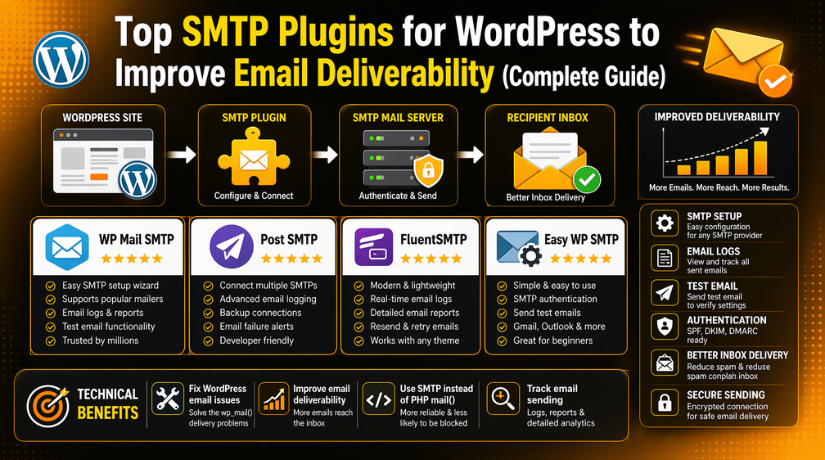
Top SMTP Plugins for WordPress to Improve Email Deliverability (Complete Guide)
Introduction
Many WordPress websites depend on email for daily communication. These emails include contact form messages, order updates, and password reset links. When emails fail, website owners can miss leads and sales. Users may also lose trust in the website very quickly. This is why email delivery should never be ignored. Many site owners face the same common problem today. Their WordPress emails do not reach the inbox properly. Sometimes messages go to spam without any warning.
In other cases, emails are not sent at all. This problem is common on business websites and online stores. It can also affect membership and booking websites badly. A proper WordPress SMTP plugin helps solve this issue. It replaces the default mail method with a safer option. It sends messages through a trusted mail server instead.
This helps improve email deliverability WordPress websites depend on. It also reduces the risk of missing important email alerts. A good SMTP mailer WordPress setup can make a big difference. It helps form emails, user emails, and store emails properly. In this guide, you will learn what SMTP plugins do. You will also understand why they matter for websites. This section will explain the basics in a simple way. It will help you understand why SMTP is important today.
What Is an SMTP Plugin in WordPress and How It Works?
SMTP stands for Simple Mail Transfer Protocol. It is a standard method for sending emails online. WordPress can send emails without SMTP, but that method is weak. By default, WordPress often uses the PHP mail function. This default method works on some websites, but not all. Many hosting servers limit or block this type of sending. Email providers may also treat those messages as suspicious. That is one reason emails often land in spam folders.
It is also why many site owners need a WordPress email not sending a fix. An SMTP plugin changes how WordPress sends those messages. It connects your website to a real email service. This connection is more trusted and more secure. A WordPress SMTP plugin helps authenticate every outgoing message correctly. It tells inbox providers that your website is a trusted sender. That improves the chance of inbox delivery. It also helps reduce failed messages and spam placement. Many SMTP plugins also include helpful tools for testing.
Some offer logs, error checks, and resend options too. This makes email setup and review much easier. A strong SMTP mailer WordPress solution supports better website communication. It also gives website owners more control over sending. With the right SMTP settings WordPress users can send email more reliably. This is why SMTP is better than the default method. It gives better trust, better delivery, and better support.
Why SMTP Plugins Matter for WordPress Websites?
Better email deliverability for important website messages
A WordPress website sends many important emails every day. These may include contact form messages, password reset links, and order emails. If those emails do not reach the inbox, users may miss important actions. A WordPress SMTP plugin helps send emails through a trusted mail server. This setup improves inbox placement and reduces spam problems. It is one of the best ways to improve email deliverability WordPress websites need for daily communication.
More reliable sending than the default WordPress mail method
WordPress often uses the default PHP mail function to send emails. This method does not always work well on every hosting server. Some hosts limit it, and some email providers do not trust it. That is why many website owners need a WordPress email not sending a fix. A proper SMTP mailer WordPress setup gives your website a more reliable sending method. It helps emails leave the server correctly and reach users faster.
Stronger trust for WooCommerce, forms, and user accounts
Websites that run stores or forms depend heavily on email. WooCommerce stores need order confirmations and shipping updates. Contact forms need quick message delivery to the business owner. User account systems need registration and password reset emails. If these emails fail, trust drops very quickly. Visitors may think the website has a technical problem. Using the Best SMTP plugin for WordPress helps keep these key emails working properly and supports a better user experience.
Fewer lost leads, missed sales, and support problems
A failed email can create a real business loss. A missed form email may mean a lost customer lead. A missing order email may cause buyer confusion or complaints. A failed password email may lead to extra support tickets. These issues can grow over time if ignored. A good WordPress SMTP plugin helps reduce these risks. It gives your site a better email system and supports smoother business operations.
Better email authentication and sending control
SMTP plugins do more than just send emails. They also help your website use proper authentication methods. This makes your messages look safer to inbox providers. It also helps your domain build a better sending reputation. Many plugins also let you manage SMTP settings WordPress users need for secure sending. With the right setup, you get better control over how your site sends emails and which mail service it uses.
Easier testing, tracking, and troubleshooting for site owners
One big benefit of SMTP plugins is visibility. Many plugins include test email tools, logs, and error tracking. These features help site owners check if emails are working. They also help find the cause of sending failures. This makes support and maintenance much easier. Instead of guessing, you can review what happened. A well-configured SMTP mailer WordPress solution saves time and helps fix problems faster.
Better long-term support for growing WordPress websites
As a website grows, email needs also grow. A small blog may only send contact emails. A larger business site may send hundreds of emails each week. Stores, booking websites, and membership sites need stable email systems. Default WordPress mail is often not enough for that growth. A strong WordPress SMTP plugin gives better support for daily sending needs. It helps your website stay reliable as traffic, users, and transactions increase.
Signs That Show Your WordPress Website Needs an SMTP Plugin
Contact form messages are not reaching your inbox on time
Many website owners first notice this problem through contact forms. Visitors fill out the form, but no message arrives. This can lead to missed leads and lost sales. In many cases, the form works, but email delivery fails. A WordPress SMTP plugin helps send those messages more reliably. It connects your website to a trusted email service. This gives your form emails a better chance of reaching the inbox.
Your website emails are going to spam instead of inboxes
Sometimes emails are sent, but users still do not see them. That happens when messages land in spam folders. This is a common issue with default WordPress email sending. Email providers may not trust messages sent without proper setup. A good SMTP mailer WordPress setup solves this problem. It adds better authentication and improves sender trust. This helps improve email deliverability WordPress websites depend on every day.
WooCommerce customers are missing order updates and confirmation emails
WooCommerce stores rely on email for many important actions. Customers need order confirmations, payment notices, and shipping updates. If those emails fail, confusion starts very quickly. Buyers may think the order did not go through. That can create support issues and harm trust. The Best SMTP plugin for WordPress helps protect these important store emails. It makes email sending more stable and easier to manage.
Password reset and account emails are failing for your users
User account emails are very important for many websites. These include welcome emails, login help, and password reset links. When these emails fail, users cannot access their accounts. That creates frustration and more support requests. A proper WordPress email not sending fix often starts with SMTP. It gives your site a safer and more trusted sending method. This helps account-related emails reach users without delay.
Your hosting server does not handle default WordPress mail properly
Not all hosting servers support email sending in the same way. Some hosts limit default PHP mail very heavily. Others allow it, but delivery remains weak. This is why many websites face silent email failures. Site owners often do not know a problem exists. Using a WordPress SMTP plugin reduces this risk. It moves sending away from weak default methods and into a better system.
You cannot track sent emails or find out what failed
Without email logs, troubleshooting becomes much harder. You may not know if the message was sent. You may also not know why it failed. This can waste time during support and maintenance. Many SMTP plugins include logging and test email tools. These features make issue checking much easier. A strong SMTP mailer WordPress setup gives more control and better visibility.
Your business depends on leads, orders, bookings, or member emails
Some websites can survive an occasional email issue. Business websites usually cannot take that risk. If your site depends on enquiries, sales, or bookings, email matters. If your site supports users, email matters even more. Reliable email delivery becomes a basic business need. That is why the SMTP settings WordPress users choose are very important. A better email setup supports trust, growth, and daily website operations.
Important Things to Look for in the Best WordPress SMTP Plugin
An easy setup process that beginners can follow without confusion
A good SMTP plugin should be simple to set up. Many website owners are not email experts. They need clear steps and easy settings. The plugin should guide users through the process clearly. A setup wizard is very helpful for this. The Best SMTP plugin for WordPress should save time during setup. It should make email configuration easier, not harder.
Support for popular email providers and custom SMTP connections
Different websites use different email services for sending. Some use Gmail or Google Workspace for business mail. Others use Outlook, Zoho, Brevo, or Mailgun. Some users want a custom SMTP connection instead. A strong WordPress SMTP plugin should support all common options. This gives users more flexibility and better long-term value. It also helps match the plugin with your email provider.
Built-in email logs that help track sent and failed messages
Email logs are one of the most useful plugin features. They help site owners see what happened after sending. You can check if an email went out correctly. You can also find failed messages more quickly. This is very useful for busy business websites. A reliable SMTP mailer WordPress plugin should include strong logging tools. These tools make email support and troubleshooting much easier.
A test email feature that confirms your setup is working
A test email tool is very important after setup. It helps confirm that your email connection works correctly. Without testing, problems may stay hidden for days. A plugin with a test feature saves time. It lets you verify the setup before real users depend on it. This small feature is very helpful for a WordPress email not sending fix. It gives quick proof that your settings are working.
Strong security features and trusted email authentication options
Email security should never be ignored during setup. SMTP plugins often store sensitive connection details. The plugin should handle those settings safely. Support for secure login methods is also important. API connections and OAuth support add extra protection. Good security also helps inbox providers trust your messages. This helps improve email deliverability WordPress websites want for business use.
Good compatibility with WooCommerce and other WordPress tools
Your SMTP plugin should work well with other plugins. This is very important for active WordPress websites. WooCommerce, contact forms, booking tools, and membership plugins all send emails. If the SMTP plugin does not support them well, problems may continue. A solid WordPress SMTP plugin should work across your website smoothly. Better compatibility means fewer issues and better daily performance.
The option to resend failed emails when something goes wrong
Failed emails can cause serious problems on business websites. A missed order email may confuse a customer quickly. A lost password email may block account access. The ability to resend messages is very helpful. It lets you recover from errors without much delay. The Best SMTP plugin for WordPress should offer this feature when possible. It adds safety for important website communication.
Helpful reports and alerts for websites that need regular monitoring
Some websites send only a few emails each week. Others send many emails every single day. For larger sites, reports and alerts become more useful. These features help monitor email health over time. They also help site owners react faster to issues. A better SMTP settings WordPress setup often includes this kind of control. It supports smoother website management and better peace of mind.
A good balance between free features and paid upgrade options
Many site owners start with a free SMTP plugin. That may work well for basic websites and blogs. Business websites may later need more advanced tools. These can include logs, alerts, reports, and resend options. A good plugin should offer value in both versions. It should solve real problems before asking for upgrades. A smart SMTP mailer WordPress choice depends on your needs and budget.
List Of 5 Best SMTP Plugins for WordPress (Top Picks)
Not every SMTP plugin offers the same value for every website. Some plugins are better for simple setup and daily use. Others are better for logs, reports, and email tracking. Some focus on flexibility, while others focus on beginner-friendly controls. That is why choosing the right plugin matters. A strong WordPress SMTP plugin should help your website send emails safely and reliably. It should also support the features your website actually needs. Below are five popular options that many site owners consider today. These plugins are widely used for email sending, logging, and deliverability support.
#1 WP Mail SMTP
WP Mail SMTP is one of the most widely used SMTP plugin options for WordPress websites. It is built to fix email sending problems by routing WordPress mail through a proper SMTP provider or supported mailer API. It is a solid choice for users who want easier setup, strong documentation, and a reliable WordPress SMTP plugin for business emails.
Features
- Easy setup wizard for faster plugin configuration.
- Supports SMTP and direct mailer integrations.
- Works with Gmail, Outlook, Brevo, SES, Mailgun, SendGrid, Zoho Mail, and more.
- Free version handles core email sending needs.
- Pro version adds logs, reports, alerts, backup connections, and routing.
Pros
- Very beginner-friendly for first-time SMTP setup.
- Strong provider support for many website types.
- Good option for a WordPress email not sending a fix.
- Helpful documentation and guided setup flow.
- Scales well for blogs, stores, and service websites.
Cons


- Many advanced features are locked in Pro.
- Full reporting needs a paid upgrade.
- Better value for business users than hobby sites.
- Some users may want more free logging options.
- Advanced routing is not part of the free core feature set.
Download Link: WP Mail SMTP
#2 FluentSMTP
FluentSMTP is a smart option for users who want a flexible SMTP mailer WordPress plugin with many useful features in the free version. It improves deliverability by intercepting WordPress emails and sending them through API connections or standard SMTP settings. It suits users who want logs, reports, and multiple connections without starting with a paid plan.
Features
- Sends emails through direct API or native SMTP.
- Supports multiple connections for different sending needs.
- Includes email logging for sent messages.
- Provides a reporting dashboard for email activity.
- Supports many services including Gmail and Amazon SES.
Pros
- Strong free feature set for growing websites.
- Good fit for users who want more control.
- Helpful for SMTP settings WordPress users need to manage carefully.
- Good choice for sites that send regular daily emails.
- Supports secure sending with API-based connections.
Cons
- May feel less simple for total beginners.
- Advanced users will benefit more than first-time users.
- Interface choices may feel feature-heavy on small sites.
- Users still need a proper mail provider account.
- Setup can take more attention than lighter plugins.
Download Link: FluentSMTP
#3 Post SMTP
Post SMTP is built for users who care about email tracking, diagnostics, and failure handling. It is a strong WordPress SMTP plugin for WooCommerce stores, business sites, and support-heavy websites. The plugin focuses on reliable delivery, detailed email logs, alerts, and backup sending tools, which makes it useful when email problems need fast troubleshooting.
Features
- Improves deliverability through SMTP servers and APIs.
- Includes detailed email logs.
- Offers instant failure alerts.
- Supports backup SMTP options.
- Works with Gmail, Outlook, Amazon SES, SendGrid, and more.
Pros
- Excellent for troubleshooting email failures.
- Strong choice for stores and business workflows.
- Helpful for users who want better email monitoring.
- Good option to improve email deliverability WordPress websites depend on.
- Useful alert system for high-value transactional emails.
Cons
- May feel advanced for simple blog websites.
- Some features are more useful on larger sites.
- Users who only need basic SMTP may not need all the tools.
- Setup may take more time than beginner-first plugins.
- Interfaces can feel more technical than lighter options.
Download Link: Post SMTP
#4 Easy WP SMTP
Easy WP SMTP is designed for users who want a cleaner and simpler way to fix WordPress email delivery problems. It supports outgoing mail through transactional mailers or a regular SMTP server. It is a practical option for smaller websites, brochure sites, and basic business sites that want a direct WordPress email not sending fix without too much setup complexity.
Features
- Sends outgoing mail through supported transactional mailers or SMTP server.
- Helps prevent emails from landing in spam.
- Offers email logs.
- Lets users view and resend emails.
- Provides email reports with tracking-related features on its feature pages.
Pros
- Easy to understand for many users.
- Good option for smaller websites.
- Clean fit for simple SMTP needs.
- Useful for quick SMTP settings WordPress setup.
- Good entry point for users who want fewer moving parts.
Cons
- Not as feature-rich as some competitors.
- Better for basic needs than complex routing.
- Advanced users may want more provider tools.
- Some reporting features may exceed what small sites need.
- Large stores may prefer deeper diagnostics elsewhere.
Download Link: Easy WP SMTP
#5 Bit SMTP
Bit SMTP is a newer-looking option for users who want a free SMTP mailer WordPress plugin with core sending tools and built-in logs. It is focused on secure email delivery, simple configuration, and support for common SMTP services like Gmail, Outlook, Amazon SES, and Mailgun. It can suit users who want an all-free tool for daily website email needs.
Features
- Connects WordPress to any real SMTP server.
- Includes detailed email logs.
- Supports SSL and TLS encryption.
- Supports providers like Gmail, Outlook, Amazon SES, SendGrid, and Mailgun.
- Includes test email and quick setup flow guidance.
Pros
- Free option with useful built-in logging.
- Good for users who want a simple start.
- Helpful for basic Best SMTP plugin for WordPress comparisons.
- Supports common provider choices for many websites.
- Can work well for blogs and standard business sites.
Cons
- Less established than the biggest SMTP plugin names.
- Fewer widely known advanced workflow features.
- May not feel as polished as older competitors.
- The support ecosystem appears smaller than major plugins.
- Larger businesses may prefer tools with stronger premium ecosystems.
Download Link: Bit SMTP
How to Choose the Right SMTP Plugin for Your WordPress Site
Choose based on the type of WordPress website you manage
The right plugin depends on how your website works daily. A blog may only send contact form and comment emails. A business site may send enquiry and support emails. A WooCommerce store sends orders and customers update emails often. A membership website sends login and account emails regularly. A booking website also depends on fast email delivery. Your WordPress SMTP plugin should match your website’s real email use.
Choose based on your technical skill and setup comfort level
Some users want a quick setup with simple settings and clear steps. Other users want more control over mailers and routes. If you are a beginner, choose a plugin with easy setup. A setup wizard can save time and reduce errors. If you are more advanced, choose a plugin with more options. Good SMTP settings WordPress users can manage should still feel clear. The plugin should match your comfort level from the start.
Choose based on how many emails your website sends each week
Email volume also matters when selecting the right plugin. A small website may only send a few emails weekly. A larger website may send many emails every single day. Stores, member sites, and support sites usually send more emails. High email volume needs better tracking and stronger reliability. In that case, choose a plugin with logs and alerts. A strong SMTP mailer WordPress setup supports better long-term email management.
Choose based on the email provider you want to use
Not every website uses the same email provider for sending. Some site owners use Gmail or Google Workspace accounts. Others use Outlook, Zoho, Brevo, or Amazon SES. Some users want to connect through custom SMTP only. Before choosing a plugin, check provider support carefully. A good WordPress SMTP plugin should support your preferred service well. This avoids setup issues and makes daily use much easier later.
Choose based on the features your website really needs
Some websites only need basic SMTP sending and test emails. Others need logs, resend tools, reports, and failure alerts. If your website depends on leads or customer orders, choose more features. If you only run a simple brochure website, basic tools may work. The Best SMTP plugin for WordPress is not always the most complex one. It is the plugin that fits your website needs correctly. Always match features with your daily website workflow.
Choose based on whether you need logs and resend options
Logs are very helpful for business and support websites. They help you check if messages were sent correctly. They also help you find out what failed and why. Resend tools are useful when important emails do not arrive. This matters a lot for WooCommerce and account-related websites. A plugin with these tools gives better control and support. It also helps with a faster WordPress email not sending fixes when issues happen.
Choose based on your budget and future website growth
Some users only need a free plugin for basic email use. That is often enough for blogs and simple websites. Business websites may need more tools over time. As your site grows, your email needs also increase. You may later need reports, alerts, and better routing options. Choose a plugin that supports both present and future needs. A smart SMTP mailer WordPress choice should work well today and later.
Best SMTP plugin choice for beginners who want simple setup
Beginners usually need a plugin that is easy to understand. Clear settings and guided steps matter a lot here. The plugin should help users complete setup without confusion. It should also make testing simple after installation. A beginner-friendly plugin reduces mistakes during setup. It also helps users manage SMTP settings WordPress websites need without stress. Simple setup is often the first thing many users need.
Best SMTP plugin choice for users who want more free features
Some website owners want more tools in the free version. They may want logs, reports, and better provider flexibility. In that case, compare free features very carefully. Some plugins offer more value before asking for upgrades. This can help small businesses save money early. It can also help users test more features before upgrading later. A plugin that helps improve email deliverability WordPress websites need should also offer practical free tools.
Best SMTP plugin choice for WooCommerce and business-critical websites
WooCommerce stores and service websites need stronger email reliability. These websites send order updates, invoices, and support replies often. If email fails, customers notice it very quickly. That is why store owners should choose more reliable plugins. Logs, resend options, and alerts are very useful here. The Best SMTP plugin for WordPress for stores should support smooth daily operations. It should also help reduce missed customer emails and support problems.
Best SMTP plugin choice for troubleshooting and email monitoring
Some users care most about tracking and issue detection. They want to know when messages fail or go missing. For them, diagnostic tools matter more than simple setup. Detailed logs and alerts can save time during support checks. These tools help website owners take action very quickly. A better WordPress SMTP plugin for monitoring gives more control over daily sending. This is helpful for high-value or high-traffic websites.
Conclusion
Choosing the right SMTP plugin is an important step for any WordPress website. Email is a core part of daily website activity. It supports contact forms, order updates, password resets, booking alerts, and user notifications. If these emails fail, your website can lose trust, leads, and sales. That is why using a reliable WordPress SMTP plugin is no longer optional for serious websites.
A good plugin helps replace the default WordPress mail method with a safer and more trusted sending process. It can help improve email deliverability WordPress websites depend on every day. It can also reduce spam issues, improve sending success, and give you better control over your email system. Some plugins are better for beginners. Others are better for WooCommerce stores, business websites, or users who need logs and alerts. The best choice depends on your website type, email volume, provider preference, and required features.
Before choosing any plugin, always think about your real website needs. Look for simple setup, strong provider support, email logs, security, and compatibility with your current tools. A strong SMTP mailer WordPress setup can save time and prevent future email problems.
If you need expert help choosing or setting up the right SMTP solution, 24x7WPSupport is here to help. We can fix email sending issues, review your SMTP settings WordPress, and set up a reliable solution for your website. Visit 24x7wpsupport to get professional WordPress support and improve your website email performance.
Related posts:

Brian is a WordPress support specialist and content contributor at 24×7 WP Support. He writes practical, easy-to-follow guides on WordPress troubleshooting, WooCommerce issues, plugin and theme errors, website security, migrations, performance optimization, and integrations. With a focus on solving real website problems, Brian helps business owners, bloggers, and online store managers keep their WordPress sites running smoothly.
