
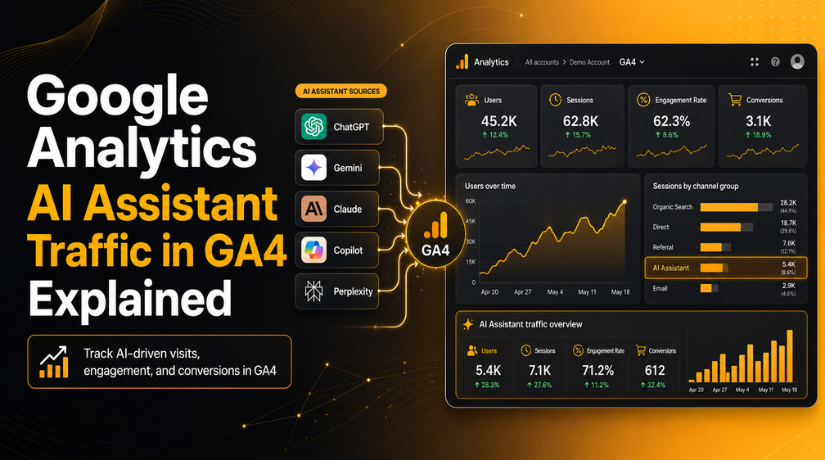
Google Analytics AI Assistant Traffic in GA4 Explained
Introduction
Website traffic is changing fast. Earlier, most users found websites through Google Search, ads, social media, or direct visits. Now, many users ask AI tools for answers before visiting a website. They may use ChatGPT, Gemini, Claude, Copilot, or other AI assistants to find services, products, guides, and expert advice.
This change matters for website owners. A user may not search Google first. They may ask an AI assistant for a trusted WordPress support company. Then, they may click a link suggested by that AI tool. This visit can become part of Google Analytics AI Assistant Traffic in GA4.
For businesses, this data is very useful. It helps you understand how AI tools send visitors to your website. It also helps you review content performance in a new way.
AI Assistant traffic in Google Analytics can help you check:
- Which pages get visits from AI tools
- How users engage after landing on your site
- Whether AI visitors complete forms or calls
- Which content may be useful for AI-based discovery
This does not replace normal SEO tracking. Organic search, direct traffic, and referral traffic still matter. However, AI traffic tracking in GA4 gives one more clear view of user behavior.
What Is Google Analytics AI Assistant Traffic?
Google Analytics AI Assistant Traffic means visits that come from AI tools. These visits happen when a user clicks your website link from an AI assistant response.
Here is a simple example. A person asks ChatGPT for help with a WordPress issue. ChatGPT may suggest a helpful blog or service page. If the user clicks that link, GA4 may record the visit as AI Assistant traffic.
This traffic is different from normal organic search. Organic traffic comes from search engines like Google or Bing. AI Assistant traffic comes from chatbot-style tools that answer user questions directly.
For WordPress website owners, this is an important update. It helps you see whether AI platforms are sending real users. It also helps you measure leads, engagement, and content value from AI-driven visits.
What Changed in GA4 With the New AI Assistant Channel?
Google Analytics 4 now gives website owners a clearer way to track AI-driven visits. This update is important because many users now find websites through AI tools. Earlier, this traffic was not always easy to understand. It could appear under referral, direct, or unassigned traffic in GA4 reports.
With the new GA4 AI Assistant channel, Google Analytics can group visits from recognized AI assistants more clearly. This helps marketers, bloggers, and WordPress website owners see how AI platforms send users to their sites.
This update improves AI traffic tracking in GA4 in three main ways:
- Medium: GA4 may show the medium as ai-assistant.
- Channel Group: The traffic may appear under AI Assistant.
- Campaign: GA4 may show the campaign as (ai-assistant).
This makes reporting much easier. You do not need to depend only on custom filters or manual checks. You can review AI Assistant traffic in Google Analytics with other channels. These include Organic Search, Direct, Referral, and Paid Search.
For WordPress site owners, this is a helpful change. It can show whether AI platforms are sending useful visitors. It can also help you review Google Analytics AI traffic metrics like users, sessions, engagement, and conversions.
Which AI Platforms Can Appear in AI Assistant Traffic?
AI Assistant traffic can come from chatbot-style tools that answer user questions. These tools may suggest websites, blogs, guides, or service pages.
Common AI platforms may include:
- ChatGPT
- Gemini
- Claude
- Microsoft Copilot
- Perplexity
- Other recognized AI assistant sources
For example, ChatGPT traffic in GA4 may appear when a user clicks your website link from a ChatGPT answer. The same can happen with other AI assistants.
However, not every AI visit will always appear clearly. GA4 depends on referral data and source recognition. If an AI tool hides referral details, the visit may appear as direct, referral, or unassigned traffic.
Where to Find AI Assistant Traffic in Google Analytics 4
You can find AI Assistant traffic in Google Analytics through the Acquisition reports. This section helps you understand where users come from before visiting your website. For WordPress website owners, this report is very useful. It shows whether AI tools are sending real visitors to your pages.
To check AI Assistant traffic in GA4, follow these simple steps:
- Open your Google Analytics 4 property.
- Go to the left-side menu.
- Click on Reports.
- Open the Acquisition section.
- Click on Traffic acquisition.
- Check the Session default channel group column.
- Look for the AI Assistant channel.
Once you find it, compare it with other traffic channels. These may include Organic Search, Direct, Referral, Paid Search, and Social. This helps you understand how AI Assistant traffic in Google Analytics performs against normal sources.
The AI Assistant channel may not show for every website. It appears only when GA4 receives matching AI referral data. If your website has no AI-driven visits yet, the report may not show this channel.


Important GA4 Metrics to Review for AI Assistant Traffic
After finding Google Analytics AI Assistant Traffic, review its quality. Do not look only at visitor numbers. A small amount of traffic can still bring strong leads.
You should check these Google Analytics AI traffic metrics:
- Users: Shows how many people came from AI assistants.
- Sessions: Shows how many visits came through this channel.
- Engagement rate: Shows if users interact with your website.
- Average engagement time: Shows how long users stay active.
- Key events: Shows important actions, like forms or calls.
- Conversion rate: Shows if AI visitors become leads.
- Landing pages: Shows which pages receive AI traffic.
These metrics help you improve content and website performance. For example, a blog page may get ChatGPT traffic in GA4. If users stay longer, that page may answer their question well. If users leave quickly, improve the content, speed, or call to action.
Why AI Assistant Traffic Matters for SEO and Content Strategy
AI Assistant traffic is now an important part of modern SEO reporting. Many users no longer depend only on search engines. They ask AI tools for direct answers, product ideas, service options, and trusted guides. If an AI assistant shows your page and users click it, that visit may appear as Google Analytics AI Assistant Traffic.
This matters because it gives website owners a new view of content performance. A page may not rank first in Google Search. Still, it may be useful enough for AI tools to suggest. This can bring new visitors from chatbot-style platforms.
AI Assistant traffic in Google Analytics can help you understand:
- Which topics attract AI-driven users
- Which pages answer questions clearly
- Which content may need more detail
- Which pages support leads or sales
- Which landing pages need stronger calls to action
This data can also support better content planning. If one blog gets AI traffic, you can update it with clearer headings, simple answers, and helpful internal links. This can improve both user experience and content depth.
However, AI traffic does not replace traditional SEO. Organic search, technical SEO, backlinks, page speed, and content quality still matter. AI traffic tracking in GA4 simply adds another useful layer to your website reports.
How WordPress Website Owners Can Use This Data
WordPress website owners can use AI traffic data to make smarter updates. First, check which pages receive visits from the GA4 AI Assistant channel. Then, review how users behave after landing on those pages.
You can improve those pages by adding clear answers and useful sections. Keep headings simple and match real user questions. Add FAQs only where they support the topic. Also, improve internal links to related service pages or blog posts.
WordPress users should also track important actions. These can include contact form submissions, phone clicks, downloads, signups, or purchases. These actions help measure Google Analytics AI traffic metrics more clearly.
You can also use this data to improve site quality. Check page speed, mobile layout, and call-to-action placement. If ChatGPT traffic in GA4 brings engaged users, that page may deserve more updates. If users leave quickly, improve the content, design, or page experience.
Common Issues and Limits of AI Assistant Traffic Tracking
Google Analytics AI Assistant Traffic is useful, but it has limits. GA4 can only report traffic when it receives clear visit data. If a user sees your website in an AI answer but does not click, GA4 cannot count that visit.
Some AI platforms may also hide referral details. In that case, traffic may not appear under the GA4 AI Assistant channel. It may show as Direct, Referral, or Unassigned traffic. This can make full AI traffic tracking in GA4 harder for some websites.
Common limits include:
- Some AI tools may not pass referral data.
- GA4 may only classify known AI assistant sources.
- Small websites may see little data at first.
- Some visits may appear under other channels.
- GA4 tracks visits, not every AI brand mention.
This means you should treat AI Assistant traffic as helpful data. Do not treat it as a complete picture of all AI visibility.
Best Practices to Improve AI Assistant Traffic Reporting
To get better reports, keep your GA4 setup clean and active. Make sure Google Analytics is installed on every important page. Also, confirm that your WordPress website tracks forms, calls, signups, and purchases as key events.
You should also review landing pages from AI Assistant traffic in Google Analytics. Check which pages bring engaged users. Then improve those pages with clear headings, direct answers, and useful links.
Follow these simple best practices:
- Review AI traffic with organic traffic.
- Update old blog posts with fresh details.
- Add clear answers to common questions.
- Improve mobile speed and page layout.
- Check referral and unassigned traffic often.
Conclusion
Google Analytics AI Assistant Traffic gives website owners a new reporting view. It helps you understand visits from AI platforms and chatbot tools. You can review users, sessions, engagement, and conversions from this channel.
For WordPress websites, this data can guide better content updates. It can also improve SEO planning, lead tracking, and reporting accuracy. If your GA4 reports look confusing, 24×7 WP Support can help you review your analytics setup, fix tracking issues, set up key events, and improve reporting accuracy. Visit 24×7 WP Support or call us at +1-888-818-9916 for expert WordPress and GA4 support.
Related posts:
Top WordPress Adsense Plugins for your Website
Google Console Error ‘Clickable elements too close together’ Fixed: Your Step-by-Step Guide
H1 vs Title Tag in WordPress: What Is the Difference and How to Add Them?
What is the difference between tags and keywords in WordPress
Ways to Discourage Search Engines for Indexing Your Website

Brian is a WordPress support specialist and content contributor at 24×7 WP Support. He writes practical, easy-to-follow guides on WordPress troubleshooting, WooCommerce issues, plugin and theme errors, website security, migrations, performance optimization, and integrations. With a focus on solving real website problems, Brian helps business owners, bloggers, and online store managers keep their WordPress sites running smoothly.
