
Admin vs Editor vs Moderator: Key Differences Explained
Introduction
Managing a website or online page becomes easier with clear user roles. Each person should get the right access for their work. This helps protect your content, settings, and business data. That is why understanding admin vs editor vs moderator is important for every website owner.
Many users give full access without checking the real need. This can create security risks and content mistakes. A user may delete important pages, change settings, or approve wrong comments. These issues often happen when roles are not assigned carefully.
User roles help you control who can do what. They also make teamwork smoother. For example, a writer may only need content access. A support person may only need comment control. A developer may need full access for a short time. This is where user roles and permissions explained becomes useful for safe website management.
What Are Admin, Editor, and Moderator Roles?
Admin, editor, and moderator are common access levels. These roles decide what a user can manage. They are used on websites, blogs, forums, social pages, and online communities.
Here is a simple meaning of each role:
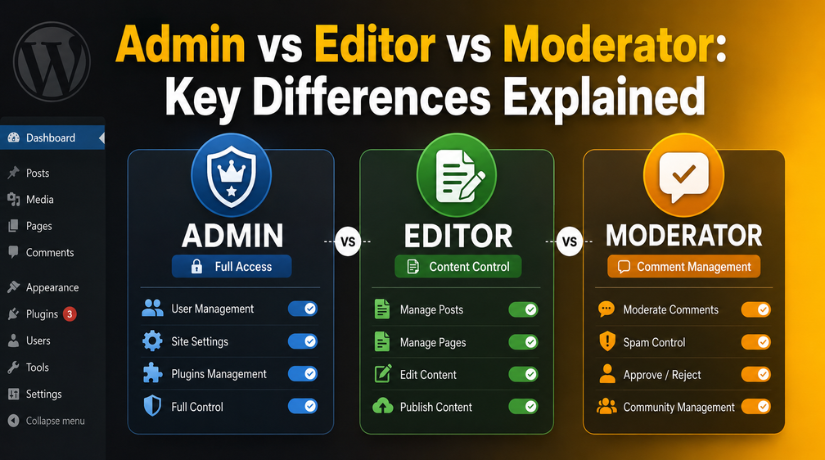
- Admin: Controls the full website or page. An admin can manage users, settings, tools, and content.
- Editor: Manages website content. An editor can usually create, edit, review, and publish posts.
- Moderator: Manages comments and discussions. A moderator helps control spam, replies, and user behavior.
This is the basic way to keep admin editor moderator roles explained in simple terms. An admin has the highest control. An editor focuses on content. A moderator focuses on community activity.
The main difference between admin editor and moderator is access level. Admins manage the full system. Editors manage content tasks. Moderators manage conversations and comments.
These roles may work differently on each platform. WordPress, Facebook, forums, and other tools may use different settings. Still, the purpose stays the same. Each role protects your website and keeps work organized.
What Does an Admin Usually Do?
An admin usually has the highest access level. This role controls the main parts of a website, page, or online platform. Admins can manage settings, users, content, tools, and security options. Because of this, admin access must be handled with care.
In most cases, an admin can add new users. They can also edit or remove existing users. This makes the admin role very powerful. If the wrong person gets this access, they may change important settings by mistake. They may also remove content, install unsafe tools, or create security problems.
On a WordPress website, an admin can often manage themes, plugins, pages, posts, and user accounts. They may also control website settings, menus, forms, and design options. This is why admin access should not be given for small tasks. A person who only updates blog posts does not need full admin control.
When comparing admin vs editor vs moderator permissions, admin access is the most complete. Editors usually manage content only. Moderators usually manage comments or discussions. Admins can manage both, along with many other website functions.
Common admin responsibilities include:
- Managing user accounts and access levels
- Changing website settings and tools
- Installing or removing plugins and themes
- Updating important website sections
- Handling security and backup settings
- Reviewing overall website performance
A business owner should usually keep admin access. A trusted manager may also have admin access if needed. A developer may need temporary admin access for technical work. However, this access should be removed after the work is complete.
Too many admins can increase risk. It becomes harder to track changes. It also becomes harder to know who made an update. For better safety, give admin access only when full control is truly required.
Admin access should always match responsibility. This keeps your website safe, organized, and easier to manage.
What Does an Editor Usually Do?
An editor mainly manages content on a website or platform. This role is useful when someone handles posts, pages, blogs, or updates. Editors can help keep content fresh, clear, and useful for readers. They support the website without needing full technical control.
In WordPress, editors usually work with website content. They may create, edit, review, and publish posts. They may also update pages when needed. However, they should not manage plugins, themes, users, or major settings. This makes the WordPress admin vs editor difference very important.
An admin controls the full website. An editor controls content-related tasks only. This helps website owners protect important settings. It also allows writers and content teams to work safely.
Common editor responsibilities include:
- Creating and updating blog posts
- Reviewing drafts before publishing
- Editing grammar, images, and formatting
- Managing published content
- Keeping content useful and accurate
Editor access is best for content teams, SEO writers, and blog managers. They can improve the website without touching technical settings. This keeps the workflow simple and secure.
What Does a Moderator Usually Do?
A moderator mainly manages comments, discussions, and user activity. This role is common on social pages, groups, forums, and communities. Moderators help keep online spaces clean, safe, and respectful.
Moderators do not usually control full website settings. They focus on user behavior and public conversations. They may approve comments, remove spam, hide harmful replies, or report issues. This makes the role useful for active pages and communities.
The Facebook admin vs moderator difference is a common example. A Facebook admin may control page settings and user access. A moderator may only manage comments, messages, or community actions. This helps page owners manage activity without giving full control.
Common moderator responsibilities include:
- Reviewing comments and discussions
- Removing spam or harmful replies
- Approving or hiding user posts
- Reporting serious issues to admins
- Keeping conversations respectful
Moderator access is best for community support. It is also useful for brands with active social pages. A moderator helps protect the user experience. They do this without changing major settings.
Editors and moderators both support the main admin. Editors handle content quality. Moderators handle community safety. Both roles reduce risk when used correctly.


Main Differences Between Admin, Editor, and Moderator
The main difference between admin editor and moderator comes from access level. Each role has a different purpose. Admins manage the full system. Editors manage content work. Moderators manage comments, discussions, and user activity.
Understanding these differences helps you assign safer access. It also keeps your website or page easier to manage.
Access Level
Admin has the highest access level. This role can usually control settings, users, tools, and content. Admin access is best for owners, managers, or trusted technical users.
Editor access is limited to content work. Editors can usually create, edit, review, and publish content. They do not need full control over website settings.
Moderator access is more limited. Moderators usually manage comments, replies, discussions, and spam. They help keep the public area clean and safe.
Control Over Users
Admins may add, remove, or manage users. They may also change user roles and permissions. This makes admin access very powerful.
Editors usually cannot manage full user access. Their main work is content review and publishing. This keeps important account settings safer.
Moderators usually cannot manage user roles. They may only manage user activity in comments, groups, or discussions.
Content Control
Editors have the strongest content-focused role. They may update blog posts, pages, images, and drafts. This makes them useful for content teams.
Admins can also manage content. However, they have many more controls beyond content. They can change settings, install tools, and manage users.
Moderators usually do not manage website content. They manage comments, discussions, and public interaction.
Settings Access
Admins can usually change important settings. This may include plugins, themes, menus, forms, and security tools. For this reason, admin access should stay limited.
Editors and moderators usually cannot change major settings. This protects the website from accidental changes.
Best Use Case
Use admin access for full website control. Use editor access for content work. Use moderator access for comments and community support.
When comparing admin vs editor vs moderator permissions, always match access to the task. A user should only get the access they need. This simple rule protects your website and reduces mistakes.
Which Role Should You Give to a User?
Many website owners ask, which role should I give to a user? The best answer is simple. Give only the access needed for the task. This keeps your website safer and easier to manage.
If someone needs full control, give admin access. This may include the owner, trusted manager, or developer. Admin access should be limited because it controls important settings.
If someone only works on blogs or pages, give editor access. This is better for writers, SEO teams, and content managers. They can update content without changing technical settings.
If someone only manages comments, give moderator access. This is useful for social pages, forums, and active communities. Moderators can help manage spam and user behavior.
Follow these simple access rules:
- Give admin access only for full control.
- Give editor access for content work.
- Give moderator access for community tasks.
- Avoid admin access for simple updates.
- Remove old users when work is complete.
Common Mistakes to Avoid When Assigning Roles
One common mistake is giving admin access to too many users. This can increase security risks. Another mistake is keeping old users active after work ends. Some businesses also use one shared login, which is unsafe.
Good user roles and permissions explained simply means this: each user should have clear, limited, and useful access.
Conclusion
Admin, editor, and moderator roles should match each user’s responsibility. Admins control the full system. Editors manage content. Moderators manage comments and community activity.
If you need help managing WordPress users, fixing role issues, or securing your website access, 24×7 WP Support can help you review and manage your WordPress permissions safely.

Brian is a WordPress support specialist and content contributor at 24×7 WP Support. He writes practical, easy-to-follow guides on WordPress troubleshooting, WooCommerce issues, plugin and theme errors, website security, migrations, performance optimization, and integrations. With a focus on solving real website problems, Brian helps business owners, bloggers, and online store managers keep their WordPress sites running smoothly.
