
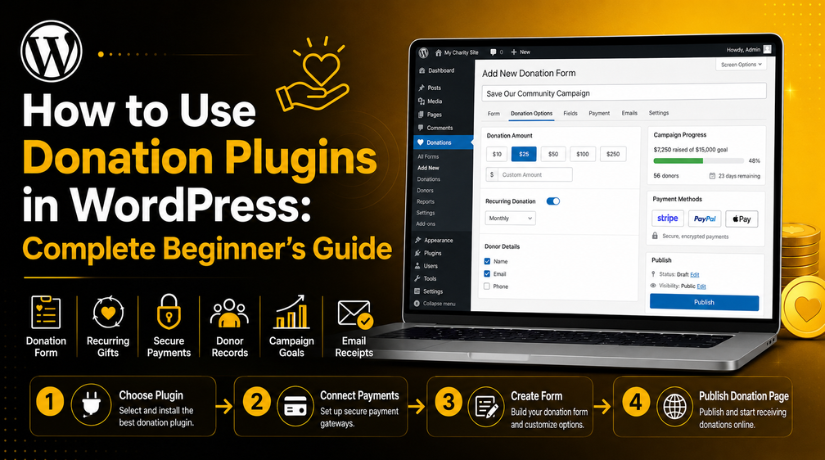
How to Use Donation Plugins in WordPress: Complete Beginner’s Guide
Introduction
Online donations are now important for many website owners. Charities, churches, schools, creators, and community groups need simple ways to collect support. Many visitors also prefer giving online because it feels fast and easy. This is where WordPress donation plugins become very useful for beginners. These plugins help you create a donation form without writing code. You can add the form to a page, post, sidebar, or campaign section. A good plugin also helps you manage payments, donors, emails, and records from one place.
A donation plugin for WordPress works like a small fundraising tool inside your website. It gives visitors a clear way to support your cause. They can choose an amount, enter their details, and complete payment safely. This makes the donation process smooth for both visitors and website owners. You do not need a custom payment system for basic fundraising needs. You only need the right plugin, a payment gateway, and a clear donation page.
Many website owners want to accept donations on WordPress but do not know where to start. Some use a simple payment button, but that has limits. A full WordPress donation system gives better control and more trust. It can show donation amounts, collect donor details, send receipts, and track donation history. Some plugins also support recurring donations and campaign goals. These features help you build a better donation experience.
This beginner’s guide explains how donation plugins work in WordPress. It also explains why they are useful for online fundraising. In this first part, you will learn the basic meaning of donation plugins. You will also understand how they work behind the scenes. This will help you choose and use them with more confidence.
What Is a Donation Plugin in WordPress?
A donation plugin in WordPress is a tool for collecting donations online. It helps you add donation forms to your website. These forms allow visitors to send money for your cause. The plugin connects your website with a payment gateway. The gateway then processes the payment safely and quickly. This setup helps you collect donations without custom development work.
A donation plugin for WordPress is useful for many website types. Nonprofits can use it for charity campaigns. Churches can use it for regular giving. Schools can use it for events and support programs. Bloggers and creators can use it for reader support. Community groups can use it for local fundraising needs. This makes donation plugins flexible for many simple and advanced uses.
A plugin can also save important donation details. These details may include donor names, emails, donation amounts, and dates. Some plugins also store campaign names and payment status. This helps website owners manage donations from the WordPress dashboard. You can check records without using many separate tools. This makes the full donation process easier to manage.
Many beginners think donation setup is hard in WordPress. But a good plugin makes it very simple. You can install the plugin from the WordPress dashboard. Then you can create a form and connect payment options. After that, you can add the form to your donation page. This makes it easy to accept donations on WordPress with less effort.
When You Should Use a Donation Plugin on Your WordPress Website
You should use a donation plugin when your website needs online support. Many website owners want a simple way to collect donations. A donation plugin for WordPress makes this process much easier. It helps you create donation forms without custom coding work. It also helps you manage payments, donor records, and emails. This makes it useful for charities, churches, schools, and creators. If your website needs regular support, donations can help greatly. A plugin gives visitors a safe and clear giving process.
Use Donation Plugins When You Run a Nonprofit Website
Nonprofit websites often need donations for daily programs and campaigns. A WordPress fundraising plugin helps nonprofits collect support online. You can create forms for different causes and donation goals. You can also show how each donation helps your work. This makes the donation page more clear and trusted. Donors can choose an amount and complete payment quickly. The plugin can also send donation receipts automatically after payment. This saves time and reduces manual follow-up work. It also helps your nonprofit manage donor records in one place.
Use Donation Plugins for Churches and Religious Groups
Churches and religious groups often collect regular community support. A donation plugin helps members give online from anywhere. It can support one-time gifts and recurring donations. This is useful for weekly, monthly, or event-based giving. Visitors can donate for services, events, missions, or community help. A clear donation form also makes giving easier for older members. It removes the need for only cash-based collections. A good online donation plugin WordPress setup can also send receipts. This makes donation records easier for both admins and members.
Use Donation Plugins for Schools and Educational Campaigns
Schools can use donation plugins for many support needs. They may collect funds for events, books, trips, or supplies. A donation form makes this process simple for parents and supporters. It also helps schools explain exactly where funds will go. Clear campaign details can improve trust and response. Supporters can donate fixed amounts or choose custom amounts. The plugin can track donation totals and donor details. This saves admin time and keeps records organized. A WordPress donation system can also help with yearly fundraising campaigns.
Use Donation Plugins for Bloggers, Creators, and Community Projects
Bloggers and creators can use donations to support their work. Readers may want to support helpful content or free resources. A simple donation button can make that support possible. Community projects can also collect funds for local needs. These may include cleanup drives, events, support groups, or awareness campaigns. A donation plugin for WordPress gives these projects a professional setup. It helps visitors understand the cause and donate with ease. Creators can also add donation forms below blog posts. This encourages support from readers who value the content.
Use Donation Plugins for Emergency or Fundraising Campaigns
Emergency campaigns often need quick action and easy donation access. A donation plugin helps you publish a campaign page fast. You can explain the problem, add a form, and share the page. Supporters can donate from mobile, desktop, or tablet devices. A good campaign page should explain the need clearly. It should also show how donations will help people. Some WordPress donation plugins support goal bars and progress updates. These features make campaigns more transparent and engaging. Emergency campaigns need trust, speed, and clear donation steps.
Benefits Of Using Donation Plugin for WordPress Websites
Using a donation plugin gives many benefits to website owners. It makes online giving simple, organized, and more professional. A basic payment link may collect money, but it has limits. A full donation plugin gives better form control and records. It also helps you manage donor details and payment history. This is useful when your campaign starts growing over time. The best donation plugin WordPress users choose should support easy setup. It should also offer secure payments and useful donation features.
Easy Donation Collection Without Any Coding Work
A donation plugin helps you collect money without coding knowledge. You can install it from the WordPress plugin area. Then you can create donation forms using simple settings. Most plugins provide form fields, buttons, and payment options. You do not need a developer for basic setup. This is helpful for beginners who manage websites themselves. You can add the form to any important page. You can also place donation buttons in visible website areas. This makes it easier to accept donations on WordPress quickly. A simple setup helps you launch campaigns without long delays.
Better Donor Management From One WordPress Dashboard
A donation plugin helps you store donor details in one place. You can view donor names, emails, amounts, and dates. This makes follow-up communication much easier for website owners. You can also check who donated to each campaign. This helps when you run many fundraising pages together. A proper WordPress donation system reduces manual record keeping. You do not need to manage every detail in spreadsheets. Some plugins also allow donor data exports when needed. Better donor management helps you build long-term donor relationships. It also makes future campaign planning more organized and effective.
Secure Payment Processing Through Trusted Payment Gateways
Security is very important when collecting donations online. Donors need to feel safe before making any payment. A donation plugin connects your site with trusted payment gateways. These gateways handle card details and payment processing safely. This reduces risk for both donors and website owners. Common options may include PayPal, Stripe, or bank transfer. The available gateway depends on your selected plugin. Always choose a plugin that supports trusted payment options. A secure payment process helps increase donor confidence.
Recurring Donation Support for Steady Monthly Giving
Recurring donations help websites receive regular monthly support. This is useful for nonprofits, churches, creators, and communities. Donors can choose to support your cause every month. This gives your campaign more stable income over time. A WordPress fundraising plugin with recurring support is very helpful. It can manage repeat payments and donor records automatically. This reduces manual reminders and follow-up work. Monthly giving also helps organizations plan future programs better. You can create clear messages around regular giving benefits.
Professional Donation Page Design That Builds Trust
A clean donation page can improve visitor trust quickly. Donors want to know where their money will go. A donation plugin helps you present this information clearly. You can add a cause message, form, and donate button. You can also show fixed amounts and custom donation options. Some WordPress donation plugins also support campaign goals and progress bars. These elements make the page more active and useful. A professional page looks better than a plain payment link. It also gives donors a smoother and more guided experience. Better design can help improve donation completion rates.
Automatic Emails and Receipts After Every Donation
Donation plugins can send emails after successful donations. This helps donors know their payment was received properly. A confirmation email also makes your website look more professional. Admin notification emails help website owners track new donations quickly. These emails reduce confusion and save manual reply time. You can also customize thank-you messages in many plugins. A warm thank-you email can build stronger donor relationships. It shows that you value every supporter’s contribution. Email receipts are also useful for donation records.
Better Campaign Tracking With Reports and Donation Records
Donation reports help you understand your fundraising performance. You can check total donations, donor count, and campaign progress. These reports help you see what is working well. You can also find campaigns that need better promotion. A good online donation plugin WordPress setup gives useful records. This helps website owners make better fundraising decisions later. Reports are also helpful for internal reviews and updates. You can share campaign progress with your team or supporters.
Important Things To Check Before Using a Donation Plugin
Before installing any plugin, you should check important details carefully. Not every plugin will match your website needs properly. Some plugins are simple, while others offer advanced features. The best donation plugin WordPress option depends on your goal. You should check features, security, support, and payment options. This helps you avoid problems after setup. A wrong plugin can create payment issues or poor user experience. It may also miss important features like recurring donations.
Check Plugin Compatibility With Your WordPress Website
The plugin should work with your current WordPress version. It should also work with your active theme and page builder. Compatibility helps avoid design, form, and payment issues later. Always check the plugin update history before installation. A recently updated plugin is usually a better choice. You should also check if it supports your PHP version. Old plugins may create errors or security risks. Compatibility is very important for a stable donation setup.
Check Payment Gateway Options Before Plugin Setup
Payment gateway support is one of the most important checks. Your plugin should support payment methods your donors prefer. Common options include PayPal, Stripe, bank transfer, and offline donations. Some plugins may also support local payment gateways. You should also check gateway availability in your country. A payment option may not work everywhere. Also check gateway fees before making the final choice. Fees can affect the final amount you receive.
Check Free and Paid Features Clearly Before Use
Many donation plugins offer both free and premium versions. The free version may support basic donation forms only. Advanced features may need a paid plan or add-on. These features can include recurring donations, reports, and extra gateways. They may also include fee recovery or email integrations. Before choosing a plugin, review all included features carefully. This helps you avoid surprise costs after setup. A small website may only need free features.
Check Security and Donor Data Handling Carefully
Donation websites handle sensitive donor and payment information. So, security should never be ignored during plugin selection. The plugin should use trusted gateways for payment processing. Your website should also have an active SSL certificate. SSL helps secure data shared through the donation form. You should also check how the plugin stores donor details. A secure plugin protects donor information and improves trust. Avoid unknown plugins with poor reviews or old updates.
Check Mobile Responsiveness of Donation Forms
Many visitors will open your donation page on mobile. So, the donation form must work well on small screens. Fields should be easy to read and fill. Buttons should be large enough for mobile users. The form should not break or look crowded. A poor mobile layout can reduce donation completion rates. Test the form on mobile before publishing the page. Also check spacing, button size, and payment steps.
Check Email Notification and Receipt Settings
Email settings are important for a professional donation process. Donors should receive confirmation after every successful donation. Website admins should also receive new donation alerts. These emails help both sides stay informed. You should check if the plugin supports custom email messages. A clear thank-you email can improve donor trust. Also check if receipts include donation amount and date. Some websites may need extra receipt details for records. Email delivery should also be tested before going live.


Check Plugin Support and Documentation Quality
Beginners may need help during donation plugin setup. Good documentation can solve many common setup questions. Check if the plugin has setup guides and support articles. Also review support response quality before choosing it. A plugin with poor support may create future stress. You should also check user reviews for support feedback. Helpful documentation makes the setup process much easier. It also helps you fix small issues without delays.
Check Reporting and Donor Export Options
Reporting features help you track donation activity clearly. You should check if the plugin shows total donations. It should also show donor details and campaign performance. Export options are useful when you need offline records. Some plugins allow CSV exports for donor and donation data. This helps with reports, reviews, and future planning. A WordPress fundraising plugin with reporting tools saves admin time. It also helps you understand donor behavior better.
Check Refund, Donation, and Privacy Policy Needs
Donation websites should explain important policies clearly. Visitors may want to know if donations are refundable. They may also want to know how their data is used. A privacy policy helps explain donor data handling. A donation policy can explain payment and refund terms. These pages help build trust before visitors donate. You should review local rules before collecting donations online. Some organizations may need special tax or receipt details. Add policy links near your donation form when needed. Clear policies make your donation system more professional and transparent.
How to Use Donation Plugins in WordPress (Step By Step Guide)
Using WordPress donation plugins is not difficult when you follow clear steps. You do not need advanced coding knowledge for basic setup. A good plugin gives ready-made options for donation forms. It also helps you connect payment gateways with simple settings. This makes it easier to accept donations on WordPress safely. Beginners should always start with a simple donation setup. After that, they can add advanced features when needed. A proper WordPress donation system should be easy, secure, and clear. It should help visitors donate without any confusion. The steps below explain the full setup process in detail.
Step 1: Choose the Right Donation Plugin for Your Website Needs
- First, decide what type of donation setup you need.
- Choose a simple plugin for a basic donation form.
- Choose an advanced plugin for full fundraising features.
- Check if the plugin supports your payment gateway.
- Check if it supports PayPal, Stripe, or bank transfer.
- Choose recurring donation support if you need monthly giving.
- Check plugin reviews before installing it.
- Check when the plugin was last updated.
- Make sure the plugin works with your WordPress version.
- The best donation plugin WordPress users choose should match their website needs.
Step 2: Install the Donation Plugin From WordPress Dashboard
- Log in to your WordPress admin dashboard.
- Go to Plugins from the left menu.
- Click on Add New.
- Type the plugin name in the search box.
- Click Install Now when the plugin appears.
- After installation, click Activate.
- The plugin will now appear in your dashboard menu.
- Some plugins may show a setup wizard.
- Follow the setup wizard if it appears.
- This helps you complete basic settings faster.
Step 3: Complete the Basic Donation Plugin Settings First
- Open the donation plugin settings page.
- Select your donation currency first.
- Choose the currency your donors will understand.
- Set the basic donation form style.
- Keep the form clean and easy to use.
- Select the payment methods you want to offer.
- Enable only the payment methods you can manage.
- Set donor email confirmation messages.
- Set admin notification email settings.
- Add a thank-you page or success message.
- These settings help your WordPress donation system work properly.
Step 4: Connect a Secure Payment Gateway With the Plugin
- Open the payment settings inside your donation plugin.
- Choose a trusted payment gateway.
- Common options include PayPal, Stripe, and bank transfer.
- Connect your payment account with the plugin.
- Some gateways may need API keys.
- Some gateways may ask you to log in.
- Check whether the plugin is in test mode.
- Use test mode before accepting real donations.
- Switch to live mode after successful testing.
- Make sure the plugin currency matches the gateway currency.
- A secure gateway helps donors trust your website.
Step 5: Create Your First Donation Form With Clear Fields
- Go to the donation form section inside the plugin.
- Click on Add New Form or similar option.
- Add a clear title for your donation form.
- Use a title that explains your campaign purpose.
- Add fixed donation amounts for quick selection.
- Add a custom amount field if needed.
- Add only important donor fields.
- Basic fields can include name and email address.
- Add a phone number only if it is required.
- Write a short message above the form.
- Explain why donations are needed.
- Add a clear button text like Donate Now.
- Save and preview the form before publishing it.
Step 6: Customize Donation Amounts for Better User Experience
- Add simple donation amount options.
- Use small, medium, and high amount choices.
- You can add amounts like $10, $25, $50, and $100.
- Add a custom amount option for flexible giving.
- Do not add too many donation choices.
- Too many choices can confuse visitors.
- Match donation amounts with your campaign goal.
- Add short impact messages if possible.
- Example: “$25 helps support one family meal.”
- Check how many buttons look on mobile.
- Make sure buttons are easy to tap.
- This helps visitors donate with less effort.
Step 7: Add a Clear Donation Message Above the Form
- Add a short message before the donation form.
- Tell visitors why you need donations.
- Explain how the money will be used.
- Mention who will benefit from the donation.
- Keep the message simple and honest.
- Avoid long or confusing details.
- Do not make false or unclear claims.
- Use friendly and clear language.
- Make the message match your cause.
- Place the message above the form.
- This helps visitors understand before they donate.
Step 8: Add the Donation Form to a WordPress Page
- Create or open the page where you want the form.
- Most WordPress donation plugins provide placement options.
- You can use a shortcode, block, or widget.
- If using Gutenberg, add the donation plugin block.
- Select your donation form from the block settings.
- If using shortcode, copy it from the plugin.
- Paste the shortcode into your page content.
- If using a page builder, use a shortcode widget.
- Preview the page after adding the form.
- Check if the form appears correctly.
- Test the page on desktop and mobile devices.
Step 9: Create a Dedicated Donation Page That Builds Trust
- A full donation page works better than a small form.
- Create a page named Donate or Support Us.
- Add a clear heading at the top.
- Explain your donation purpose in simple words.
- Add your donation form in a visible place.
- Add short points about donation impact.
- Mention how donations will help your cause.
- Add contact details for trust.
- Add FAQs if donors may have questions.
- Add a thank-you message after the form.
- Keep the page clean and mobile-friendly.
- A clear page helps visitors donate with confidence.
Step 10: Test the Full Donation Process Before Publishing
- Testing is very important before going live.
- Open the donation page as a normal visitor.
- Check if the form loads properly.
- Select each donation amount once.
- Test the custom amount field.
- Fill in donor details.
- Check if the payment gateway opens correctly.
- Make a test donation if the plugin supports test mode.
- Confirm that the thank-you page opens.
- Check if donor email confirmation is received.
- Check if an admin email notification is received.
- Check if the donation record appears in WordPress.
- Test the form on mobile, tablet, and desktop.
- Fix all issues before sharing the donation page.
Step 11: Publish and Promote the Donation Page Properly
- Publish the donation page after testing everything.
- Add a Donate Now button in the website header.
- Add the donation page link in the footer.
- Add donation CTAs inside related blog posts.
- Add a donation section on the homepage.
- Share the donation page on social media.
- Send the donation page through email campaigns.
- Keep your message short and clear.
- Explain the cause and share the donation link.
- Review donation reports regularly.
- Check which campaign gets more donations.
- Improve the page based on donor response.
- A good WordPress fundraising plugin works better with regular tracking.
Common Mistakes and Fixes While Using Donation Plugins in WordPress
Many beginners make small mistakes while setting up donation plugins. These mistakes can stop visitors from completing their donations. They can also affect trust, payments, emails, and user experience. A good WordPress donation system should work smoothly on every device. It should also guide donors with clear steps and simple messages. When you use WordPress donation plugins, you must test every setting carefully. Even one wrong setting can create payment or email issues.
Choosing the Wrong Donation Plugin for Your Website
Choosing the wrong plugin is a very common beginner mistake. Every donation plugin for WordPress does not offer the same features. Some plugins work best for simple donation forms. Some plugins work better for full fundraising campaigns. Some plugins support recurring donations, while others do not. If you choose the wrong plugin, you may face limits later. You may also need to replace the plugin after setup. This can waste time and create extra work.
Not Testing the Donation Form Before Publishing
Many website owners publish donation forms without proper testing. This can create problems for real donors later. The form may not submit correctly after users fill it. The payment gateway may fail during the final step. The thank-you page may not open after payment. Donors may also not receive confirmation emails. These issues can reduce trust and lose donations quickly.
Using Too Many Required Fields in Donation Forms
Long donation forms can make visitors leave quickly. Many beginners ask for too many details from donors. They may ask for an address, phone, company, and extra notes. These details are not always needed for basic donations. When forms look long, visitors may feel tired. They may also worry about sharing too much information. This can reduce the number of completed donations.
Hiding the Donate Button on the Website
A donation page is not useful if visitors cannot find it. Many websites hide donation buttons deep inside menus. Some place the donation link only in the footer. Some use small buttons that visitors easily miss. If users cannot find the donation option, they will not donate. A hidden button can reduce campaign performance greatly.
Connecting the Payment Gateway Incorrectly
Payment gateway errors are common with donation plugins. Wrong API keys can stop payments from working. Test mode and live mode confusion can also create issues. Currency mismatch may cause payment failure during checkout. Sometimes the gateway account is not fully verified. These problems can stop donors from completing payments.
Donation Email Receipts Are Not Sending
Email receipt issues can create confusion for donors. Donors expect a confirmation after completing their donation. If they receive no email, they may worry. They may think the payment failed or was unsafe. Admins may also miss important donation alerts. This can create poor communication and record problems.
Donation Page Looks Poor on Mobile Devices
Many donors use mobile phones to visit websites. If your donation page looks broken, they may leave. Fields may look too small or too close together. Buttons may be hard to tap on small screens. Payment steps may also look confusing on mobile. A poor mobile layout can reduce donations quickly.
Not Explaining the Donation Purpose Clearly
Visitors need a reason before they donate money. If your page does not explain the cause, users may leave. Many beginners add a form but no clear message. This makes the donation page look incomplete and weak. Donors want to know how their money will help. They also want to know who benefits from their support.
Ignoring Website Security Before Accepting Donations
Security is very important for donation websites. Donors must feel safe before sharing payment details. A weak website can reduce trust quickly. Outdated plugins can create security risks. Weak passwords can also expose your website to attacks. Missing SSL can make payment pages look unsafe. These issues can harm your donation campaign badly.
Not Tracking Donation Reports and Donor Records
Some beginners collect donations but never review reports. This makes it hard to measure campaign success. You may not know which page performs better. You may also miss repeat donors or high-value supporters. Without reports, future planning becomes difficult. Donation records help you understand donor behavior clearly.
Conclusion
Donation plugins make online fundraising easier for WordPress website owners. They help you create forms, collect payments, and manage donors. They also help send receipts and track campaign results. A good donation plugin for WordPress can save time and reduce manual work. It can also make your donation page look more professional. This helps visitors trust your website before giving support.
Beginners should start with a simple and clear setup. Choose a plugin that matches your donation goals. Check payment gateway support before installing any plugin. Create a short form with clear donation amounts. Add a strong message that explains your purpose. Then test the full donation process before publishing. These steps help you accept donations on WordPress safely and smoothly.
You should also avoid common setup mistakes. Do not use long forms or hidden donation buttons. Do not ignore mobile design, emails, security, or reports. A reliable WordPress donation system needs regular testing and improvement. When your donation page feels easy and trusted, visitors respond better. This can help your campaign receive more support over time.
If you need expert help, 24x7wpsupport is ready to assist you. Our team can help you install and configure WordPress donation plugins properly. We can also set up payment gateways, donation forms, security checks, and email receipts. We make sure your donation page works smoothly on desktop and mobile devices. Visit 24x7wpsupport to get professional WordPress support. Let our experts help you build a secure donation setup today.

Brian is a WordPress support specialist and content contributor at 24×7 WP Support. He writes practical, easy-to-follow guides on WordPress troubleshooting, WooCommerce issues, plugin and theme errors, website security, migrations, performance optimization, and integrations. With a focus on solving real website problems, Brian helps business owners, bloggers, and online store managers keep their WordPress sites running smoothly.
