
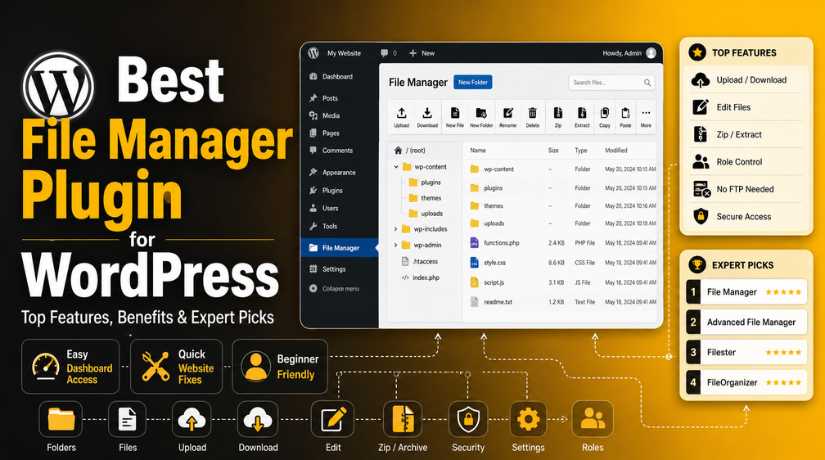
Best File Manager Plugin for WordPress: Top Features, Benefits & Expert Picks
Introduction
Every WordPress website has many important files behind its design. These files control themes, plugins, images, scripts, uploads, and settings. Sometimes, you may need to upload a file, replace a broken file, or remove an unwanted folder. Many users do this through FTP or cPanel. However, these tools can feel confusing for beginners. A WordPress file manager plugin makes this process much easier.
It helps you manage website files directly from your WordPress dashboard. You do not need separate FTP software for basic file tasks. The best file manager plugin for WordPress can save time and reduce technical work. It can help website owners, bloggers, developers, and support teams. A good file manager WordPress plugin gives simple access to files and folders. It also helps you handle quick fixes without opening your hosting account. This guide explains what a file manager plugin does. It also explains why your website may need one.
What Is a WordPress File Manager Plugin and How Does It Work?
A WordPress file management plugin works like a file explorer inside WordPress. It allows you to view, upload, edit, delete, rename, copy, and move files. You can complete these tasks from your admin dashboard. This makes file handling easier for non-technical users. A WP file manager plugin adds a file manager screen inside WordPress. From there, you can open folders and manage files quickly. You can view theme files, plugin files, upload folders, and media files.
Some plugins also allow file previews and code editing. Some tools include zip and unzip options for folders. This helps during migration, backup, and file transfer tasks. The best WordPress file manager should be simple, secure, and easy to control. It should not confuse users with too many complex options.
Why Do You Need a File Manager Plugin for WordPress Websites?
A file manager plugin is helpful when you need quick file access. Many website owners do not feel comfortable using FTP tools. Some users also do not have hosting panel access. In these cases, a WordPress file manager plugin gives direct dashboard access. You can manage files without switching between many platforms. This saves time during urgent website fixes. For example, you may need to replace a missing image file. You may also need to remove an unwanted plugin folder. Sometimes, small file changes can fix display or layout issues. A file manager WordPress plugin helps you complete these tasks faster. However, you should always take a backup before changes.
Manage WordPress Files Without FTP or Hosting Panel Access
FTP tools are useful, but they need technical setup. You need server details, usernames, passwords, and port settings. Beginners may find these details hard to manage. A WP file manager plugin removes many of these steps. It lets you manage files from your WordPress dashboard. This is helpful when you need simple file actions. You can upload, download, rename, or delete files quickly. This makes the process easier for small business owners. It also helps bloggers who manage their own websites. The best file manager plugin for WordPress should make file access simple. It should also keep important security controls in place.
Make Quick Website Fixes Without Delays or Extra Tools
Website issues often need fast action. A missing file can break a page layout. A wrong folder can stop a feature from working. An unwanted file can also create security concerns. A WordPress file management plugin helps you check files quickly. You can replace missing files without opening cPanel. You can remove old folders after confirming they are unused. You can download important files before making changes. Developers can also review theme or plugin files faster. This improves support speed during urgent WordPress errors. Still, file changes should always be handled with care. One wrong edit can affect the whole website.
Improve File Organization and Keep Website Files Cleaner
Poor file organization can make website maintenance difficult. Many websites collect unused files over time. Old folders, duplicate uploads, and test files can create confusion. A manage WordPress files plugin helps you review these files. You can organize folders and remove unwanted items carefully. This makes future maintenance easier for your team. It also helps developers find the correct files faster. A clean file structure supports smoother website management. It also reduces mistakes during updates or troubleshooting. The best WordPress file manager should help users work clearly. It should make file browsing simple and easy to understand.
Support Developers, Agencies, and Website Maintenance Teams
Developers often need quick access to website files. Agencies also manage many client websites daily. Logging into hosting panels every time can slow work. A file manager for WordPress website helps teams work faster. They can check files directly from the dashboard. They can upload assets, review folders, and download backups. They can also handle small file-level changes quickly. This improves support quality and saves useful time. It is also helpful during website testing and staging work. However, agencies should limit access to trusted users only. File manager access should never be given to every user.
Help During Website Migration, Backup, and Testing Tasks
Website migration often needs careful file handling. You may need to zip folders before moving them. You may also need to download files for backup use. A WordPress file manager plugin can support these basic tasks. It helps users move files during staging or testing work. You can create folders, upload files, and manage structure easily. This is useful during redesigns, migrations, and maintenance jobs. Still, it should not replace a complete backup system. Always keep full backups before moving or editing files. The best file manager plugin for WordPress should support safe work. It should make file management easier without reducing website security.
Features to Look for in the File Manager Plugin for WordPress
Easy Dashboard File Access for Simple WordPress File Control
The best file manager plugin for WordPress should offer easy dashboard access. Users should not feel confused while opening website files. A clean layout helps beginners manage files with confidence. The plugin should show folders in a simple structure. It should work like a normal computer file explorer. This makes file browsing easier for every website owner. A good WordPress file manager plugin should reduce extra steps. Users should access files without opening FTP or cPanel. The dashboard should include clear buttons and simple labels. This helps users upload, move, rename, or delete files safely.
File Upload and Download Support for Faster Website Updates
A strong file manager WordPress plugin should support smooth uploads and downloads. Users often need to upload images, documents, scripts, or backup files. The plugin should allow single and bulk file uploads. Drag-and-drop upload support can make the process easier. Download options are also important for safe file handling. Users may need a copy before editing any file. This protects important data during updates or fixes. A reliable WordPress file management plugin should handle common file types well. It should also show upload progress clearly. This helps users avoid confusion during large file uploads.
Built-In File Editing Option for Quick Small Changes
File editing is an important feature for technical users. A manage WordPress files plugin should include a safe editor. This helps users make small changes inside files. Developers may need to edit theme or plugin files. A code editor with syntax highlighting is very helpful. It makes code easier to read and update. However, file editing must be used very carefully. One wrong change can break the website layout. The best WordPress file manager should support safe editing steps. It should also allow users to download backups before changes. This helps reduce risk during quick file fixes.
Zip and Extract Support for Backup and Migration Tasks
Zip and extract features are very useful for WordPress users. A good WP file manager plugin should compress files and folders easily. This helps when users need to download many files. It also helps during website migration or backup work. Users can zip folders before moving them elsewhere. They can also extract uploaded zip files inside WordPress. This saves time and removes extra hosting steps. A useful file manager for WordPress website should handle archives smoothly. It should support common formats without creating file errors. This feature is helpful for developers, agencies, and site owners.
Copy, Move, Rename, and Delete Options for Daily File Tasks
Daily file tasks should be simple and safe. A WordPress file manager plugin should allow basic file actions easily. Users should copy, move, rename, and delete files quickly. These actions help keep website folders clean and organized. The plugin should also support bulk actions when needed. This saves time on websites with many files. Clear confirmation messages are also very important. They help prevent users from deleting important files by mistake. The best file manager plugin for WordPress should make each action clear. It should also show file paths before major changes happen.
User Role and Permission Control for Better Website Safety
Permission control is one of the most important features. A file manager WordPress plugin gives powerful access to website files. So, only trusted users should manage those files. The plugin should support user role control options. Admins should decide who can view or edit files. This is very helpful for teams and client websites. It also protects the website from accidental file damage. A secure WordPress file management plugin should limit risky actions. It should allow admins to block delete or edit rights. Good permission settings help keep the website safer.
List Of 5 Best File Manager Plugins for WordPress (Top Picks)
#1 File Manager
File Manager is a popular WordPress file manager plugin for backend file control. It helps users edit, delete, upload, download, zip, copy, and paste files. It removes the need for FTP during basic file tasks. This file manager WordPress plugin is useful for website owners, agencies, and developers who need quick dashboard access.
Features
- Upload and download files from the WordPress dashboard.
- Edit files directly from the backend file screen.
- Copy, paste, move, and delete files easily.
- Zip and unzip folders for quick file transfer.
- Supports cloud-related add-ons for storage workflows.
Pros
- Easy to use for many WordPress website owners.
- Reduces the need for FTP and cPanel access.
- Good for quick file fixes and small updates.
- Useful for agencies managing many client websites.
- Offers many basic file actions in one place.
Cons
- File access can be risky for new users.
- Some advanced options may need extra add-ons.
- Wrong file edits can break website functions.
- Access should be limited to trusted administrators only.
- It may feel too powerful for simple media tasks.
Download Link: File Manager
#2 Advanced File Manager
Advanced File Manager helps users manage WordPress files from the dashboard. It supports file tasks like copy, paste, upload, download, and delete. It also supports archive creation and document library use cases. This WordPress file management plugin is helpful for teams needing better access control and safer file operations.
Features
- Manage files directly from the WordPress admin area.
- Copy, paste, upload, download, and delete files.
- Create archives for backup and migration tasks.
- Supports document library use with advanced options.
- Offers role control options in the Pro version.
Pros
- Good choice for advanced file management needs.
- Helpful for teams and client website workflows.
- Works as a useful FTP alternative.
- Supports document library style file handling.
- Offers better control for authorized users.
Cons


- Some advanced features may need the Pro version.
- Beginners may need time to understand settings.
- Wrong access settings can create file security risks.
- It may offer more features than small sites need.
- Careful setup is important before team use.
Download Link: Advanced File Manager
#3 Filester
Filester is a free WP file manager plugin for WordPress users. It helps users manage files without FTP or cPanel access. Users can copy, paste, upload, download, edit, delete, preview, duplicate, and archive files. This plugin is useful for admins who need a simple and clean file management workflow.
Features
- Copy and paste files inside WordPress.
- Upload and download website files easily.
- Create archives for selected files or folders.
- Edit and delete files from the dashboard.
- Preview, duplicate, and check file information.
Pros
- Good FTP alternative for WordPress admins.
- Offers many useful file actions for free.
- Helps improve daily file management work.
- Simple dashboard workflow saves useful time.
- Helpful for website owners and developers.
Cons
- Admin-only access is strongly recommended.
- Users should always take backups before edits.
- Not mainly built for frontend file uploads.
- Cloud storage options may not suit every workflow.
- Wrong file changes can cause website errors.
Download Link: Filester
#4 FileOrganizer
FileOrganizer is a lightweight file manager for WordPress website users. It helps users access, upload, download, edit, delete, zip, cut, copy, and paste files. It works without FTP or control panel access. This plugin is useful for beginners who need simple dashboard-based file control and clean file handling.
Features
- Upload and download files from WordPress admin.
- Edit and delete files when changes are needed.
- Zip files and folders for easy transfer.
- Cut, copy, and paste files between folders.
- Access files outside the WordPress root directory.
Pros
- Lightweight and easy to understand.
- Good option for simple file management tasks.
- Removes the need for FTP in basic work.
- Useful for beginners and small website owners.
- Supports many common file actions from WordPress.
Cons
- May not suit complex team permission needs.
- Advanced users may need deeper control options.
- Not focused only on media library management.
- File access still needs careful handling.
- Not ideal for large client file portals alone.
Download Link: FileOrganizer
#5 WPIDE
WPIDE is a developer-focused best WordPress file manager option. It works as an advanced file manager and code editor. Users can edit files inside the wp-content folder. It also includes code completion and tabbed editing. This plugin is best for technical users who manage theme and plugin files.
Features
- Includes a file manager and code editor.
- Edits files inside the wp-content folder.
- Supports tabbed editing for multiple files.
- Offers code completion for faster coding work.
- Helps developers manage theme and plugin files.
Pros
- Strong option for developers and technical users.
- Helpful for theme and plugin file editing.
- Tabbed editing improves coding workflow.
- Code completion can save development time.
- Useful when quick code access is needed.
Cons
- Not ideal for complete WordPress beginners.
- Wrong code edits can break the website.
- Mainly useful for technical workflows only.
- Backups are needed before every file change.
- Not built for frontend user file uploads.
Download Link: WPIDE
How to Choose the Right File Manager Plugin for Your WordPress Website
Choose the Right File Manager Plugin Based on Your Skill Level
The right WordPress file manager plugin should match your skill level. Beginners should choose a simple plugin with clear options. A clean dashboard helps users avoid file mistakes. Developers may need a plugin with code editing features. Agencies may need better control for team access. The best file manager plugin for WordPress should never feel confusing. It should help you complete tasks with confidence. If you are new to WordPress files, avoid advanced tools first. Start with basic upload, download, and folder management options. This keeps your file work safer and easier.
Check Your Main File Management Need Before Choosing Any Plugin
Every website has different file management needs. Some users only need simple dashboard file access. Others need advanced editing, folder control, or archive options. A file manager WordPress plugin should solve your main problem first. For simple file tasks, choose a lightweight plugin. For document handling, choose a tool with better file control. For code work, choose a developer-friendly file editor plugin. For regular maintenance, choose a stable and secure option. The best WordPress file manager is not always the biggest plugin. It is the one that fits your website workflow.
Review Security Features Before Installing a File Manager Plugin
Security should be your first priority before choosing any plugin. A WordPress file management plugin gives direct file access. That access can be risky without proper control. The plugin should support role-based access where possible. It should allow only trusted users to manage files. Admins should restrict editing, deleting, and upload permissions. This helps protect important folders from unwanted changes. A secure manage WordPress files plugin should also control file types. It should not allow unsafe file uploads without checks. Strong security features help protect your complete WordPress website.
Check Plugin Updates and WordPress Version Compatibility Carefully
Always check plugin updates before installing any file manager tool. An outdated WP file manager plugin may create security problems. It may also conflict with themes or other plugins. A good plugin should support the latest WordPress version. It should also have recent updates and active support. User reviews can also show common plugin problems. Active installs may help you understand plugin trust level. Still, popularity alone should not decide your choice. The best file manager plugin for WordPress should be stable and maintained. Regular updates help keep your website safer long term.
Test the File Manager Plugin on a Staging Website First
Testing is important before using any plugin on a live website. A staging site helps you check features safely. You can test upload, edit, zip, and delete options. You can also check if the plugin affects website speed. This step helps you find conflicts before real users notice them. A file manager for WordPress website should work smoothly with your setup. Test it with your current theme and active plugins. Also check whether file permissions work as expected. Never test risky file changes directly on your live website. A staging test can prevent serious website problems.
Take a Complete Backup Before Making Any File Changes
Backups are very important before changing website files. A small file mistake can break your website layout. It can also stop plugins or themes from working. Before using a WordPress file manager plugin, create a complete backup. Your backup should include website files and the database. Store the backup outside your hosting account if possible. This gives you a safer recovery option. You should also download important files before editing them. The best WordPress file manager can make changes easier. However, backups make those changes much safer.
Conclusion
A file manager plugin can make WordPress file work much easier. It helps users manage files without FTP or cPanel. You can upload, download, rename, move, and organize files quickly. The best file manager plugin for WordPress depends on your exact needs. Beginners may need a simple and clean plugin. Developers may need code editing and advanced file controls. Agencies may need permission settings for team workflows. Security should always come before extra features. Always test plugins on staging before live use. Also take backups before editing or moving website files. A good WordPress file manager plugin saves time and supports safer maintenance. When used carefully, it becomes a helpful WordPress management tool.
Managing WordPress files can be risky without proper care. One wrong file change can break your complete website. It can also create security or display issues. If you need expert support, 24x7wpsupport can help. Our team can safely manage files, check errors, clean unwanted files, and support backups. We can also help with plugin setup, malware checks, and WordPress troubleshooting. Visit 24x7wpsupport for professional WordPress support anytime.

Brian is a WordPress support specialist and content contributor at 24×7 WP Support. He writes practical, easy-to-follow guides on WordPress troubleshooting, WooCommerce issues, plugin and theme errors, website security, migrations, performance optimization, and integrations. With a focus on solving real website problems, Brian helps business owners, bloggers, and online store managers keep their WordPress sites running smoothly.
